Can an AI Agent Draft Eventbrite Events from Google Sheets Rows?
Connect Eventbrite to Google Sheets so a new event request row builds a draft Eventbrite event automatically, with a human confirming the details before it goes live and attendee and order data synced back for reporting.
How do you connect Eventbrite to Google Sheets?
You connect Eventbrite to Google Sheets by triggering on On New Row in a tracker sheet and calling Create Event, Create Ticket Class, and Create Venue in Eventbrite to build the event as a draft from the row’s data, then writing the result back with Update Row. FlowRunner is a visual AI-agent orchestration platform where automations run autonomously and pause for human judgment on the steps that carry real consequence. The same connection can run as an AI agent that assembles the entire draft on its own and invokes a human confirmation before it calls Publish Event and the event goes live.
The problem event teams run into
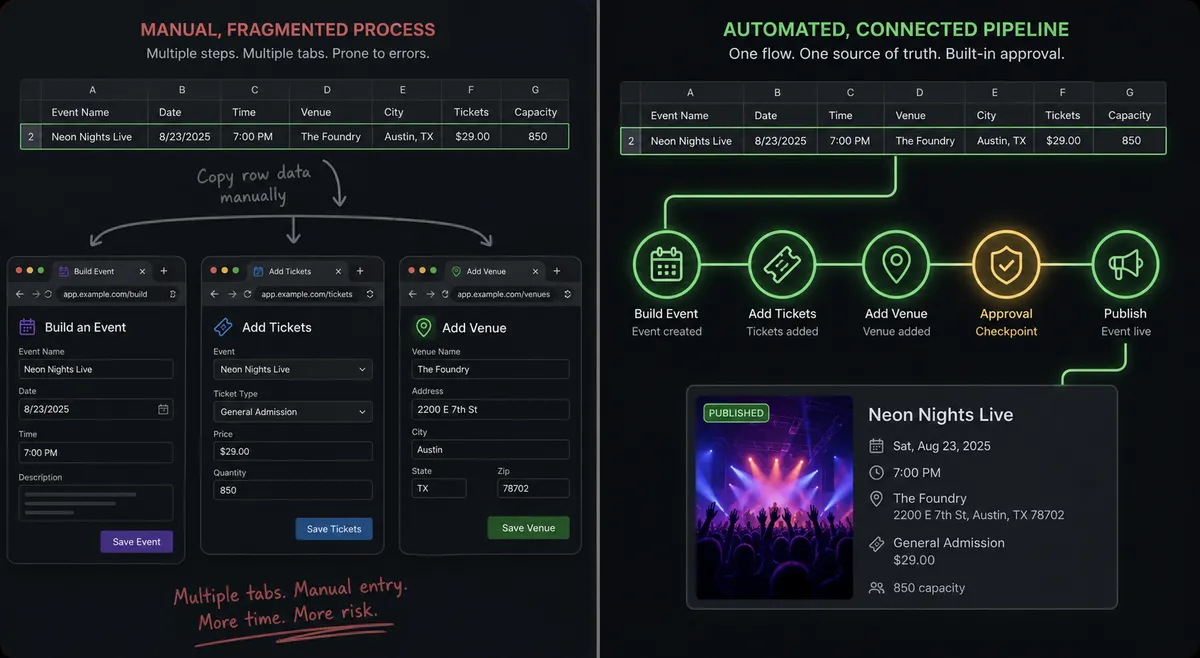
An events coordinator collects requests for new events the way most teams do: a form, an email thread, or a running spreadsheet where marketing and program leads list what they need. Turning each row into a real Eventbrite event, the name, the dates, the timezone, the ticket classes, the venue, is manual work. Someone opens the Eventbrite dashboard, builds the event field by field, adds each ticket type by hand, and attaches a venue. For a team running a handful of events a month, that is an afternoon lost to data entry that a spreadsheet row already contained.
The risk compounds after the event goes live. Attendee and order data lives in Eventbrite, but reporting lives in a spreadsheet, so someone exports a CSV every week to keep the tracker current. That export step gets skipped when the team is busy, which is exactly when accurate numbers matter most. And because there is no structured review before an event publishes, a wrong date or a mispriced ticket class can go live to the public before anyone catches it. The tracker sheet was supposed to be the source of truth. Instead it falls out of sync the moment the event is built by hand.
How it works: the connection
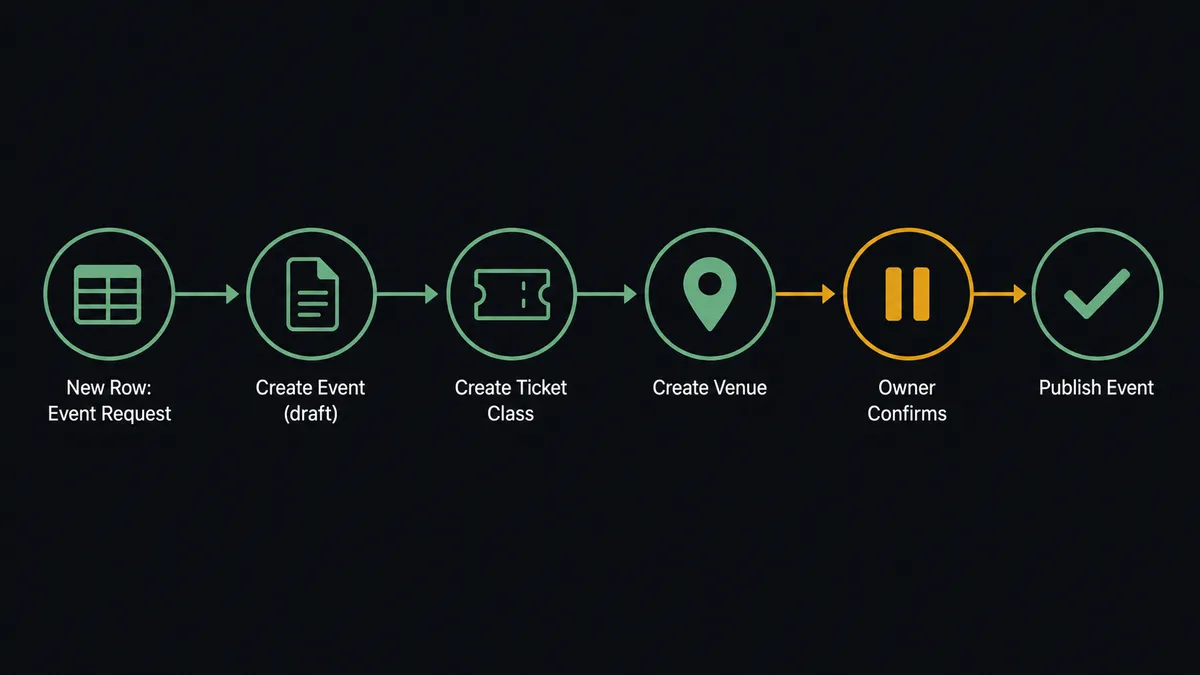
The flow starts with a trigger on On New Row watching your event request tracker sheet. When a coordinator adds a row with the event name, start and end times, timezone, and venue details, the agent reads that row against the mapped header columns using Load Header Row, so it always knows which column is which even if someone reorders the sheet.
With the row’s data in hand, the agent calls Create Event to build the event as a draft, never live, with the name, dates, and timezone from the row. It calls Create Ticket Class for each ticket type the row specifies, and Create Venue to attach the location, or reuses an existing one found with List Venues. Before moving further, the agent confirms the event has a valid time range and at least one ticket class, the same check Eventbrite events need before they can go public.
Once the draft is complete, the flow does not stop at “built.” The event owner needs to see it before it reaches the public, which is where the human-in-loop step comes in, covered in the next section. After the owner approves, the agent calls Publish Event and writes the live status and the event page URL back to the original row with Update Row, so the tracker reflects what actually happened in Eventbrite rather than what was requested.
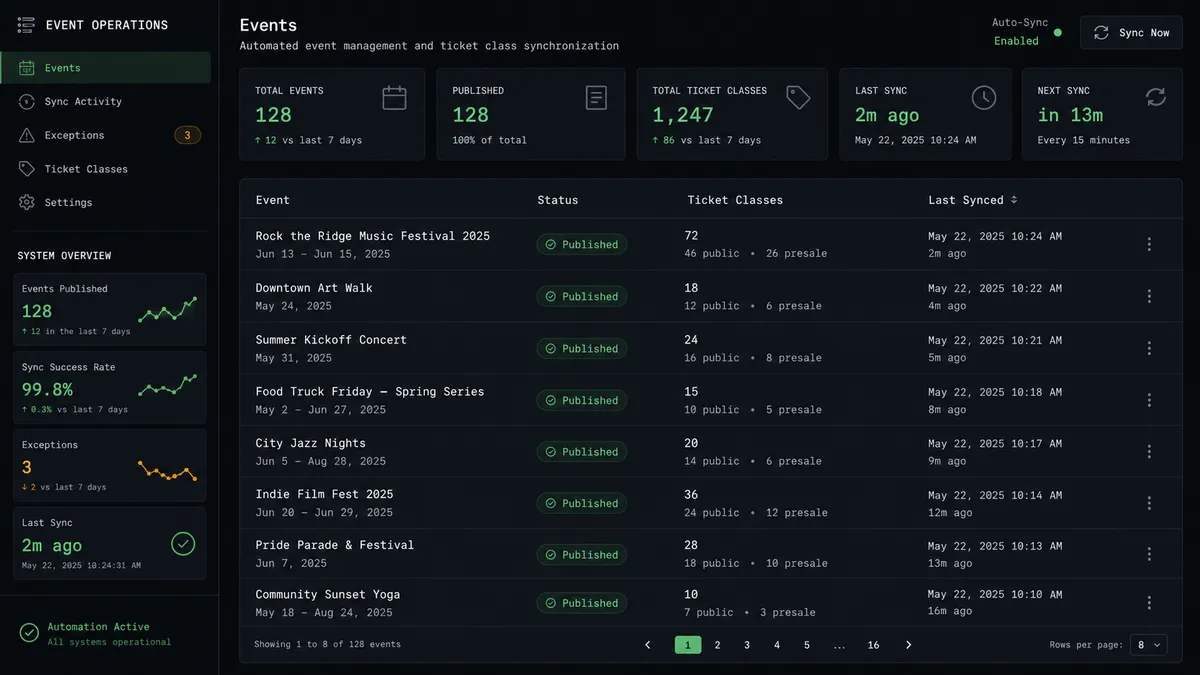
A second, scheduled flow keeps the loop closed after launch. On an interval, the agent calls List Attendees and List Orders for the published event and appends new registrants and sales to a reporting tab with Add Rows. The tracker becomes a live view of both the request pipeline and the event’s performance, not a static list of asks.
Can an AI agent run it? (and why a human stays in the loop)
Yes. The plain connection builds the draft and syncs the data. The AI-agent version adds judgment to both ends of that process.
On the build side, the agent does not just copy fields from the row into Eventbrite. It reads what the row is actually asking for. A row requesting a free community meetup gets a single free ticket class. A row requesting a multi-day conference with early-bird pricing gets multiple ticket classes with different price points and capacity limits, built with separate Create Ticket Class calls. If the row is missing a required field, a start date with no end date, or no venue for an in-person event, the agent does not build a broken draft and hope someone notices. It holds the row and routes a question back to the requester instead.
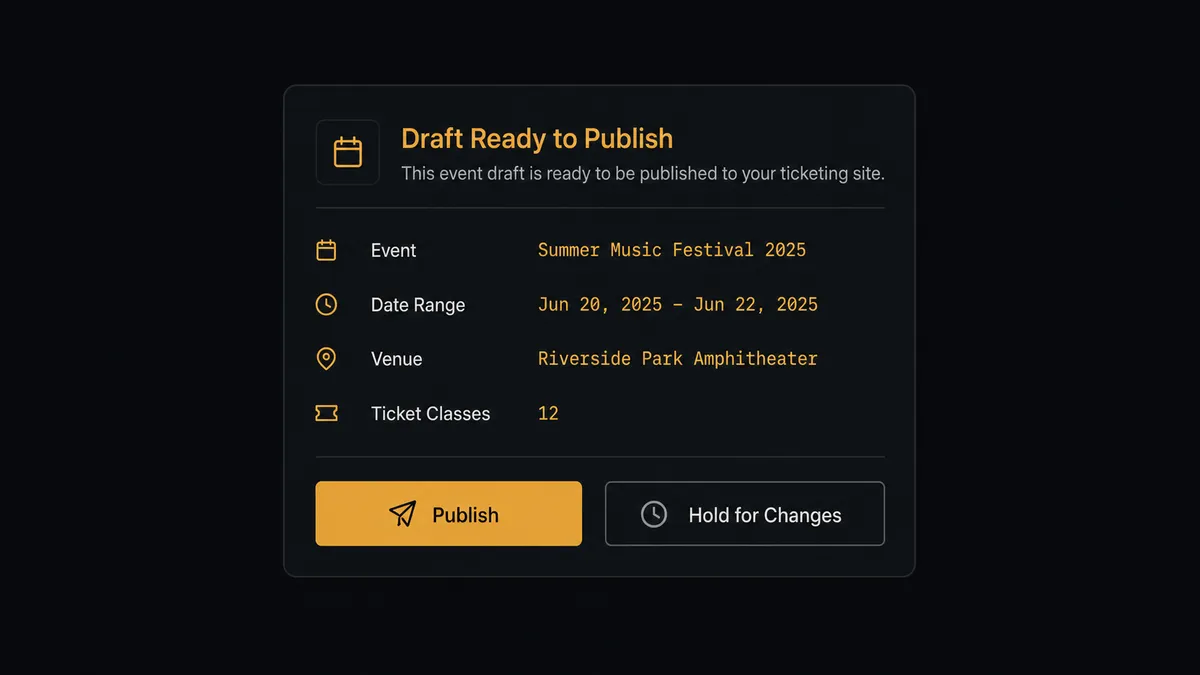
The moment that carries real consequence is publishing. Making an event live reaches the public, and a wrong date or an incorrect ticket price does not stay contained to a spreadsheet once it is out. So the agent never calls Publish Event on its own. It assembles the full draft, then pauses and routes to the event owner through their preferred channel: “The ‘Fall Product Summit’ draft is built for October 14 to 15 at the Riverside Conference Center, with 3 ticket classes ranging from early-bird to full-price admission. Review it here: [link]. Publish it to the public, or hold for changes?”
The owner reviews the actual draft, not a description of it, and responds. Only then does the agent call Publish Event. If the owner asks for changes, the agent updates the draft with Update Event or Update Ticket Class and comes back for another look rather than guessing at what “fix the pricing” means. This is not a threshold trigger checking a dollar amount. It is the agent recognizing that this specific action, taking something from draft to public, is the one step in the whole flow that a script should not make alone.
FlowRunner vs the tool you are probably already using
If you searched “connect Eventbrite to Google Sheets,” you have likely already looked at Zapier. Zapier handles the basic version of this well: a scheduled poll that pulls new Eventbrite attendees into a sheet is a common template, and it takes minutes to set up with no configuration work. For a team that only needs data flowing one direction into a spreadsheet, that is a reasonable, fast option.
The differences show up once the flow needs to build something in Eventbrite, not just read from it, and once a human needs to sign off before that thing goes public.
| Feature | Zapier | FlowRunner |
|---|---|---|
| Sync attendees or orders into a sheet | Yes, via Zap templates | Yes, via scheduled flow |
| Build a multi-step Eventbrite draft (event, ticket classes, venue) from a row | Limited, requires chaining several Zaps | Yes, one agent reasons across all the steps |
| Human-in-loop before publishing an event | No native support | Yes, callable approval flow with full context |
| Unlimited users on every plan | No (seat-based on higher tiers) | Yes, all tiers |
| Bring Your Own AI Keys (BYOK) | No | Yes |
| Self-hosted deployment option | No | Yes, Community Edition and Enterprise |
Zapier moves data between two systems. FlowRunner runs an agent that reads a spreadsheet row, decides what kind of event it describes, builds the draft across three Eventbrite calls, and knows to stop and ask before that draft reaches the public. For a team building more than a handful of events, or one that wants a review step before anything goes live, that gap is the one that matters.
Before and after
| Category | Before | After |
|---|---|---|
| Event setup | Someone builds each event, ticket class, and venue by hand in the Eventbrite UI | The draft is assembled automatically from the tracker row: event, ticket classes, and venue |
| Attendee and order visibility | Registrant and order data pulled into a spreadsheet manually after the fact | Attendees and orders sync into the tracker automatically on a schedule |
| Pre-launch review | Events go live with whatever details the last editor happened to save | Publishing waits for the event owner to confirm the draft is correct |
| Tracker accuracy | The request row sits static once the event is built, disconnected from what actually shipped | The row updates with live status and the event URL once the event publishes |
| Sales reporting | Reporting requires opening Eventbrite and exporting order data by hand | List Orders logs sales into the tracker on schedule without anyone opening Eventbrite |
What you can build
Event request to draft build. Every new row in the tracker sheet becomes a draft event with Create Event, Create Ticket Class, and Create Venue, matched to exactly what the row asked for, without anyone touching the Eventbrite dashboard.
Publish approval workflow. The agent assembles the draft, posts it to the events channel, and waits for the owner to approve before calling Publish Event. Nothing reaches the public without a person confirming the dates, pricing, and venue are correct.
Attendee and order sync-back. On a schedule, the agent calls List Attendees and List Orders on the published event and writes new registrants and sales into a reporting tab with Add Rows, so the tracker shows live performance, not a snapshot from setup day.
Ticket pricing reconciliation. The agent compares List Ticket Classes against the pricing and capacity the original row requested. If they no longer match, because someone edited the event directly in Eventbrite, it flags the mismatch in the sheet with Format Row and routes it to the owner to confirm which version is correct.
Multi-tab event portfolio tracking. For teams running different event types, the agent uses Find Sheet to route webinar requests to one tab and in-person conference requests to another, each with its own header mapping loaded through Load Header Row, while every event still flows through the same build-and-publish logic.
Common questions
Is it free to connect Eventbrite and Google Sheets on FlowRunner? FlowRunner has a free plan with 100 executions a month, every integration included, and no credit card required, and new accounts get 14 days of Professional on top. Beyond the free plan, Growth starts at $45 per month. All tiers include unlimited users and workflows.
Can I self-host FlowRunner? Yes. FlowRunner offers a free Community Edition for self-hosted single-instance deployments and an Enterprise self-hosted option with multi-instance clustering and full compliance features.
Does the AI agent need my own OpenAI key? FlowRunner uses a Bring Your Own Keys model. You connect your preferred AI provider directly to the agent. The platform is not tied to any single model or vendor.
What happens when the AI agent is not sure what to do? The agent pauses and routes to a human through your preferred channel, Slack, email, or WhatsApp. It packages the full context of what it found, why it stopped, and what the options are. The human decides, and the agent resumes with that decision as input.
Does this work if my event request tracker has multiple tabs for different event types? Yes. The agent uses Find Sheet to target the correct tab by name and Load Header Row to map columns cleanly, so a webinar request tab and an in-person conference tab can drive different Eventbrite setups from the same document.
Can FlowRunner sync attendees and orders back into the same tracker sheet, not just create events from it? Yes. A scheduled step calls List Attendees and List Orders on the published event and writes new registrants and sales into a reporting tab with Add Rows, so the tracker stays the single place to check event status.
Getting started
FlowRunner has a free plan with 100 executions a month, every integration included, and no credit card required, and new accounts get 14 days of Professional on top. No credit card is required to start.
Connect both integrations in minutes: Eventbrite and Google Sheets. Build your first request-to-draft flow, add the human-in-loop approval step before publishing, and have the reporting sync running before your next event.
Start at flowrunner.ai or book a 30-minute walkthrough at calendly.com/flowrunner/intro.
Frequently asked questions
Is it free to connect Eventbrite and Google Sheets on FlowRunner?
FlowRunner has a free plan with 100 executions a month, every integration included, and no credit card required, and new accounts get 14 days of Professional on top. Beyond the free plan, Growth starts at $45 per month. All tiers include unlimited users and workflows.
Can I self-host FlowRunner?
Yes. FlowRunner offers a free Community Edition for self-hosted single-instance deployments and an Enterprise self-hosted option with multi-instance clustering and full compliance features.
Does the AI agent need my own OpenAI key?
FlowRunner uses a Bring Your Own Keys model. You connect your preferred AI provider directly to the agent. The platform is not tied to any single model or vendor.
What happens when the AI agent is not sure what to do?
The agent pauses and routes to a human through your preferred channel, Slack, email, or WhatsApp. It packages the full context of what it found, why it stopped, and what the options are. The human decides, and the agent resumes with that decision as input.
Does this work if my event request tracker has multiple tabs for different event types?
Yes. The agent uses Find Sheet to target the correct tab by name and Load Header Row to map columns cleanly, so a webinar request tab and an in-person conference tab can drive different Eventbrite setups from the same document.
Can FlowRunner sync attendees and orders back into the same tracker sheet, not just create events from it?
Yes. A scheduled step calls List Attendees and List Orders on the published event and writes new registrants and sales into a reporting tab with Add Rows, so the tracker stays the single place to check event status.