How to Connect Xero with Aircall (With or Without an AI Agent)
Connect Xero invoices and payments to Aircall contacts and insight cards so reps see the account balance on every call, optionally as an AI agent that pauses for the AR owner before any customer gets flagged for a collections conversation.
How do you connect Xero to Aircall?
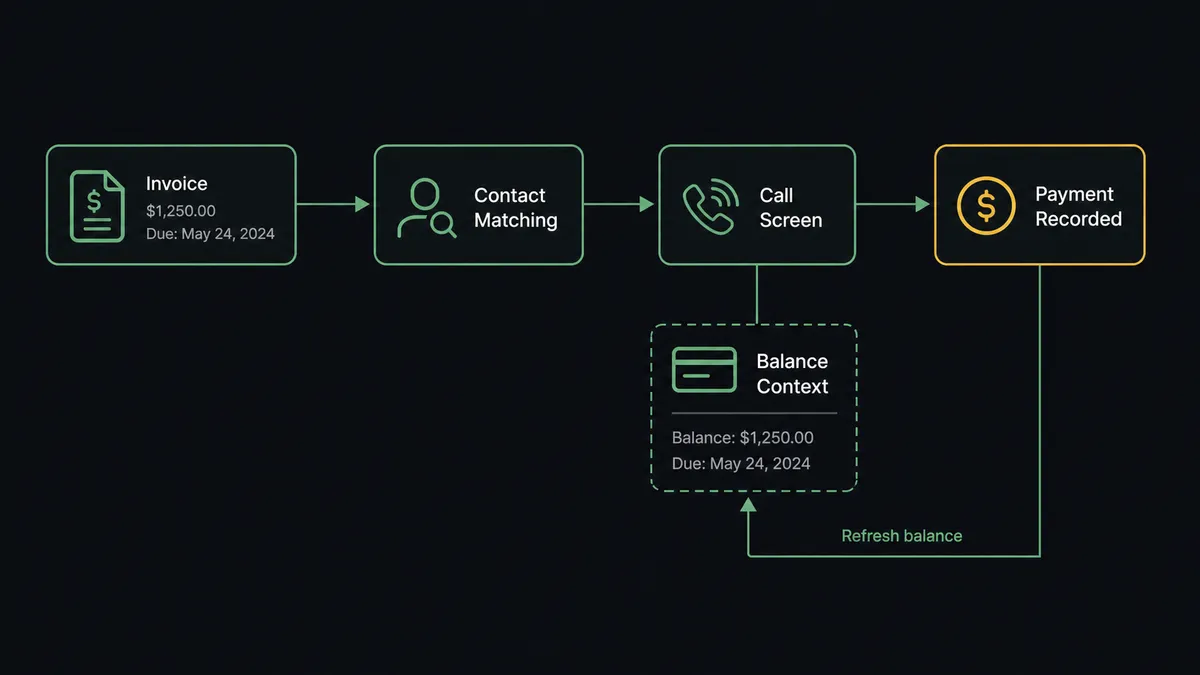
You connect Xero to Aircall by having Xero’s invoice and payment triggers drive Aircall actions: On Invoice Created fires, the workflow matches the customer with Get Contact and List Contacts, keeps them current with Create Contact or Update Contact, and puts the invoice number, amount due, and due date on the call screen with Add Insight Cards. When On New Payment Received fires, the card updates to current. FlowRunner is a visual AI-agent orchestration platform where automations run autonomously and pause for human judgment on the steps that carry real consequence. The same connection can run as an AI agent that keeps the phone system in step with the ledger on its own and pauses for the AR owner before any customer gets flagged for a collections conversation.
The problem it solves
Today the people who talk to your customers and the system that knows who owes you money never meet. A customer calls support about a feature, and the rep has no idea their account is sixty days past due, so the company’s one live touchpoint that week goes unused. Worse in reverse: finance sends someone a final-notice email on an invoice that was credited last week, because the credit note lives in Xero and the collections list lives in a spreadsheet exported before the credit landed.
The edge cases are relationship-enders. An invoice is disputed, a partial credit is agreed on a call, and then a different rep, seeing only “overdue” on their sheet, opens the next call by asking for payment. The customer explains the dispute for the third time, angrier each round. Nothing in that chain was malicious. The ledger and the phone system just never agreed on the state of the account, and the customer paid the difference in patience.
How it works: the connection
The connection listens to Xero and writes to Aircall. Here is the plain version, grounded in the real connector actions.
- Trigger: Xero fires On Invoice Created when an invoice is issued.
- Read: The workflow calls Get Contact in Xero to pull the customer’s name, email, and phone, and Get Invoice for the amount and due date.
- Match: It calls List Contacts in Aircall to find the customer by phone and email, then Create Contact or Update Contact to keep the record current.
- Surface the balance: It calls Add Insight Cards so the invoice number, amount due, and due date appear on screen whenever that customer calls or is called.
- Clear on payment: When On New Payment Received fires, it refreshes the insight card to show the account current and calls Comment on Call to close any open collections thread in the call history.
- Watch the aging: On a schedule, it calls Get Aged Receivables and Find Invoices to spot accounts drifting past due, feeding the escalation path.
That is the “just connect them” answer. The rep on the phone finally sees what finance sees, at the moment it matters, which is while the customer is actually on the line.
Can an AI agent run it? (and why a human stays in the loop)
Yes, and the agent matters most at the exact point where automation usually does damage: deciding who gets treated as a debtor. The agent holds the actions as tools: Get Invoice, Find Invoices, Get Credit Note, Get Aged Receivables, Find Payments on the Xero side; List Contacts, Update Contact, Add Insight Cards, Add Tags to Call, Comment on Call on the Aircall side. Routine sync runs itself: invoices appear on cards, payments clear them, contact edits flow through.
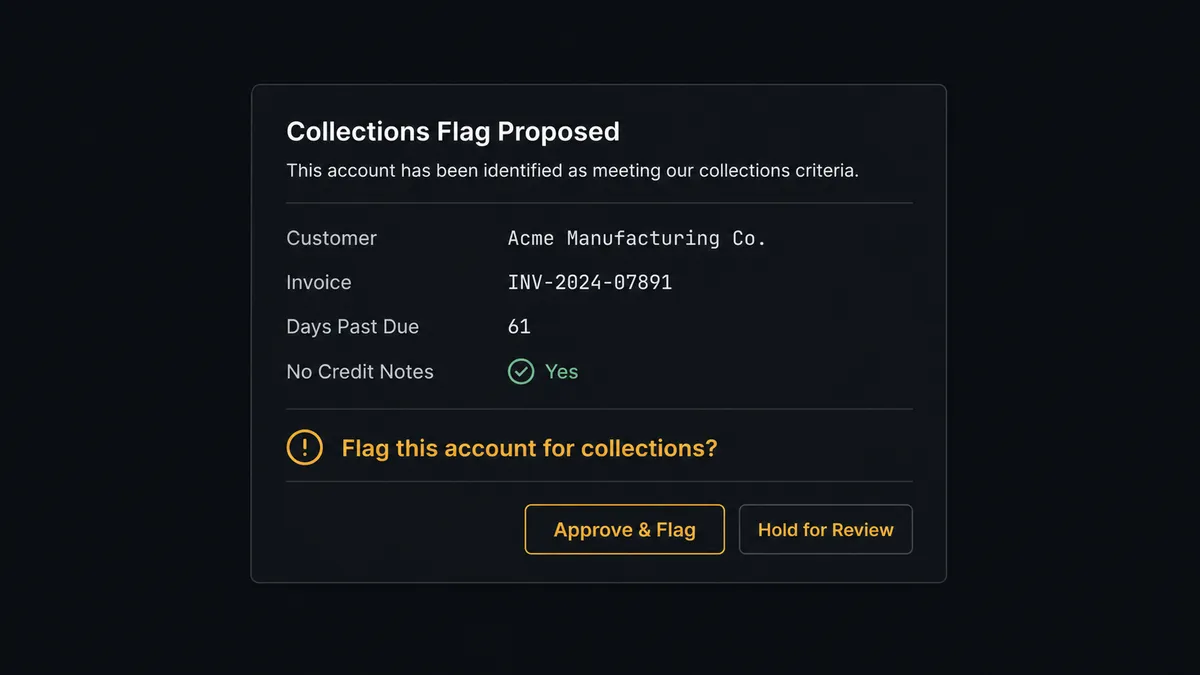
The consequential step is the overdue flag. It is not a database write, it is an instruction to every rep about how to speak to a human being on their next call. So before the agent marks anyone overdue, it investigates: is there a credit note against this invoice per Get Credit Note? Was the invoice edited recently per Find Invoices, suggesting an active dispute? Did a payment land against a different invoice per Find Payments? When the picture is clean, it still does not act alone. It invokes a human-in-loop flow it holds as a callable tool, and the workflow pauses and posts to the AR owner: “Invoice [number] for [customer] is past due, no credit notes, no recent edits, last payment [when]. Flag the account for a collections conversation on the next call?” Only after approval does Add Insight Cards carry the overdue state, with Add Tags to Call routing the follow-up. The approver and timestamp land in the audit trail.
Prospects call this a digital andon cord: like Toyota’s production line pull cord, the workflow stops the line before the step that changes a customer conversation. Balances flow at machine speed. The decision to dun waits for a person.
FlowRunner vs Zapier
Zapier is where most teams start with Xero automations, deservedly: both connectors are long-supported there, setup is quick, and the template gallery covers plenty of invoice-notification patterns. If the goal is “post to a channel when an invoice is paid,” Zapier answers it in an afternoon.
The gap opens where this pair actually earns money: the judgment about who gets flagged, and the sync volume of a busy ledger.
| What matters for this pair | FlowRunner | Zapier |
|---|---|---|
| Human-in-the-loop before the collections flag | Native. The agent invokes an approval flow as a callable tool and pauses mid-run | Available via added approval steps, not a decision informed by credit notes and payment history |
| Who runs the flow | An AI agent checks credits, disputes, and payments, then picks actions as tools | A fixed trigger-action sequence per Zap |
| Users included | Unlimited users on every tier | Priced by task volume; seat limits vary by plan |
| Bring your own AI keys | Yes, BYOK | AI features tied to Zapier’s own AI offering |
| Self-hosted option | Yes, cloud-hosted or self-hosted | Cloud only |
| Pricing model | Transparent workflow-based tiers | Per-task pricing; every invoice, payment, and contact event consumes tasks |
If you want simple invoice notifications, Zapier is a fine tool. If you want the ledger live on the call screen and a human gate between “past due” and “treated as past due,” this pairing on FlowRunner is the better fit.
Before and after
| Category | Before | After |
|---|---|---|
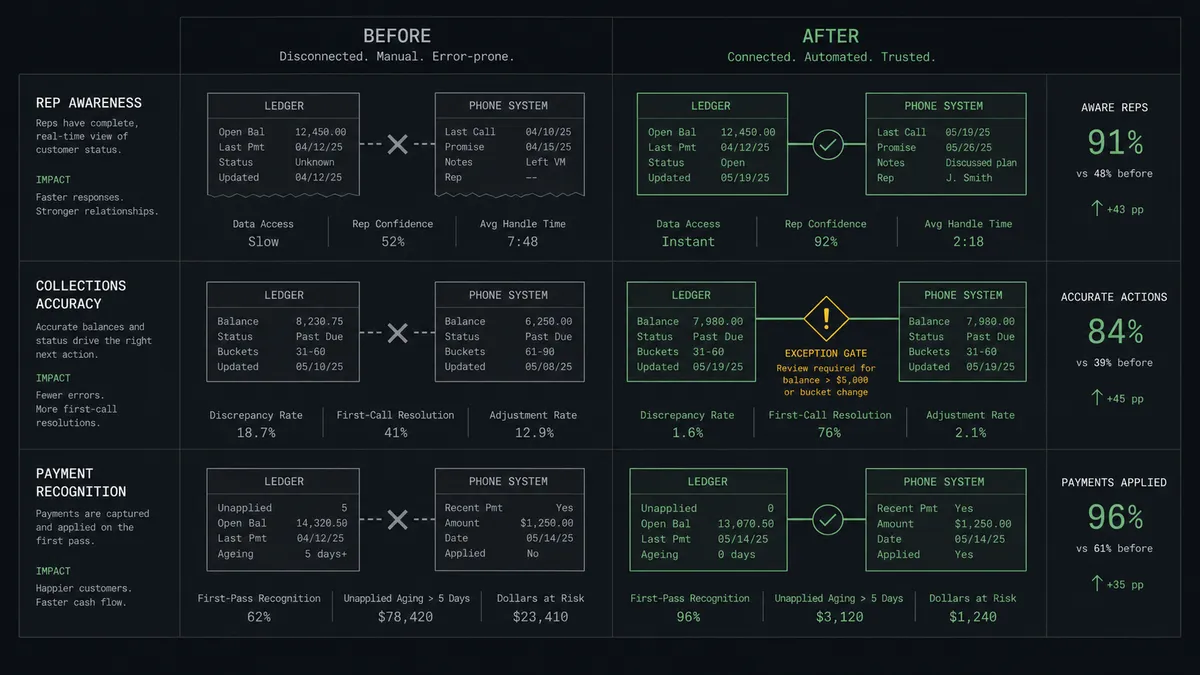
| Rep awareness | Support reps have no idea an account is past due | The balance and due date sit on the call screen during every conversation |
| Collections accuracy | Dunning lists come from stale spreadsheet exports | Flags are checked against credit notes and payments before anyone sees them |
| Disputed invoices | A disputed account gets asked for payment on the next call anyway | Disputes hold the flag at the AR owner’s desk instead of reaching reps |
| Payment recognition | Customers get chased for invoices they already paid | On New Payment Received clears the card and closes the thread the same day |
| Accountability | Nobody knows who decided to start collections on an account | Every flag carries an approver and a timestamp in the audit trail |
What you can build
Balance-aware answering. On Invoice Created, the agent matches the customer and pushes Add Insight Cards, so every rep sees the open balance and due date while the customer is on the line.
Gated collections queue. Past-due accounts are checked against Get Credit Note and Find Payments, then queued for the AR owner’s approval before the overdue flag ever reaches a call screen.
Same-day payment recognition. On New Payment Received, the agent refreshes the card, drops the collections tag, and posts Comment on Call so the thread shows the account went current.
New customer, ready phone system. On Contact Created fires in Xero and the agent mirrors the customer into Aircall with Create Contact, so the first inbound call already resolves to a name and account.
Aging digest for finance. On a schedule, the agent runs Get Aged Receivables, cross-references recent call tags from List Calls, and posts a digest showing which overdue accounts have actually been spoken to this week.
Common questions
Is it free to connect Xero and Aircall on FlowRunner? You can build and run the connection on FlowRunner’s free plan, which includes 100 executions a month and every integration with no credit card required, and new accounts also get 14 days of Professional. Both connectors are available on every FlowRunner tier, and every tier includes unlimited users and unlimited workflows.
Can I self-host the Xero to Aircall workflow? Yes. FlowRunner offers a cloud-hosted option and a self-hosted option, so the connection can run inside your own environment.
Does the AI agent need my own OpenAI or Claude key? FlowRunner uses a bring-your-own-keys model, so you connect the AI provider key you already have. You are not locked to one model.
What stops a disputed invoice from triggering a collections call? Before flagging any account, the agent calls Get Credit Note and Find Invoices to check for credits, edits, and disputes in Xero. Anything ambiguous goes to the AR owner with the evidence attached, and the collections flag only appears on the call screen after a named approval.
Which Xero events can trigger an Aircall action? Xero offers eight triggers, including On Invoice Created, On Invoice Updated, On New Payment Received, On Contact Created, On Contact Updated, On Credit Note Created, On Credit Note Updated, and On New Bank Transaction. This pair leans on the invoice, payment, and contact triggers.
What happens on the call screen when a customer pays? On New Payment Received fires and the agent updates the insight card to show the account as current, then uses Comment on Call to close out any open collections thread in the call history. Reps stop chasing money that already arrived.
Getting started
Start on the free plan: 100 executions a month, every integration included, no credit card required, plus 14 days of Professional for new accounts. Both connectors are available on every tier, and every tier includes unlimited users and unlimited workflows, so finance, support, and the AR owner who approves flags all work from the same system.
Explore the integration details:
- Xero integration (8 triggers and 38 actions covering contacts, invoices, payments, credit notes, and reports)
- Aircall integration (33 actions covering calls, contacts, tags, and insight cards)
Start building free at flowrunner.ai or book a demo to see a live Xero to Aircall workflow, collections approval and all.
Frequently asked questions
Is it free to connect Xero and Aircall on FlowRunner?
You can build and run the connection on FlowRunner's free plan, which includes 100 executions a month and every integration with no credit card required, and new accounts also get 14 days of Professional. Both connectors are available on every FlowRunner tier, and every tier includes unlimited users and unlimited workflows.
Can I self-host the Xero to Aircall workflow?
Yes. FlowRunner offers a cloud-hosted option and a self-hosted option, so the connection can run inside your own environment.
Does the AI agent need my own OpenAI or Claude key?
FlowRunner uses a bring-your-own-keys model, so you connect the AI provider key you already have. You are not locked to one model.
What stops a disputed invoice from triggering a collections call?
Before flagging any account, the agent calls Get Credit Note and Find Invoices to check for credits, edits, and disputes in Xero. Anything ambiguous goes to the AR owner with the evidence attached, and the collections flag only appears on the call screen after a named approval.
Which Xero events can trigger an Aircall action?
Xero offers eight triggers, including On Invoice Created, On Invoice Updated, On New Payment Received, On Contact Created, On Contact Updated, On Credit Note Created, On Credit Note Updated, and On New Bank Transaction. This pair leans on the invoice, payment, and contact triggers.
What happens on the call screen when a customer pays?
On New Payment Received fires and the agent updates the insight card to show the account as current, then uses Comment on Call to close out any open collections thread in the call history. Reps stop chasing money that already arrived.