How to Connect Typeform with Basecamp (With or Without an AI Agent)
Turn Typeform intake submissions into fully built Basecamp projects with task plans and kickoffs, run by an AI agent that stages everything automatically and pauses for the project lead before the kickoff is booked and the team is notified.
How do you connect Typeform to Basecamp?
You connect Typeform to Basecamp with a scheduled workflow that calls Get Form Responses to pull new intake submissions, maps each answer through the form definition from Get Form, and builds the workspace: Create Project for the container, Create To-do List and Create To-do for the task plan, Create Message for the intake summary, and Create Schedule Entry for the kickoff. Typeform has no trigger in FlowRunner, so the schedule starts each run. FlowRunner is a visual AI-agent orchestration platform where automations run autonomously and pause for human judgment on the steps that carry real consequence. Run as an AI agent, the same connection builds the project on its own and stops at the step people actually feel: the kickoff is not booked and nobody is notified until the project lead confirms the date and the scope holds up.
The problem it solves
The intake form was supposed to fix onboarding, and it half did. Requests now arrive structured: the client or internal team fills out the Typeform with scope, deliverables, contacts, and a requested start date. But the second half is still manual. Someone reads the submission, creates the Basecamp project, retypes the scope into the description, rebuilds the standard task list, works out who should be assigned, and books the kickoff. When intake is busy, submissions queue for days, and the requester’s first impression of your delivery organization is silence.
The edges hurt more. A submission with a contradictory scope answer becomes a project anyway, and the confusion is discovered at the kickoff in front of the client. A requested start date that collides with the team’s actual load gets booked because nobody checked. Two submissions from the same client become two half-duplicate projects. The form collects good structure and the handoff throws that structure away, one retyped field at a time.
How it works: the connection
The connection reads from Typeform on a schedule and builds in Basecamp. Here is the plain version, grounded in the real connector actions.
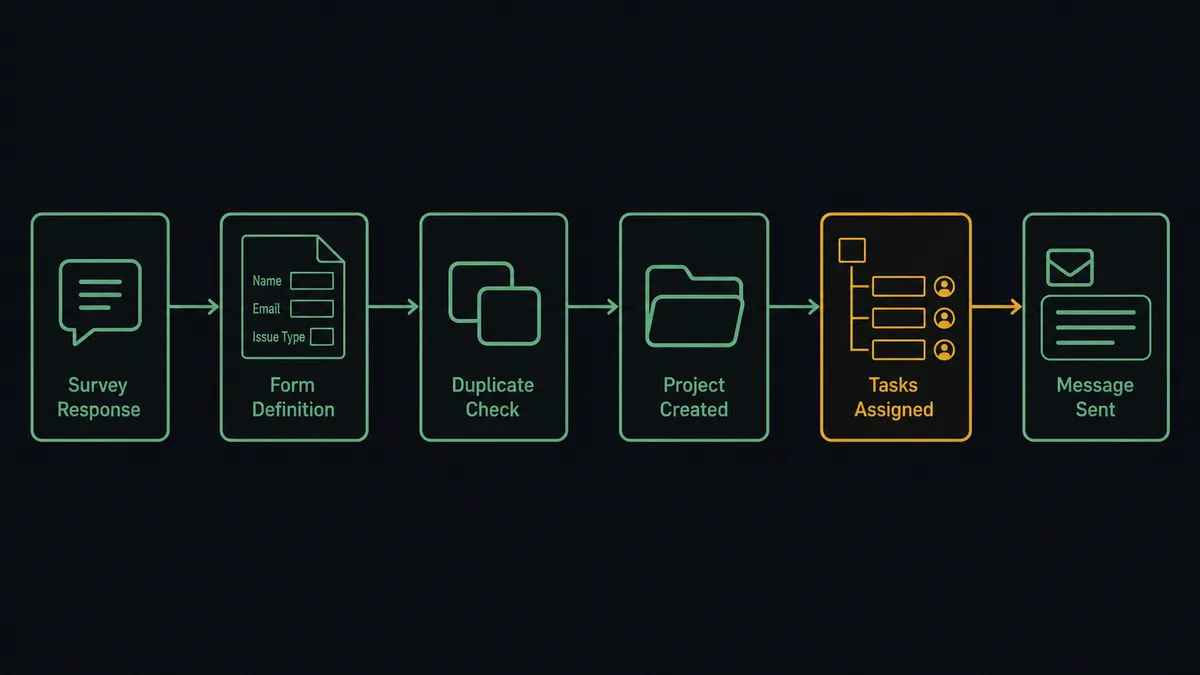
- Trigger: On a schedule, the workflow calls Get Form Responses to pull every intake submission received since the last run.
- Read the shape: It calls Get Form for the form definition, so each answer maps to a named intake field instead of a question ID.
- Check for duplicates: It calls List Projects to see whether a project already exists for this client or request.
- Create the container: It calls Create Project with the project-name answer and the scope answers as the description.
- Build the plan: It calls Create To-do List for each phase and Create To-do for each deliverable, with due dates derived from the requested timeline and assignees from List Project People.
- Post the brief: It calls Create Message on the message board with the full intake summary, so the team reads one canonical version of what was requested.
- Book the kickoff: It calls Create Schedule Entry with the start date and participants, notifying the team.
That is the “just connect them” answer. A submitted form becomes a structured, staffed workspace, and the intake queue stops being a queue.
Can an AI agent run it? (and why a human stays in the loop)
Yes, and the agent’s value is that it reads the intake like a delivery manager, not a mail merge. It holds the actions as tools: Get Form Responses, Get Form, List Projects, Create Project, Create To-do List, Create To-do, Create Message, Create Schedule Entry, Create Campfire Line. It checks that the scope answers are internally consistent, that the company is one you recognize, that the requested timeline is not obviously impossible, and that no existing project already covers the request. Clean submissions get a full build. Broken ones stop before a workspace exists, with the gaps posted for a person to resolve.
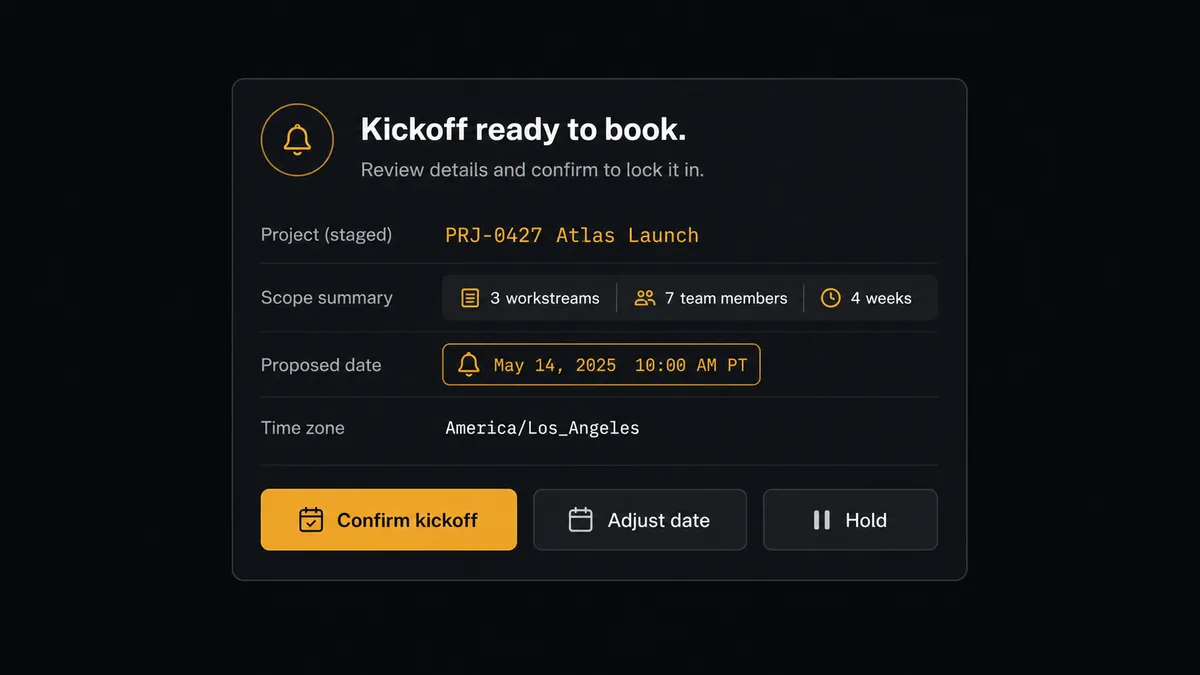
The consequential step is the kickoff, because Create Schedule Entry with notifications is the moment the project becomes real to other people: calendars fill, the client gets a date, and the team reprioritizes around it. So the agent stages everything, project, plan, brief, and then invokes a human-in-loop flow it holds as a callable tool. The workflow pauses and posts to the project lead: “Intake from [company] built and staged. Proposed kickoff [date] per their request. Scope summary attached. Confirm the date, adjust, or hold?” The lead confirms with the team’s real load in view. Only then does Create Schedule Entry book the kickoff and notify participants, with Create Message posting the confirmed plan, and the intake summary, approver, and timestamp landing in the audit trail.
That is the digital andon cord for onboarding: like Toyota’s andon cord, the workflow stops the line before a date becomes a promise. Projects assemble at machine speed; commitments to people still get a human signature.
FlowRunner vs n8n
A developer comfortable in n8n can connect Typeform to Basecamp today: both services have nodes, the community publishes similar patterns, and fair-code self-hosting keeps the cost of trying it low. For teams with engineering time to invest in internal plumbing, that is a genuine path.
The difference is what stands between the form and the calendar. In n8n, submission validation, duplicate checks, and the kickoff approval are custom logic someone designs, tests, and maintains, and the approval is a node fixed in the graph, not a tool the agent reaches for because this particular intake looks shaky. FlowRunner ships the judgment layer as the product, and the ops lead who owns intake can run it.
| What matters for this pair | FlowRunner | n8n |
|---|---|---|
| Human-in-the-loop on the notified kickoff | Native. The agent stages the build and holds Create Schedule Entry for the project lead | Wait and approval nodes exist; validation and gating logic is yours to build |
| Who runs the flow | An AI agent reads the intake, reasons, and picks actions as tools | Node graph a developer designs and maintains |
| Users included | Unlimited users on every tier | Cloud plans priced with limits; self-host to lift them |
| Bring your own AI keys | Yes, BYOK. Connect the AI provider key you already have | BYOK supported as well |
| Self-hosted option | Yes, cloud-hosted or self-hosted | Yes, fair-code self-hosting is its hallmark |
| Pricing model | Transparent workflow-based tiers, compliance from the $299/mo tier | Execution-based cloud pricing; full compliance features sit at Enterprise |
If your engineers want to own the intake pipeline as code, n8n serves them well. If you want onboarding to run itself with a human confirming every kickoff before it hits calendars, without anyone writing the gating logic, that is where FlowRunner is the better fit.
Before and after
| Category | Before | After |
|---|---|---|
| Intake handoff | Submissions queue until someone rebuilds them as projects by hand | Every valid submission is a staged workspace by the next scheduled run |
| Structure fidelity | Scope answers get retyped, trimmed, and paraphrased | The form’s own answers become the description, brief, and task plan |
| Bad submissions | Half-specified requests become confused projects | Gaps and contradictions stop the build and route to a person |
| Kickoff dates | Requested dates get booked without checking the team’s load | The lead confirms every kickoff before notifications go out |
| Duplicates | Repeat submissions spawn parallel half-projects | List Projects is checked before any container is created |
What you can build
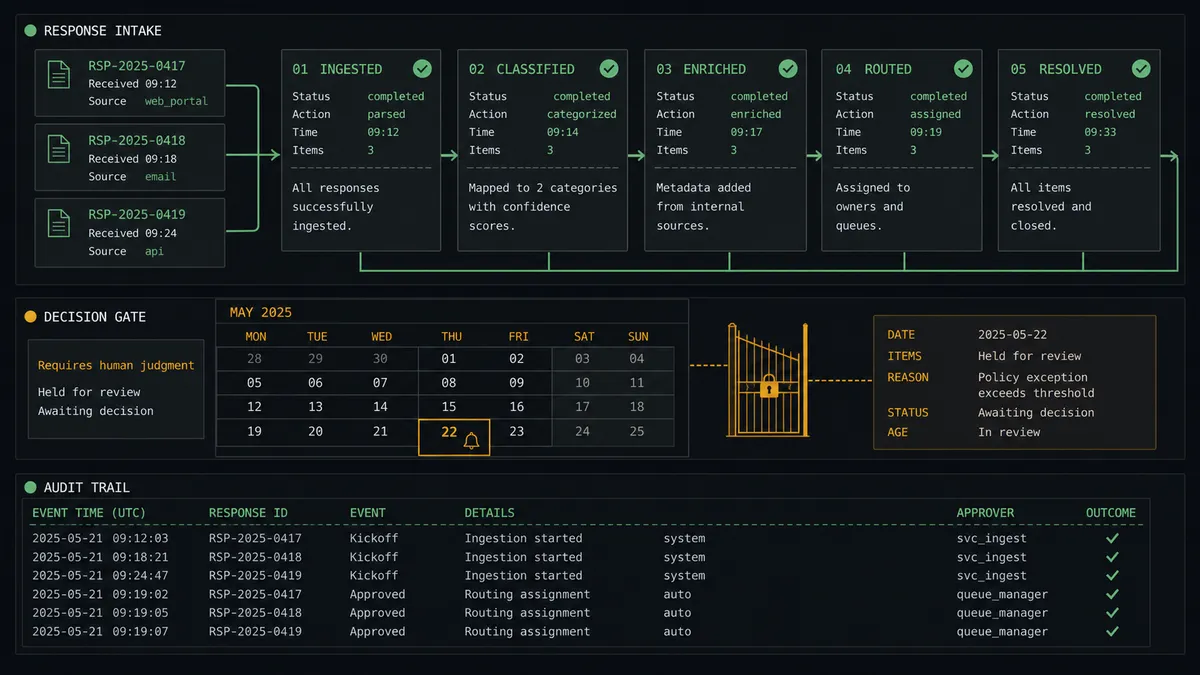
Intake-to-workspace assembly line. Get Form Responses pulls the submissions, and the agent runs Create Project, Create To-do List, Create To-do, and Create Message in sequence, staging a complete workspace whose kickoff waits at the gate for the lead’s confirmation.
Validation desk for shaky submissions. Contradictory scope answers, missing dates, or unknown companies stop the build. The agent posts the submission with the specific gaps called out, and a person decides to chase, fix, or proceed.
Client-facing kickoff confirmation. After the lead approves, Create Schedule Entry books the kickoff with participants notified, and Create Campfire Line drops the intake headline into the project chat so the team meets the request before the meeting.
Repeat-client request router. When List Projects finds a live project for the same client, the agent files the new deliverables as Create To-do items in the existing workspace instead of spawning a duplicate, and posts a Create Message note explaining what was added and why.
Weekly intake digest. On a schedule, the agent compiles the week’s submissions, builds, and holds into a single Create Message post on your operations project’s board, so leadership sees intake volume and every kickoff decision with its named approver.
Common questions
Is it free to connect Typeform and Basecamp on FlowRunner? You can build and run the connection on FlowRunner’s free plan, which includes 100 executions a month and every integration with no credit card required, and new accounts also get 14 days of Professional. Both connectors are available on every FlowRunner tier, and every tier includes unlimited users and unlimited workflows.
Can I self-host the Typeform to Basecamp workflow? Yes. FlowRunner offers a cloud-hosted option and a self-hosted option, so the connection can run inside your own environment.
Does the AI agent need my own OpenAI or Claude key? FlowRunner uses a bring-your-own-keys model, so you connect the AI provider key you already have. You are not locked to one model.
What happens when an intake submission is incomplete or the scope looks unworkable? The build stops before the project exists. The agent posts the submission with the gaps called out, missing dates, contradictory scope answers, an unrecognized company, and waits for a person to decide: chase the requester, fix the answers, or build anyway. Nothing half-specified becomes a live workspace.
Typeform has no trigger in FlowRunner, so what starts the workflow? A schedule. Each run calls Get Form Responses to pull intake submissions received since the last check, and Get Form maps every answer to a named field. Cadence is yours, from every few minutes to hourly.
Which Basecamp actions build the project from the form answers? Create Project stands up the workspace, Create To-do List and Create To-do build the task plan with assignees from List Project People, Create Message posts the intake summary to the message board, and Create Schedule Entry books the kickoff with participants once the project lead approves it.
Getting started
Start on the free plan: 100 executions a month, every integration included, no credit card required, plus 14 days of Professional for new accounts. Both connectors are available on every tier, and every tier includes unlimited users and unlimited workflows.
Explore the integration details:
- Typeform integration (36 actions covering forms, responses, themes, and insights)
- Basecamp integration (37 actions covering projects, to-dos, messages, and schedules)
Start building free at flowrunner.ai or book a demo to see a live Typeform to Basecamp workflow, kickoff approval and all.
Frequently asked questions
Is it free to connect Typeform and Basecamp on FlowRunner?
You can build and run the connection on FlowRunner's free plan, which includes 100 executions a month and every integration with no credit card required, and new accounts also get 14 days of Professional. Both connectors are available on every FlowRunner tier, and every tier includes unlimited users and unlimited workflows.
Can I self-host the Typeform to Basecamp workflow?
Yes. FlowRunner offers a cloud-hosted option and a self-hosted option, so the connection can run inside your own environment.
Does the AI agent need my own OpenAI or Claude key?
FlowRunner uses a bring-your-own-keys model, so you connect the AI provider key you already have. You are not locked to one model.
What happens when an intake submission is incomplete or the scope looks unworkable?
The build stops before the project exists. The agent posts the submission with the gaps called out, missing dates, contradictory scope answers, an unrecognized company, and waits for a person to decide: chase the requester, fix the answers, or build anyway. Nothing half-specified becomes a live workspace.
Typeform has no trigger in FlowRunner, so what starts the workflow?
A schedule. Each run calls Get Form Responses to pull intake submissions received since the last check, and Get Form maps every answer to a named field. Cadence is yours, from every few minutes to hourly.
Which Basecamp actions build the project from the form answers?
Create Project stands up the workspace, Create To-do List and Create To-do build the task plan with assignees from List Project People, Create Message posts the intake summary to the message board, and Create Schedule Entry books the kickoff with participants once the project lead approves it.