How to Connect Typeform with Amazon Redshift (With or Without an AI Agent)
Load Typeform responses into Amazon Redshift on a schedule, optionally as an AI agent that verifies every batch by row count and pauses for a human before Delete Responses clears the source data.
How do you connect Typeform to Amazon Redshift?
You connect Typeform to Amazon Redshift with a scheduled workflow that calls Get Form Responses to pull new submissions, maps each answer to a typed column, and loads the batch with Batch Execute Statement, polling Describe Statement until the load reports FINISHED. Typeform has no trigger in FlowRunner, so the schedule drives the pipeline, and the Redshift Data API means no persistent connection to manage. FlowRunner is a visual AI-agent orchestration platform where automations run autonomously and pause for human judgment on the steps that carry real consequence. Run as an AI agent, the same connection verifies every batch by row count, quarantines responses that do not fit the table, and stops for a named approver before the one irreversible step: clearing loaded responses out of Typeform with Delete Responses.
The problem it solves
Survey data is real data until it has to reach the warehouse, at which point it becomes a CSV on someone’s laptop. The research or ops person exports responses from Typeform, renames columns, fights the date formats, and hands the file to whoever has warehouse access, who runs a COPY when they get to it. Every analysis that joins survey answers against product usage or revenue waits on that relay, and the survey table in Redshift is perpetually one export behind reality.
The edges are quietly destructive. Free-text answers with commas and quotes shred the CSV parsing. A revised form question changes the column shape mid-export, and rows land misaligned with nobody noticing until an analyst finds ratings in the email column. Worst is the false confidence: the script INSERTs, nothing errors, and half the batch silently failed a type cast. The dashboard built on that table is wrong in a way no one can see from the dashboard.
How it works: the connection
The connection reads from Typeform on a schedule and writes to Amazon Redshift through the Data API. Here is the plain version, grounded in the real connector actions.
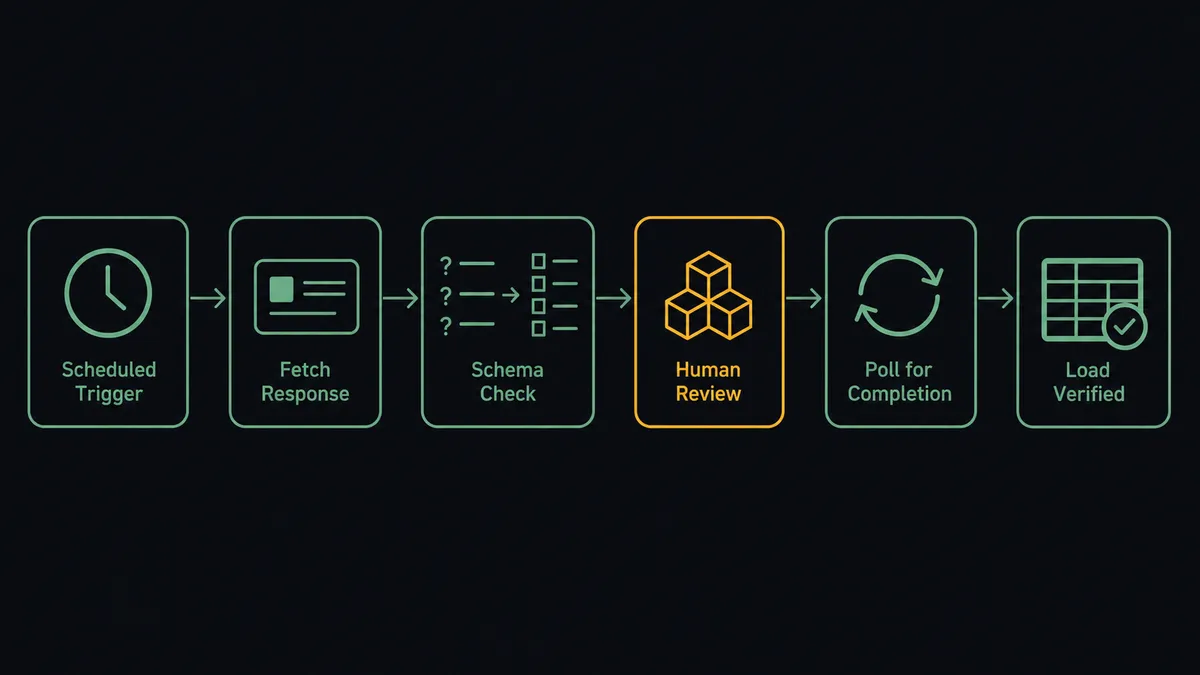
- Trigger: On a schedule, the workflow calls Get Form Responses to pull every submission received since the last run.
- Read the shape: It calls Get Form for the current form definition, so each answer maps to a named question, and Describe Table for the warehouse table’s column types.
- Type the rows: It builds parameterized INSERT statements keyed on the response ID: text to VARCHAR, ratings and numbers to NUMERIC, dates to TIMESTAMP.
- Load: It calls Batch Execute Statement so the batch runs in order inside a single transaction. A partial load never lands.
- Poll: It calls Describe Statement with the returned statement ID until the status is FINISHED, catching FAILED or ABORTED with the error message attached.
- Verify: It calls Get Statement Result to confirm the affected row counts match the batch it sent, paging with the next token on large sets.
That is the “just connect them” answer. Every response is a typed, keyed warehouse row minutes after submission, ready to join against the rest of your data, and no CSV is involved at any point.
Can an AI agent run it? (and why a human stays in the loop)
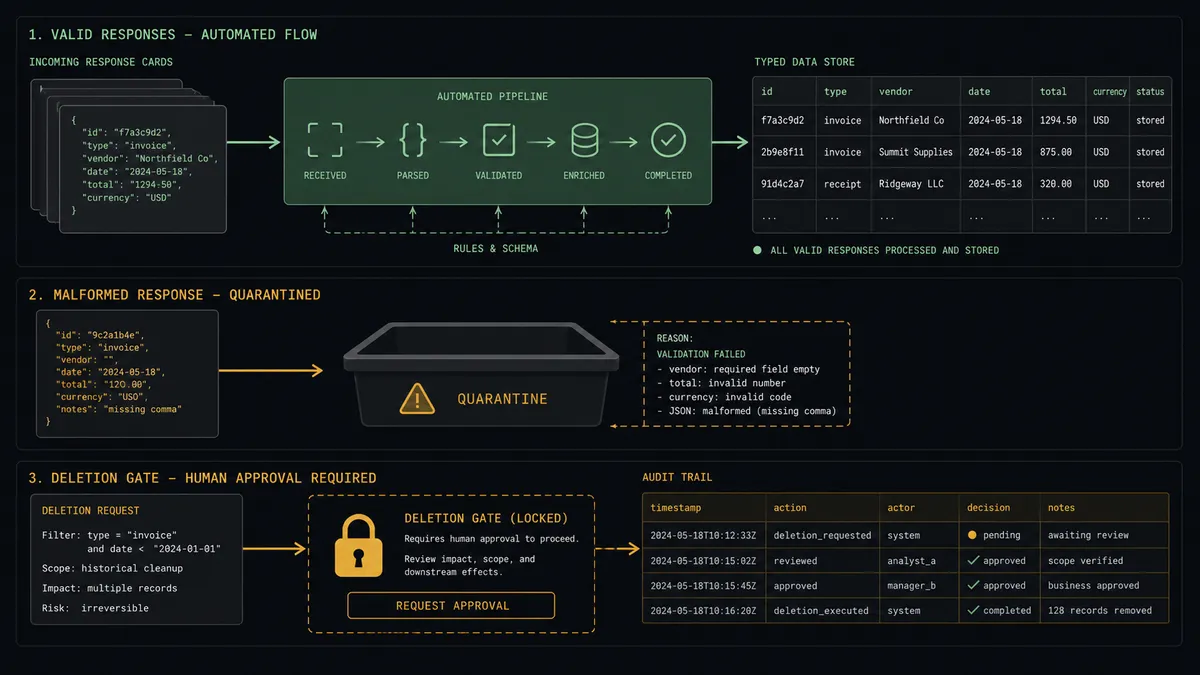
Yes, and the agent is what turns a pipeline into a pipeline you can trust. It holds the connector actions as tools: Get Form Responses, Get Form, Describe Table, Batch Execute Statement, Describe Statement, Get Statement Result, Execute Statement, Delete Responses. On every run it checks the form definition against the table before loading, so a question edited in Typeform becomes a surfaced decision, not a silent misalignment. Responses that do not fit, a malformed date, an answer for a question the table has never seen, get quarantined with specifics posted to your channel while the clean rows load on schedule.
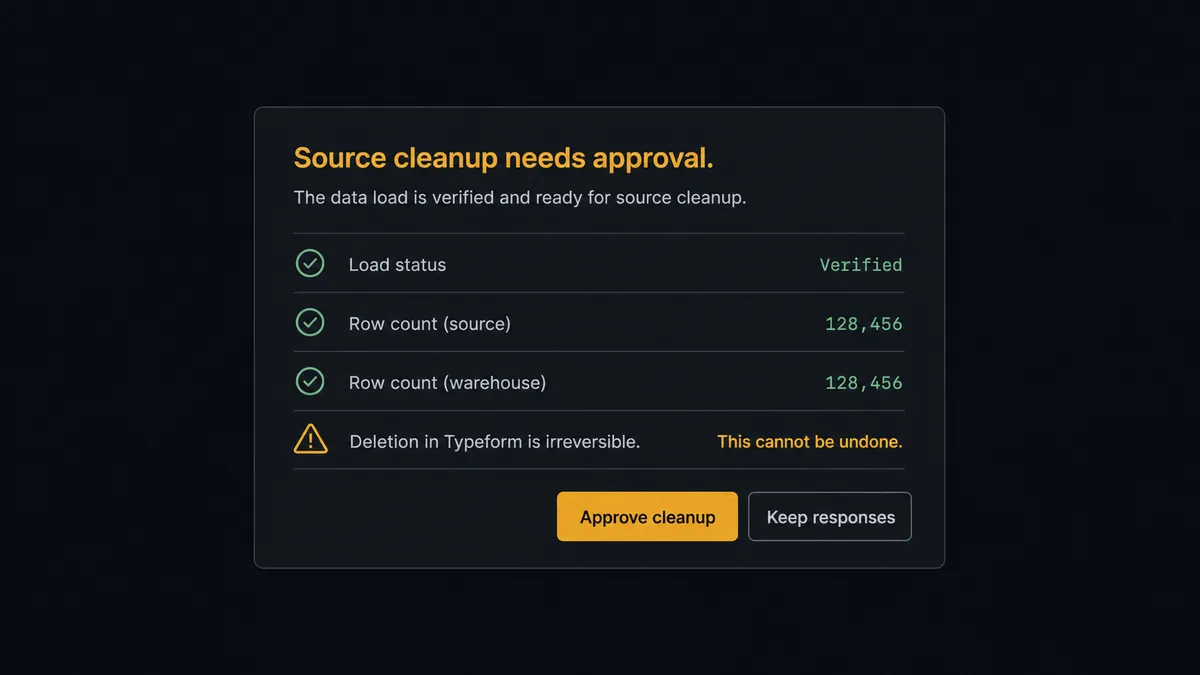
The consequential step is deleting source data. Teams with a data-minimization policy clear responses out of Typeform once they are archived in the warehouse, and Delete Responses is permanent: there is no undo on the form side. So the agent never runs it alone. After a verified load, it invokes a human-in-loop flow it holds as a callable tool. The workflow pauses and posts: “Batch loaded and verified against [table]. Row counts match. Clear these loaded responses from Typeform? This is irreversible.” A named approver confirms, and only then does Delete Responses run, with the approver and timestamp recorded in the audit trail. The same gate guards destructive SQL on the warehouse side: a DELETE or a table rebuild through Execute Statement waits for the same sign-off.
This is the digital andon cord applied to data engineering: like Toyota’s andon cord, the workflow stops the line the moment it reaches a step it cannot take back. Loads run themselves; deletions get a witness.
FlowRunner vs Fivetran
Fivetran built its reputation moving SaaS data into warehouses with near-zero maintenance, and it includes a Typeform connector. If you want responses replicated on a managed schedule alongside dozens of other sources, and you have the budget for consumption pricing, that machinery works and works reliably. That deserves a straight acknowledgment.
What Fivetran replicates, though, it replicates as-is, on its cadence, with no judgment in the loop and no writeback: it will never quarantine a malformed response, never flag a form edit as a decision, and never manage the Typeform side of a retention policy.
| What matters for this pair | FlowRunner | Fivetran |
|---|---|---|
| Human-in-the-loop on source deletion | Native. Delete Responses waits for a named approver after every verified load | Not applicable; replication only, no writeback to Typeform |
| Who runs the flow | An AI agent types rows, verifies counts, and picks actions as tools | Managed replication with fixed sync behavior |
| Users included | Unlimited users on every tier | Seat and usage model varies by plan |
| Bring your own AI keys | Yes, BYOK. Connect the AI provider key you already have | Not an agent platform |
| Self-hosted option | Yes, cloud-hosted or self-hosted | Cloud service |
| Pricing model | Transparent workflow-based tiers | Consumption pricing tied to monthly active rows |
If Typeform is one of thirty sources you need mirrored into Redshift and nothing more, Fivetran fits. If this survey data feeds decisions, needs validation on the way in, and carries a retention obligation on the way out, that is where FlowRunner is the better fit.
Before and after
| Category | Before | After |
|---|---|---|
| Getting responses in | Manual CSV exports relayed to whoever has warehouse access | Scheduled loads land typed rows minutes after submission |
| Type safety | Silent cast failures leave half a batch missing | Every batch is one transaction, verified by row count before it counts as loaded |
| Form edits | A revised question misaligns columns until an analyst notices | The agent checks Get Form against Describe Table and surfaces the change |
| Bad responses | Malformed answers break the import or load as garbage | Misfits are quarantined with specifics while clean rows load on time |
| Retention policy | Old responses linger in Typeform because deletion is scary | Cleanup runs on policy, gated by a named approver, logged in the audit trail |
What you can build
Survey-to-warehouse pipeline, verified per batch. Get Form Responses pulls the new submissions, Batch Execute Statement loads them in one transaction, and Describe Statement plus Get Statement Result confirm the counts before the run is marked green.
Policy-driven source cleanup. After each verified load, the agent proposes clearing the loaded responses with Delete Responses, waits at the human gate, and executes only on a named approval. Data minimization becomes a routine instead of a risk.
Form-edit change control. When Get Form shows a question added or reworded, the agent drafts the matching ALTER TABLE, posts it for review, and applies it through Execute Statement only after an engineer approves the SQL as written.
Response quality quarantine. Answers that fail typing, impossible dates, numbers outside the scale, get held out of the batch and posted with specifics. A person decides whether to fix, discard, or load them raw into a staging table.
Multi-form consolidation. Get List Forms enumerates the active surveys, and the agent routes each form’s responses to its own target table, using List Tables and Describe Table to confirm each destination before any INSERT runs.
Common questions
Is it free to connect Typeform and Amazon Redshift on FlowRunner? You can build and run the connection on FlowRunner’s free plan, which includes 100 executions a month and every integration with no credit card required, and new accounts also get 14 days of Professional. Both connectors are available on every FlowRunner tier, and every tier includes unlimited users and unlimited workflows.
Can I self-host the Typeform to Amazon Redshift workflow? Yes. FlowRunner offers a cloud-hosted option and a self-hosted option, so the connection can run inside your own environment, next to your warehouse.
Does the AI agent need my own OpenAI or Claude key? FlowRunner uses a bring-your-own-keys model, so you connect the AI provider key you already have. You are not locked to one model.
What happens when a response does not fit the warehouse table? The agent quarantines it instead of forcing it. A response with a malformed answer or a field the table has no column for is held out of the batch, and the agent posts the specifics to your team’s channel for a decision. The clean rows load on schedule; nothing gets coerced into the wrong type to make an INSERT pass.
Typeform has no trigger in FlowRunner, so what starts the load? A schedule. Each run calls Get Form Responses to pull the submissions received since the last check, maps them to typed columns, and loads them with Batch Execute Statement. You choose the cadence, from every few minutes to nightly.
Does the workflow have to delete responses from Typeform after loading? No, and by default it does not. Delete Responses is there for teams with a data-minimization policy that requires clearing collected responses out of the form tool once they are archived in the warehouse. When you enable that cleanup, the agent always routes it through a named approver first, because deletion in Typeform is irreversible.
Getting started
Start on the free plan: 100 executions a month, every integration included, no credit card required, plus 14 days of Professional for new accounts. Both connectors are available on every tier, and every tier includes unlimited users and unlimited workflows.
Explore the integration details:
- Typeform integration (36 actions covering forms, responses, themes, and insights)
- Amazon Redshift integration (10 actions covering SQL execution, results, and schema exploration)
Start building free at flowrunner.ai or book a demo to see a live Typeform to Amazon Redshift workflow, deletion gate and all.
Frequently asked questions
Is it free to connect Typeform and Amazon Redshift on FlowRunner?
You can build and run the connection on FlowRunner's free plan, which includes 100 executions a month and every integration with no credit card required, and new accounts also get 14 days of Professional. Both connectors are available on every FlowRunner tier, and every tier includes unlimited users and unlimited workflows.
Can I self-host the Typeform to Amazon Redshift workflow?
Yes. FlowRunner offers a cloud-hosted option and a self-hosted option, so the connection can run inside your own environment, next to your warehouse.
Does the AI agent need my own OpenAI or Claude key?
FlowRunner uses a bring-your-own-keys model, so you connect the AI provider key you already have. You are not locked to one model.
What happens when a response does not fit the warehouse table?
The agent quarantines it instead of forcing it. A response with a malformed answer or a field the table has no column for is held out of the batch, and the agent posts the specifics to your team's channel for a decision. The clean rows load on schedule; nothing gets coerced into the wrong type to make an INSERT pass.
Typeform has no trigger in FlowRunner, so what starts the load?
A schedule. Each run calls Get Form Responses to pull the submissions received since the last check, maps them to typed columns, and loads them with Batch Execute Statement. You choose the cadence, from every few minutes to nightly.
Does the workflow have to delete responses from Typeform after loading?
No, and by default it does not. Delete Responses is there for teams with a data-minimization policy that requires clearing collected responses out of the form tool once they are archived in the warehouse. When you enable that cleanup, the agent always routes it through a named approver first, because deletion in Typeform is irreversible.