Connect Supabase to Google Sheets: Sync Records, Flag Anomalies
Connect Supabase to Google Sheets so database events write straight into a live ops sheet, and run it as an AI agent that pauses on anomalous records before they sync.
How do you connect Supabase to Google Sheets?
Connect Supabase to Google Sheets by triggering on On Record Created or On Record Updated in Supabase, then having the agent call Find Row and Update Row (or Add Row for a new match) in Google Sheets to write the record’s values into the tracking sheet. FlowRunner is a visual AI-agent orchestration platform where automations run autonomously and pause for human judgment on the steps that carry real consequence. The same connection can run as a plain sync, or as an AI agent that reads each record, decides whether it looks right, and calls a human-in-loop flow as a tool when a value falls outside expected ranges, before that record ever reaches the sheet.
The problem it solves
Most teams running Supabase as an application database eventually need that data somewhere non-technical people can see it. An operations lead wants a live view of new signups, orders, or events without asking an engineer to run a query. The usual answer is a script someone wrote once, a webhook endpoint someone half-remembers how to redeploy, or a person who exports a table and pastes it into a spreadsheet every Monday. None of those scale past the person who built them, and none of them catch a bad record before it spreads.
The failure mode is quiet. A record with a null amount, a duplicate ID, or a status value nobody expected gets written to Supabase, and whatever downstream process reads it either breaks or, worse, doesn’t. It propagates into the CRM, the ERP, the finance sheet, and the billing manager finds it three weeks later during reconciliation. Exceptions fall through the cracks not because nobody cares, but because nothing was watching for them at the point of entry. Operations teams don’t need another dashboard. They need the sheet to stay current and the bad rows caught before they cost anyone time back.
How it works: the connection
On Record Created fires the moment a new row lands in a monitored Supabase table, whether that’s a signups table, an orders table, or an internal events log. On Record Updated fires the same way when an existing row changes. Either trigger hands the agent the full record.
From there, the agent calls Load Header Row on the target Google Sheets tab so it can map columns by name instead of guessing at positions. It calls Find Row to check whether the record already has a matching row in the sheet. If one exists, Update Row writes the current values into it. If not, Add Row appends a new one. This is the same pattern Supabase and Google Sheets already use independently: Supabase’s own workflow calls Update Record to set a processed_at timestamp after each record is handled, so a Select Records query with a null-timestamp filter always finds exactly the unprocessed batch. Applied here, the agent sets that same processed_at field in Supabase once the Google Sheets write succeeds, which means a record is never synced into the sheet twice, even if the trigger fires again on a later update to the same row.
The result is a spreadsheet that reflects Supabase’s data without anyone exporting a file or writing a webhook handler, and a Supabase table that always knows what it has already pushed downstream.
Can an AI agent run it? (and why a human stays in the loop)
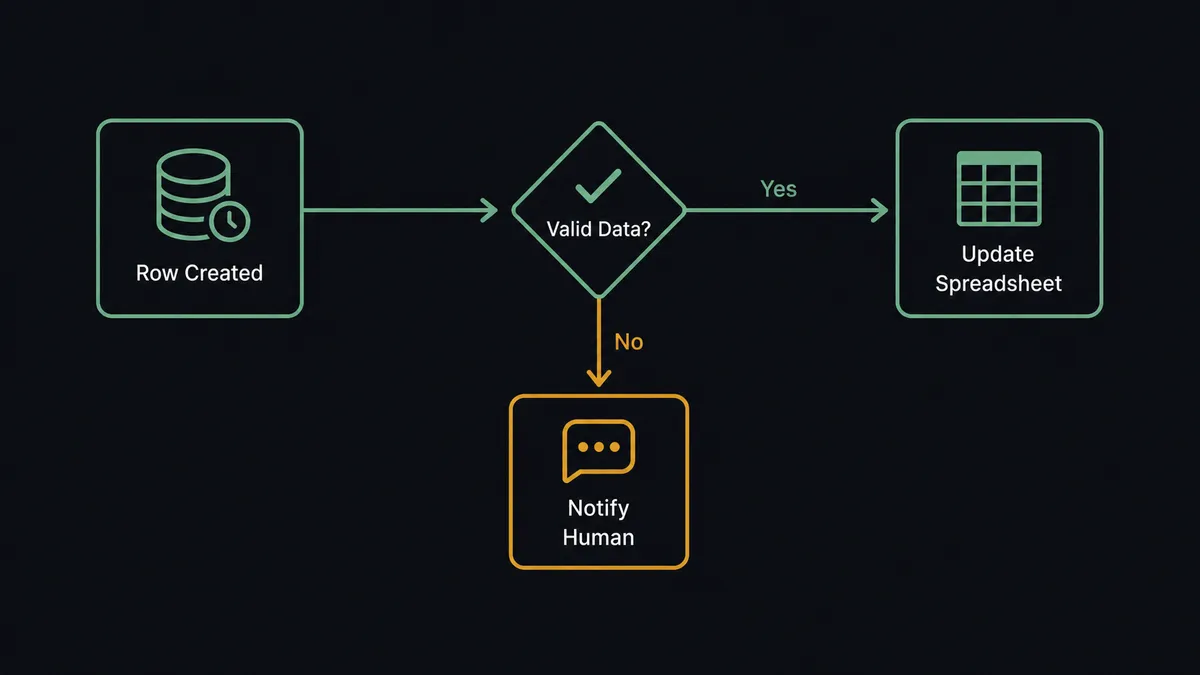
A plain sync tool moves every record it sees. An agent reads the record first. When On Record Created or On Record Updated fires, the agent checks the field values against expected ranges before it writes anything to Google Sheets, the same check Supabase’s own human-in-loop pattern is built around. A signup with a null email, an order with an amount three times the account’s typical size, or a status value that doesn’t match any known state gets flagged before it ever reaches the sheet.
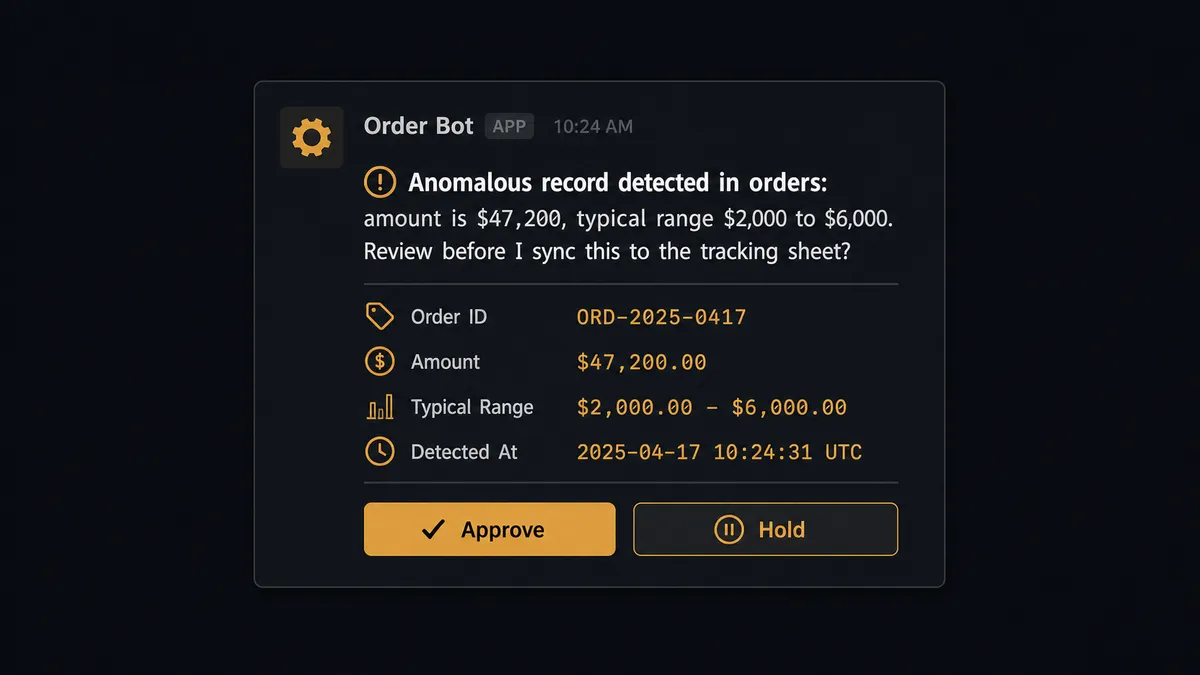
When that happens, the agent doesn’t skip the record or force it through. It invokes a human-in-loop flow as a callable tool, the same way it would call Update Row or Insert Record. That flow packages the raw record data, the table name, and the specific field that looks wrong, and posts it to the operations channel in Slack: “Anomalous record detected in orders: amount is $47,200 against a typical range of $2,000 to $6,000. Review before I sync this to the tracking sheet?” The workflow pauses there. A person looks at the raw data, approves it, corrects it, or tells the agent to hold it entirely. The agent resumes with that decision as input, and the outcome, the decider, and the timestamp all land in the audit trail.
This is not a sync tool with an if-statement bolted on. The threshold isn’t hardcoded at “flag anything over $10,000.” The agent is reasoning about what’s normal for this table, this account, this field, and deciding case by case whether the record needs a person before it moves. This is not a sync tool. The agent knows when to stop and ask.
FlowRunner vs Zapier for Supabase and Google Sheets
Zapier connects Supabase and Google Sheets well for a straightforward trigger-and-action sync, and its interface is genuinely easy for a non-technical person to set up in minutes. That’s a real strength, and for a team that just wants new rows to appear in a sheet with no exceptions to worry about, Zapier does the job.
Where it stops is at judgment. Zapier moves whatever data arrives; it has no native concept of pausing a run to ask a person whether a specific record looks wrong, and building that with Zapier’s own logic branches means hardcoding thresholds by hand for every field you care about.
| Capability | Zapier | FlowRunner |
|---|---|---|
| Human-in-the-loop | Not native; requires manual branching logic per field | Built in; the agent decides when to pause, not a fixed rule |
| Pricing model | Per-task execution pricing that scales with volume | Transparent workflow-based tiers with a fixed execution ceiling |
| Users per plan | Paid seats scale with team size on most tiers | Unlimited users on every tier |
| AI provider | No BYOK model for AI agent runs | Bring-your-own-key, so you control model and cost |
| Self-hosting | Not available | Available on the Enterprise tier |
Before and after
| Category | Before | After |
|---|---|---|
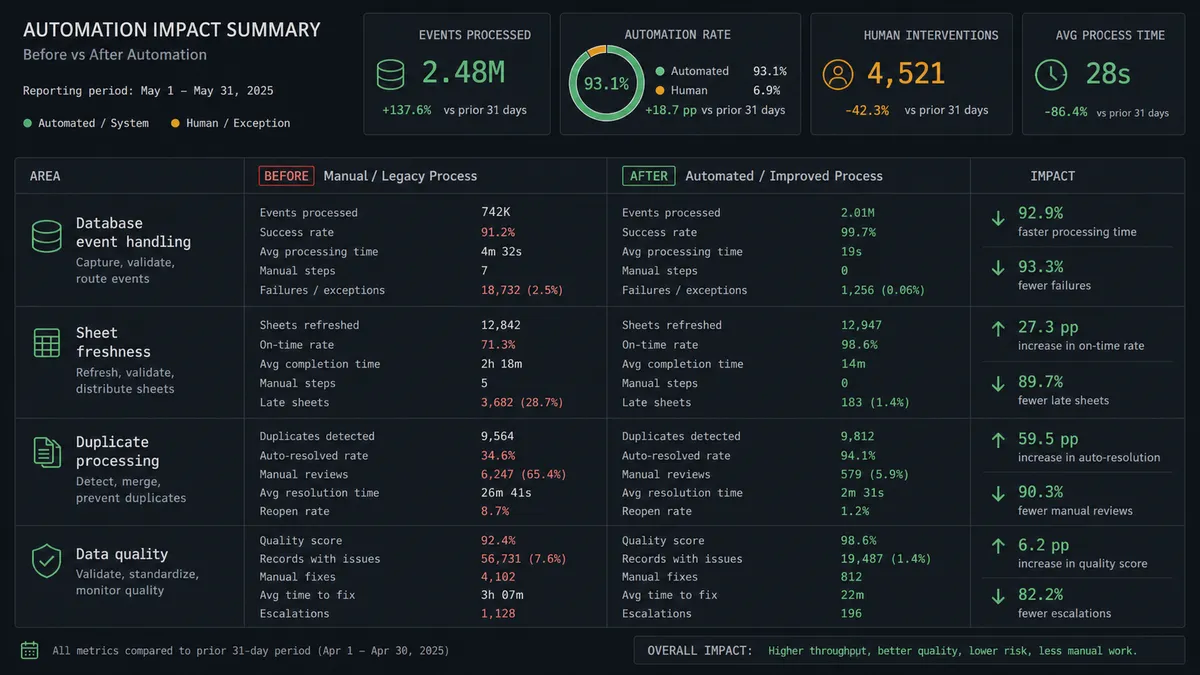
| Database event handling | Custom webhook code needed to react to every Supabase change | On Record Created and On Record Updated route events without custom code |
| Sheet freshness | Someone exports data and pastes it into the sheet each week | The sheet reads and writes as operational events fire, staying current |
| Duplicate processing | No way to tell which records have already synced | processed_at timestamps make the sync idempotent, so no record posts twice |
| Data quality | Anomalous values flow straight into every connected system | Anomalous records are held in Slack for review before they reach the sheet |
| New sheet rows | A new row sits until someone notices and acts on it | A new or updated row can trigger downstream work the moment it lands |
What you can build
A live signups tracker. On Record Created fires when a new user row lands in Supabase, the agent finds or adds the matching row in Google Sheets with Find Row and Add Row, and operations always has a current view of new signups without querying the database.
A reconciled orders sheet. On Record Updated fires whenever an order’s status changes in Supabase, and Update Row keeps the sheet’s status column in sync, so finance sees the same state the application does without a second system of record.
An anomaly-gated export pipeline. The agent checks each incoming record, syncs clean ones straight to Google Sheets, and routes flagged ones to Slack for review before Export Sheet later produces the clean report file.
A two-way status loop. Google Sheets’ On New or Updated Row trigger can feed corrections back into Supabase with Update Record, so a person fixing a flagged row in the sheet automatically clears the record in the source database too.
Common questions
Is it free to connect Supabase and Google Sheets on FlowRunner? Yes. FlowRunner has a free plan with 100 executions a month, every integration included, and no credit card required, and new accounts get 14 days of Professional on top.
Do I need to write code to sync Supabase records into Google Sheets? No. FlowRunner connects to both accounts through their APIs, and you map the trigger and action visually. There is no webhook code to write and no script to maintain.
Can the agent write to Supabase as well as read from it? Yes. The agent has full access to Insert Record, Update Record, Select Records, and Delete Record on the Supabase side, and Add Row, Update Row, Find Row, and the rest of the Google Sheets action set on the other.
What happens when the agent isn’t sure about a record? It stops and asks. The agent packages the raw record data into a Slack message and routes it to operations before the record reaches Google Sheets or any other connected system, rather than guessing.
Can I self-host this connection instead of using FlowRunner Cloud? Yes. FlowRunner’s Enterprise tier supports self-hosted deployment for teams that need the Supabase and Google Sheets connection to run inside their own infrastructure.
Does the agent need my own OpenAI or Anthropic key? Yes, FlowRunner runs on a bring-your-own-key model for AI providers, so you control which model runs the agent and what it costs.
Getting started
FlowRunner has a free plan with 100 executions a month, every integration included, and no credit card required, and new accounts get 14 days of Professional on top. Build the trigger, map the actions, and add the human-in-loop step for anomalous records in one flow.
Start at flowrunner.ai or book a walkthrough at calendly.com/flowrunner/intro.
Frequently asked questions
Is it free to connect Supabase and Google Sheets on FlowRunner?
Yes. FlowRunner has a free plan with 100 executions a month, every integration included, and no credit card required, and new accounts get 14 days of Professional on top.
Do I need to write code to sync Supabase records into Google Sheets?
No. FlowRunner connects to both accounts through their APIs, and you map the trigger and action visually. There is no webhook code to write and no script to maintain.
Can the agent write to Supabase as well as read from it?
Yes. The agent has full access to Insert Record, Update Record, Select Records, and Delete Record on the Supabase side, and Add Row, Update Row, Find Row, and the rest of the Google Sheets action set on the other.
What happens when the agent isn't sure about a record?
It stops and asks. The agent packages the raw record data into a Slack message and routes it to operations before the record reaches Google Sheets or any other connected system, rather than guessing.
Can I self-host this connection instead of using FlowRunner Cloud?
Yes. FlowRunner's Enterprise tier supports self-hosted deployment for teams that need the Supabase and Google Sheets connection to run inside their own infrastructure.
Does the agent need my own OpenAI or Anthropic key?
Yes, FlowRunner runs on a bring-your-own-key model for AI providers, so you control which model runs the agent and what it costs.