How to Connect Stripe with Xero (With or Without an AI Agent)
Connect Stripe and Xero so every payment, invoice, and reconciliation event flows automatically, optionally as an AI agent that pauses for a human before voiding an invoice or processing a large refund.
How do you connect Stripe to Xero?
You connect Stripe to Xero by using the Stripe Parse Webhook Event trigger to fire a FlowRunner workflow when a payment succeeds or fails, then using the Xero Create Payment or Create Invoice action to record the transaction in your accounting system automatically. FlowRunner is a visual AI-agent orchestration platform where automations run autonomously and pause for human judgment on the steps that carry real consequence. The same connection can run as an AI agent that records routine payments without touching them and stops to ask your accounting manager before voiding an invoice or processing a refund above a threshold the agent itself determines is worth checking.
The problem it solves
Every business that uses Stripe for billing and Xero for accounting has the same gap: someone has to manually reconcile them. A payment lands in Stripe. Someone logs into Xero, finds the customer, creates a payment record, matches it to the invoice, and updates the CRM. On a good day, this takes ten minutes. On a busy month-end, it becomes a backlog. Entries fall through the cracks. The AR manager does not know an invoice is 30 days overdue until she runs the aging report on Friday.
The problem is not the tools. Stripe and Xero are excellent at what they do. The problem is the space between them. AP clerks and billing managers spend hours every week moving information between systems that do not talk to each other. Every manual step is a chance for an error, a delay, or something that falls through the cracks. The spreadsheet that tracks what has and has not been recorded is itself a liability.
How it works: the connection
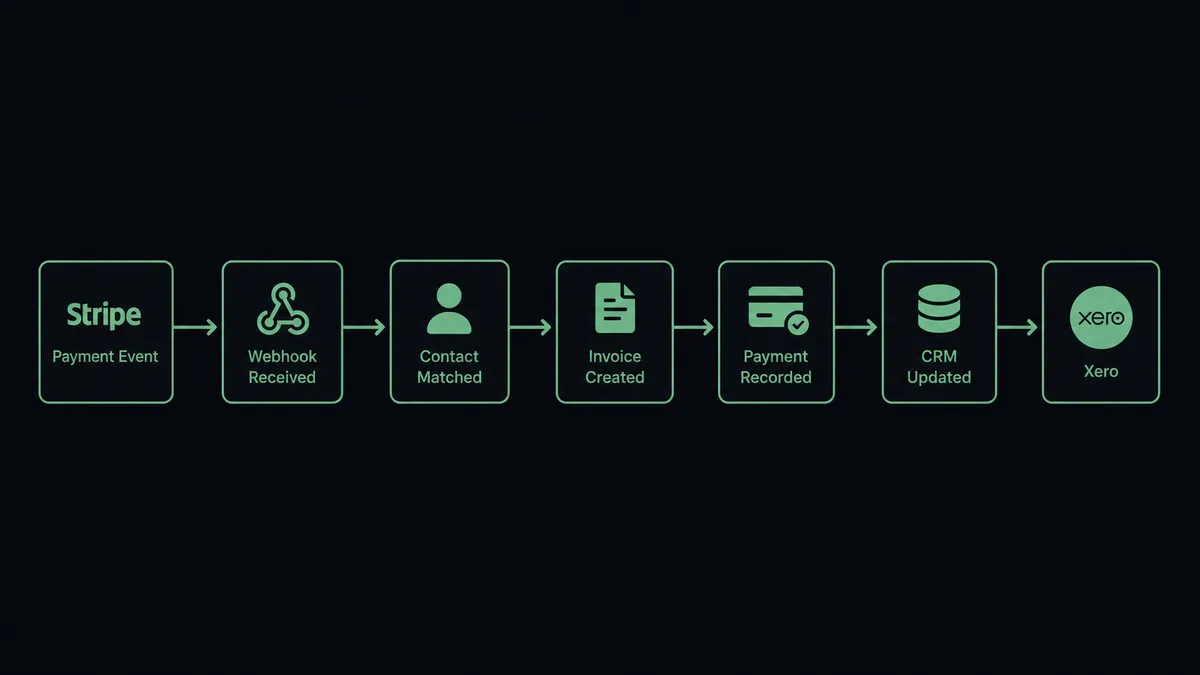
The trigger is Stripe’s Parse Webhook Event. This single trigger covers every Stripe event type: payment success, payment failure, subscription created, subscription canceled, dispute opened, refund requested. When a payment succeeds, the workflow fires immediately.
The agent’s first action is to search Xero for the existing contact using Find Contacts. If the customer exists, it retrieves their full record with Get Contact to pull billing terms, currency, and tax settings. If the customer does not exist, it creates one with Create Contact.
From there, the agent creates the invoice in Xero using Create Invoice, finalize-checks the invoice status, and records the payment using Create Payment, allocating it against the correct invoice. The entire reconciliation happens in seconds. No one touches Xero manually.
For the reverse direction, the Xero On Invoice Updated trigger fires when an invoice is marked paid in Xero. The agent retrieves the corresponding Stripe charge using Get Payment Intent, confirms the amounts match, and updates the deal stage in your CRM. On New Payment Received triggers the same logic: instant confirmation, CRM update, customer notification.
Can an AI agent run it? (and why a human stays in the loop)
Yes, and this is where the connection changes from a sync tool into something that handles your exceptions.
A standard Stripe-to-Xero sync copies data. The FlowRunner agent reads the data, reasons about it, and decides what to do. The agent has every Stripe and Xero action available as a tool: Create Invoice, Create Payment, Void Invoice, Create Refund, Get Aged Receivables, Email Invoice. It chooses which ones to use based on what it finds.
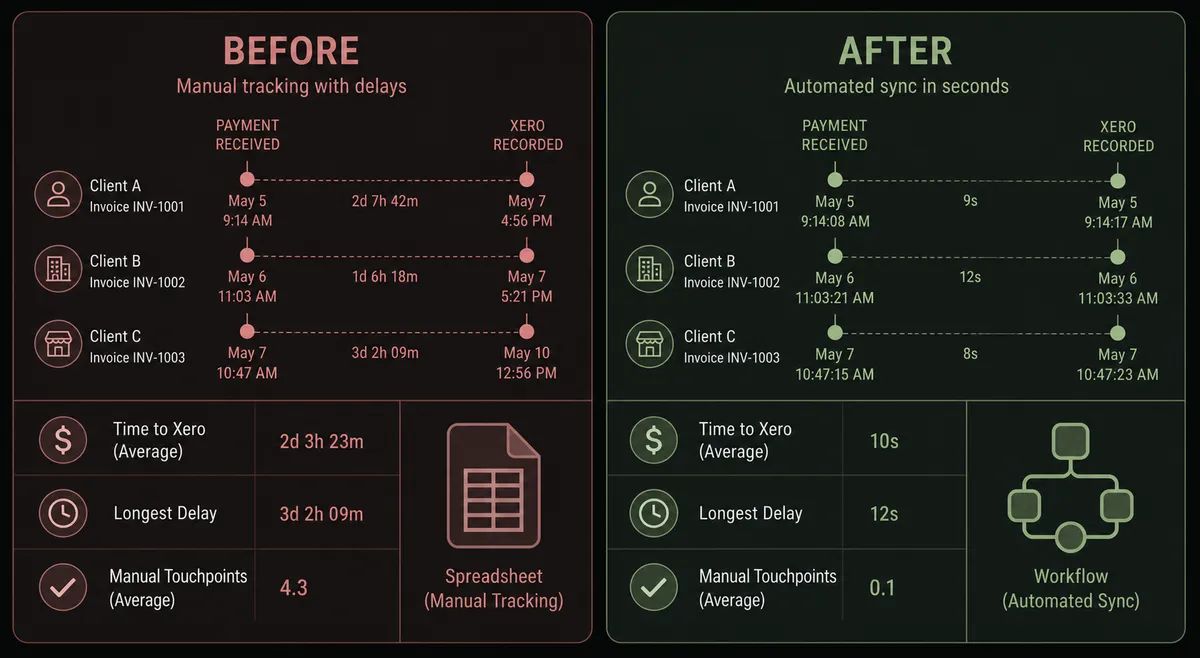
Consider this scenario: a payment comes in from a customer the agent has seen dozens of times. The amount matches the open invoice exactly. The agent records it in Xero, updates the CRM, and sends the customer a receipt. No one is involved. The work is done in under 10 seconds.
Now consider the next payment: same customer, but the amount is 40 percent higher than any previous charge. The agent does not auto-record it. It does not have a hardcoded threshold rule that says “amounts over $5,000 require approval.” Instead, the agent evaluates the context. The vendor’s typical invoice is $2,200. This one is $3,080. The agent decides this is worth a human check.
It invokes the human-in-loop tool, which is a separate sub-flow built in FlowRunner. That flow sends a Slack message to the accounting manager: “Invoice #XR-4421 from [Vendor] is $3,080. Their average charge is $2,200. The invoice is attached. Approve and record in Xero, or flag for review?” The accounting manager sees the full context, checks the attached invoice, and clicks Approve. The agent records the payment using Create Payment, logs the decision, and moves on.
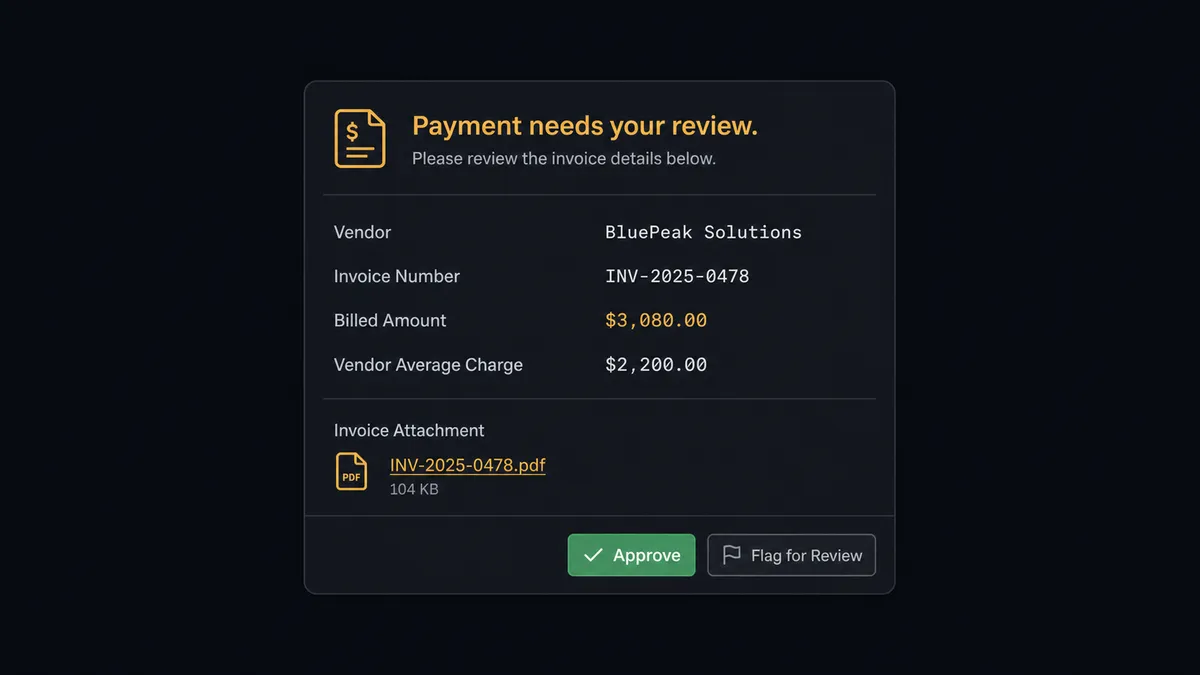
This is not a basic approval gate. The agent’s decision to escalate is itself an AI decision. It escalates a $3,000 charge from an unfamiliar vendor and auto-processes a $15,000 charge from a vendor with a clean 3-year history. The digital andon cord: the agent stops the line when it hits something it is not confident about.
The Xero Void Invoice action has the same protection built in. Voiding an invoice is irreversible. Before the agent executes Void Invoice, it always pauses, sends the full invoice detail to the accounting manager, and waits. The decision, the manager’s identity, and the timestamp are logged in the audit trail.
FlowRunner vs Zapier
Zapier is the right comparison for non-technical operations teams evaluating this connection. It is genuinely good at simple, linear triggers: when X happens in Stripe, do Y in Xero. Setup is fast. The library of pre-built templates is large. If you need a straight payment-to-invoice sync and nothing more, Zapier works.
The differences emerge as soon as the workflow needs to reason, branch, or involve a human.
| Feature | Zapier | FlowRunner |
|---|---|---|
| AI agent with decision logic | No native AI agent; logic requires filters and paths set up manually | AI Agent node reads data and decides which actions to take as tools |
| Human-in-loop | Not available; escalations require a separate tool like Slack + manual follow-up | Native: agent invokes a human-in-loop sub-flow as a callable tool at runtime |
| Audit trail for human decisions | No | Every approval, approver identity, and timestamp logged automatically |
| Unlimited users | Per-seat pricing at higher tiers | Unlimited users on every FlowRunner tier |
| BYOK for AI providers | No | Yes; bring your own Anthropic, OpenAI, or other LLM key |
| Self-hosted option | No | Yes; Community and Enterprise self-hosted tiers available |
The honest summary: if your Stripe-to-Xero flow is a simple one-way sync with no exceptions, Zapier handles it. If you have refund approvals, disputed charges, invoice voids, or any step where a human needs to stay in the loop, you will spend more time building workarounds in Zapier than it would take to set up the full flow in FlowRunner.
Before and after
| Before | After | |
|---|---|---|
| Payment reconciliation | AP clerk manually creates Xero payment record after checking Stripe | Agent records payment in Xero within seconds of the Stripe webhook |
| Exception handling | Unusual charges processed the same as routine ones, or held pending review | Agent escalates anomalies to the accounting manager with full context before recording |
| Invoice voids | Anyone with Xero access can void an invoice without a paper trail | Every void paused for manager approval; decision logged with identity and timestamp |
| AR aging response | Overdue invoices discovered at weekly review | Agent pulls Get Aged Receivables, sends 30-day reminders, escalates 60-day accounts same day |
| Customer confirmation | Receipt emails sent manually at end of day or forgotten | Customer receives confirmation email within seconds of payment posting |
| Dispute evidence | 2-3 hours assembling order records, emails, and shipping data manually | Agent compiles and uploads evidence package to Stripe in under 4 minutes |
What you can build
Subscription renewal with dunning logic. The Parse Webhook Event trigger fires when a subscription payment fails. The agent checks the failure reason via the event payload: insufficient funds versus expired card. For expired cards, it uses Email Invoice in Xero to send a payment update request. For insufficient funds, it waits 72 hours and retries. If the second attempt fails, the agent routes to the billing team: “This account has failed twice. Extend grace period or begin cancellation?” The team decides. The agent acts.
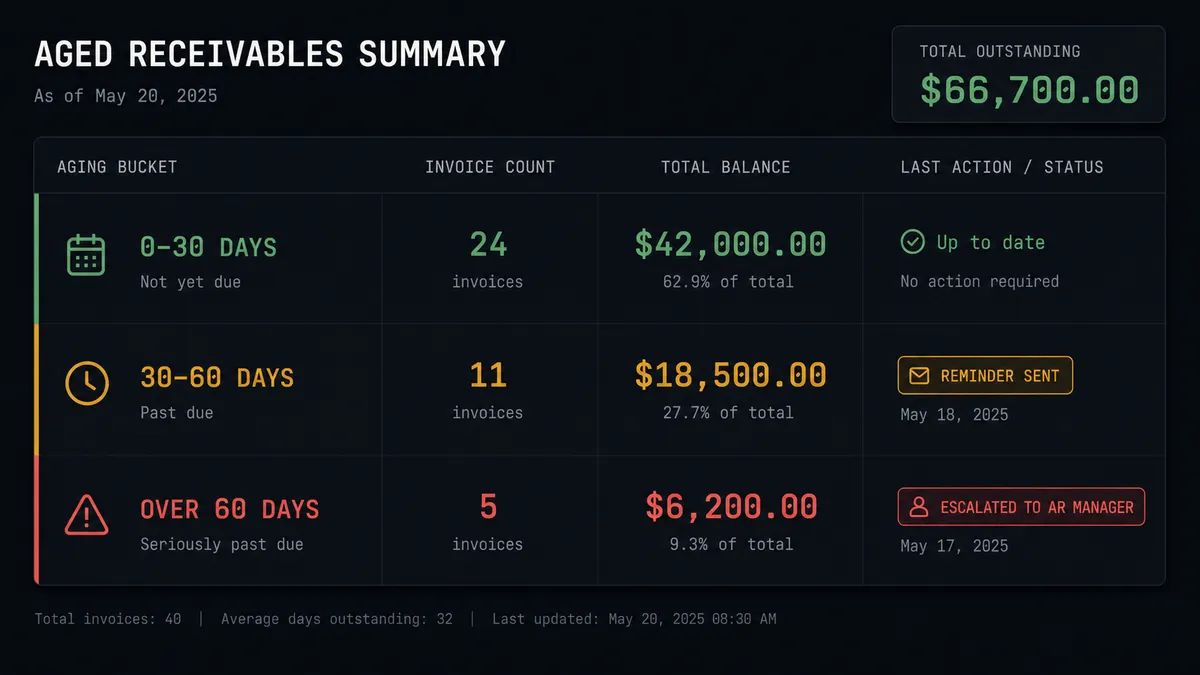
Aged receivables collections. Every Monday, the agent calls Get Aged Receivables from Xero. For invoices 30 to 60 days overdue, it sends a reminder using Email Invoice. For invoices over 60 days, it pauses and routes to the AR manager via Slack with the invoice details and contact history. The manager decides whether to send a final notice or escalate to collections.
Deal-close to invoice in one step. A deal closes in your CRM. FlowRunner fires. The agent creates a Stripe customer using Create Customer, creates the subscription with Create Subscription, creates the invoice in Xero using Create Invoice, finalizes and sends it with Email Invoice, and posts a summary to your revenue-ops Slack channel. The customer is billed and the team knows about it, all without anyone opening Stripe or Xero.
Dispute evidence package. A chargeback opens. Parse Webhook Event fires. The agent pulls the original order record, retrieves all related payment data using Get Payment Intent, creates a credit note in Xero using Create Credit Note if needed, compiles the evidence, and uploads it to the Stripe dispute. Total time: under 4 minutes. Without automation, this process takes 2 to 3 hours of manual assembly.
New contact sync. The Xero On Contact Created trigger fires when a new supplier or customer is added to Xero. The agent creates the corresponding Stripe customer using Create Customer, maps billing terms from Get Contact, and sends the new contact a welcome email. Contacts are consistent across both systems from day one.
Common questions
Is it free to connect Stripe and Xero on FlowRunner?
FlowRunner has a free plan with 100 executions a month, every integration included, and no credit card required, and new accounts get 14 days of Professional on top. Corporate email is required to sign up.
Can I self-host the Stripe and Xero integration?
Yes. FlowRunner offers a self-hosted Community Edition at no cost and an Enterprise self-hosted tier for multi-instance deployments. The same Stripe and Xero connectors are available in both.
Does the AI agent need my own OpenAI key?
FlowRunner uses a Bring Your Own Key model for AI providers. You connect whichever LLM provider you already use, including Anthropic, OpenAI, or others. You are not locked into one AI vendor.
What happens when the agent is not sure whether to process a transaction?
The agent invokes a human-in-loop flow as a callable tool. It packages the invoice, the payment amount, the vendor history, and the reason for uncertainty, then sends it to your accounting manager via Slack, email, or another channel. The workflow pauses until a human decides.
How is FlowRunner different from a direct Stripe-to-Xero sync?
A direct sync copies data. FlowRunner agents read the data, reason about it, and decide what to do next. The agent can route a failed payment to one recovery sequence, hold a voided invoice for manager approval, and update your CRM record, all from a single trigger event.
How many users and workflows are included?
All FlowRunner tiers include unlimited users and unlimited workflows. There are no per-seat charges.
Getting started
FlowRunner’s Growth tier starts at $45 per month and includes 12,000 workflow executions, full AI agents with BYOK, human-in-loop orchestration, and all integrations. FlowRunner has a free plan with 100 executions a month, every integration included, and no credit card required, and new accounts get 14 days of Professional on top.
Connect your systems: Stripe integration and Xero integration.
Start building at flowrunner.ai or book a 30-minute intro call to walk through a live workflow for your specific use case.
Frequently asked questions
Is it free to connect Stripe and Xero on FlowRunner?
FlowRunner has a free plan with 100 executions a month, every integration included, and no credit card required, and new accounts get 14 days of Professional on top. Corporate email is required to sign up.
Can I self-host the Stripe and Xero integration?
Yes. FlowRunner offers a self-hosted Community Edition at no cost and an Enterprise self-hosted tier for multi-instance deployments. The same Stripe and Xero connectors are available in both.
Does the AI agent need my own OpenAI key?
FlowRunner uses a Bring Your Own Key model for AI providers. You connect whichever LLM provider you already use, including Anthropic, OpenAI, or others. You are not locked into one AI vendor.
What happens when the agent is not sure whether to process a transaction?
The agent invokes a human-in-loop flow as a callable tool. It packages the invoice, the payment amount, the vendor history, and the reason for uncertainty, then sends it to your accounting manager via Slack, email, or another channel. The workflow pauses until a human decides.
How is FlowRunner different from a direct Stripe-to-Xero sync?
A direct sync copies data. FlowRunner agents read the data, reason about it, and decide what to do next. The agent can route a failed payment to one recovery sequence, hold a voided invoice for manager approval, and update your CRM record, all from a single trigger event.
How many users and workflows are included?
All FlowRunner tiers include unlimited users and unlimited workflows. There are no per-seat charges.