How to Connect Stripe with Capsule CRM (With or Without an AI Agent)
Connect Stripe payments to Capsule CRM so opportunities advance through their milestones automatically, with an AI agent that opens cases for disputes and pauses for a human before a refund is issued.
How do you connect Stripe to Capsule CRM?
You connect Stripe to Capsule CRM by having Stripe’s Parse Webhook Event trigger drive Capsule actions: when a checkout completes or an invoice is paid, the workflow matches the buyer with Search Parties, creates the record with Create Person if it is a new customer, and advances the deal with Update Opportunity, moving it to the milestone your pipeline uses for won business. FlowRunner is a visual AI-agent orchestration platform where automations run autonomously and pause for human judgment on the steps that carry real consequence. The same connection can run as an AI agent that keeps parties, opportunities, and cases current on its own and pauses for a named human before it calls Create Refund, because money leaving the business deserves a decision, not a default.
The problem it solves
Right now the money and the pipeline update on different schedules. A customer pays through Stripe and the Capsule opportunity sits at Proposal Sent until someone remembers to move it. Opportunity hygiene is nobody’s first job, so milestones drift and the Monday review starts with “actually, that one closed.” The CRM that is supposed to be the single view of the customer is missing the single most important fact about them.
The edges do the real damage. A renewal fails and no task exists, so the churn is discovered after it happened. A dispute opens in Stripe and gets handled entirely in the Stripe dashboard, invisible to the account’s Capsule record, so the account manager cheerfully emails an upsell to a customer who is actively contesting a charge. A refund goes out with no note anywhere, and six months later nobody can reconstruct who approved it or why.
How it works: the connection
The connection listens to Stripe and writes to Capsule. Here is the plain version, grounded in the real connector actions.
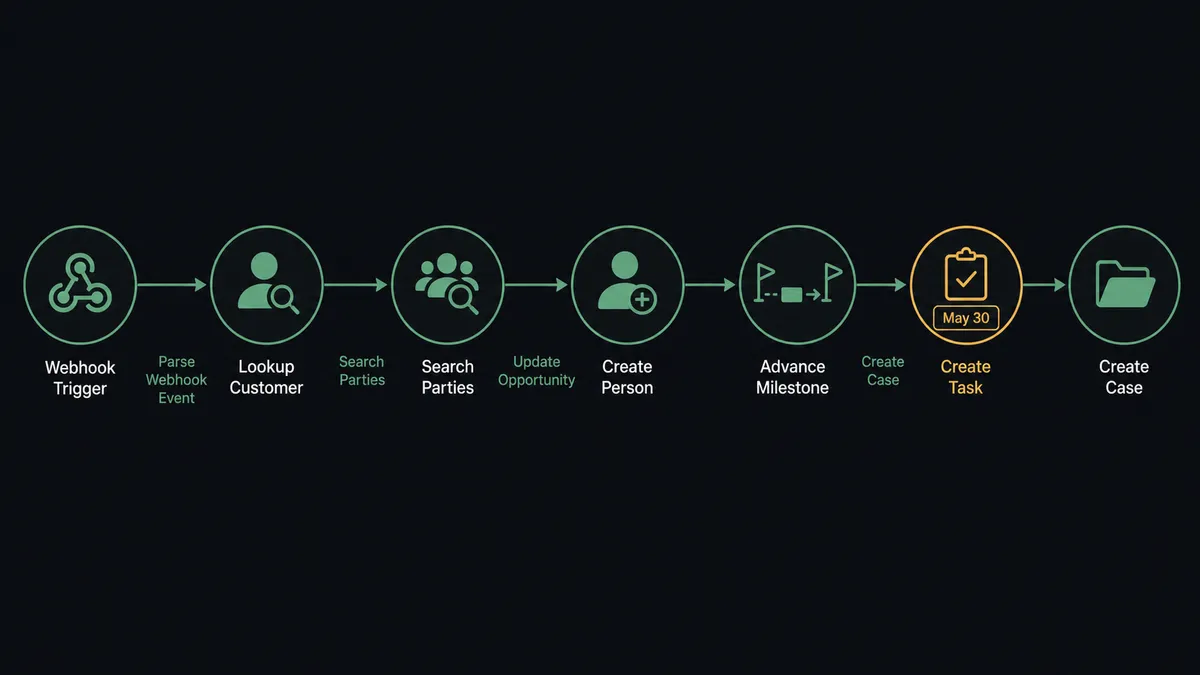
- Trigger: Stripe fires Parse Webhook Event when an event arrives at the connected endpoint: a completed checkout, a paid or failed invoice, a subscription change, a dispute.
- Read: The workflow calls Get Customer in Stripe to pull the payer’s email and details behind the event.
- Match the party: It calls Search Parties in Capsule against names, emails, and phone numbers to find the person or organisation.
- Create if new: When no party exists, it calls Create Person, or Create Organisation for a business buyer, so a first-time customer enters Capsule with a real record.
- Advance the opportunity: It calls Update Opportunity to move the milestone, using the IDs from List Pipelines and List Milestones so the move lands in your actual pipeline, and sets the value to the paid amount.
- File the follow-ups: On a failed renewal, it calls Create Task linked to the party with a due date, so the chase exists before anyone reads a report.
- Track the disputes: On a dispute event, it calls Create Case linked to the party, so the contested charge becomes a tracked, owned piece of work rather than a dashboard entry nobody watches.
That is the “just connect them” answer. Opportunities move themselves, failed charges become dated tasks, and disputes become cases with owners.
Can an AI agent run it? (and why a human stays in the loop)
Yes, and the agent is what turns event plumbing into account management. The agent holds Get Customer, Get Subscription, Search Parties, Create Person, Create Organisation, List Opportunities, Update Opportunity, Create Task, Create Case, Update Case, and Create Refund as tools, and it reasons about each event. A payment from a known party with one open opportunity is an easy milestone move. A payment from a party with three open opportunities gets matched on amount and recency, and when that is ambiguous, the agent asks instead of guessing. A dispute from a party whose case history shows a pattern gets flagged with that history attached.
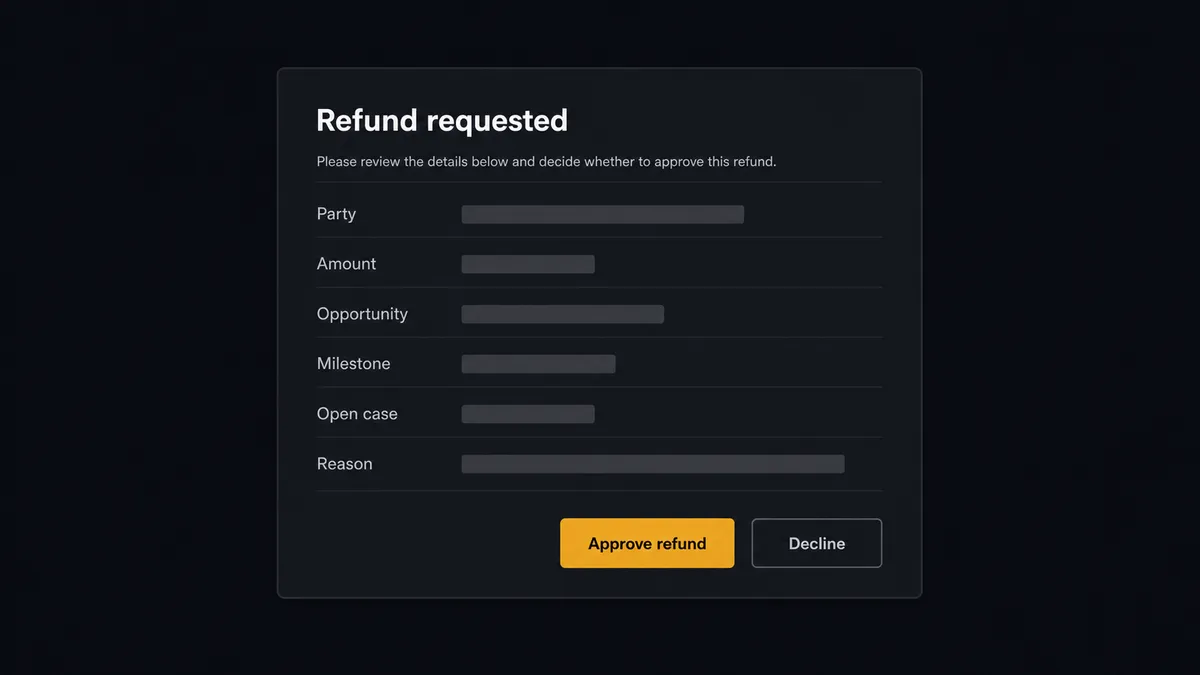
The consequential step is Create Refund. Everything else in this flow is correctable; a refund is money gone. So when a refund request arrives, the agent builds the decision package: the party, the amount, the opportunity’s value and milestone from Get Opportunity, any open cases, and the stated reason. Then it invokes the human-in-loop flow it holds as a callable tool. The workflow pauses and posts to your team’s channel: “Refund requested: [party], [amount], opportunity [name] at [milestone], open case: [case]. Reason: [reason]. Approve to issue?” Only after a named approver signs off does the agent call Create Refund, then open or update the Capsule case so the account’s record tells the whole story. The decision, the approver, and the timestamp land in the audit trail.
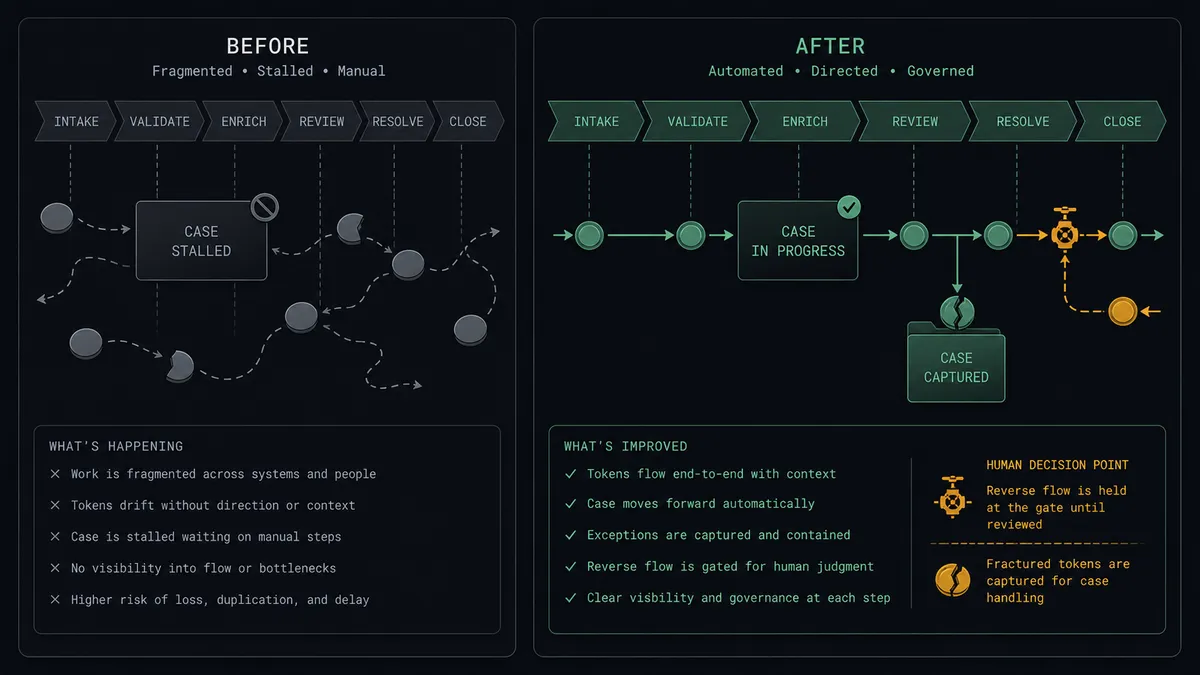
This is the digital andon cord, the framing our own prospects gave us: like Toyota’s pull cord on the production line, the workflow stops the line the moment money would move without judgment. Milestones, tasks, and cases stay current all day on their own. The refund waits for a name.
FlowRunner vs Zapier
Zapier is the default first look for a Stripe to Capsule sync, and its strengths are real: the category’s largest app directory, ready-made templates for payment-to-CRM patterns, and the fastest first-Zap experience for a newcomer. Zapier also ships a native Request Approval step on paid plans, so a pause-for-a-person exists there as well. Credit where it is due.
The difference is one agent versus many Zaps, and where the approval happens. Stripe’s webhook stream carries checkouts, invoices, failures, disputes, and refunds; in Zapier each typically becomes its own Zap, and each action step in every run consumes a task. FlowRunner runs one agent over the whole stream, and its approvals land in the channel your team already reads rather than requiring the reviewer to sign in to Zapier.
| What matters for this pair | FlowRunner | Zapier |
|---|---|---|
| Human-in-the-loop on Create Refund | Native. The agent invokes an approval flow as a callable tool and pauses before money moves | Native Request Approval step on paid plans; the reviewer signs in to Zapier to act on it |
| Who runs the flow | One AI agent classifies every webhook event and picks actions as tools | A step sequence per Zap; each event type typically gets its own Zap |
| Users included | Unlimited users on every tier | Per-seat pricing until Enterprise |
| Bring your own AI keys | Yes, BYOK | AI runs through Zapier’s own AI products and billing |
| Self-hosted option | Yes, cloud-hosted or self-hosted | Cloud only |
| Pricing model | Transparent workflow-based tiers, priced per execution | Per-task; each action step in a run consumes a task |
If you need one simple push, checkout to new person, and you already run Zapier, it will serve. If you want the full payment lifecycle reflected in Capsule with refunds gated by a named approver, this pairing is where FlowRunner is the better fit.
Before and after
| Category | Before | After |
|---|---|---|
| Opportunity milestones | Drift until someone does pipeline hygiene before the Monday review | Update Opportunity moves the milestone the moment the payment lands |
| New buyers | Self-serve customers exist in Stripe but not in Capsule | Create Person and Create Organisation put them in the CRM with revenue attached |
| Failed renewals | Discovered in a report after the customer is gone | Create Task files a dated, party-linked follow-up the day the charge fails |
| Disputes | Handled in the Stripe dashboard, invisible to the account record | Create Case opens a tracked, owned record linked to the party |
| Refunds | Issued ad hoc with no trail in the CRM | Approved by a named person, issued by the agent, closed out on the case |
What you can build
Payment to won milestone. Parse Webhook Event fires on a paid invoice, the agent matches with Search Parties, advances with Update Opportunity using your pipeline’s real milestone IDs, and the pipeline finally agrees with the bank.
Self-serve buyer intake. A checkout from an unknown email becomes Create Person, Create Organisation where there is a company, and a won opportunity, so product-led revenue is visible in Capsule reporting.
Failed-renewal rescue. A failed charge becomes a Create Task linked to the party, due before the next retry, with the account context in the description, so saves start while the card can still be fixed.
Dispute case management. A dispute event opens a Create Case on the party, the agent attaches the charge details, and Update Case records the resolution when Stripe settles it, so the account’s history is complete.
Refund with named approval. A refund request pauses at the human gate with party, amount, milestone, and case history packaged. On approval the agent calls Create Refund and writes the outcome to the case.
Common questions
Is it free to connect Stripe and Capsule CRM on FlowRunner? You can build and run the connection on FlowRunner’s free plan, which includes 100 executions a month and every integration with no credit card required, and new accounts also get 14 days of Professional. Both connectors are available on every FlowRunner tier, and every tier includes unlimited users and unlimited workflows.
Can I self-host the Stripe to Capsule CRM workflow? Yes. FlowRunner offers a cloud-hosted option and a self-hosted option, so the connection can run inside your own environment.
Does the AI agent need my own OpenAI or Claude key? FlowRunner uses a bring-your-own-keys model, so you connect the AI provider key you already have. You are not locked to one model.
What happens when the agent cannot match a Stripe payment to a Capsule party? The agent calls Search Parties against names, email addresses, and phone numbers. When nothing matches confidently, it does not create a duplicate person or attach the payment to the wrong opportunity. It posts the payment details and closest candidates to your team’s channel and waits for a person to pick the record or approve creating a new one.
Which Stripe events can trigger a Capsule CRM action? Stripe uses a single trigger, Parse Webhook Event, which receives every Stripe event type from a connected webhook endpoint. One workflow reacts to completed checkouts, paid and failed invoices, subscription changes, disputes, and refund events, and the agent branches on the event type it receives.
How are payment disputes tracked in Capsule? When a dispute event arrives, the agent calls Create Case linked to the party, so the dispute has a tracked record with an owner instead of living in the Stripe dashboard. As the resolution progresses, Update Case captures the outcome, and the case is closed with a closed date when the dispute settles.
Getting started
Start on the free plan: 100 executions a month, every integration included, no credit card required, plus 14 days of Professional for new accounts. Both connectors are available on every tier, and every tier includes unlimited users and unlimited workflows.
Explore the integration details:
- Stripe integration (1 webhook trigger and 67 actions across payments, subscriptions, invoices, refunds, and payouts)
- Capsule CRM integration (31 actions across parties, opportunities, cases, tasks, and pipelines)
Start building free at flowrunner.ai or book a demo to see a live Stripe to Capsule CRM workflow, refund approval and all.
Frequently asked questions
Is it free to connect Stripe and Capsule CRM on FlowRunner?
You can build and run the connection on FlowRunner's free plan, which includes 100 executions a month and every integration with no credit card required, and new accounts also get 14 days of Professional. Both connectors are available on every FlowRunner tier, and every tier includes unlimited users and unlimited workflows.
Can I self-host the Stripe to Capsule CRM workflow?
Yes. FlowRunner offers a cloud-hosted option and a self-hosted option, so the connection can run inside your own environment.
Does the AI agent need my own OpenAI or Claude key?
FlowRunner uses a bring-your-own-keys model, so you connect the AI provider key you already have. You are not locked to one model.
What happens when the agent cannot match a Stripe payment to a Capsule party?
The agent calls Search Parties against names, email addresses, and phone numbers. When nothing matches confidently, it does not create a duplicate person or attach the payment to the wrong opportunity. It posts the payment details and closest candidates to your team's channel and waits for a person to pick the record or approve creating a new one.
Which Stripe events can trigger a Capsule CRM action?
Stripe uses a single trigger, Parse Webhook Event, which receives every Stripe event type from a connected webhook endpoint. One workflow reacts to completed checkouts, paid and failed invoices, subscription changes, disputes, and refund events, and the agent branches on the event type it receives.
How are payment disputes tracked in Capsule?
When a dispute event arrives, the agent calls Create Case linked to the party, so the dispute has a tracked record with an owner instead of living in the Stripe dashboard. As the resolution progresses, Update Case captures the outcome, and the case is closed with a closed date when the dispute settles.