How to Connect Slack with Bigin (With or Without an AI Agent)
Keep your Bigin pipeline current from Slack: sales chatter becomes contacts, deals, and tasks automatically, and an AI agent pauses for the deal owner before Update Deal moves anything into Closed Won or Closed Lost.
How do you connect Slack to Bigin?
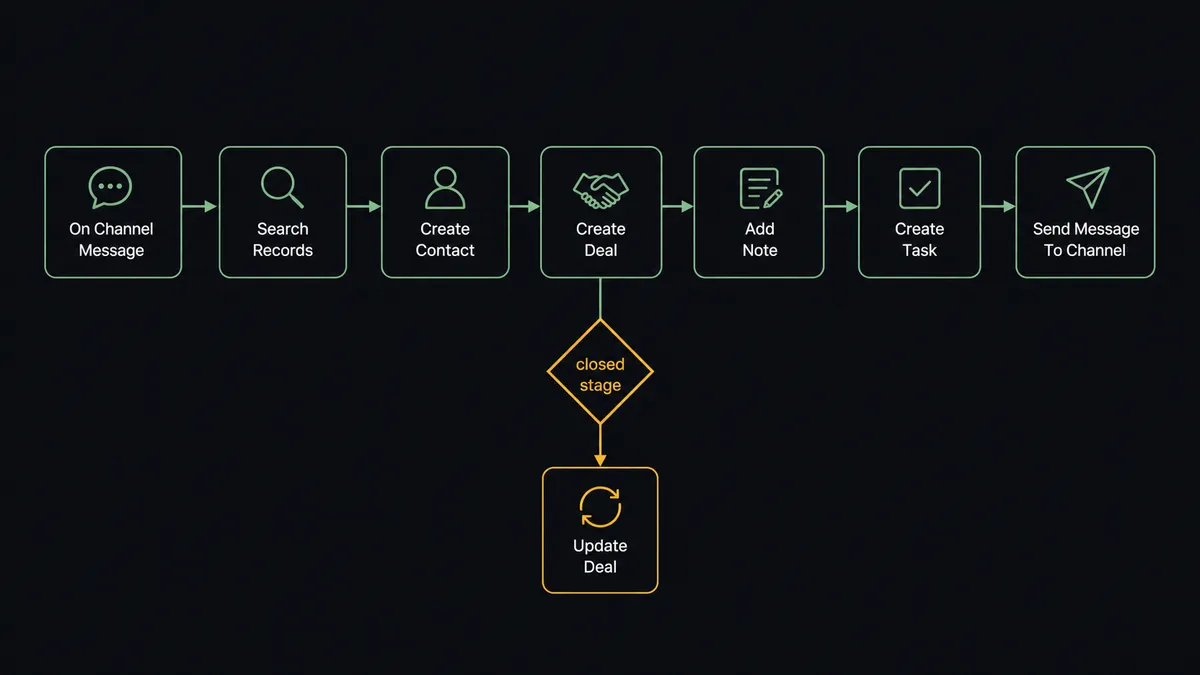
You connect Slack to Bigin by having Slack’s On Channel Message trigger drive Bigin actions: when a rep posts about a new prospect in the sales channel, the workflow checks for an existing record with Search Records, writes the person with Create Contact, opens the opportunity with Create Deal, and schedules the follow-up with Create Task, so the pipeline fills itself from the conversation. FlowRunner is a visual AI-agent orchestration platform where automations run autonomously and pause for human judgment on the steps that carry real consequence. The same connection can run as an AI agent that maintains the pipeline all day and pauses for the deal owner before Update Deal moves anything into Closed Won or Closed Lost, because the stage field is not chatter, it is the forecast.
The problem it solves
Small sales teams sell in Slack and report in Bigin, and the two drift apart daily. A rep posts “great call with the Fairview folks, they want a proposal by Friday” and keeps selling. The CRM update, create the contact, open the deal, set the amount, schedule the follow-up, is homework, and homework loses to selling every time. So Friday’s pipeline review starts with twenty minutes of archaeology: whose deal is that, what stage is it really in, did anyone follow up with the proposal.
Stage fields decay worst of all. Deals sit in Negotiation for weeks after the customer signed because nobody flipped the field, and then someone flips the wrong one: a deal marked Closed Won on an enthusiastic message that was actually a verbal maybe. That single wrong write ripples outward, into the forecast the owner shows the board, the commission the rep expects, and the onboarding sequence that fires at a customer who never signed. The pipeline is a shared ledger being edited casually, and nobody notices until the numbers disagree with reality in front of an audience.
How it works: the connection
The connection listens to Slack and writes to Bigin. Here is the plain version, grounded in the real connector actions.
- Trigger: Slack fires On Channel Message when deal chatter lands in the sales channel.
- Match first: The workflow calls Search Records with the email, phone, or name mentioned, so existing records are found before anything is created.
- Write the prospect: For a genuinely new lead it calls Create Contact, and Create Company when the account matters separately.
- Open the deal: It calls Create Deal with Deal_Name, Stage, and Amount in the Pipelines module, linked to the contact.
- Log the context: It calls Add Note on the record with the message that started it, so the CRM keeps the story, not just the fields.
- Schedule the follow-up: It calls Create Task with a subject, due date, and owner, so “proposal by Friday” exists somewhere that nags.
- Report back: It calls Send Message To Channel confirming what was logged, and answers On Mention questions like “what’s open with Fairview?” from List Records and Get Record.
That is the “just connect them” answer. The rep’s message becomes the contact, the deal, the note, and the task, and nobody does CRM homework at 6pm.
Can an AI agent run it? (and why a human stays in the loop)
Yes, and the agent is what lets loose sales language drive a structured pipeline safely. It holds the Bigin actions as tools: Search Records, Create Contact, Update Contact, Create Company, Create Deal, Update Deal, Create Task, Update Task, Add Note, List Records. Reading “Fairview wants the proposal by Friday, feels like 15k,” the agent decides what that means for the pipeline: an existing deal found through Search Records gets its Amount adjusted through Update Deal and a note attached; a brand-new name gets the full Create Contact and Create Deal treatment; an offhand joke about a prospect gets nothing at all, because not every message is CRM data.
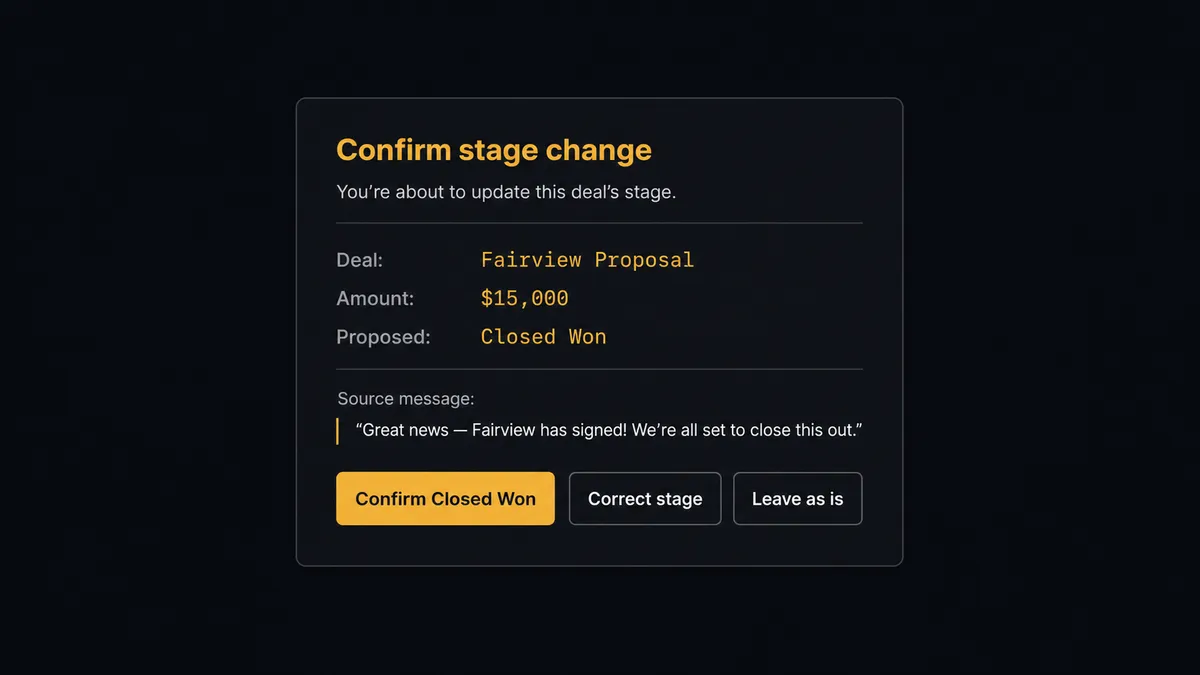
The consequential step is the closed stage. When a message reads like an ending, “Acme signed!”, “Fairview went dark, I’m calling it”, the agent does not write the stage. It invokes the confirmation flow it holds as a callable tool and posts to the channel: “Reading this as [deal name], [amount], moving to [Closed Won or Closed Lost]. Confirm, correct the stage, or leave it?” The deal owner answers in one click. Only then does Update Deal write the stage, with the approver and timestamp in the audit trail, and only then do the downstream consequences, the forecast change, the handoff task, fire. Delete Record, which permanently removes a contact or deal, is gated the same way, every time.
This is the digital andon cord for the pipeline: the line runs at conversation speed through contacts, notes, and tasks, and stops at the one field that becomes the forecast. Reps sell in Slack all day; the ledger changes state only when its owner says so.
FlowRunner vs Zapier
Zapier is a reasonable first reach for Slack to Bigin, and its strengths are concrete: both connectors are in its library, its template gallery covers “new lead becomes a CRM record” patterns well, and a sales ops person can wire a fixed path without writing code or waiting on IT. For simple, one-directional logging, it earns its popularity.
The gap is between logging and operating. A Zap maps a trigger to steps; it does not read ambiguous sales language, decide whether a message is a new deal or a stage change, or hold the forecast-critical write until the deal owner confirms. That mid-flow pause and resume around human judgment is the native mechanic here.
| What matters for this pair | FlowRunner | Zapier |
|---|---|---|
| Human-in-the-loop on Closed Won and Closed Lost stage writes | Native. The agent pauses Update Deal until the deal owner confirms | Available via added approval steps, not a native agent decision |
| Who runs the flow | An AI agent reads sales chatter, reasons, picks Bigin actions as tools | Predefined step sequence you configure per Zap |
| Users included | Unlimited users on every tier | Priced by task volume; seats vary by plan |
| Bring your own AI keys | Yes, BYOK | AI features tied to Zapier’s own AI offering |
| Self-hosted option | Yes, cloud-hosted or self-hosted | Cloud only |
| Pricing model | Transparent workflow-based tiers | Per-task pricing; an active sales channel burns tasks fast |
If you want each new lead form to append a Bigin record and nothing more, Zapier will do it. If the sales channel itself should maintain the pipeline, with the closed stages held for their owners, this pairing is the better fit.
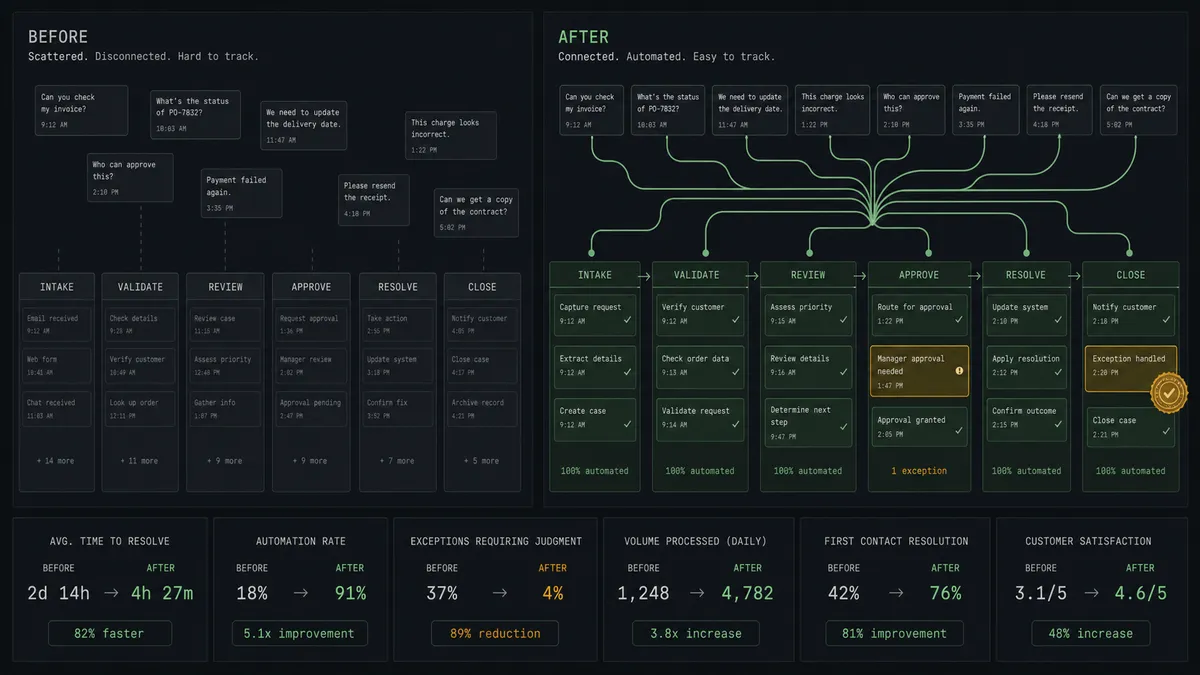
Before and after
| Category | Before | After |
|---|---|---|
| Logging deals | CRM homework after selling hours, done inconsistently | Create Contact, Create Deal, and Add Note fire from the message itself |
| Duplicates | The same prospect entered by two reps in two weeks | Search Records runs before every write |
| Stage accuracy | Deals sit in stale stages; some get closed on a hunch | Routine moves flow; Closed Won and Closed Lost wait for owner confirmation |
| Follow-ups | ”Proposal by Friday” lives in the thread and gets forgotten | Create Task schedules it with an owner and a due date |
| Pipeline reviews | Twenty minutes of archaeology before the real conversation | List Records answers from a pipeline that matched the conversation all week |
What you can build
Chatter-to-pipeline intake. On Channel Message parses new-prospect posts, Search Records dedupes, Create Contact and Create Deal open the opportunity, and Add Note preserves the message that started it.
Owner-confirmed closes. Ending language triggers the confirmation card; Update Deal writes Closed Won or Closed Lost only after the owner clicks. Forecast changes always trace to a person.
Follow-up enforcement. Every commitment parsed from the channel becomes a Create Task with a due date. The agent checks open tasks with List Records each morning and nudges owners in Slack before deadlines slip.
Ask-the-pipeline. On Mention answers “where are we with Fairview?” by pulling the deal with Search Records and Get Record, then summarizing stage, amount, notes, and open tasks into the thread.
Stale-deal sweep. On a schedule, the agent lists deals unchanged past your threshold and posts a digest with proposed next steps. Any suggested stage moves ride the same confirmation gate; nothing in the Pipelines module changes silently.
Common questions
Is it free to connect Slack and Bigin on FlowRunner? You can build and run the connection on FlowRunner’s free plan, which includes 100 executions a month and every integration with no credit card required, and new accounts also get 14 days of Professional. Both connectors are available on every FlowRunner tier, and every tier includes unlimited users and unlimited workflows.
Can I self-host the Slack to Bigin workflow? Yes. FlowRunner offers a cloud-hosted option and a self-hosted option, so the connection can run inside your own environment.
Does the AI agent need my own OpenAI or Claude key? FlowRunner uses a bring-your-own-keys model, so you connect the AI provider key you already have. You are not locked to one model.
Why does closing a deal need human confirmation if the rep announced it in Slack? Because chat is ambiguous and the stage field is not. A rep writing “Acme is done” can mean won, lost, or paused. The agent reads it as a likely stage change, packages the deal name, amount, and source message, and asks the owner to confirm before Update Deal writes Closed Won or Closed Lost. The confirmation is captured in the audit trail.
Which Slack triggers and Bigin actions does this pair use? On Channel Message watches the sales channel and On Mention takes direct requests, since Bigin has no trigger in the catalog. The agent then works the pipeline with Search Records, Create Contact, Create Deal, Update Deal, Create Task, and Add Note.
How does the workflow avoid creating duplicate contacts in Bigin? Before writing, the agent calls Search Records with the email, phone, or name from the conversation. If a match exists it updates the existing record with Update Contact or adds context with Add Note; only genuinely new people get Create Contact.
Getting started
Start on the free plan: 100 executions a month, every integration included, no credit card required, plus 14 days of Professional for new accounts. Both connectors are available on every tier, and every tier includes unlimited users and unlimited workflows.
Explore the integration details:
- Slack integration (8 triggers and 16 actions covering messages, reactions, files, and channel management)
- Bigin integration (17 actions covering contacts, companies, deals, tasks, and notes)
Start building free at flowrunner.ai or book a demo to see a live Slack to Bigin workflow, stage-confirmation gate and all.
Frequently asked questions
Is it free to connect Slack and Bigin on FlowRunner?
You can build and run the connection on FlowRunner's free plan, which includes 100 executions a month and every integration with no credit card required, and new accounts also get 14 days of Professional. Both connectors are available on every FlowRunner tier, and every tier includes unlimited users and unlimited workflows.
Can I self-host the Slack to Bigin workflow?
Yes. FlowRunner offers a cloud-hosted option and a self-hosted option, so the connection can run inside your own environment.
Does the AI agent need my own OpenAI or Claude key?
FlowRunner uses a bring-your-own-keys model, so you connect the AI provider key you already have. You are not locked to one model.
Why does closing a deal need human confirmation if the rep announced it in Slack?
Because chat is ambiguous and the stage field is not. A rep writing 'Acme is done' can mean won, lost, or paused. The agent reads it as a likely stage change, packages the deal name, amount, and source message, and asks the owner to confirm before Update Deal writes Closed Won or Closed Lost. The confirmation is captured in the audit trail.
Which Slack triggers and Bigin actions does this pair use?
On Channel Message watches the sales channel and On Mention takes direct requests, since Bigin has no trigger in the catalog. The agent then works the pipeline with Search Records, Create Contact, Create Deal, Update Deal, Create Task, and Add Note.
How does the workflow avoid creating duplicate contacts in Bigin?
Before writing, the agent calls Search Records with the email, phone, or name from the conversation. If a match exists it updates the existing record with Update Contact or adds context with Add Note; only genuinely new people get Create Contact.