How to Connect Slack with Amazon Redshift (With or Without an AI Agent)
Ask data questions in Slack and get answers from Amazon Redshift, with an AI agent that runs read queries on its own and pauses for a data engineer before any statement that writes, deletes, or alters.
How do you connect Slack to Amazon Redshift?
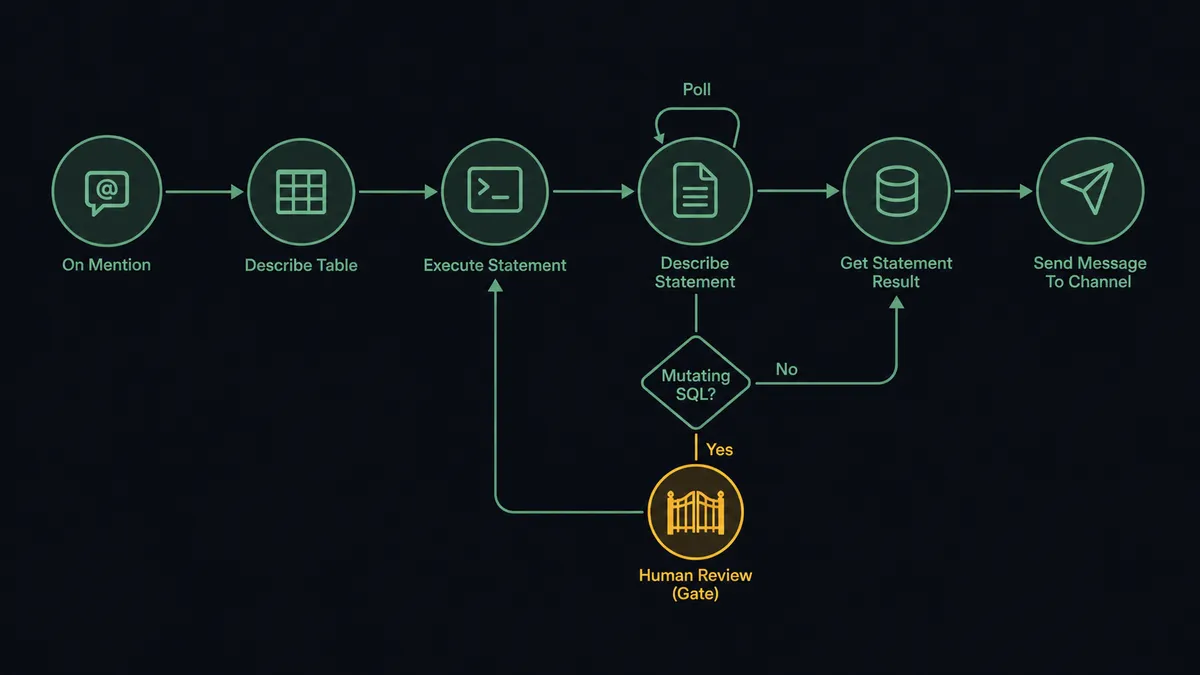
You connect Slack to Amazon Redshift by having Slack’s On Mention trigger drive Redshift Data API actions: the workflow takes the question from the channel, composes SQL grounded in List Tables and Describe Table, submits it with Execute Statement, polls Describe Statement until it completes, fetches rows with Get Statement Result, and posts the formatted answer back to the thread. FlowRunner is a visual AI-agent orchestration platform where automations run autonomously and pause for human judgment on the steps that carry real consequence. The same connection can run as an AI agent that answers read queries on its own and stops for a data engineer before executing anything that writes, deletes, or alters.
The problem it solves
Every data team knows this queue. “Quick question, how many active accounts do we have in EMEA?” lands in the channel, and someone with warehouse access context-switches out of real work to write a thirty-second query. Multiply by every PM, marketer, and founder with a legitimate question, and the warehouse team becomes a human query API with a response time measured in days. The alternative is worse: hand out SQL clients and credentials, and now untrained users are composing joins against production tables, and nobody knows who ran what.
The edges are what make a naive Slack-SQL integration dangerous rather than merely unhelpful. A generated query that misreads intent and updates rows instead of counting them. A DROP composed from an ambiguous phrase. A runaway cross join on your two largest tables burning cluster hours while everyone else’s dashboards queue behind it. The problem was never connecting Slack to Redshift; a webhook can do that. The problem is doing it with the same discipline your team applies to a pull request.
How it works: the connection
The connection listens to Slack and drives the Redshift Data API. Here is the plain version, grounded in the real connector actions.
- Trigger: Slack fires On Mention when someone asks the workflow a question in the data channel.
- Ground: The workflow calls List Schemas, List Tables, and Describe Table so the SQL is written against the real structure and column types.
- Submit: It calls Execute Statement to run the query through the Data API, no persistent connection or tunnel required.
- Poll: It calls Describe Statement until the run completes, since the Data API is asynchronous by design.
- Fetch: It calls Get Statement Result to pull the typed result rows.
- Answer: It calls Send Message To Channel to post a formatted table in the thread, with the statement ID attached for traceability.
- Batch and housekeeping: Batch Execute Statement handles multi-statement jobs, List Statements shows what has run, and Cancel Statement kills anything misbehaving.
That is the “just connect them” answer. Questions go in, tables come back, and the warehouse team stops being a ticket queue for thirty-second SELECTs.
Can an AI agent run it? (and why a human stays in the loop)
Yes, and the agent is what turns a query relay into a data analyst on call. It does not template questions into canned SQL. It explores the schema with List Databases, List Schemas, List Tables, and Describe Table, composes the query, and holds the Data API actions as tools: Execute Statement, Batch Execute Statement, Describe Statement, Get Statement Result, Cancel Statement. Ambiguity gets clarified in-thread (“active by login or by billing status?”) instead of silently guessed. Results come back as an answer, not a dump: the number, the table behind it, and the statement ID.
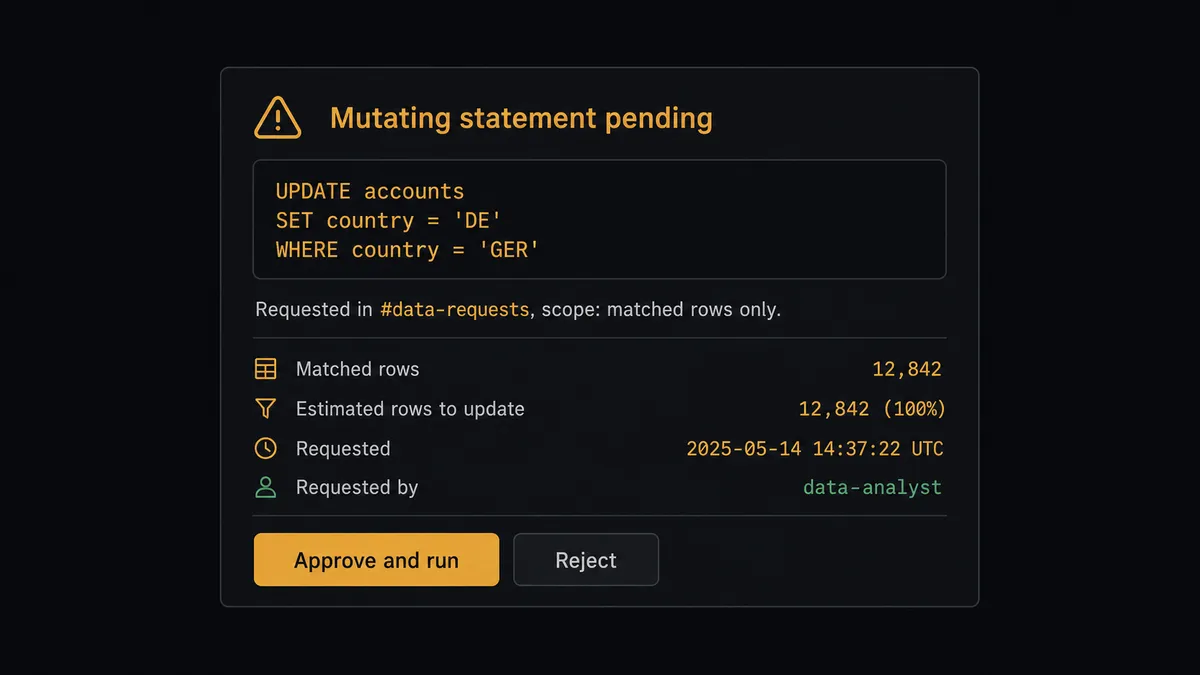
The consequential step is mutation. A SELECT that is wrong wastes a retry; an UPDATE that is wrong rewrites history for every dashboard downstream. So the agent classifies every statement before execution. Reads flow through freely. Anything that writes, deletes, or alters, UPDATE, DELETE, DROP, TRUNCATE, ALTER, CREATE, stops the workflow cold. The agent invokes a human-in-loop flow it holds as a callable tool and sends the data engineer the decision with the full SQL: “Requested in #data-requests: backfill of country codes on accounts. Statement: UPDATE accounts SET country = ‘DE’ WHERE country = ‘GER’. Estimated scope: one column, matched rows only. Approve to run?” Only after sign-off does Execute Statement fire, followed by Describe Statement to verify completion and a posted outcome in the thread. The SQL, the requester, the approver, and the Data API statement ID all land in the audit trail.
The same instinct covers cost. A query shaped like a runaway scan gets flagged before submission, and Cancel Statement is always in reach for anything already burning. Prospects call this pattern a digital andon cord: like Toyota’s production line pull cord, the workflow stops the line the moment a statement carries risk, an engineer clears it in seconds, and every ordinary read keeps flowing without one.
FlowRunner vs Fivetran
Fivetran solves a neighboring problem, and solves it well. If what you need is Slack’s own data replicated into Redshift for analytics, message volumes, channel activity, response times, Fivetran’s managed ELT pipelines are purpose-built for exactly that: reliable, schema-managed, and hands-off. For bulk one-way replication into the warehouse, it is a strong choice.
But replication is not interaction. Fivetran moves data into Redshift on a sync schedule; it does not answer a question in a thread, compose SQL on demand, or gate a write behind an engineer. Here is the honest side-by-side.
| What matters for this pair | FlowRunner | Fivetran |
|---|---|---|
| Human-in-the-loop on mutating SQL | Native. The exact statement goes to an engineer before Execute Statement runs it | Not part of the product; pipelines sync data, they do not execute ad hoc statements for users |
| Who runs the flow | An AI agent reads the question, explores the schema, composes and runs SQL as tools | Managed connectors replicate sources into the warehouse on schedule |
| Users included | Unlimited users on every tier can ask the warehouse questions | Consumption pricing; end users interact with the warehouse through other tools |
| Bring your own AI keys | Yes, BYOK | Not applicable; no agent layer to key |
| Self-hosted option | Yes, cloud-hosted or self-hosted | Cloud service managing your pipelines |
| Pricing model | Transparent workflow-based tiers with clear execution limits | Consumption-based pricing tied to rows synced, which moves with your data volume |
If your goal is Slack data landing in Redshift for BI, use Fivetran; that is its job and it does it properly. If your goal is the reverse direction, Redshift answering your team inside Slack with an engineer gating every write, that is not what a pipeline does, and this pairing on FlowRunner is the fit.
Before and after
| Category | Before | After |
|---|---|---|
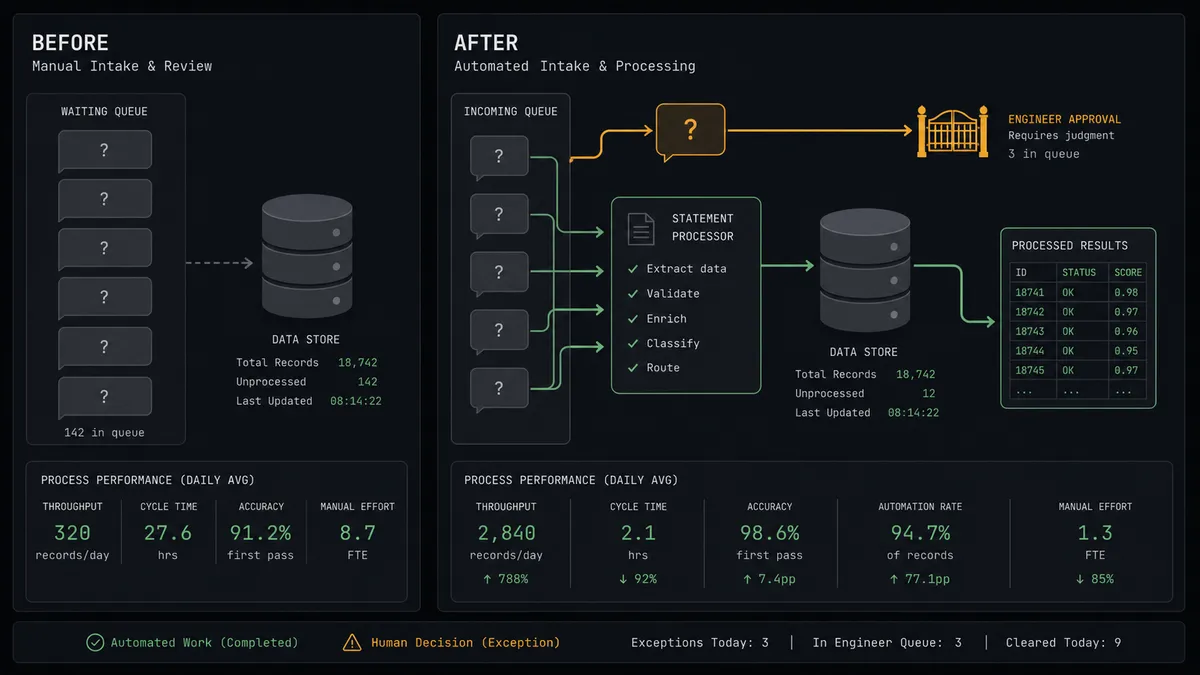
| Quick questions | Queue behind the data team’s real work for days | Answered in-thread by Execute Statement and Get Statement Result in the time a query takes to run |
| Warehouse access | Either locked to a few people or sprayed across SQL clients with shared credentials | One governed path through the Data API, no credentials handed out |
| Writes and DDL | Whoever has access runs it, sometimes from a Slack paste, with no review | Held at the gate; the exact SQL is approved by a named engineer before execution |
| Runaway queries | Discovered when dashboards slow down | Flagged at composition, and Cancel Statement ends anything misbehaving |
| Who ran what | Reconstructed from cluster logs after the fact | Every statement carries requester, approver, SQL, and statement ID in the audit trail |
What you can build
Ask-the-warehouse channel. On Mention fires, the agent grounds itself with Describe Table, runs Execute Statement, and posts the formatted rows from Get Statement Result in-thread. The data team keeps office hours instead of a ticket queue.
Scheduled metric drops. On a schedule, the agent runs the weekly revenue and activation queries with Batch Execute Statement and posts the tables to the metrics channel before Monday standup, no one asking.
Gated backfill runner. Ops requests a data fix in-channel. The agent composes the UPDATE, estimates scope, and holds at the engineer gate. Approved statements run through Execute Statement with the outcome verified by Describe Statement and posted back.
Schema explorer for humans. “What tables do we have for billing?” The agent answers from List Schemas, List Tables, and Describe Table, so newcomers learn the warehouse by asking instead of by spelunking.
Long-query watchdog. The agent reviews List Statements on an interval, flags runs exceeding your duration threshold, and asks the channel whether to Cancel Statement, putting the kill decision one click from the people who feel the slowdown.
Common questions
Is it free to connect Slack and Amazon Redshift on FlowRunner? You can build and run the connection on FlowRunner’s free plan, which includes 100 executions a month and every integration with no credit card required, and new accounts also get 14 days of Professional. Both connectors are available on every FlowRunner tier, and every tier includes unlimited users and unlimited workflows.
Can I self-host the Slack to Amazon Redshift workflow? Yes. FlowRunner offers a cloud-hosted option and a self-hosted option, so the connection can run inside your own environment, close to your cluster.
Does the AI agent need my own OpenAI or Claude key? FlowRunner uses a bring-your-own-keys model, so you connect the AI provider key you already have. You are not locked to one model.
What stops the agent from running a destructive query? Classification before execution. The agent inspects every statement it composes, and anything that is not a plain read, an UPDATE, DELETE, DROP, TRUNCATE, or ALTER, is held. The exact SQL goes to a data engineer with approve and reject options, and Execute Statement runs it only after sign-off. The agent can also call Cancel Statement on anything already running.
Which trigger starts a query from Slack? On Mention is the main path: mention the workflow with a question and it composes SQL, runs Execute Statement, polls Describe Statement, and posts the rows from Get Statement Result. On a schedule, the same workflow can push recurring reports to a channel without being asked.
How does the agent know our schema? It explores before it writes SQL. List Databases, List Schemas, List Tables, and Describe Table give it the real structure and column types, so queries are grounded in the warehouse you actually have rather than a guessed schema.
Getting started
Start on the free plan: 100 executions a month, every integration included, no credit card required, plus 14 days of Professional for new accounts. Both connectors are available on every tier, and every tier includes unlimited users and unlimited workflows.
Explore the integration details:
- Slack integration (8 triggers and 16 actions covering messages, channels, members, and files)
- Amazon Redshift integration (10 actions covering SQL execution, results, and schema exploration)
Start building free at flowrunner.ai or book a demo to see a live Slack to Amazon Redshift workflow, write gate and all.
Frequently asked questions
Is it free to connect Slack and Amazon Redshift on FlowRunner?
You can build and run the connection on FlowRunner's free plan, which includes 100 executions a month and every integration with no credit card required, and new accounts also get 14 days of Professional. Both connectors are available on every FlowRunner tier, and every tier includes unlimited users and unlimited workflows.
Can I self-host the Slack to Amazon Redshift workflow?
Yes. FlowRunner offers a cloud-hosted option and a self-hosted option, so the connection can run inside your own environment, close to your cluster.
Does the AI agent need my own OpenAI or Claude key?
FlowRunner uses a bring-your-own-keys model, so you connect the AI provider key you already have. You are not locked to one model.
What stops the agent from running a destructive query?
Classification before execution. The agent inspects every statement it composes, and anything that is not a plain read, an UPDATE, DELETE, DROP, TRUNCATE, or ALTER, is held. The exact SQL goes to a data engineer with approve and reject options, and Execute Statement runs it only after sign-off. The agent can also call Cancel Statement on anything already running.
Which trigger starts a query from Slack?
On Mention is the main path: mention the workflow with a question and it composes SQL, runs Execute Statement, polls Describe Statement, and posts the rows from Get Statement Result. On a schedule, the same workflow can push recurring reports to a channel without being asked.
How does the agent know our schema?
It explores before it writes SQL. List Databases, List Schemas, List Tables, and Describe Table give it the real structure and column types, so queries are grounded in the warehouse you actually have rather than a guessed schema.