How to Connect Shopify with QuickBooks Online (With or Without an AI Agent)
Connect Shopify orders and refunds to QuickBooks Online, optionally as an AI agent that records the sale automatically and pauses for a human before a refund posts.
How do you connect Shopify to QuickBooks Online?
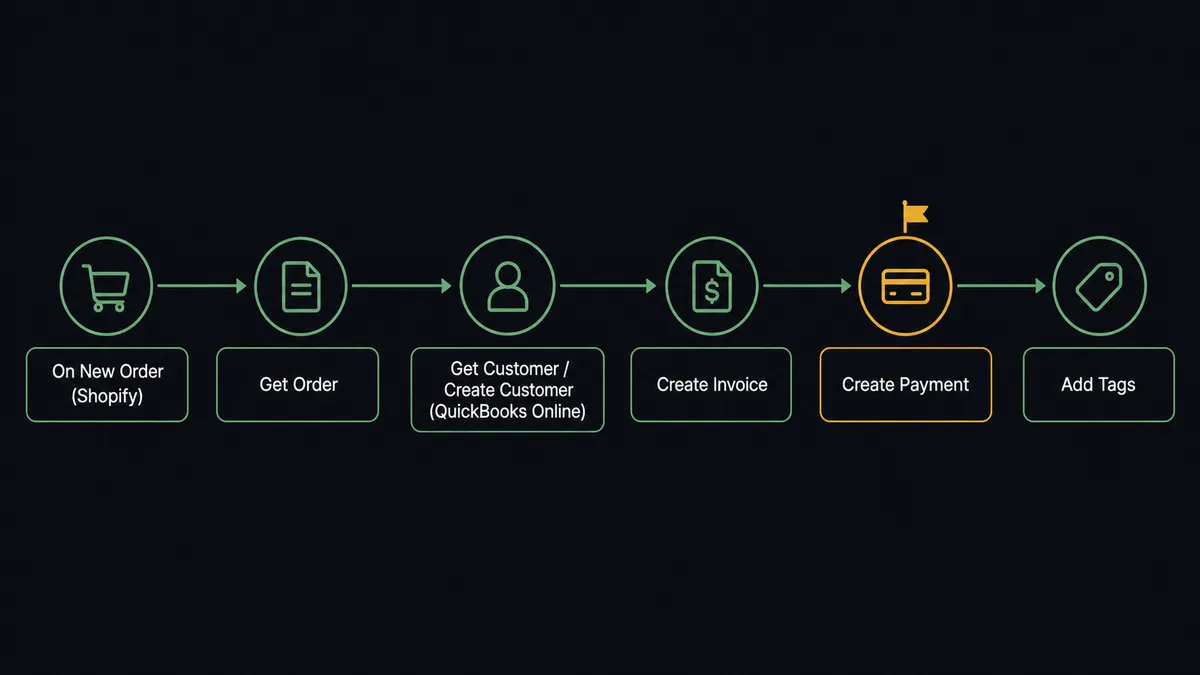
You connect Shopify to QuickBooks Online by having Shopify’s On New Order trigger drive QuickBooks Online actions: the workflow matches the buyer with Get Customer or Create Customer, records the sale with Create Invoice, and logs the money received with Create Payment, so a paid order in the store becomes a closed, paid entry in the books. FlowRunner is a visual AI-agent orchestration platform where automations run autonomously and pause for human judgment on the steps that carry real consequence. The same connection can run as an AI agent that reads each order, records it in QuickBooks Online on its own, and pauses for a named human before it issues a refund with Create Refund or voids an invoice with Void Invoice.
The problem it solves
Right now the bridge between your store and your books is a person. An order clears in Shopify. Someone, usually a bookkeeper or an ops lead wearing the finance hat, opens QuickBooks Online, finds or creates the customer, keys in the invoice, records the payment, and marks it paid. Multiply that by every order, every day. Then do it again for refunds, disputes, and the orders where the amount does not match the invoice. The books are always a few hours behind the storefront, and AR sits in “open” status long after the money has actually landed.
The exceptions are where it really breaks. A refund gets issued in Shopify but never reversed in QuickBooks Online. A chargeback comes in through On New Dispute and nobody assembles the evidence before the deadline. A high-value order ships before anyone checks it against fraud signals. These are not edge cases, they are Tuesday. Your team tracks them in spreadsheets and DM threads, and every reconciliation cycle turns into a scavenger hunt for what fell through the cracks. What you want back is time and a clean paper trail.
How it works: the connection
The connection listens to Shopify and writes to QuickBooks Online. Here is the plain version, grounded in the real connector actions.
- Trigger: Shopify fires On New Order when a customer checks out.
- Read: The workflow calls Get Order to pull the full order: line items, customer, addresses, and the order total.
- Match the customer: It calls Get Customer in QuickBooks Online to find the matching account by email. If none exists, it calls Create Customer so the buyer has a record to bill against.
- Record the sale: It calls Create Invoice in QuickBooks Online with the order’s line items and total.
- Log the payment: For a paid Shopify order, it calls Create Payment in QuickBooks Online against that invoice, so the invoice is marked paid and AR is current.
- Tag for routing: It calls Add Tags on the Shopify order to mark it recorded, so downstream flows know the books are in step.
That is the “just connect them” answer. Orders become invoices, payments become closed AR, and nobody keys anything by hand. A dispute path runs the same way: On New Dispute fires, the workflow pulls the order and payout context with Get List of Disputes, and posts the amount, reason, and evidence deadline to finance before the clock runs out.
Can an AI agent run it? (and why a human stays in the loop)
Yes, and this is the upgrade a plain sync tool cannot offer. Instead of a fixed script that always runs the same steps in the same order, an AI agent reads the order in front of it, reasons about it, and picks the QuickBooks Online and Shopify actions it needs as tools. Get Customer, Create Invoice, Create Payment, Create Refund, Void Invoice: these are the agent’s toolbox, and it chooses which to use based on the situation.
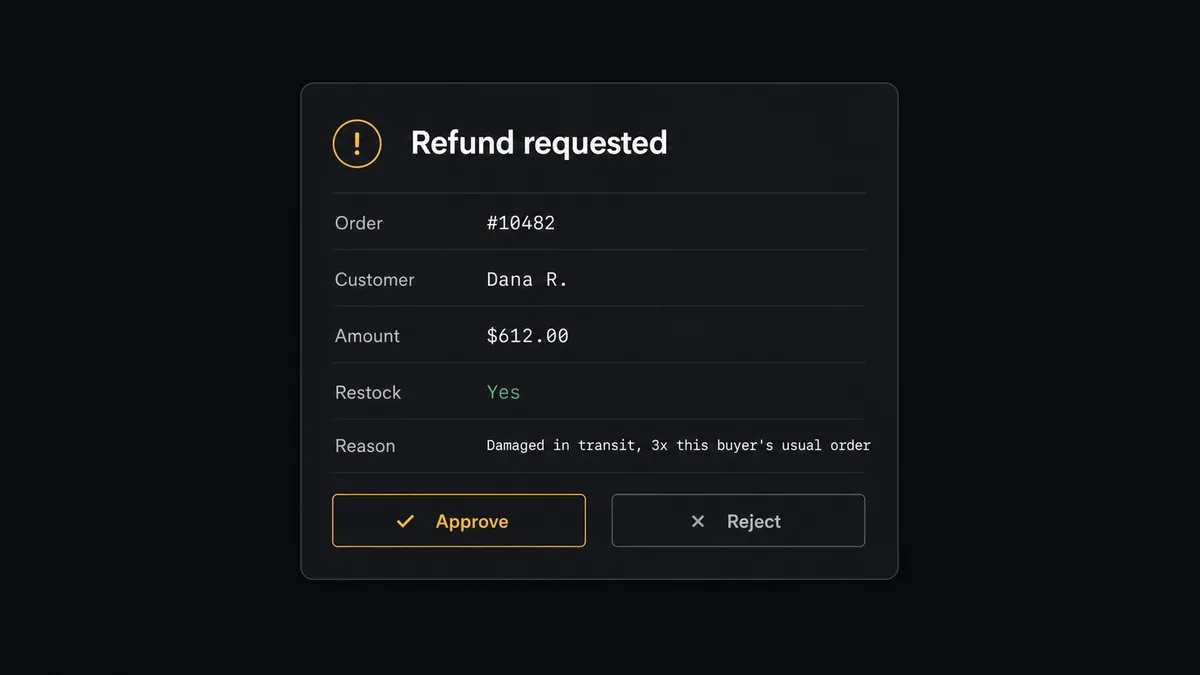
The consequential step is money leaving the business. When a return or dispute reaches a refund decision, the agent does not just fire Create Refund. It gathers the context a human would need: the order number, the customer name, the amount, the restock intent, and the reason. Then it invokes a human-in-loop flow that it holds as a callable tool. The workflow pauses and posts to the operations channel: “Refund requested for order [number], customer [name], amount $[total], restock [yes/no]. Reason: [reason]. Approve to issue?” The approver clicks once. Only then does the agent call Create Refund. The decision, the approver’s identity, and the timestamp all land in the audit trail.
Here is the part a threshold rule cannot do. The agent escalates on context, not on an arbitrary dollar line. A refund that is three times the customer’s usual order value gets pulled to a human even if it sits under the cutoff. A routine return from a customer with a clean history posts on its own. This is not a sync tool. The agent knows when to stop and ask. Prospects call it a digital andon cord: like Toyota’s quality control pull cord, the workflow stops the line the moment it hits uncertainty, and your team pulls it back into motion.
FlowRunner vs Zapier
Most non-technical teams connecting Shopify to QuickBooks Online reach for Zapier first, and for good reason. Zapier has an enormous connector library, a genuinely friendly setup experience, and a huge template gallery for exactly this kind of order-to-books sync. For a straight, one-way “new order creates an invoice” Zap, it is fast to stand up and it works. Credit where it is due.
The difference shows up at the steps that carry consequence and at scale. FlowRunner is built around native human-in-the-loop and AI-agent orchestration, where the agent decides when to pause for a person, rather than a fixed multi-step Zap. Here is the honest side-by-side.
| What matters for this pair | FlowRunner | Zapier |
|---|---|---|
| Human-in-the-loop on refunds and voids | Native. The agent invokes an approval flow as a callable tool and pauses before Create Refund or Void Invoice | Available via added approval steps or paths, not a native agent decision |
| Who runs the flow | An AI agent reads the order, reasons, and picks actions as tools | Predefined step sequence you configure per Zap |
| Users included | Unlimited users on every tier | Priced by task volume; seats vary by plan |
| Bring your own AI keys | Yes, BYOK. Connect the AI provider key you already have | AI features tied to Zapier’s own AI offering |
| Self-hosted option | Yes, cloud-hosted or self-hosted | Cloud only |
| Pricing model | Transparent workflow-based tiers with clear execution limits | Per-task pricing that can be hard to predict as volume grows |
If all you need is a one-way Shopify to QuickBooks Online push, Zapier will do it. If you want the store and the books in step and a human on the refund and void decisions, with a full audit trail, that is where FlowRunner is the better fit.
Before and after
The numbers below come from the connector’s own before and after data for this pair.
| Category | Before | After |
|---|---|---|
| Order triage | New orders wait in the admin queue until someone opens the dashboard and routes each one | Orders are validated, tagged, and routed the moment they are placed |
| Payment recording | Bookkeeper logs each payment in QuickBooks Online by hand | The invoice is marked paid in QuickBooks Online within seconds of the order confirming |
| Manual entry | AR stays open until someone runs the reconciliation process | Every order and vendor bill flows to QuickBooks Online without bookkeeper involvement |
| Refund records | Refund decisions get made in DMs, then keyed into Shopify with no consistent record of who approved what | Every refund is quoted with full context and issued only after a named approver signs off |
| Financial visibility | Leadership waits for the CFO to prepare a P&L report before seeing financials | Month-to-date vs prior month variance posted to the finance channel before 8am via Get Profit and Loss |
What you can build
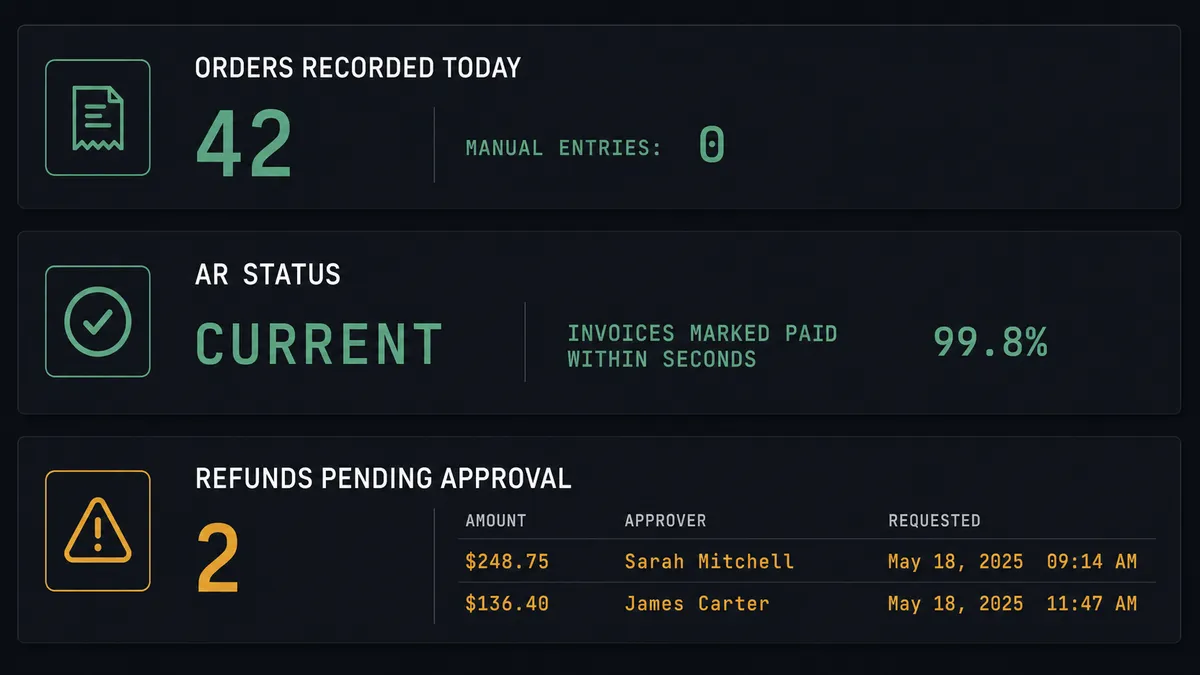
Order to paid invoice, hands off. On New Order fires. The agent calls Get Order, matches the buyer with Get Customer or Create Customer, then records the sale with Create Invoice and Create Payment in QuickBooks Online. AR stays current with zero manual entry.
Refund with named approval. A return reaches a refund decision. The agent packages the order, amount, and reason, invokes the human-in-loop tool, and only calls Create Refund in Shopify after a person approves. Every refund carries an approver and a timestamp.
Dispute response before the deadline. On New Dispute fires. The agent pulls the order, customer, and payout context with Get List of Disputes and posts the amount, reason, and evidence deadline to finance so a person can decide to submit or accept in time.
High-value order hold. The agent scores each new order against fraud signals and a high-value threshold, tags clean orders with Add Tags and hands them to fulfillment, and pauses the flagged ones for a hold-or-release call before anything ships.
Monday P&L digest. Every Monday the agent calls Get Profit and Loss for the current and prior month, calculates variance by category, and posts the comparison to the finance channel so leadership sees the picture without waiting for a CFO report.
Common questions
Is it free to connect Shopify and QuickBooks Online on FlowRunner? You can build and run the connection on FlowRunner’s free plan, which includes 100 executions a month and every integration with no credit card required, and new accounts also get 14 days of Professional. Both connectors are available on every FlowRunner tier, and every tier includes unlimited users and unlimited workflows.
Can I self-host the Shopify to QuickBooks Online workflow? Yes. FlowRunner offers a cloud-hosted option and a self-hosted option, so the connection can run inside your own environment. Self-hosting is available for teams that need the workflow to run on their own infrastructure.
Does the AI agent need my own OpenAI or Claude key? FlowRunner uses a bring-your-own-keys model, so you connect the AI provider key you already have. You are not locked to one model, and you control which provider runs the agent.
What happens when the agent is not sure about an order or a refund? The agent stops and invokes a human-in-loop step. It posts the order number, customer, amount, and reason to the channel your team already uses, then waits for an approve or reject decision before it records anything in QuickBooks Online.
Which Shopify events can trigger a QuickBooks Online action? Shopify offers six triggers: On New Order, On Order Updated, On New Customer, On Customer Updated, On New Product, and On New Dispute. On New Order and On New Dispute are the two most teams start with for accounting sync.
Does every refund require human approval? You decide. The agent evaluates each refund in context and escalates the ones that carry weight, such as a refund above your configured amount or a disputed charge. A refund is only issued after a named approver signs off, and that approval is captured in the audit trail.
Getting started
Start on the free plan: 100 executions a month, every integration included, no credit card required, plus 14 days of Professional for new accounts. Both connectors are available on every tier, and every tier includes unlimited users and unlimited workflows.
Explore the integration details:
- Shopify integration (6 triggers and 25 actions covering orders, refunds, collections, customers, multi-location inventory, and Shopify Payments)
- QuickBooks Online integration (write access across customers, vendors, invoices, bills, payments, and P&L reports)
Start building free at flowrunner.ai or book a demo to see a live Shopify to QuickBooks Online workflow, refund approval and all.
Frequently asked questions
Is it free to connect Shopify and QuickBooks Online on FlowRunner?
You can build and run the connection on FlowRunner's free plan, which includes 100 executions a month and every integration with no credit card required, and new accounts also get 14 days of Professional. Both connectors are available on every FlowRunner tier, and every tier includes unlimited users and unlimited workflows.
Can I self-host the Shopify to QuickBooks Online workflow?
Yes. FlowRunner offers a cloud-hosted option and a self-hosted option, so the connection can run inside your own environment. Self-hosting is available for teams that need the workflow to run on their own infrastructure.
Does the AI agent need my own OpenAI or Claude key?
FlowRunner uses a bring-your-own-keys model, so you connect the AI provider key you already have. You are not locked to one model, and you control which provider runs the agent.
What happens when the agent is not sure about an order or a refund?
The agent stops and invokes a human-in-loop step. It posts the order number, customer, amount, and reason to the channel your team already uses, then waits for an approve or reject decision before it records anything in QuickBooks Online.
Which Shopify events can trigger a QuickBooks Online action?
Shopify offers six triggers: On New Order, On Order Updated, On New Customer, On Customer Updated, On New Product, and On New Dispute. On New Order and On New Dispute are the two most teams start with for accounting sync.
Does every refund require human approval?
You decide. The agent evaluates each refund in context and escalates the ones that carry weight, such as a refund above your configured amount or a disputed charge. A refund is only issued after a named approver signs off, and that approval is captured in the audit trail.