The Salesloft + Salesforce Pro Integration That Checks First
Connect Salesloft to Salesforce Pro so new leads land as CRM records and only reach outreach cadences after an AI agent checks for open opportunities and a person confirms the send.
How do you connect Salesloft to Salesforce Pro?
You connect Salesloft to Salesforce Pro by pulling qualified leads out of Salesforce with Find Records by Query, checking each one against Salesloft with List People to avoid duplicates, and enrolling the genuinely new prospects with Add Person to Cadence. FlowRunner is a visual AI-agent orchestration platform where automations run autonomously and pause for human judgment on the steps that carry real consequence. The same connection can run as an AI agent that checks Salesforce Pro for open opportunities or existing-customer status before it enrolls anyone, and pauses for the sales ops lead on the enrollment itself, because a cadence membership sends real emails to real inboxes that cannot be unsent.
The problem teams are solving
Salesforce Pro is the system of record for the deal. Salesloft is where outreach actually happens. The two rarely agree without someone in the middle. A batch of webinar leads or web form fills sits in Salesforce while an SDR manually checks each one, decides who is already in an active deal, and copies the rest into Salesloft one at a time. By the time the cadence starts, the window where a fast follow-up converts has often closed quietly.
The riskier version of this gap is not speed, it is targeting. A contact whose account has an open opportunity, or who already belongs to a current customer, can end up in a cold outreach sequence anyway, because nobody cross-checked Salesforce before hitting enroll. Reps catch some of these by memory. They miss others, and the cost lands on a relationship, not a data field. Sales ops leads want the busywork of deduplication and record creation handled automatically, and they want the enrollment decision itself, the one that commits outreach, to stay with a person.
How it works: the connection
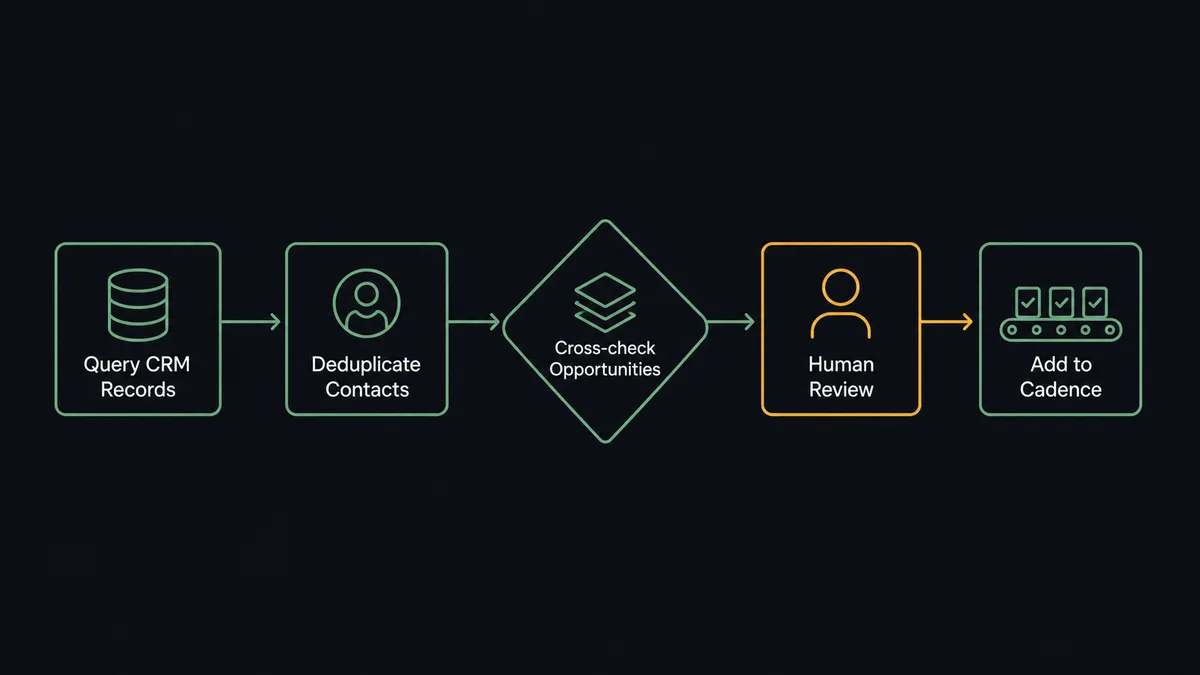
Because neither Salesloft nor Salesforce Pro exposes a real-time trigger, the workflow starts on a schedule. Find Records by Query runs a SOQL statement against Salesforce Pro, pulling contacts or converted leads that match your qualification criteria, for example a stage change or a recent conversion.
For each match, List People checks Salesloft by exact email so nobody gets created twice. Genuinely new prospects go through Create Person, which resolves company, stage, tags, and custom fields from your Salesloft team settings in the same step.
Before any cadence work happens, the workflow runs Find Records by Query again, this time against the prospect’s account in Salesforce Pro, checking for open opportunities and existing-customer status. This is the step that turns a simple sync into a coordinated one: the CRM’s own pipeline data decides which prospects are safe for cold outreach and which ones need a second look.
Approved prospects get Add Person to Cadence, which creates the membership and starts the sequence. Create Note attaches the source, the webinar attended or the form filled, to each Salesloft record, and a second Create Note in Salesforce Pro logs that outreach began, so anyone looking at the opportunity later sees the full picture without switching tools.
Can an AI agent run it? (and why a human stays in the loop)
A plain trigger-action version of this workflow can query, dedupe, and enroll on its own. What it cannot do is reason about context, and that is where an AI agent changes the shape of the workflow. The agent reads the batch of matched contacts, evaluates each one against the Salesforce Pro account data, and decides which prospects are ready for a cadence and which ones need a person to weigh in. It is not applying a single hardcoded rule. It is looking at the account’s opportunity stage, the tags on the record, and the cadence being considered, then making a judgment call.
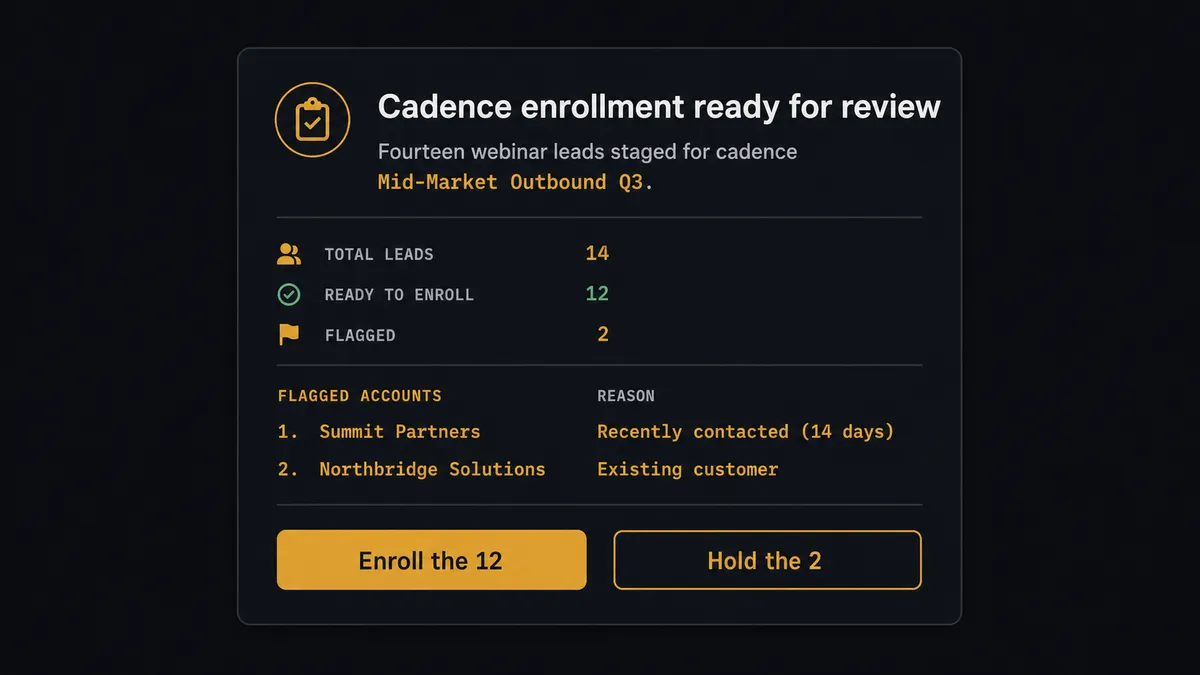
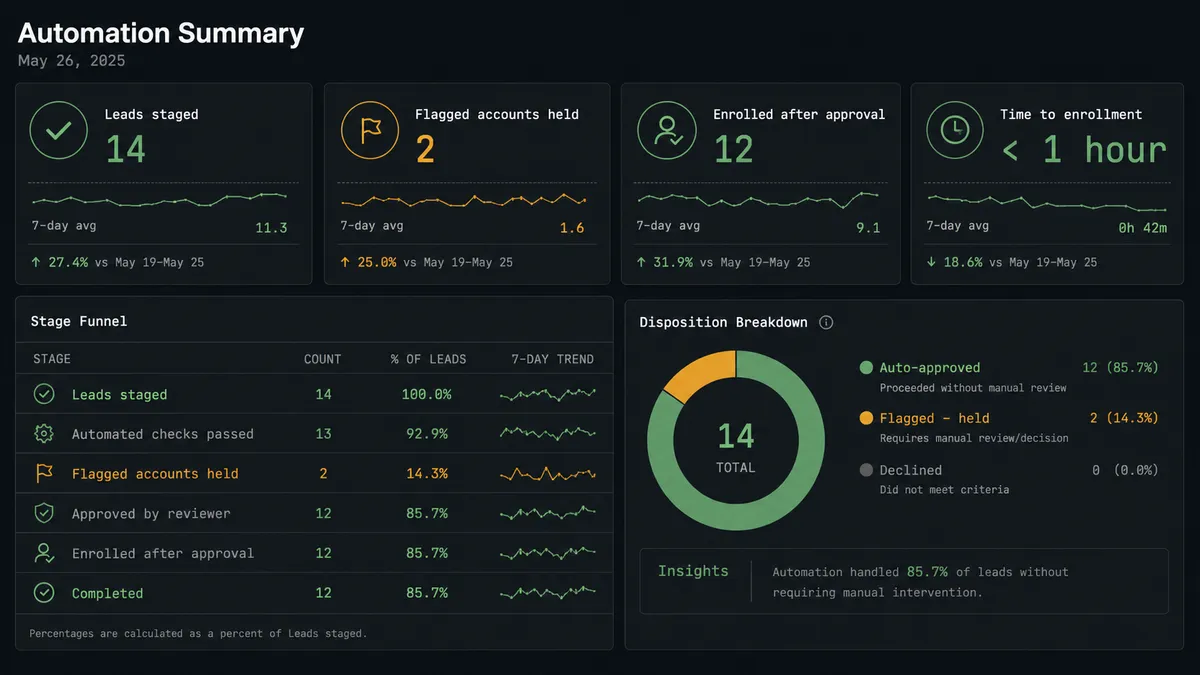
Here is the decision moment in practice. The agent has staged fourteen webinar leads for a cadence called “Mid-Market Outbound Q3.” Before it calls Add Person to Cadence, it checks each account in Salesforce Pro and finds two problems: one prospect’s account has an open opportunity, and one prospect is a contact at a current customer. Rather than enroll all fourteen or hold all fourteen, the agent invokes a human-in-loop flow as a callable tool and sends the sales ops lead a Slack message: “14 webinar leads staged for cadence ‘Mid-Market Outbound Q3’. Two flagged: one matches an account with an open opportunity, one is a contact at a current customer. Enroll the 12, hold the 2?” The sales ops lead approves in one click. Only then does the agent create the memberships. The decision, the approver, and the timestamp are captured in the audit trail.
This is not a sync tool deciding on a fixed threshold. The agent knows when to stop and ask, and it packages exactly the context a person needs to answer fast. That is the digital andon cord: the line keeps running until the agent hits real uncertainty, and then it stops for a human rather than guessing.
FlowRunner vs Zapier for Salesloft and Salesforce Pro
Zapier genuinely is the fastest way to wire a single Salesforce trigger to a single Salesloft action, and its app library covers both platforms well. For a one-step notification or a simple field copy, that speed is a real advantage, and teams without a technical resource often start there for good reason.
Where it runs out of room is exactly the scenario above: a decision that depends on cross-system context (open opportunities in Salesforce) feeding a consequential action in Salesloft (a cadence enrollment that sends real emails). Zapier’s conditional paths are static rules you configure once; they do not reason about a specific batch of accounts the way an agent does.
| Capability | Zapier | FlowRunner |
|---|---|---|
| Human-in-loop on the enrollment step | Not native; requires a separate approval app or manual review | Built into the workflow as a callable tool the agent invokes |
| Cross-system reasoning (check Salesforce before enrolling in Salesloft) | Static filters and conditional zaps only | AI agent evaluates account context and decides case by case |
| Users included | Priced per user on most plans | Unlimited users on every tier |
| AI provider | Zapier-managed AI credits | Bring your own key for any provider |
| Self-hosting | Not available | Free self-hosted Community Edition, or Enterprise clustering |
| Pricing model | Per-task pricing across connected zaps | Transparent workflow-based execution tiers |
Before and after connecting Salesloft and Salesforce Pro
| Metric | Before | After |
|---|---|---|
| Lead-to-cadence handoff | Webinar and form leads wait for a manual batch import, and the window for a fast follow-up closes quietly | Leads are deduplicated, matched against Salesforce Pro, and staged for cadence within the scheduled run |
| Cold outreach into live deals | Prospects at accounts with open opportunities or current-customer status occasionally get enrolled anyway | Every enrollment is checked against Salesforce Pro’s opportunity and account data before it is staged |
| Enrollment control | Reps enroll individually with no consistent review step | The sales ops lead reviews and approves the staged list in one Slack message before any membership is created |
| Activity visibility | Salesloft shows a name and email; the deal context lives in Salesforce alone | Create Note in Salesloft carries source context, and Create Note in Salesforce Pro logs that outreach began |
| Reporting | Revenue ops pulls activity manually across two systems to build a picture | Email, call, and cadence data can be joined against Salesforce opportunity and campaign data on a schedule |
What you can build with Salesloft and Salesforce Pro
Webinar-to-cadence handoff with a CRM guardrail. New webinar and form leads land in Salesforce Pro, get mirrored into Salesloft with List People and Create Person, and only reach a cadence after the agent checks each account for open opportunities and a person confirms the enrollment list.
Rep-ready meeting prep, logged both ways. When a discovery call lands on the calendar, the agent uses Create Task and Create Note in Salesloft to prep the rep with account history pulled from Get Account. After the call, Log a Call records disposition and sentiment in Salesloft, and a matching Create Note in Salesforce Pro keeps the opportunity’s activity timeline current.
Cadence pause on deal progression. When an opportunity in Salesforce Pro reaches a later stage, the agent calls Remove Person from Cadence in Salesloft so an automated sequence never talks over an active negotiation the rep is running by hand.
Joined activity and attribution reporting. On a schedule, the agent pulls List Emails, List Calls, and List Meetings from Salesloft and joins them against a Custom SOQL Query in Salesforce Pro covering closed opportunities and campaign attribution, giving revenue ops one report instead of two spreadsheets.
Common questions
Is it free to connect Salesloft and Salesforce Pro on FlowRunner? FlowRunner has a free plan with 100 executions a month, every integration included, and no credit card required, and new accounts get 14 days of Professional on top. Beyond the free plan, Growth starts at $45 per month with unlimited users and workflows included.
Can I self-host the Salesloft and Salesforce Pro integration? Yes. FlowRunner offers a self-hosted Community Edition at no cost for single-instance deployments. Enterprise self-hosting adds multi-instance clustering and the full compliance suite for teams that need the orchestration layer on their own infrastructure.
Does the AI agent need my own OpenAI or AI model key? FlowRunner uses a bring-your-own-keys model. You connect your preferred AI provider directly, and the platform is not tied to a single model or vendor.
What happens when the agent isn’t sure whether to enroll a prospect in a cadence? The agent invokes a human-in-loop flow as a callable tool. It packages the staged enrollment list, the cadence name, and any flagged accounts, then routes the decision to the sales ops lead through Slack or email. The workflow resumes once the person responds.
Can I run this without an AI agent, just a plain trigger-action automation? Yes. Neither Salesloft nor Salesforce Pro exposes a native real-time trigger in FlowRunner, so the plain connection runs on a schedule: Find Records by Query in Salesforce Pro pulls newly qualified contacts, and Add Person to Cadence enrolls them in a fixed sequence. Add the agent layer when you want the enrollment list screened before anyone touches a send.
Does FlowRunner verify actions against the real Salesloft and Salesforce APIs? Yes. Every action is built and verified against the official APIs. Salesloft covers 41 actions across people, accounts, cadences, tasks, notes, and calls. Salesforce Pro covers 26 actions including SOQL queries, lead conversion, and file handling.
Getting started
FlowRunner has a free plan with 100 executions a month, every integration included, and no credit card required, and new accounts get 14 days of Professional on top. Build the scheduled query-and-enroll flow first, add the agent’s account cross-check when you’re ready, and layer in the human-in-loop approval before your first live cadence run.
Start free at flowrunner.ai, or book time with the team at calendly.com/flowrunner/intro to walk through the workflow with your own data.
Frequently asked questions
Is it free to connect Salesloft and Salesforce Pro on FlowRunner?
FlowRunner has a free plan with 100 executions a month, every integration included, and no credit card required, and new accounts get 14 days of Professional on top. Beyond the free plan, Growth starts at $45 per month with unlimited users and workflows included.
Can I self-host the Salesloft and Salesforce Pro integration?
Yes. FlowRunner offers a self-hosted Community Edition at no cost for single-instance deployments. Enterprise self-hosting adds multi-instance clustering and the full compliance suite for teams that need the orchestration layer on their own infrastructure.
Does the AI agent need my own OpenAI or AI model key?
FlowRunner uses a bring-your-own-keys model. You connect your preferred AI provider directly, and the platform is not tied to a single model or vendor.
What happens when the agent isn't sure whether to enroll a prospect in a cadence?
The agent invokes a human-in-loop flow as a callable tool. It packages the staged enrollment list, the cadence name, and any flagged accounts, then routes the decision to the sales ops lead through Slack or email. The workflow resumes once the person responds.
Can I run this without an AI agent, just a plain trigger-action automation?
Yes. Neither Salesloft nor Salesforce Pro exposes a native real-time trigger in FlowRunner, so the plain connection runs on a schedule: Find Records by Query in Salesforce Pro pulls newly qualified contacts, and Add Person to Cadence enrolls them in a fixed sequence. Add the agent layer when you want the enrollment list screened before anyone touches a send.
Does FlowRunner verify actions against the real Salesloft and Salesforce APIs?
Yes. Every action is built and verified against the official APIs. Salesloft covers 41 actions across people, accounts, cadences, tasks, notes, and calls. Salesforce Pro covers 26 actions including SOQL queries, lead conversion, and file handling.