Connect RingCentral to Slack: Confirm Every Fax Before It Sends
Connect RingCentral and Slack so a shared document routes straight to a fax, or run it as an AI agent that stages the send and pauses in Slack for a human to confirm the number first.
How do you connect RingCentral to Slack?
Connect RingCentral to Slack by having On File Shared fire when a document lands in a Slack channel, then using Get File Info and List Contacts to resolve who it’s for, and Send Fax to transmit it from FlowRunner file storage once a person confirms the destination number in Slack. FlowRunner is a visual AI-agent orchestration platform where automations run autonomously and pause for human judgment on the steps that carry real consequence. The same connection can run as an AI agent that drafts the fax, reasons about the risk of a misdirected send, and invokes a human-in-loop Slack message with Approve and Correct buttons before RingCentral ever dials.
The problem it solves
An ops coordinator gets a signed authorization, a referral form, or a vendor contract dropped into a Slack channel, and now it has to go out by fax because the receiving office, a clinic, an insurer, a government intake desk, still runs on one. Someone opens the PDF, finds the destination number buried in an old email thread or a spreadsheet of provider contacts, types it into the fax portal by hand, and hopes it’s still current. There’s no second check. A digit transposed or a stale number pulled from an outdated row sends someone’s medical record or signed contract to a stranger, and nobody finds out until the intended recipient calls asking where it is.
The manual version of this doesn’t scale past a handful of faxes a week, and it doesn’t leave a trail. Nobody can say who typed the number, when the confirmation happened, or whether one happened at all. Exceptions, a bad number, a rejected transmission, fall through the cracks because the whole process lives in someone’s memory and a fax portal’s job log, not in a system anyone can audit.
How it works: the connection
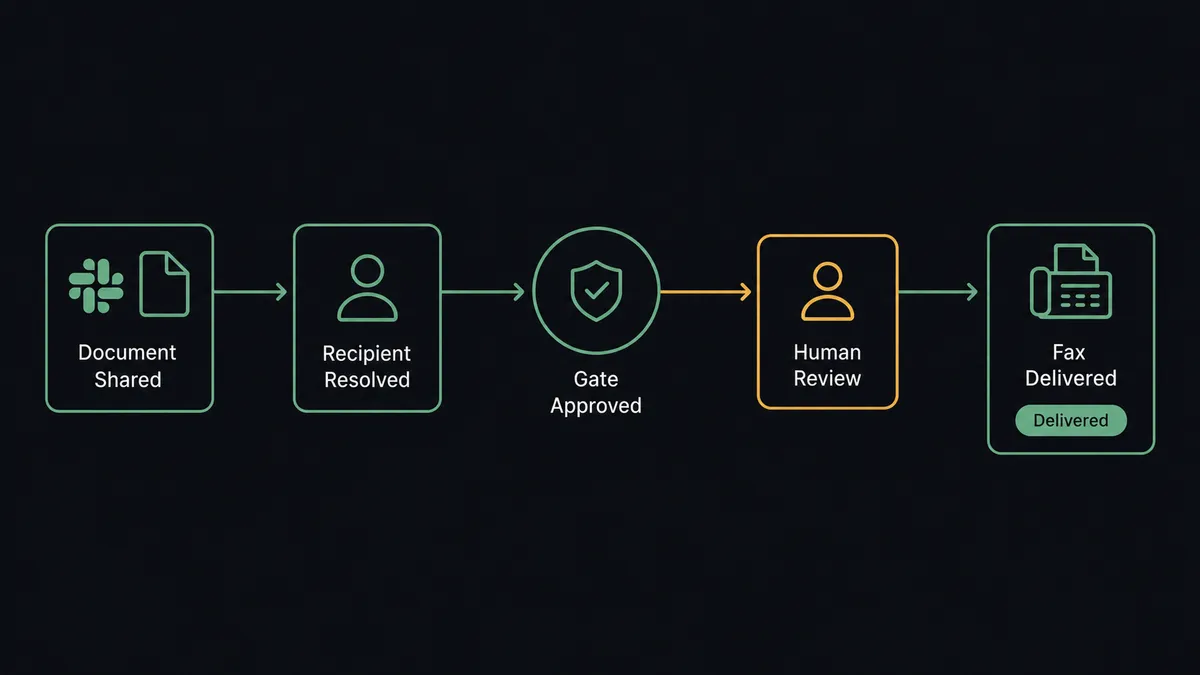
The flow starts in Slack. On File Shared fires the moment a document is dropped into a monitored channel like #vendor-docs. Get File Info pulls the file’s metadata and content into FlowRunner, and List Contacts, or Get Contact when the case already names a recipient, resolves which destination this document belongs to. The agent drafts the fax: cover page text, resolution setting, and the destination number pulled from the contact record rather than typed from memory.
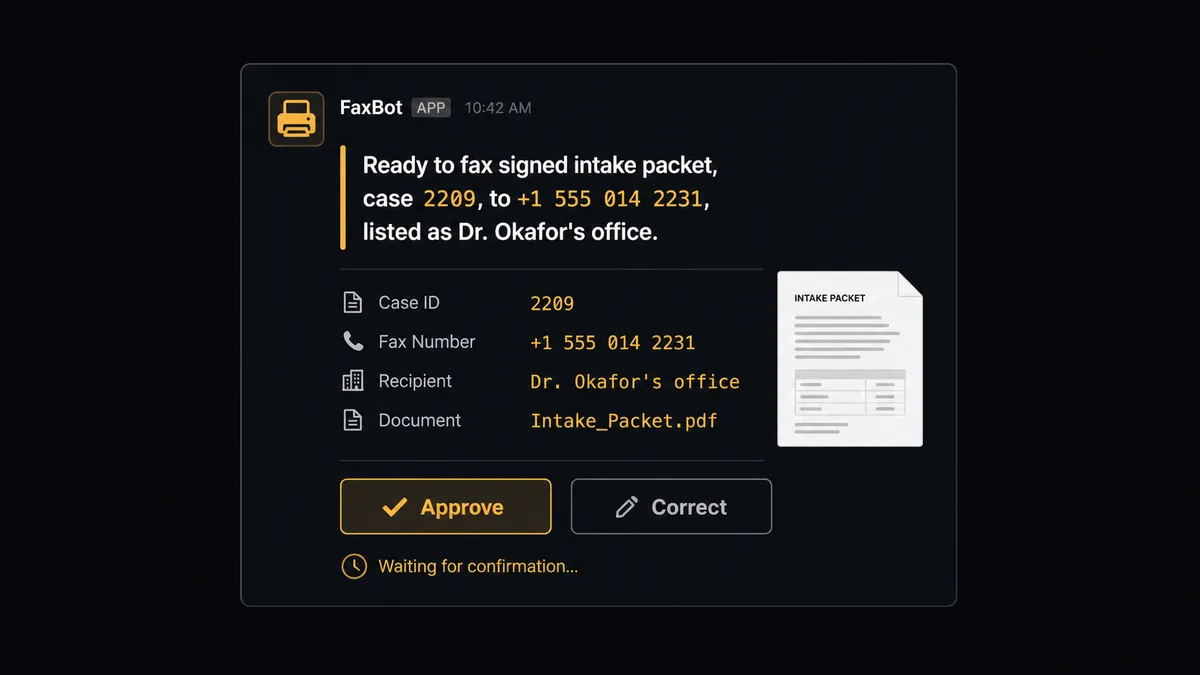
That draft doesn’t transmit yet. Send Message to Channel posts it back to Slack: the destination number, who it’s listed as, and the document name, with Approve and Correct buttons built on Block Kit. Only after a person clicks Approve, captured by the On Block Action trigger, does Send Fax transmit the document straight from FlowRunner file storage. Get Message then polls the transmission until its status settles, sent, failed, or busy, and a final Send Message to Channel posts the outcome back to the same thread. The whole path, from a file dropped in Slack to a confirmed delivery, never requires anyone to open the RingCentral fax portal directly.
Can an AI agent run it? (and why a human stays in the loop)
A hardcoded rule can check that a fax number field isn’t blank. It can’t tell you the number is wrong. An AI agent reads the case context, the contact record, and the document itself, and it recognizes that this specific action, an outbound fax to an external destination, carries a kind of risk none of RingCentral’s archival actions do: once it transmits, it can’t be recalled. Downloading a call recording or pulling a voicemail into file storage is routine and runs unattended. Sending a signed intake packet to a number is not, so the agent treats it differently every time, not just on the ones a rule happens to flag.
When the agent reaches that step, it invokes a human-in-loop flow as a tool, the same way it calls List Contacts or Get File Info. It packages what it knows: “Ready to fax the signed intake packet for case 2209 to +1 555 014 2231, listed as Dr. Okafor’s office. Confirm the number, or correct it.” That lands in Slack through Send Message to Channel with Approve and Correct buttons. The person checks the digits against the source document, one glance, and clicks. On Block Action captures the decision, the workflow resumes, and Send Fax transmits only what was confirmed. The decision, the decider’s identity, and the timestamp are all written to the audit trail. This is not a sync tool quietly moving a file from one system to another. The agent does the assembly and the tracking; the human owns the one step that can’t be undone.
The same judgment carries to related decisions. When a nightly sweep flags a personal address book entry with Delete Contact, the agent doesn’t remove it quietly, because deleting the wrong contact can’t be undone either. It proposes the deletion in Slack and waits.
FlowRunner vs Zapier
Zapier is genuinely fast for the simple version of this: file lands in a folder, ping a channel, done. For a team that just wants a notification when a document arrives, that’s a real strength and it takes minutes to set up. Where it runs out of road is the step that actually matters here: staging an outbound fax, pausing for a specific person to verify the destination against the document, and resuming that exact transmission from a button click isn’t a shape Zapier’s trigger-action model handles natively.
| Capability | Zapier | FlowRunner |
|---|---|---|
| Human-in-loop decisions | Notifications are simple triggers; approval logic requires separate add-ons | Native tool the agent invokes mid-workflow; the click resumes the exact send |
| Who decides to escalate | Every file matches the same static rule | The agent reasons about the case and the document, then decides when to pause |
| Users included | Paid tiers gate how many people can build and edit workflows | Unlimited users on every tier, cloud or self-hosted |
| AI provider | Uses Zapier’s own AI credits | BYOK: bring your own Claude or OpenAI key |
| Self-hosting | Cloud only | Enterprise tier includes a self-hosted option |
| Pricing model | Per-task pricing that’s easy to misjudge at scale | Transparent workflow-based execution tiers |
Before and after
| Category | Before | After |
|---|---|---|
| Fax delivery | Documents printed, fed into a machine, and confirmed by hoping | Faxes sent straight from file storage with delivery status polled automatically |
| Recipient confirmation | No one verifies the destination number before a fax goes out | The agent posts the number to Slack and waits for a person to confirm or correct it |
| Decision speed | Exceptions require a meeting or email chain before resolution | A destination gets confirmed or corrected in one Slack session, from a phone, in minutes |
| Audit trail | Managers ask team members directly to get a status on open items | Every confirmation is captured automatically with the approver’s identity and timestamp |
| Voicemail and recordings | Recordings and voicemails sit in the RingCentral portal until someone remembers to check | Voicemail audio and call recordings pull into file storage for review automatically |
What you can build
Gated fax delivery from shared files. On File Shared starts the flow when a document lands in #vendor-docs, and the agent stages Send Fax but waits for Approve and Correct in Slack before transmitting.
Missed call and voicemail triage. List Call Log Records and Get Message Attachment Content pull the day’s missed calls and voicemails into file storage, and the agent posts a Slack summary with Send Message to Channel, escalating any that sound like a cancellation.
Follow-up call handoff. After a Slack thread confirms a lead is ready, the agent places a Make RingOut Call and posts the result, tracked with Get RingOut Status, back to the same channel.
Contact hygiene confirmation. When a sweep finds a stale or duplicate entry, the agent proposes the Delete Contact in Slack with Send Direct Message instead of removing it quietly.
Weekly call archive digest. Every Monday, List Account Call Log compiles the week’s volume and recording count, and the agent posts a Block Kit summary to #operations for leadership visibility.
Common questions
Is it free to connect RingCentral and Slack on FlowRunner? FlowRunner has a free plan with 100 executions a month, every integration included, and no credit card required, and new accounts get 14 days of Professional on top.
Can I self-host this RingCentral-to-Slack workflow? Yes. The Enterprise tier includes a self-hosted option with multi-instance clustering, in addition to the cloud-hosted tiers most teams start on.
Does the agent need my own OpenAI key? FlowRunner runs on a bring-your-own-key model for AI providers, so you connect your own Claude or OpenAI key rather than paying FlowRunner’s markup on model usage.
What happens when the agent isn’t sure which number a fax should go to? It stops. It posts the destination number and the document to Slack and waits for a person to confirm or correct it. It never dials or transmits on its own guess.
Can RingCentral trigger a Slack alert directly? RingCentral doesn’t expose its own triggers in FlowRunner, so this connection runs the other direction: a Slack event or a schedule starts the flow, and RingCentral actions like Send Fax and Send SMS run as steps inside it.
Does this work with Slack’s interactive buttons? Yes. The confirmation step uses Block Kit buttons and the On Block Action trigger, so a person approves or corrects the fax destination from their phone without leaving Slack.
Getting started
FlowRunner has a free plan with 100 executions a month, every integration included, and no credit card required, and new accounts get 14 days of Professional on top. Connect RingCentral and Slack, build the gated fax flow above in the visual editor, and add the human-in-loop confirmation where a wrong number would actually cost you something.
Start free at flowrunner.ai, or book time to walk through your document delivery workflow at calendly.com/flowrunner/intro.
Frequently asked questions
Is it free to connect RingCentral and Slack on FlowRunner?
FlowRunner has a free plan with 100 executions a month, every integration included, and no credit card required, and new accounts get 14 days of Professional on top.
Can I self-host this RingCentral-to-Slack workflow?
Yes. The Enterprise tier includes a self-hosted option with multi-instance clustering, in addition to the cloud-hosted tiers most teams start on.
Does the agent need my own OpenAI key?
FlowRunner runs on a bring-your-own-key model for AI providers, so you connect your own Claude or OpenAI key rather than paying FlowRunner's markup on model usage.
What happens when the agent isn't sure which number a fax should go to?
It stops. It posts the destination number and the document to Slack and waits for a person to confirm or correct it. It never dials or transmits on its own guess.
Can RingCentral trigger a Slack alert directly?
RingCentral doesn't expose its own triggers in FlowRunner, so this connection runs the other direction: a Slack event or a schedule starts the flow, and RingCentral actions like Send Fax and Send SMS run as steps inside it.
Does this work with Slack's interactive buttons?
Yes. The confirmation step uses Block Kit buttons and the On Block Action trigger, so a person approves or corrects the fax destination from their phone without leaving Slack.