How to Connect Parseur with Aircall (With or Without an AI Agent)
Connect Parseur-extracted lead emails to Aircall contacts and insight cards so reps call new inquiries in minutes, optionally as an AI agent that pauses for a human before an uncertain parse puts a wrong number on a rep's dial list.
How do you connect Parseur to Aircall?
You connect Parseur to Aircall by having Parseur’s On Document Processed (Realtime) trigger drive Aircall actions: the workflow calls Get Parsed Data to pull the lead’s name, company, and phone number from an inquiry email, checks for an existing record with List Contacts, and calls Create Contact plus Add Insight Cards, so a new inquiry becomes a dialable contact with context on the call screen within minutes of arriving. FlowRunner is a visual AI-agent orchestration platform where automations run autonomously and pause for human judgment on the steps that carry real consequence. The same connection can run as an AI agent that pushes clean leads straight to the phone team and pauses for a human before an uncertain parse puts a doubtful number on anyone’s dial list.
The problem it solves
Inbound leads arrive as unstructured mess: a web form notification here, a directory referral email there, a PDF inquiry from a partner portal. Today someone on sales ops opens each one, picks out the name and number, and either keys it into the phone system or, more often, pastes it into a sheet that reps work from hours later. Speed-to-lead is the one metric everyone agrees on, and the manual step in the middle is exactly where the speed dies. A lead that inquired at nine in the morning gets called after lunch, and by then they have spoken to two competitors.
The edges cut both ways. A layout change in the referral email shifts every field by one, and suddenly the phone column holds zip codes. A parsed number is missing a digit, and a rep burns the golden first-touch window dialing a dead line. Or the same lead inquires twice through two channels and two reps call the same person an hour apart, which reads as disorganized exactly when you are trying to look sharp. Fast is the point. Fast and wrong is worse than slow.
How it works: the connection
The connection listens to Parseur and writes to Aircall. Here is the plain version, grounded in the real connector actions.
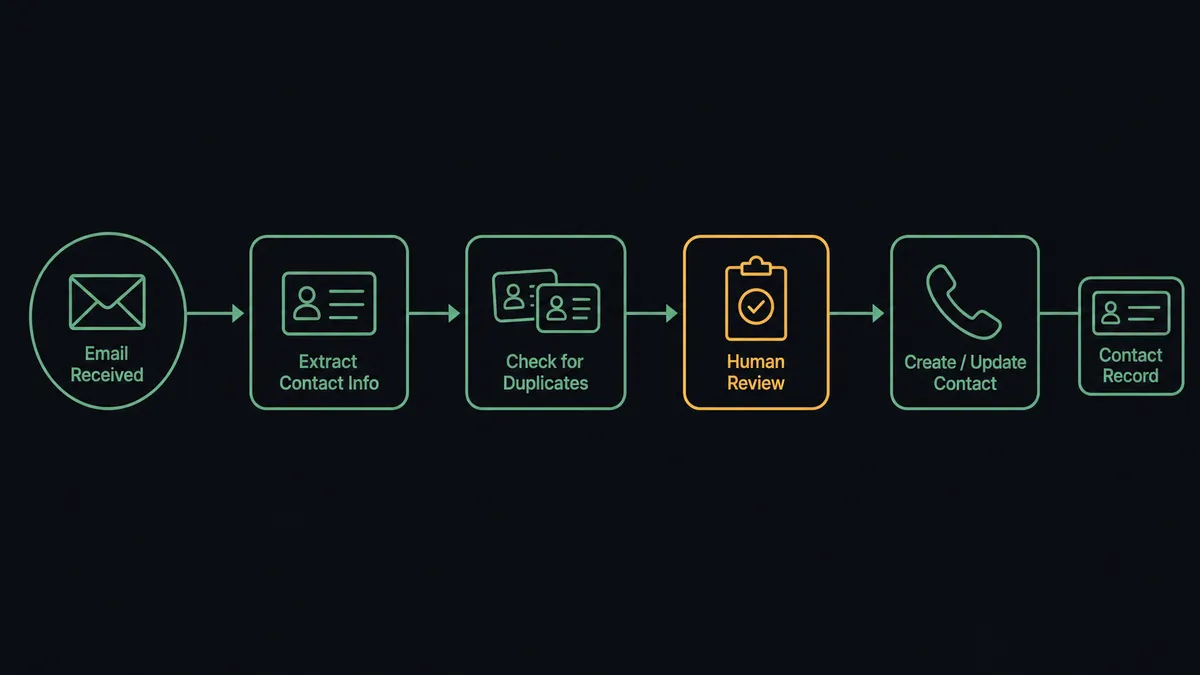
- Trigger: Parseur fires On Document Processed (Realtime) when an inquiry email or attached document lands in the leads mailbox and gets parsed.
- Read: The workflow calls Get Parsed Data to pull the structured fields: name, company, phone, email, and the inquiry text itself.
- Check for twins: It calls List Contacts in Aircall by phone and email, so a repeat inquirer updates an existing record instead of spawning a duplicate.
- Create the contact: It calls Create Contact with the parsed identity fields, putting the lead one tap away from a dial.
- Attach the context: It calls Add Insight Cards with the inquiry summary and source, so the rep sees what the lead actually asked for while the phone rings.
- Route the follow-up: After the first call, Add Tags to Call and Comment on Call record the disposition, keeping the lead’s thread readable for whoever touches it next.
That is the “just connect them” answer. The mailbox stops being a queue a person drains, and the gap between “lead inquired” and “rep dialed” shrinks from hours to minutes.
Can an AI agent run it? (and why a human stays in the loop)
Yes, and the agent is the difference between a pipe and a gatekeeper. It holds the actions as tools: Get Parsed Data, List Documents, Reprocess Document on the Parseur side; List Contacts, Get Contact, Create Contact, Update Contact, Add Insight Cards on the Aircall side. A dumb mapping copies whatever the parser produced. The agent reads it first: does the phone field actually look like a phone number for that country? Does the name field contain a name or a company slogan? Does this inquiry match a contact who already exists, meaning this is a follow-up, not a fresh lead?
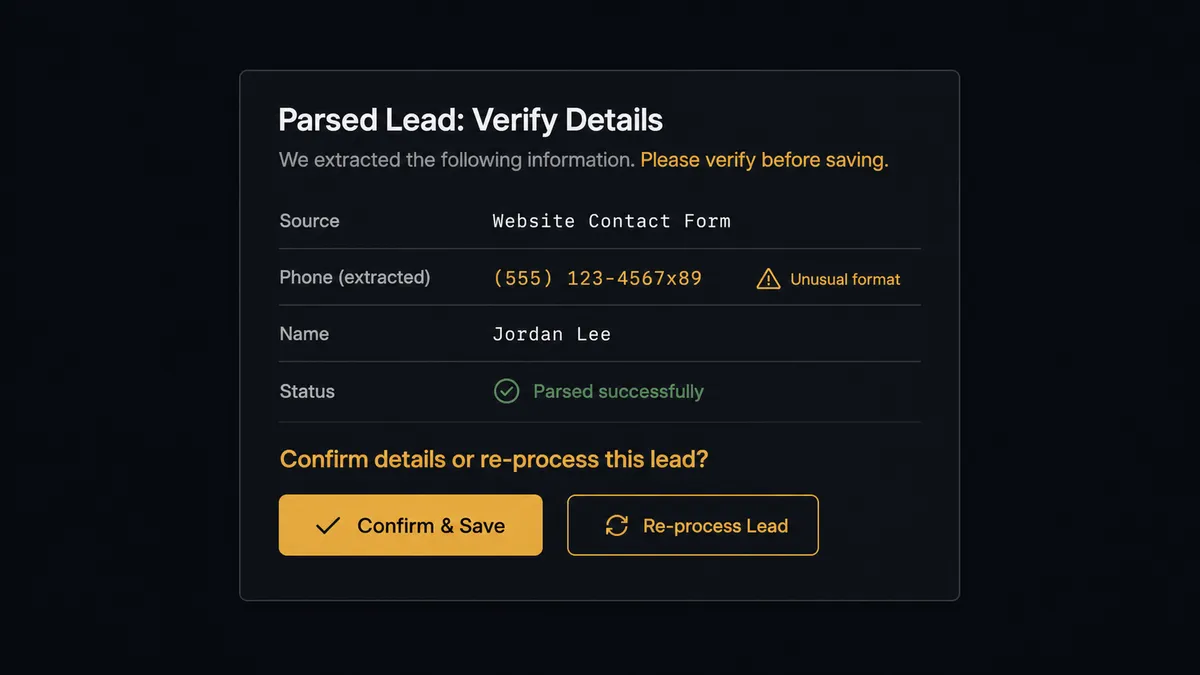
The consequential step is Create Contact, because in this workflow a contact is not a record, it is an instruction to call a human being. Create one from a garbled parse and a rep confidently dials a stranger, or a dead line, during the exact window when the real lead expected a callback. So when the agent is unsure, it invokes a human-in-loop flow it holds as a callable tool. The workflow pauses and posts to sales ops: “New inquiry parsed from [source]. Extracted phone [number] fails the format check for [country], and the name field reads [value]. Raw document attached. Confirm the fields or send to reprocess?” On a correction, the agent calls Create Contact with the fixed fields; on a reprocess decision, it calls Reprocess Document and re-evaluates. Either way, the approver and timestamp land in the audit trail.
Prospects call this a digital andon cord: like Toyota’s production line pull cord, the workflow stops the line the moment it hits uncertainty. Clean leads reach a rep’s screen in minutes. Doubtful ones wait the extra two minutes it takes a human to look, which is still faster than the spreadsheet ever was.
FlowRunner vs Zapier
Zapier is the natural first try for this pair, and credit where due: it supports both Parseur and Aircall, the trigger-action setup is approachable for a sales ops person, and its gallery includes parsed-email-to-CRM patterns that adapt to this. For a trickle of well-formatted leads from one source, a Zap works.
The difference is what happens when the parse is imperfect, which at real volume is weekly, not hypothetical.
| What matters for this pair | FlowRunner | Zapier |
|---|---|---|
| Human-in-the-loop before Create Contact on doubtful parses | Native. The agent invokes an approval flow as a callable tool and pauses mid-run | Available via added approval steps, not a decision made from parse quality |
| Who runs the flow | An AI agent validates fields, dedupes, and picks actions as tools | A fixed field mapping that forwards whatever the parser emits |
| Users included | Unlimited users on every tier | Priced by task volume; seat limits vary by plan |
| Bring your own AI keys | Yes, BYOK | AI features tied to Zapier’s own AI offering |
| Self-hosted option | Yes, cloud-hosted or self-hosted | Cloud only |
| Pricing model | Transparent workflow-based tiers | Per-task pricing; every parsed lead and follow-up step consumes tasks |
If your lead volume is small and your sources never change format, Zapier will serve. If speed-to-lead is a number you report on and a wrong first call costs you the deal, the validated, gated version on FlowRunner is the better fit.
Before and after
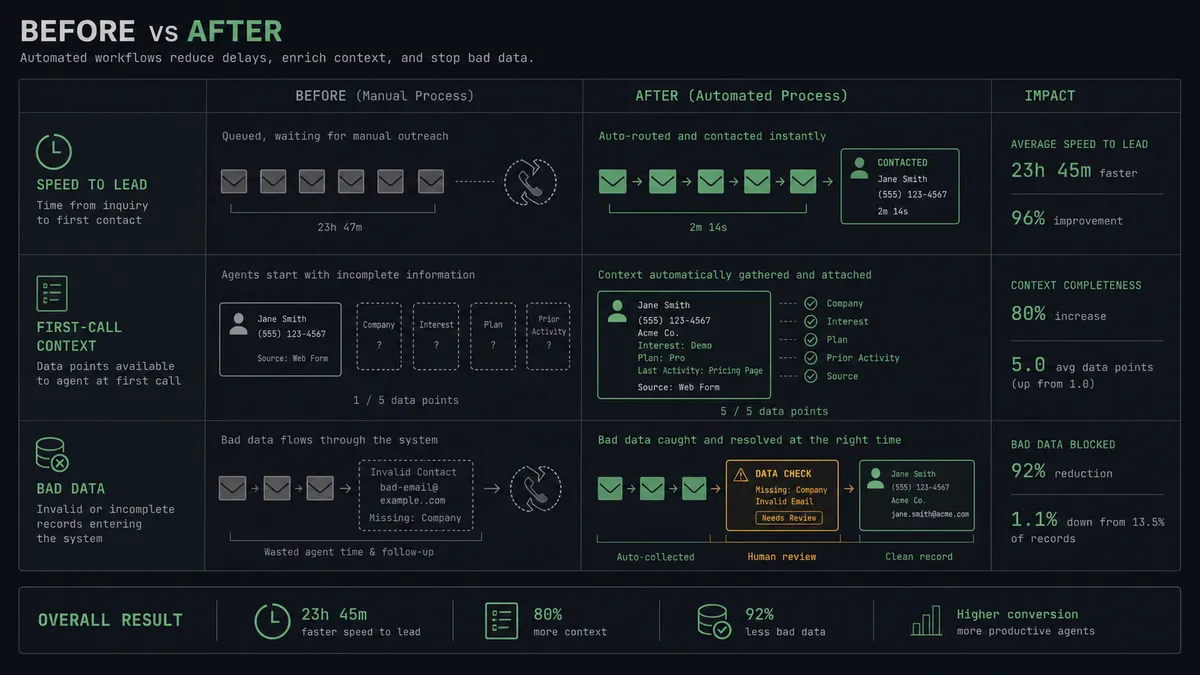
| Category | Before | After |
|---|---|---|
| Speed to lead | Inquiries sit in a mailbox until someone drains it into a sheet | Parsed leads are dialable contacts within minutes of arriving |
| First-call context | Reps dial from a name and number, cold | The inquiry, source, and request sit on the call screen as the phone rings |
| Bad data | Garbled numbers surface only as failed dials | Format checks catch them before a contact exists, and a human corrects the parse |
| Duplicates | Two channels produce two contacts and two awkward calls | List Contacts matches repeat inquirers to their existing record |
| Handoffs | Lead history lives in whoever called first | Tags and comments keep the thread readable for the whole team |
What you can build
Minutes-to-dial lead response. On Document Processed (Realtime) fires, the agent validates the parse, checks List Contacts, and runs Create Contact with Add Insight Cards, so the rep dials while the inquiry is still warm.
Verification gate for doubtful parses. Fields that fail format or identity checks route to sales ops with the raw document attached, and the contact is only created after a confirm or correct decision.
Repeat-inquirer recognition. When a parse matches an existing contact, the agent updates the record with Update Contact and refreshes the insight card, so the rep opens with “good to hear from you again” instead of a cold pitch.
Source-tagged routing. The agent reads the parsed source field and applies Add Tags to Call conventions per channel, so partner referrals, web forms, and directory leads each land with the team that handles them.
Parser drift alarm. When several parses in a row fail validation from one mailbox, the agent stops creating contacts, posts a single alert that the template has drifted, and queues the documents for Reprocess Document once the mailbox rules are fixed.
Common questions
Is it free to connect Parseur and Aircall on FlowRunner? You can build and run the connection on FlowRunner’s free plan, which includes 100 executions a month and every integration with no credit card required, and new accounts also get 14 days of Professional. Both connectors are available on every FlowRunner tier, and every tier includes unlimited users and unlimited workflows.
Can I self-host the Parseur to Aircall workflow? Yes. FlowRunner offers a cloud-hosted option and a self-hosted option, so the connection can run inside your own environment.
Does the AI agent need my own OpenAI or Claude key? FlowRunner uses a bring-your-own-keys model, so you connect the AI provider key you already have. You are not locked to one model.
What happens when a parsed lead has a suspicious or incomplete phone number? The agent stops and invokes a human-in-loop step. It posts the raw document alongside the extracted fields to your sales ops channel and waits for a confirm or correct decision before Create Contact runs. No rep ever dials a number the workflow was unsure about.
Which Parseur events can trigger an Aircall action? Parseur offers two triggers: On Document Processed (Realtime) and On Document Processed (Polling). Realtime is the right choice for lead response, because the value of this pair is measured in minutes between the inquiry and the first dial.
How do reps see what the lead asked for? The workflow maps the parsed inquiry details into Add Insight Cards on the new contact. When the rep calls, the lead’s own words, their source, and their request are on the screen, so the conversation starts informed instead of cold.
Getting started
Start on the free plan: 100 executions a month, every integration included, no credit card required, plus 14 days of Professional for new accounts. Both connectors are available on every tier, and every tier includes unlimited users and unlimited workflows, so sales ops and every rep on the dialer are covered without seat math.
Explore the integration details:
- Parseur integration (2 triggers and 6 actions covering mailboxes, parsing, and document reprocessing)
- Aircall integration (33 actions covering calls, contacts, tags, and insight cards)
Start building free at flowrunner.ai or book a demo to see a live Parseur to Aircall workflow, parse verification gate and all.
Frequently asked questions
Is it free to connect Parseur and Aircall on FlowRunner?
You can build and run the connection on FlowRunner's free plan, which includes 100 executions a month and every integration with no credit card required, and new accounts also get 14 days of Professional. Both connectors are available on every FlowRunner tier, and every tier includes unlimited users and unlimited workflows.
Can I self-host the Parseur to Aircall workflow?
Yes. FlowRunner offers a cloud-hosted option and a self-hosted option, so the connection can run inside your own environment.
Does the AI agent need my own OpenAI or Claude key?
FlowRunner uses a bring-your-own-keys model, so you connect the AI provider key you already have. You are not locked to one model.
What happens when a parsed lead has a suspicious or incomplete phone number?
The agent stops and invokes a human-in-loop step. It posts the raw document alongside the extracted fields to your sales ops channel and waits for a confirm or correct decision before Create Contact runs. No rep ever dials a number the workflow was unsure about.
Which Parseur events can trigger an Aircall action?
Parseur offers two triggers: On Document Processed (Realtime) and On Document Processed (Polling). Realtime is the right choice for lead response, because the value of this pair is measured in minutes between the inquiry and the first dial.
How do reps see what the lead asked for?
The workflow maps the parsed inquiry details into Add Insight Cards on the new contact. When the rep calls, the lead's own words, their source, and their request are on the screen, so the conversation starts informed instead of cold.