OpenAI + Google Sheets: Every New Row Gets a Reviewed Draft
Connect OpenAI and Google Sheets so every new row gets classified and drafted a reply automatically, with an AI agent that pauses for a human before a complaint or flagged draft goes out.
How do you connect OpenAI to Google Sheets?
Google Sheets’ On New Row trigger fires when a fresh row lands in a tracking sheet, and that trigger runs OpenAI’s Create Chat Completion to classify the row and Create Response to draft a reply, before Update Row writes the result back to the sheet. FlowRunner is a visual AI-agent orchestration platform where automations run autonomously and pause for human judgment on the steps that carry real consequence. The same connection can run as a script that always drafts the same way, or as an AI agent that reads each row, decides how to handle it, and stops to ask a person before a complaint or a flagged draft goes anywhere near a customer.
The problem it solves
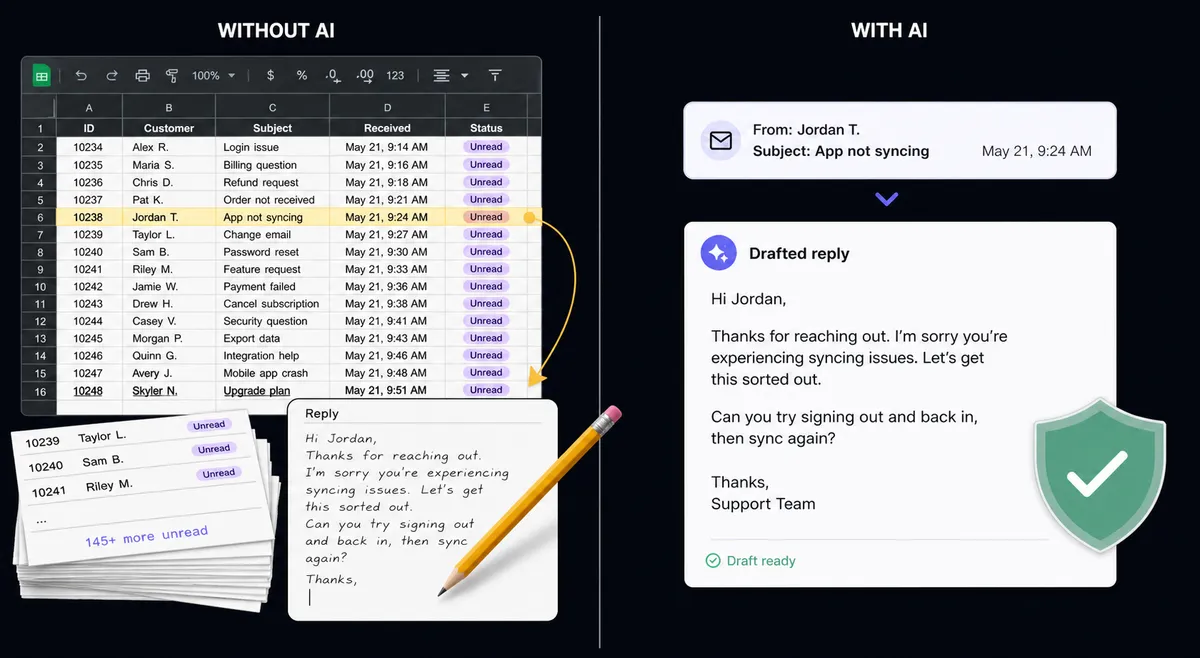
A support lead or ops manager tracks customer feedback, contact-form messages, or support requests in a spreadsheet because that is where the team already looks. Someone reads each new row, decides what it means, writes a reply from scratch, and pastes it into an email or a help desk ticket. On a busy week, rows pile up faster than anyone can get through them, and the rows that need the fastest response, a complaint or a cancellation threat, sit in the same queue as a routine thank-you note with no way to tell them apart at a glance.
Nothing about this is a skills problem. It is a person doing manual triage and manual drafting on every single row, with no consistent screening before a reply goes out. A generic acknowledgment takes the same five minutes as a message that actually needs care, and by the time someone gets to the row that matters, the customer has already emailed a second time. The team spends its morning drafting instead of deciding, and the spreadsheet gives no signal about which rows are safe to answer and which ones need a second set of eyes.
How it works: the connection
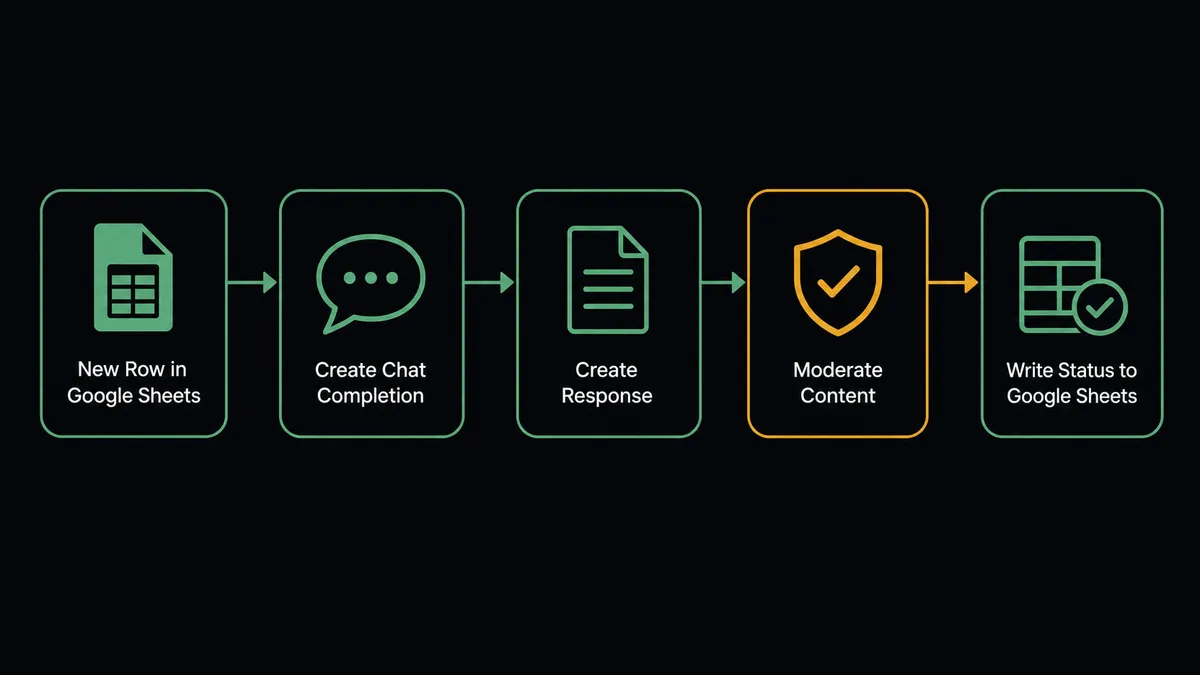
The flow starts on Google Sheets’ On New Row trigger, which fires the moment a new row is appended, whether it came from a form, an import, or someone typing it in directly. The agent calls Get Rows to pull the new data and checks it against the columns set by Load Header Row, so it addresses “Message” or “Email” by name instead of guessing at a column letter.
Once a row has the fields it needs, the agent calls Create Chat Completion to classify the intent and sentiment behind the message, whether it reads as a routine question, a compliment, or a complaint. It then calls Create Response to draft a grounded reply and Moderate Content to screen that draft for anything that shouldn’t go out. Finally, the agent writes the reply and a status back to the row with Update Row, so anyone scanning the sheet sees exactly what happened to each entry without opening a single message.
Can an AI agent run it? (and why a human stays in the loop)
A fixed sync tool would run Create Chat Completion, Create Response, and Update Row in the same order on every row, with no judgment about what any individual message actually needs. FlowRunner’s agent reads the row, reasons about it, and calls those same OpenAI and Google Sheets actions as tools it chooses to use, in the order the situation calls for. This is not a sync tool. The agent knows when to stop and ask.
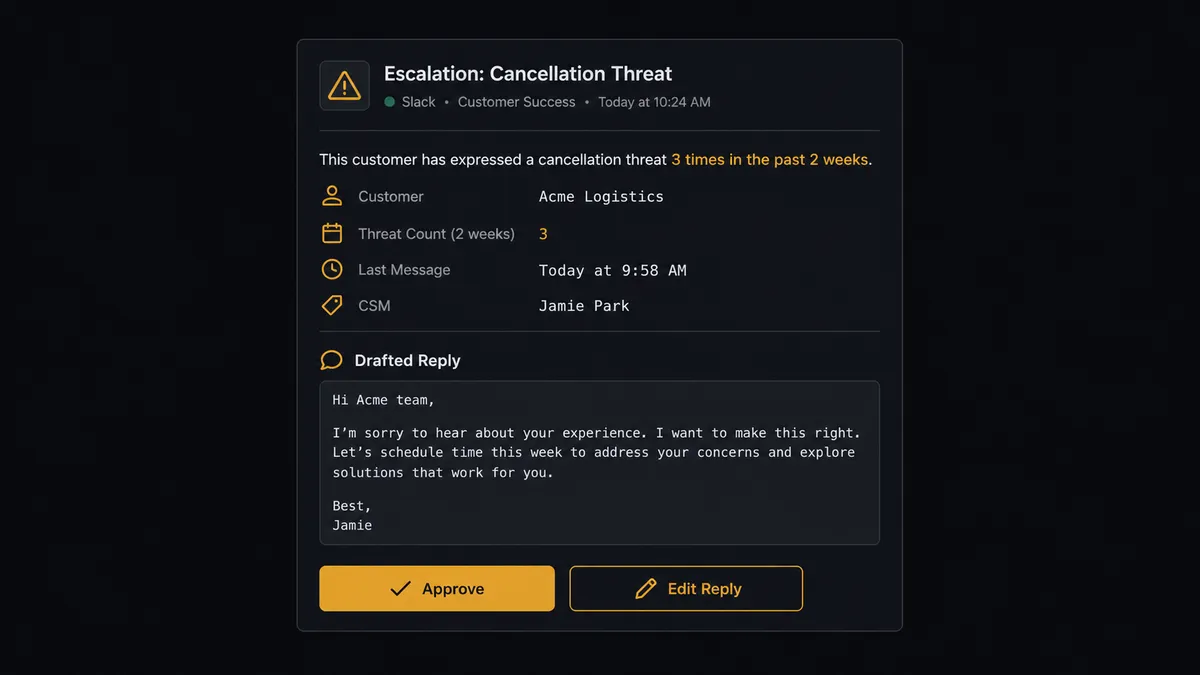
The moment that matters is what happens after the draft comes back. A drafted reply is a starting point the flow produces, not a final decision. When the agent’s classification reads the row as a complaint or a refund request, or when Moderate Content flags anything in the draft, the agent does not write the reply back as ready. It packages the original row, the drafted reply, and the reason it’s escalating, and sends it to the support lead on Slack: “Row 22 in ‘Customer Feedback’ reads as a cancellation threat, three messages from this customer in two weeks. Here’s the drafted reply. Edit and approve, or write your own.” The lead edits or approves, and the agent writes the final reply and a status back to the row in the same run. A routine question with a clean moderation result gets marked ready without anyone touching it.
The same discipline runs on the intake side. When a row is missing the message or the customer’s email, the agent does not draft against incomplete data. It flags the row, marks it in the sheet, and routes it to the owner: “Row 31 in ‘Customer Feedback’ is missing a value in the Email column. Correct the row and I will process it, or tell me to skip it.” Clean, complete rows move through on their own. The ones that are incomplete, or the drafts that touch something with real consequence, get a person first.
FlowRunner vs Zapier
Zapier connects OpenAI and Google Sheets natively, and for a team that wants a quick draft-and-log flow with no setup overhead, it is genuinely fast to wire up. Where the two diverge is what happens to the draft before it reaches a customer, and what the connection costs as message volume grows.
| Capability | Zapier | FlowRunner |
|---|---|---|
| Human-in-loop on the risky reply | A manual review step or delay you build and wire yourself | Native: the agent invokes a human-in-loop flow as a callable tool at the step that carries weight |
| Reasoning over each row | Filter steps follow fixed rules you define in advance | The agent classifies each row and decides whether to draft, escalate, or hold |
| AI provider | Zapier’s own AI credits or a connected key, depending on the app | Bring-your-own-key: every OpenAI call runs on your account |
| Users included | Paid seats on the tiers with the automation depth this flow needs | Unlimited users on every tier |
| Pricing model | Per-task pricing that gets harder to predict as message volume grows | Transparent workflow-based tiers with clear execution limits |
Before and after
| Category | Before | After |
|---|---|---|
| Reply drafting | A person reads the row and writes a reply from scratch | Create Chat Completion and Create Response draft a grounded reply the moment the row lands |
| Content safety | Generated or manually written text goes out with no screening | Moderate Content screens every draft before it’s marked ready |
| Triage | Complaints sit in the same queue as routine notes with no signal | The agent classifies intent so flagged rows stand out immediately |
| Row status | A new row sits until someone notices and acts on it | On New Row triggers processing immediately, and Update Row shows the result |
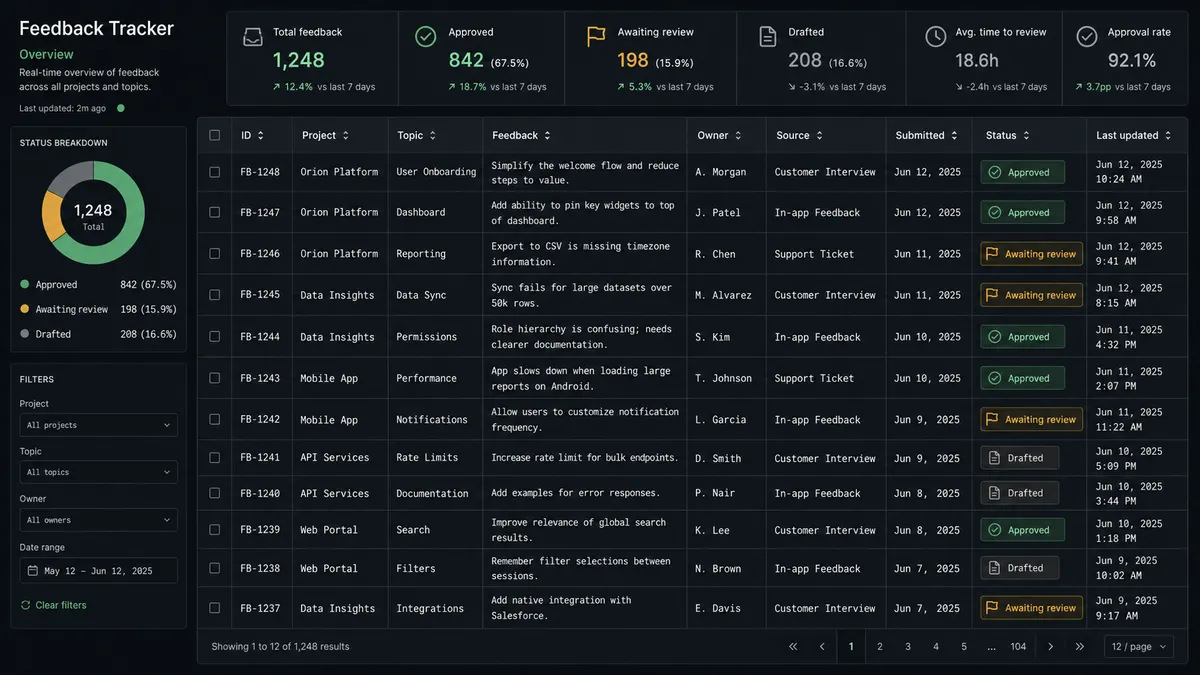
| Reporting | Someone opens the sheet to see what’s been answered | The sheet’s status column shows drafted, approved, or waiting on review at a glance |
What you can build
Feedback triage with drafted replies. Every new row in a feedback sheet gets classified and drafted automatically, with complaints and refund requests routed to a person before the reply is marked ready.
Grounded internal Q&A logged to a sheet. The agent calls Create Embeddings and Search Vector Store to answer employee questions from your own content, then Add Row logs each question and answer to a Google Sheet for a running record.
Scheduled sentiment reports. On a schedule, the agent calls Get Rows to pull the week’s classified feedback and Export Sheet to generate a file for the team, so leadership sees sentiment trends without opening the spreadsheet.
Row validation before a draft is generated. The agent checks each new row against the mapped header before calling Create Chat Completion, and any row missing the message or the customer’s email is flagged for a human instead of drafting against incomplete data.
Flagged draft approval. A reply that fails Moderate Content or reads as a complaint pauses for the support lead’s edit and approval before Update Row marks it ready.
Common questions
Is it free to connect OpenAI and Google Sheets on FlowRunner? FlowRunner has a free plan with 100 executions a month, every integration included, and no credit card required, and new accounts get 14 days of Professional on top. Beyond the free plan, Growth starts at $45/mo for 12,000 executions.
Can I self-host the OpenAI and Google Sheets connection? Yes. The Community Edition is free for a single self-hosted instance, and the self-hosted Enterprise tier adds multi-instance clustering and the full compliance suite for teams that need data to stay on their own infrastructure.
Does the agent need my own OpenAI key? Yes. FlowRunner uses a bring-your-own-key model, so you connect your own OpenAI API key and every Create Chat Completion, Create Response, and Moderate Content call runs on your account, not a shared pool.
What happens when the agent isn’t sure a reply is safe to send? The agent does not send it. It packages the row, the draft, and the reason it flagged the reply, then routes it to the support lead in Slack for edit and approval before anything reaches a customer.
Does this replace the review process my support team already does? No. FlowRunner drafts the reply and screens it, but a person still edits and approves anything that carries risk; routine, clean replies are the only ones that move without a stop.
Can the flow run in reverse, from OpenAI back into Google Sheets? Yes. The agent can call Create Embeddings and Search Vector Store to answer a question grounded in your own content, then log the question and answer to a Google Sheet with Add Row for a running record.
Getting started
FlowRunner has a free plan with 100 executions a month, every integration included, and no credit card required, and new accounts get 14 days of Professional on top. Start at flowrunner.ai to build the flow yourself, or book time at calendly.com/flowrunner/intro to walk through the escalation rules and row validation with the team.
Frequently asked questions
Is it free to connect OpenAI and Google Sheets on FlowRunner?
FlowRunner has a free plan with 100 executions a month, every integration included, and no credit card required, and new accounts get 14 days of Professional on top. Beyond the free plan, Growth starts at $45/mo for 12,000 executions.
Can I self-host the OpenAI and Google Sheets connection?
Yes. The Community Edition is free for a single self-hosted instance, and the self-hosted Enterprise tier adds multi-instance clustering and the full compliance suite for teams that need data to stay on their own infrastructure.
Does the agent need my own OpenAI key?
Yes. FlowRunner uses a bring-your-own-key model, so you connect your own OpenAI API key and every Create Chat Completion, Create Response, and Moderate Content call runs on your account, not a shared pool.
What happens when the agent isn't sure a reply is safe to send?
The agent does not send it. It packages the row, the draft, and the reason it flagged the reply, then routes it to the support lead in Slack for edit and approval before anything reaches a customer.
Does this replace the review process my support team already does?
No. FlowRunner drafts the reply and screens it, but a person still edits and approves anything that carries risk; routine, clean replies are the only ones that move without a stop.
Can the flow run in reverse, from OpenAI back into Google Sheets?
Yes. The agent can call Create Embeddings and Search Vector Store to answer a question grounded in your own content, then log the question and answer to a Google Sheet with Add Row for a running record.