How to Connect Mailchimp Marketing with HubSpot (With or Without an AI Agent)
Connect Mailchimp Marketing and HubSpot so every CRM lifecycle change updates your email audiences in real time, with an AI agent that pauses for human approval before deploying campaigns to large lists.
How do you connect Mailchimp Marketing to HubSpot?
You connect them by triggering a FlowRunner workflow when a HubSpot contact changes lifecycle stage, then calling Add Or Update List Member in Mailchimp to sync that contact to the correct audience and Apply a tag with Add Tag for segmentation. FlowRunner is a visual AI-agent orchestration platform where automations run autonomously and pause for human judgment on the steps that carry real consequence. The same connection can run as an AI agent that reasons about each contact’s context, picks the right audience and tags, and holds large campaign deployments for Slack approval before sending.
The problem that disconnected systems create
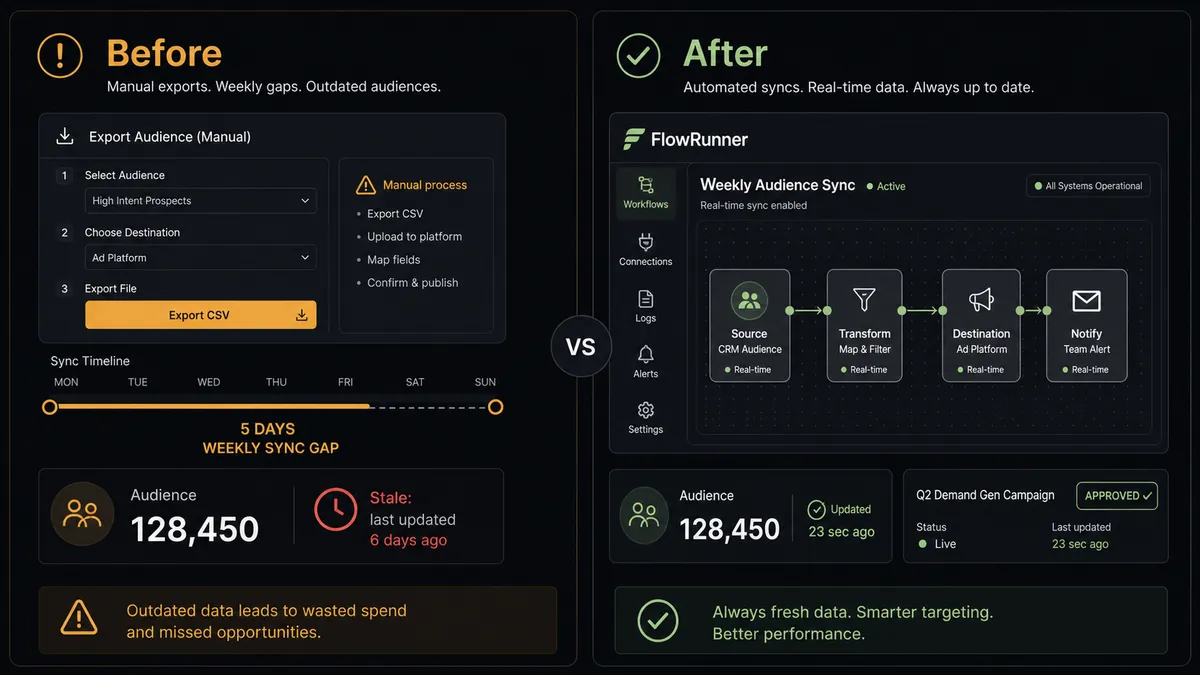
Marketing teams manage two separate systems that should reflect the same reality but rarely do. HubSpot holds the authoritative record: who the prospect is, where they are in the buying journey, what they have done. Mailchimp holds the audience that receives campaigns. The gap between them is filled by a marketing coordinator exporting segments from HubSpot, formatting them, importing them into Mailchimp, and applying tags manually. That process runs on a weekly or bi-weekly cadence at best.
The result is a Mailchimp audience that reflects CRM state from last Tuesday, not today. A contact who hit Marketing Qualified Lead on Wednesday is still receiving the awareness sequence on Friday. A contact who unsubscribed across another channel is still on the active list. Tags applied to behavioral signals (pricing page visits, content downloads) never make it into Mailchimp at all because nobody is watching every interaction in real time. Exceptions fall through the cracks. The audience data you are running campaigns against is stale before the next batch lands.
How it works: the connection
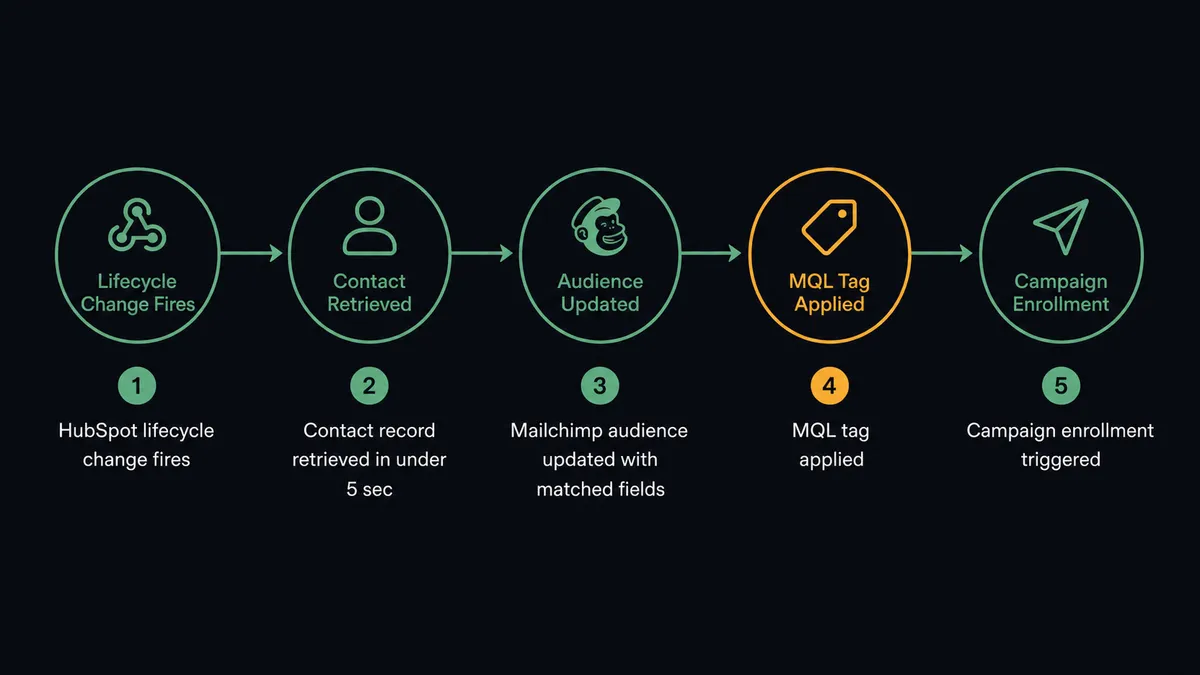
When a HubSpot contact reaches the Marketing Qualified Lead lifecycle stage, a FlowRunner workflow fires. The agent starts by calling Get Contact by Email to retrieve the full contact record and confirm no duplicate exists in HubSpot. With a clean record confirmed, the agent calls Add Or Update List Member in Mailchimp: it checks for an existing subscriber by email, updates the record if found, creates it if not. The operation is idempotent, meaning running it twice does not create a duplicate.
The agent then calls Add Tag with the tag “MQL” to place the contact in the right segmentation bucket. If the contact should enter a specific nurture campaign, the agent calls Search Campaign to locate the right campaign and enrolls them. The entire sequence runs in under 30 seconds from the HubSpot lifecycle change.
For the reverse direction, behavioral signals in Mailchimp (link clicks on a pricing page, resource downloads) can trigger an agent that calls Update Contact in HubSpot to update the lead score or lifecycle stage. The two systems stay in sync without a human managing the connection.
Can an AI agent run it? And why a human stays in the loop
A standard Mailchimp-HubSpot integration executes a fixed sequence: contact reaches stage X, add to list Y, apply tag Z. An AI agent in FlowRunner does something different. It reads the contact record, evaluates context, and decides what to do next. It does not follow the same path every time.
The agent’s tools are the real Mailchimp and HubSpot actions: Add Or Update List Member, Add Tag, Search Campaign, Send Campaign, Get Campaign Report, Get Contact by Email, Update Contact. It chooses which ones to call based on what it finds. A contact already in the Mailchimp audience with the right tags does not need to be re-enrolled. A contact with a conflicting audience assignment gets paused and flagged, not silently moved.
The consequential moment is campaign deployment. When the agent builds or queues a campaign for a large audience (above a threshold you configure, for example 5,000 subscribers), it does not send automatically. It routes an approval request to Slack: “Campaign [Name] is ready to send to [N] subscribers. Subject line: [subject]. Approve send or review content first?” The marketing manager responds with one click. The agent sends only after a human has confirmed.
This is not a hardcoded rule (“if audience > 5,000, ask”). The agent evaluates the campaign’s context: a reactivation campaign targeting dormant contacts on a Monday morning might warrant review at 2,000 subscribers. A routine newsletter to an engaged list might not need review at 8,000. The agent’s judgment is shaped by its instructions, not a threshold table.
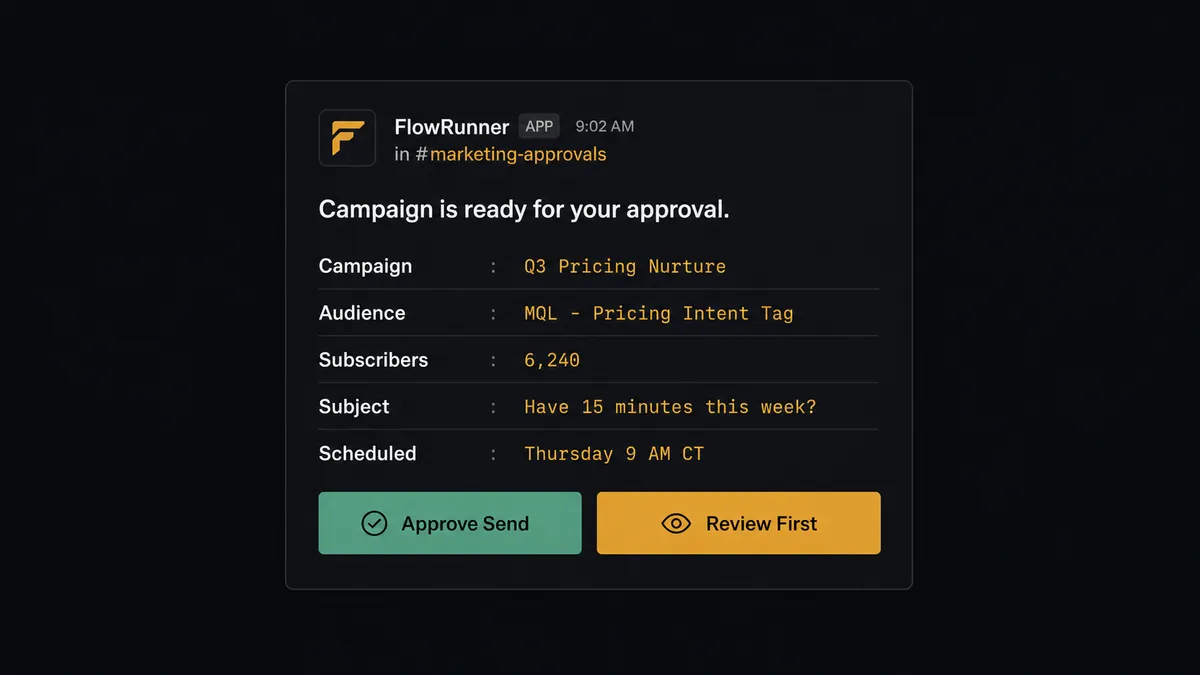
Prospects who have seen this capability call it a “digital andon cord.” Like Toyota’s quality control pull cord, FlowRunner stops the line when the AI hits a decision point that carries weight. The agent knows when to ask.
FlowRunner vs Zapier for Mailchimp and HubSpot
Most non-technical marketing teams connecting Mailchimp and HubSpot reach for Zapier first. Zapier is worth acknowledging honestly: it has a polished interface, an enormous library of pre-built Zaps, and a shallow learning curve for basic triggers and actions. For a simple one-way sync (contact updates HubSpot, contact added to Mailchimp list), Zapier works.
The real differences surface when the connection needs to be more than a relay:
| Capability | Zapier | FlowRunner |
|---|---|---|
| Basic trigger-to-action sync | Yes | Yes |
| AI agent with reasoning across steps | No | Yes |
| Native human-in-loop checkpoint | No | Yes, as a callable tool the agent invokes |
| Unlimited users on every plan | No (per-seat on Business+) | Yes, all tiers |
| BYOK for AI model calls | No | Yes |
| Self-hosted deployment option | No | Yes (Community Edition free) |
| Audit trail of agent decisions | No | Yes, including who approved and when |
Zapier executes the Zap. FlowRunner runs an agent that reads data, makes decisions, and knows when to stop and ask. For a “set and forget” sync, either works. For campaigns that reach thousands of subscribers and contacts that could duplicate across CRM records, the distinction matters.
Before and after
| Metric | Before | After |
|---|---|---|
| Audience sync frequency | Weekly manual export/import cycle | Real-time on every HubSpot lifecycle change |
| Time for new MQL to reach Mailchimp | Up to 7 days | Under 30 seconds |
| Behavioral tagging in Mailchimp | Not done; no process to track intent signals | Applied automatically when HubSpot data or link clicks signal intent |
| Duplicate contact risk | No check before list updates | Agent calls Get Contact by Email before every write |
| Campaign approvals | Informal Slack conversation with no record | Structured Slack approval with decision logged in audit trail |
| Weekly campaign reporting | Marketing manager pulls Mailchimp reports manually | Agent retrieves Get Campaign Report and posts digest to Slack automatically |
What you can build
MQL nurture enrollment with real-time sync. When a HubSpot contact reaches Marketing Qualified Lead, the agent calls Add Or Update List Member to add them to the MQL Mailchimp audience, applies the “MQL” tag via Add Tag, and enrolls them in the nurture sequence. No manual export. No weekly batch. The contact is in the right sequence within 30 seconds.
Behavioral intent tagging from HubSpot activity. When HubSpot records a contact’s pricing page visit or resource download, the agent calls Search Member to locate them in Mailchimp and Add Tag to apply the “Pricing Intent” or “Content Download” tag. The contact’s email journey shifts to match their buying signal automatically.
Large campaign approval workflow with human checkpoint. Before any campaign deploys to an audience above your configured threshold, the agent sends a structured Slack approval card with campaign name, audience size, subject line, and scheduled send time. The marketing manager approves or requests review. The approval decision and approver identity log in the audit trail.
Stalled deal re-engagement trigger. An agent queries HubSpot weekly for deals in Negotiation that have not updated in 14 days using Get All Deals with filters. For each stalled deal’s primary contact, the agent calls Add Tag in Mailchimp to add “Re-Engagement Candidate” and enrolls them in a re-engagement sequence. Sales sees the outreach logged; marketing does not need to coordinate manually.
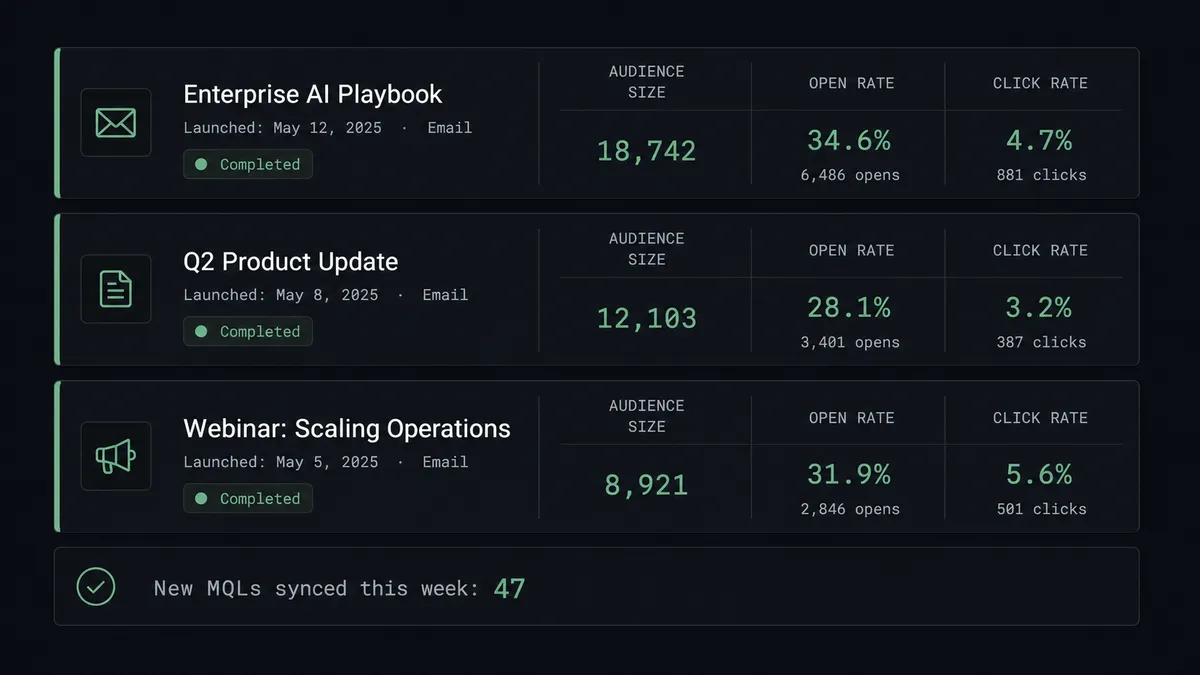
Monday performance digest. Every Monday morning, an agent retrieves the prior week’s campaign performance using Get Campaign Report for each active campaign. It formats open rates, click rates, and audience growth into a summary and posts it to #marketing-weekly. The marketing team sees last week’s numbers before they open Mailchimp.
Common questions
Is it free to connect Mailchimp Marketing and HubSpot on FlowRunner?
FlowRunner has a free plan with 100 executions a month, every integration included, and no credit card required, and new accounts get 14 days of Professional on top. Beyond the free plan, Growth starts at $45 per month. All tiers include unlimited users and workflows.
Can I self-host FlowRunner?
Yes. FlowRunner offers a free Community Edition for self-hosted single-instance deployments. Enterprise self-hosted includes multi-instance clustering and the full compliance suite.
Does the AI agent need my own API keys for Mailchimp and HubSpot?
Yes. FlowRunner uses a Bring Your Own Keys model. You connect your own Mailchimp API key and HubSpot API key or OAuth2 credentials. Your data stays in your accounts.
What happens when the agent is not sure which HubSpot contact to use?
When the agent detects a potential duplicate contact or conflicting record, it pauses and routes the question to a CRM admin via Slack or email with full context. The human decides. The agent resumes with that decision logged in the audit trail.
Can the AI agent send Mailchimp campaigns automatically?
The agent can send campaigns automatically to small audiences. For campaigns above a configurable threshold (for example, 5,000 subscribers), the agent routes approval through Slack before sending. Large deployments have a human checkpoint.
What is the difference between FlowRunner and Zapier for this connection?
Zapier executes a fixed sequence of steps. FlowRunner runs an AI agent that reads data, reasons about it, picks the right actions, and decides when to involve a human. Zapier has no native human-in-loop capability; FlowRunner’s human oversight is a callable tool the agent invokes based on its own judgment.
Getting started
FlowRunner has a free plan with 100 executions a month, every integration included, and no credit card required, and new accounts get 14 days of Professional on top. Corporate email required; no Gmail or Yahoo addresses.
Connect both integrations from the FlowRunner integrations catalog:
Start your free trial at flowrunner.ai or book a 30-minute walkthrough at calendly.com/flowrunner/intro to see the Mailchimp-HubSpot agent running on real data.
Frequently asked questions
Is it free to connect Mailchimp Marketing and HubSpot on FlowRunner?
FlowRunner has a free plan with 100 executions a month, every integration included, and no credit card required, and new accounts get 14 days of Professional on top. Beyond the free plan, Growth starts at $45 per month. All tiers include unlimited users and workflows.
Can I self-host FlowRunner?
Yes. FlowRunner offers a free Community Edition for self-hosted single-instance deployments. Enterprise self-hosted includes multi-instance clustering and the full compliance suite.
Does the AI agent need my own API keys for Mailchimp and HubSpot?
Yes. FlowRunner uses a Bring Your Own Keys model. You connect your own Mailchimp API key and HubSpot API key or OAuth2 credentials. Your data stays in your accounts.
What happens when the agent is not sure which HubSpot contact to use?
When the agent detects a potential duplicate contact or conflicting record, it pauses and routes the question to a CRM admin via Slack or email with full context. The human decides. The agent resumes with that decision logged in the audit trail.
Can the AI agent send Mailchimp campaigns automatically?
The agent can send campaigns automatically to small audiences. For campaigns above a configurable threshold (for example, 5,000 subscribers), the agent routes approval through Slack before sending. Large deployments have a human checkpoint.
What is the difference between FlowRunner and Zapier for this connection?
Zapier executes a fixed sequence of steps. FlowRunner runs an AI agent that reads data, reasons about it, picks the right actions, and decides when to involve a human. Zapier has no native human-in-loop capability; FlowRunner's human oversight is a callable tool the agent invokes based on its own judgment.