Klaviyo + Typeform: Every Response Becomes a Subscribed Profile
Connect Klaviyo and Typeform so every form submission upserts a profile and records consent, with an AI agent holding sensitive answers for human review before anything reaches Klaviyo.
How do you connect Klaviyo to Typeform?
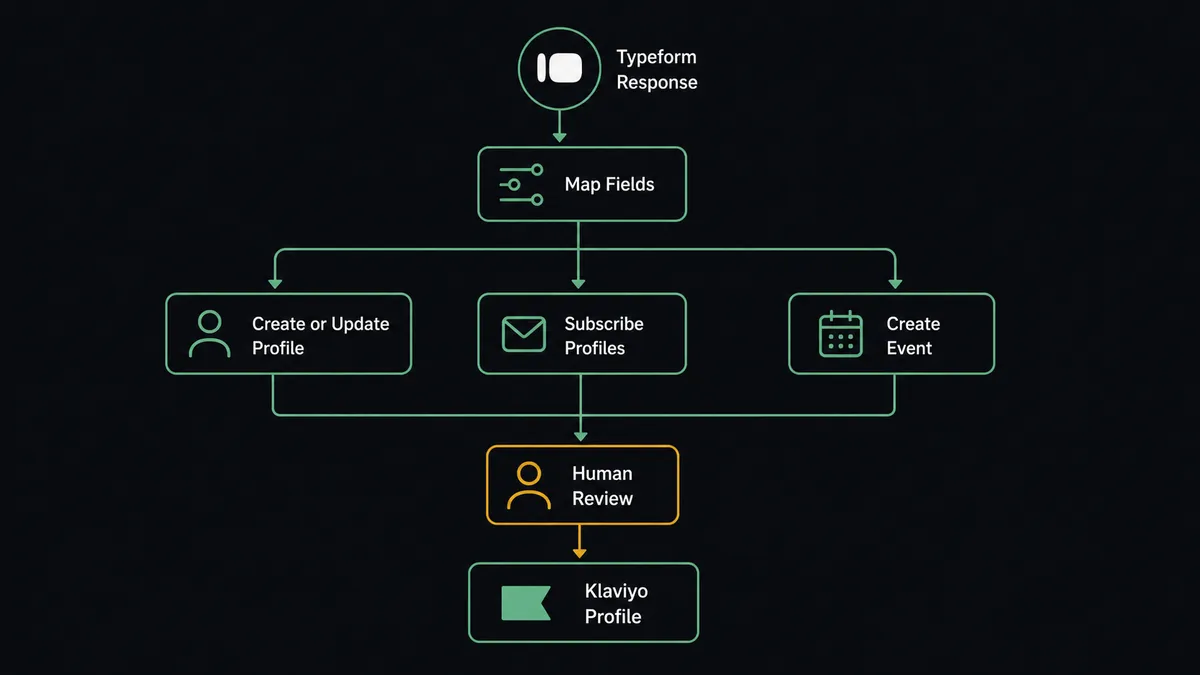
Get Form Responses in Typeform feeds Create or Update Profile in Klaviyo, so every new form submission upserts a profile with the respondent’s answers, and Subscribe Profiles records consent when the form’s opt-in question was checked. FlowRunner is a visual AI-agent orchestration platform where automations run autonomously and pause for human judgment on the steps that carry real consequence. The same connection can run as an AI agent that reads each submission, decides how to route it, and pauses for a human when a response contains healthcare or financial information before that data ever reaches Klaviyo.
The problem it solves
Marketing ops teams collect a lot through Typeform: webinar signups, client intake forms, support surveys, product feedback. Someone still has to move that data into Klaviyo by hand, export responses, match them to existing profiles, decide who gets subscribed and who doesn’t, and remember which list requires double opt-in. On a busy week, that queue backs up. A registrant who filled out a form on Monday might not get added to the campaign until Thursday, and by then the webinar reminder has already gone out without them.
The bigger risk sits in consent. Someone checks a box on a form, and days later a person on the marketing team has to translate that checkbox into a Klaviyo subscription, correctly, every time. Miss it and you either email someone who didn’t opt in or fail to email someone who did. When a form response contains something sensitive, healthcare details on an intake form, financial figures on an application, there’s often no process at all for catching that before it lands in a marketing platform. It falls through the cracks because nobody built a step to catch it.
How it works: the connection
The agent polls Get Form Responses on the Typeform form you choose. Each new submission carries the respondent’s answers: name, email, and whatever custom questions the form asks. The agent reads the opt-in question if the form has one, then calls Create or Update Profile in Klaviyo, which upserts by identifier so the same person’s second submission updates their existing profile instead of creating a duplicate.
If the opt-in question was checked, Subscribe Profiles records explicit SUBSCRIBED consent for email or SMS, honoring double opt-in where the list requires it. This is a distinct operation from just adding someone to a list, so the audit trail shows exactly when and how consent was given. The agent then calls Create Event to log the submission, Completed Intake Form or Registered for Webinar depending on the form, which is the event that fires the matching Klaviyo flow and updates any segment built around it. A confirmation posts to the marketing channel so the team sees the pipeline running without checking Klaviyo directly.
Can an AI agent run it? (and why a human stays in the loop)
This is not a sync tool copying fields from one box to another. The agent reads each Typeform response, reasons about what it contains, and calls Klaviyo’s actions as tools in whatever order the situation calls for. It has Create or Update Profile, Subscribe Profiles, and Create Event available, and it decides which to invoke and when, based on the answers in front of it.
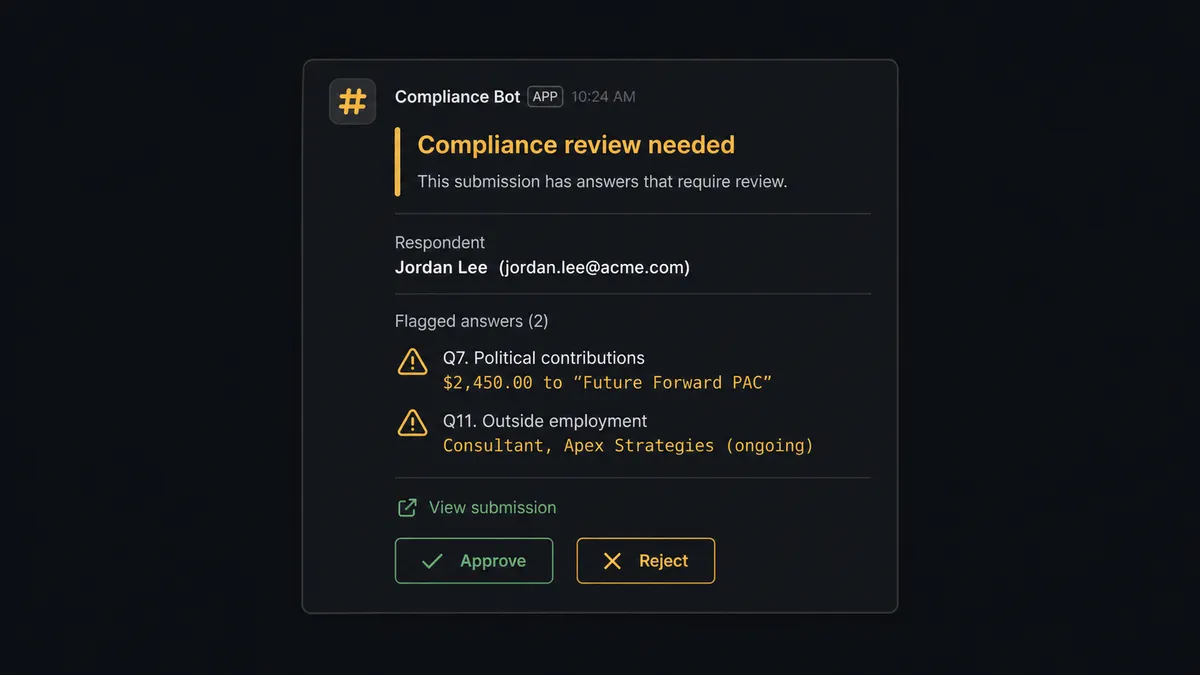
The decision to involve a human isn’t a hardcoded keyword filter. When a response includes language that reads as healthcare or financial information, an intake form answer describing a medical condition, a loan application listing an income figure, the agent recognizes the pattern and holds the submission instead of pushing it into Klaviyo automatically. It packages the context a reviewer needs: the respondent’s name, which fields triggered the flag, and a link to view the full submission, then sends it to the designated reviewer in Slack: “New intake form submission from [Name] contains information that may require legal or compliance review before processing. View submission here: [link]. Approve forwarding to the next step.” The reviewer approves or rejects. On approval, the agent resumes and calls Create or Update Profile, Subscribe Profiles, and Create Event in sequence. On rejection, the submission stays out of Klaviyo entirely. The decision, the reviewer’s identity, and the timestamp are captured in the audit trail.
This is the digital andon cord in practice. The agent runs the routine cases end to end and stops the line the moment a submission carries real consequence. It is not a sync tool. The agent knows when to stop and ask.
FlowRunner vs Zapier
Zapier is genuinely good at the basic version of this connection. It has native Klaviyo and Typeform integrations, a simple visual builder, and non-technical marketers can wire up a “new response creates a profile” Zap in a few minutes. For a straightforward, no-branching sync, Zapier is a reasonable, well-worn choice.
Where it stops is the sensitive-data problem. Zapier can add a filter step or a conditional path, but that filter is a rule someone writes once and forgets, not a judgment call made fresh on each submission’s actual content. There’s no native concept of pausing a multi-step Zap for a person to review context and respond, then resuming from where it left off.
| Capability | FlowRunner | Zapier |
|---|---|---|
| Human-in-the-loop | Native: agent invokes a human review flow as a tool, mid-run | Bolt-on at best: filters and manual review outside the Zap |
| Users included | Unlimited on every tier | Priced per user on team plans |
| AI provider keys | BYOK: connect your own OpenAI or Anthropic key | Built-in AI credits metered by Zapier |
| Self-hosting | Available on Enterprise | Not offered |
| Pricing model | Transparent workflow-based execution tiers | Per-task pricing that scales with volume in ways that surprise teams |
Before and after
| Category | Before | After |
|---|---|---|
| Profile updates | Customer data reaches Klaviyo through periodic CSV imports, so segments run on stale state | Typeform submissions upsert profiles through Create or Update Profile within minutes of submission |
| Consent tracking | Who opted in from a form lives in a spreadsheet or someone’s memory | Subscribe Profiles records explicit SUBSCRIBED consent as a distinct, audited operation |
| Response processing | Staff export Typeform responses and manually create records in each downstream system | Get Form Responses feeds the agent directly; profile, consent, and event fire from one submission |
| Event registration | Webinar registrants get added to email lists by hand after each registration batch | Each registrant becomes a subscribed profile and enters the nurture flow within the hour |
| Sensitive data handling | All form answers flow downstream regardless of content | Healthcare or financial answers are held for compliance review before any profile is touched |
What you can build
Webinar registration to subscribed segment. Every Typeform registrant becomes a Klaviyo profile with consent recorded and a Registered for Webinar event, so the reminder flow and post-event nurture both fire off the same data.
Client intake that starts the relationship correctly. A new client fills out an intake form, the agent creates or updates their Klaviyo profile, records consent, and logs Completed Intake Form to trigger a welcome flow, with any sensitive answer held for review first.
Multi-language survey to region-specific segments. Responses from Auto-Translate Form variants in Spanish, French, and German all route through the same profile-and-event mapping, so regional segments build themselves regardless of which language version someone filled out.
Suppression sync from an opt-out form. A dedicated Typeform “stop contacting me” form feeds Unsubscribe Profiles directly, so a request typed into a form becomes a recorded consent change instead of a message someone has to remember to act on.
Common questions
Is it free to connect Klaviyo and Typeform on FlowRunner? FlowRunner has a free plan with 100 executions a month, every integration included, and no credit card required, and new accounts get 14 days of Professional on top. After that, Growth runs $45/mo for 12,000 executions, with unlimited users and workflows on every tier.
Can I self-host the Klaviyo Typeform connection? Self-hosting is available on the Enterprise tier for teams that need it. The cloud tiers (Growth, Professional, Business) run this flow hosted, with audit trails and compliance features scaling up at Professional and Business.
Does the agent need my own OpenAI key? Yes. FlowRunner uses a bring-your-own-key model for AI providers, so you connect your own OpenAI, Anthropic, or other provider key and control that spend directly.
What happens when the agent isn’t sure a Typeform response is sensitive? The agent errs toward the human gate. If a response contains language that could plausibly be healthcare or financial information, it routes to the compliance reviewer instead of guessing and pushing the data downstream.
Does FlowRunner overwrite my existing Klaviyo consent records? No. Subscribe Profiles and Unsubscribe Profiles are explicit consent operations, separate from list membership, so the agent only changes consent when a Typeform opt-in answer says to.
Can I limit this to one specific Typeform form instead of my whole account? Yes. The trigger polls Get Form Responses against the form ID you choose, so a webinar registration form and a client intake form can run entirely separate Klaviyo mappings.
Getting started
FlowRunner has a free plan with 100 executions a month, every integration included, and no credit card required, and new accounts get 14 days of Professional on top. Connect Klaviyo and Typeform, pick the form you want to watch, and the agent handles the rest, holding sensitive submissions for a person to clear.
Start at flowrunner.ai or book time to walk through your specific forms at calendly.com/flowrunner/intro.
Frequently asked questions
Is it free to connect Klaviyo and Typeform on FlowRunner?
FlowRunner has a free plan with 100 executions a month, every integration included, and no credit card required, and new accounts get 14 days of Professional on top. After that, Growth runs $45/mo for 12,000 executions, with unlimited users and workflows on every tier.
Can I self-host the Klaviyo Typeform connection?
Self-hosting is available on the Enterprise tier for teams that need it. The cloud tiers (Growth, Professional, Business) run this flow hosted, with audit trails and compliance features scaling up at Professional and Business.
Does the agent need my own OpenAI key?
Yes. FlowRunner uses a bring-your-own-key model for AI providers, so you connect your own OpenAI, Anthropic, or other provider key and control that spend directly.
What happens when the agent isn't sure a Typeform response is sensitive?
The agent errs toward the human gate. If a response contains language that could plausibly be healthcare or financial information, it routes to the compliance reviewer instead of guessing and pushing the data downstream.
Does FlowRunner overwrite my existing Klaviyo consent records?
No. Subscribe Profiles and Unsubscribe Profiles are explicit consent operations, separate from list membership, so the agent only changes consent when a Typeform opt-in answer says to.
Can I limit this to one specific Typeform form instead of my whole account?
Yes. The trigger polls Get Form Responses against the form ID you choose, so a webinar registration form and a client intake form can run entirely separate Klaviyo mappings.