Gong + Slack: Every Call Recapped in the Team Channel
Connect Gong and Slack so every finished call lands as a recap in the team channel, and run it as an AI agent that pauses for a compliance owner before any GDPR erasure goes through.
How do you connect Gong to Slack?
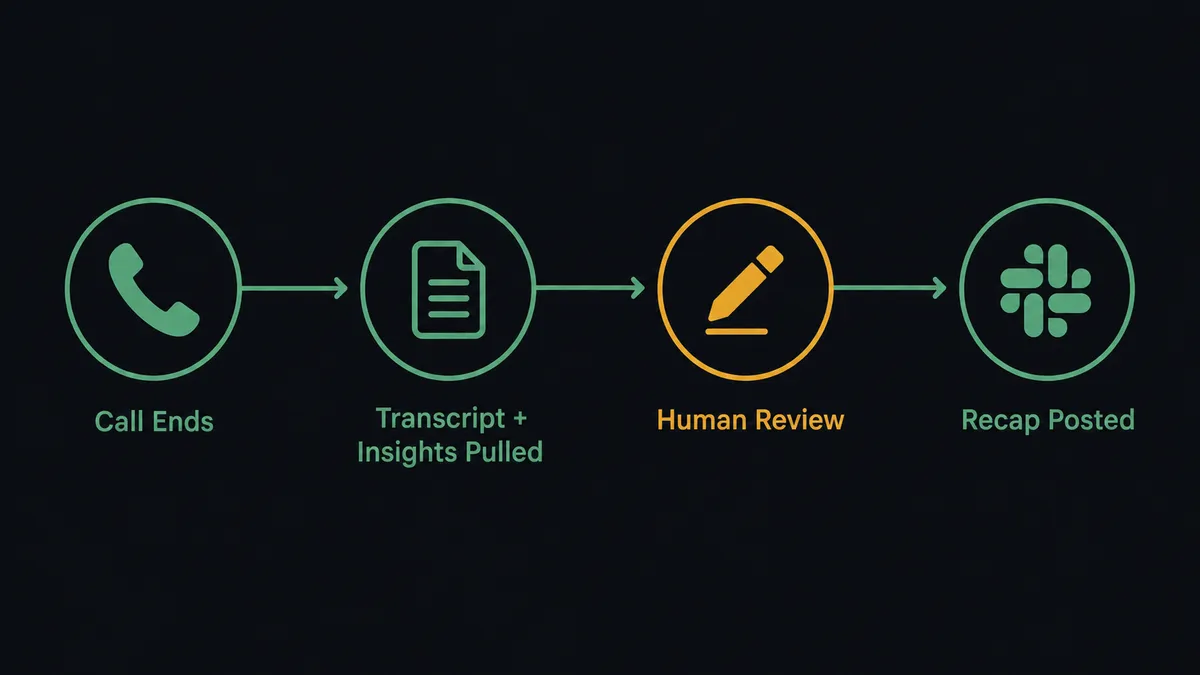
Connect Gong’s On New Call trigger to Slack’s Send Message to Channel action: the moment a call finishes processing in Gong, FlowRunner pulls the transcript and AI-derived insights with Get Call Transcripts and Get Extensive Call Data, then posts a written recap to the account owner’s Slack channel. FlowRunner is a visual AI-agent orchestration platform where automations run autonomously and pause for human judgment on the steps that carry real consequence. The same connection can run as an AI agent that reads each call, decides what belongs in the recap, and separately knows to pause and ask a compliance owner in Slack before it ever deletes a person’s data. You can wire this as a straight trigger-to-action sync, or let the agent make the judgment calls.
The problem it solves
Right now, someone on the sales or RevOps team has to make time to actually listen to calls, or trust that reps will summarize their own conversations honestly. Account owners miss what happened on calls they weren’t personally on. Managers export activity stats by hand to build a leaderboard nobody trusts because it’s a week stale by the time it’s posted. And when a GDPR or CCPA erasure request comes in, someone has to remember to check what Gong actually holds for that person before deleting it, which is the kind of manual step that falls through the cracks precisely because it’s rare and irreversible.
None of this is a Gong problem or a Slack problem on its own. It’s a gap between the two systems. The insight lives in Gong. The team that needs it lives in Slack. Someone has to be the bridge, and right now that someone is a person copying information from one tab to another, or worse, not doing it at all because there’s no time.
How it works: the connection
The core flow starts with Gong’s On New Call trigger, which fires when a call finishes processing and can be scoped to a single workspace with a configurable poll interval. From there, the agent calls Get Call Transcripts for the speaker-attributed text and Get Extensive Call Data for the AI-derived topics, key points, and highlights. That gets packaged into a written recap and delivered with Slack’s Send Message to Channel, landing in the account owner’s channel minutes after the call ends, or routed privately with Send Direct Message when the recap is for one person rather than a team.
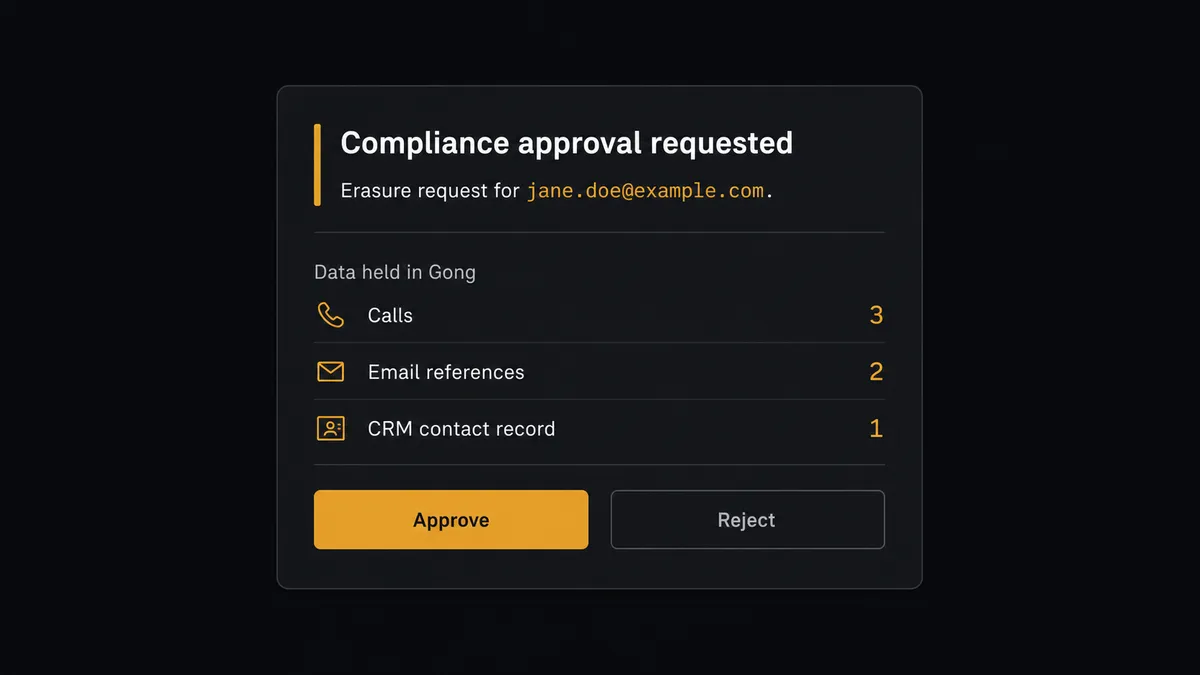
The same connection runs a second, quieter workflow. When a privacy request comes in for a person’s data, the agent calls Get Data for Email or Get Data for Phone to see everything Gong holds for them, referenced by their email or phone number. That data preview is the input for the next decision, which is not one the agent makes alone.
Can an AI agent run it? (and why a human stays in the loop)
This is not a sync tool bolted onto a trigger. The agent reads what Get Data for Email returns, reasons about what it’s looking at, and decides on its own that a GDPR or CCPA erasure is not a step it should complete unattended. Erase Data for Email and Erase Data for Phone are permanent. There’s no undo. So instead of running the deletion, the agent invokes a human-in-loop flow as a callable tool, the same way it would call any other Slack action.
The agent posts the erasure request to a compliance owner in Slack with full context: who the request is for, what Gong currently holds for them (the exact output of Get Data for Email), and two options, Approve and Reject, delivered as Block Kit buttons. The compliance owner reviews it from their phone if that’s where they are. Their click fires Slack’s On Block Action trigger, which resumes the workflow with the decision attached. On approval, the agent runs Erase Data for Email or Erase Data for Phone and logs it. On rejection, nothing runs, and that’s logged too. The decision, the decider’s identity, and the timestamp all land in the audit trail.
This is not a hardcoded rule like “always ask before deleting.” The agent evaluates the specific request, checks what’s actually at stake, and makes the call to escalate because the action is irreversible, not because a threshold told it to. That’s the digital andon cord: the agent keeps pulling recaps and building reports on its own, and it stops the line the moment it hits something a person needs to own.
FlowRunner vs Zapier
Zapier is a genuinely easy way to fire a Slack message when a Gong event happens, and for RevOps teams already living in Zapier for lightweight notifications, that simplicity is real and worth acknowledging. Where it runs out of road is anything that needs judgment applied to the data in between the trigger and the action, especially a step like an irreversible data erasure that shouldn’t run on a fixed rule.
| Capability | FlowRunner | Zapier |
|---|---|---|
| Human-in-the-loop on the consequential step | Native: the agent decides when to pause and routes full context to a person | Not built in; requires a separate manual approval app bolted on |
| Users included | Unlimited on every tier | Priced per user on most plans |
| AI provider access | Bring your own key, any supported provider | Tied to Zapier’s built-in AI steps |
| Self-hosting | Community Edition free, Enterprise for multi-instance | Cloud only |
| Pricing model | Transparent workflow-based tiers with a clear execution ceiling | Per-task pricing that scales with volume in ways that are easy to misjudge |
Before and after
| Metric | Before | After |
|---|---|---|
| Call review | Someone listens to the recording to find what mattered | The agent pulls the transcript and insights the moment the call is ready |
| Insight delivery | AI-derived topics and key points stay inside Gong | Recaps land in the account owner’s Slack channel automatically |
| Activity reporting | Rep call counters are exported and pasted into a leaderboard by hand | Get Aggregated Activity reads the numbers and appends them without manual export |
| Erasure requests | Someone has to remember to check what Gong holds before deleting anything | The agent checks automatically and routes the decision to a compliance owner before anything is deleted |
| Decision trail | Approvals happen over email or in someone’s memory | Every approval or rejection is captured with identity and timestamp in the audit trail |
What you can build
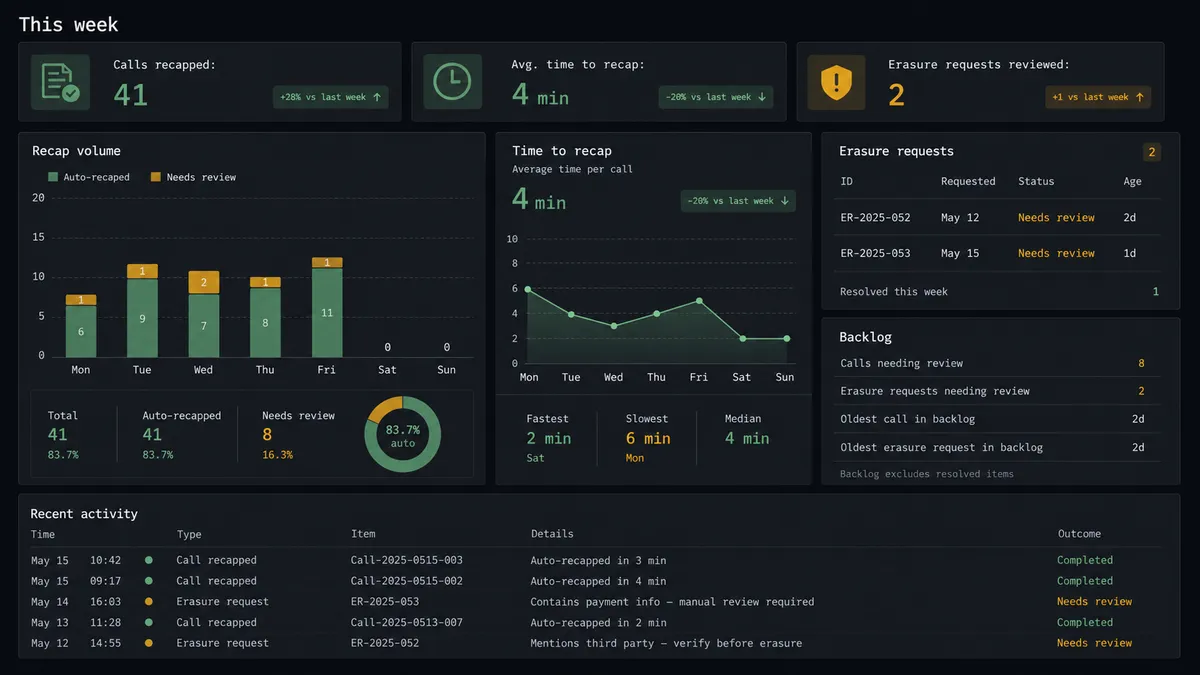
Automatic call recaps by account owner. On New Call triggers Get Call Transcripts and Get Extensive Call Data, and the agent posts the recap with Send Direct Message so the right owner gets it without checking a shared channel.
A weekly rep activity leaderboard. The agent calls Get Aggregated Activity on a schedule and posts a formatted summary to a team channel with Send Message to Channel, replacing the manual export-and-paste routine.
GDPR and CCPA request handling with a compliance gate. Get Data for Email feeds a Slack approval message with On Block Action buttons; only an approved request reaches Erase Data for Email.
Scorecard review digests. The agent pulls Get Answered Scorecards results and posts a summary to a coaching channel so managers see review activity without opening Gong.
Live meeting status checks. Get Meeting Integration Status runs before Create Meeting, and any failure gets flagged in Slack so a scheduled call doesn’t silently fail to record.
Getting started
FlowRunner has a free plan with 100 executions a month, every integration included, and no credit card required, and new accounts get 14 days of Professional on top. Connect Gong and Slack, pick the trigger that fits your team, and add the human-in-loop step for anything irreversible. Start building at flowrunner.ai, or book time to walk through it at calendly.com/flowrunner/intro.
Frequently asked questions
Is it free to connect Gong and Slack on FlowRunner?
Yes to start. FlowRunner has a free plan with 100 executions a month, every integration included, and no credit card required, and new accounts get 14 days of Professional on top.
Can I self-host this Gong and Slack workflow?
Yes. FlowRunner's Community Edition runs self-hosted for free on a single instance, and the Enterprise tier adds multi-instance clustering plus full audit retention for teams that need compliance guarantees on top of self-hosting.
Does the agent need my own OpenAI key?
FlowRunner uses a bring-your-own-key model for AI providers, so you connect the provider and model you already use rather than routing through a shared key you don't control.
What happens when the agent isn't sure about an erasure request?
It doesn't guess. The agent pauses before running Erase Data for Email or Erase Data for Phone, posts the request and a preview of what Gong holds to a compliance owner in Slack, and waits for an Approve or Reject click before it acts.
Does this only fire on new calls, or can I recap older ones too?
The live flow runs on the On New Call trigger, which fires as each call finishes processing and can be scoped to a single Gong workspace with a configurable poll interval; older calls can still be pulled on demand with Get Call Transcripts and Get Extensive Call Data.