GoCardless QuickBooks Online Integration: Payouts to the Penny
Connect GoCardless and QuickBooks Online so every payout reconciles to its line items automatically, with an AI agent that pauses for human review before any refund or mismatched entry posts to the books.
How do you connect GoCardless to QuickBooks Online?
You connect GoCardless and QuickBooks Online by building a FlowRunner flow that fires on When a Payout Event Happens, pulls the payout’s line items with List Payout Items, and matches each one to an open invoice in QuickBooks Online before recording it with Create Payment. FlowRunner is a visual AI-agent orchestration platform where automations run autonomously and pause for human judgment on the steps that carry real consequence. The same connection runs as an AI agent that reconciles the clean lines on its own and pauses for a person on the refunds and mismatches that a straight sync would post blindly.
The problem it solves
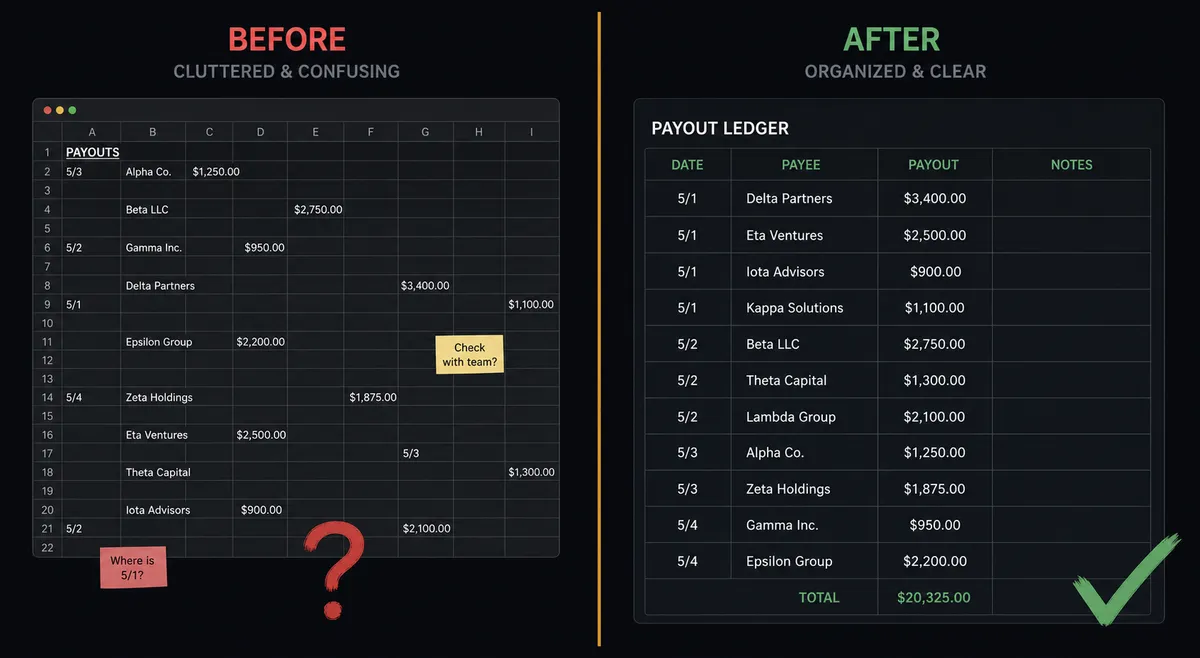
A GoCardless payout arrives as one lump sum, but it is made up of dozens or hundreds of individual payments, a handful of refunds, and a fee line. Someone on the finance team, usually a billing manager or an AP clerk, has to open the payout report, cross-reference every line against open invoices in QuickBooks Online, and enter each match by hand. When the payout is small this is annoying. When it is large, it is the kind of task that gets pushed to the end of the day and then to the next day, and invoices sit open past their due date while the cash has already landed.
Refunds inside a payout make it worse. A refund line reduces the payout total, but it is not the same as a clean payment and it should never be recorded the same way. If the person reconciling is moving fast, a refund line can get logged as a regular payment, or missed entirely, and the books stop matching the bank statement. The reconciliation that was supposed to take twenty minutes turns into an afternoon of chasing down which line is which, and the discrepancy usually surfaces at month-end close, which is the worst possible time to find it.
How it works: the connection
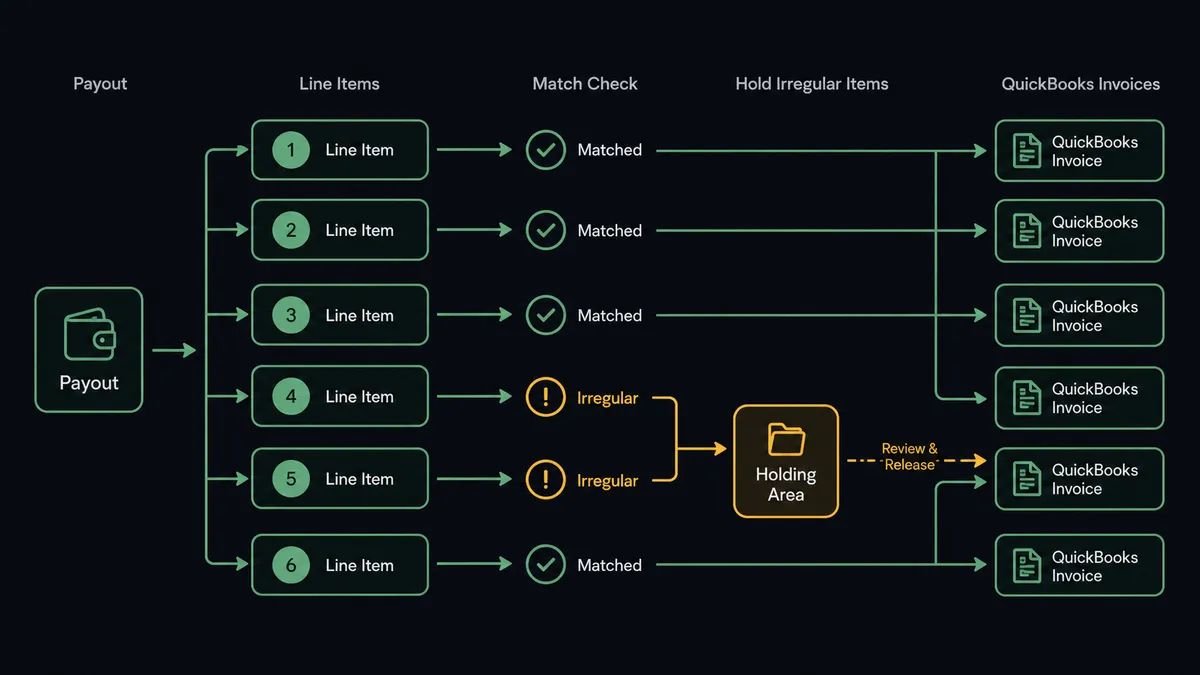
The flow starts when a payout settles into your bank account and When a Payout Event Happens fires in GoCardless. The agent calls Get Payout to read the total, then List Payout Items to pull every individual payment, refund, and fee that adds up to that total. This is the same line-item detail a person would otherwise pull manually from the GoCardless dashboard.
For each payment line, the agent calls QuickBooks Online List Invoices and Get Invoice to find the open invoice it belongs to. Once it confirms the match, it calls Create Payment in QuickBooks Online to record the amount and close the invoice. This is the core of the connection: GoCardless tells you what money arrived, and QuickBooks Online gets told exactly which invoice it paid off, line by line, instead of one unexplained deposit.
Not every line matches cleanly. A refund line item reduces the payout instead of adding to it, and an amount with no corresponding open invoice does not have anywhere obvious to go. The agent does not guess on either of these. It sets them aside for the check step described below, and only the lines it can confirm get recorded automatically.
Can an AI agent run it? (and why a human stays in the loop)
A straight sync would post the payout total and call it done, or it would try to record every line item as a payment regardless of whether it actually matches an invoice. An AI agent reads the payout the way a person would: it matches what it can confirm and stops on what it cannot.
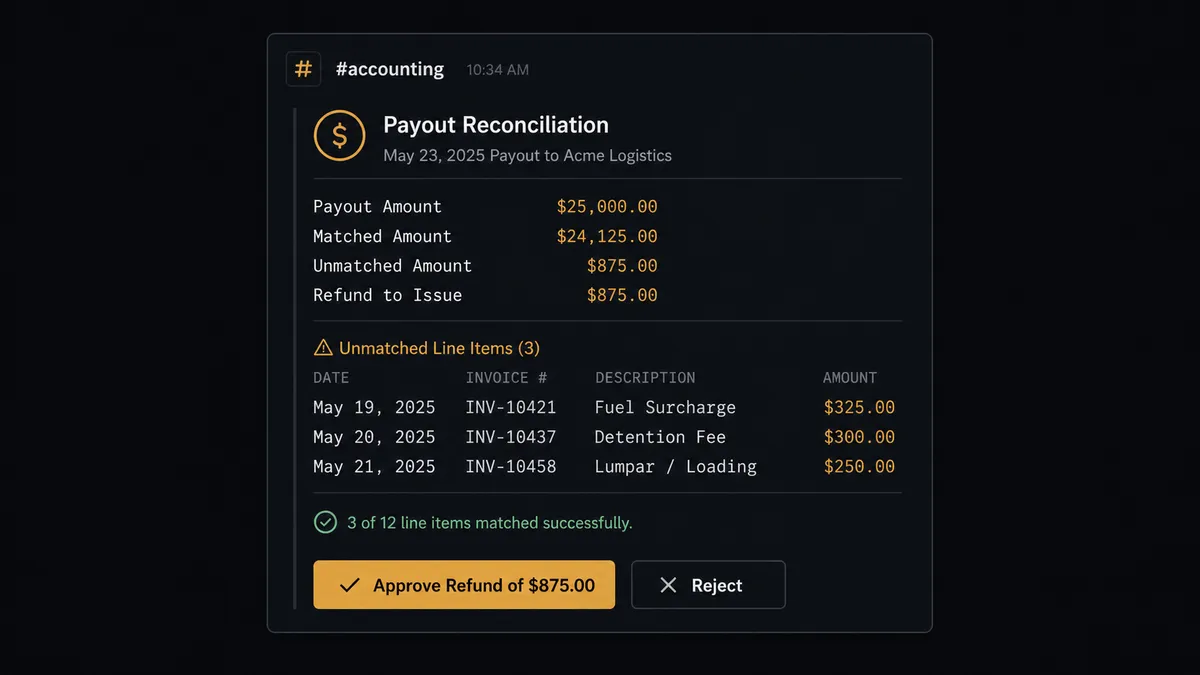
Here is what that looks like on a real payout. The agent reconciles 47 of 49 payment lines cleanly against open QuickBooks invoices and records each one with Create Payment. The remaining two lines are a $340 refund and an $890 payment with no matching invoice in QuickBooks. Rather than posting a guess or skipping them silently, the agent packages the full context: the payout total, the 47 clean matches already recorded, the refund amount and the original payment it ties back to, and the unmatched $890 with the customer name attached to the GoCardless record. It sends that package to the accounting manager through Slack: “Payout of $12,940 reconciled. 47 lines matched. 1 refund and 1 unmatched payment need a decision.” The manager reviews the two flagged lines, confirms the refund and tells the agent to create a new customer invoice for the unmatched payment. The agent calls GoCardless Create Refund and QuickBooks Create Invoice accordingly, and the approver’s identity and the decision are written to the audit trail.
This is not a fixed rule like “always flag refunds.” The agent’s instructions tell it what a clean match looks like, and it applies judgment to everything else: an $890 payment from a known long-standing customer with a clear reference might get flagged the same way as a first-time payer, because the invoice genuinely does not exist yet in QuickBooks and creating one automatically is a decision, not a lookup. This is the digital andon cord: the agent keeps the payout moving on the lines it can confirm and stops the line on the ones that need a person’s judgment.
FlowRunner vs Zapier
Zapier is a reasonable choice for teams that just want a payout notification to trigger a QuickBooks action. It connects the two systems quickly and it is genuinely easy to set up for a single, predictable step.
Where it runs out of road is the reconciliation itself. Zapier can catch a payout event, but matching dozens of line items to open invoices, distinguishing a refund from a payment, and deciding what to do with an amount that has no invoice yet is not something a fixed action sequence can reason through.
| Zapier | FlowRunner | |
|---|---|---|
| Line-item reconciliation | Can trigger on a payout event but does not evaluate individual line items against invoices. | Agent pulls List Payout Items and matches each line to a QuickBooks invoice before recording it. |
| Human-in-loop | Not available. Zaps run to completion or fail; no native pause-and-ask. | Native. The agent invokes a human-in-loop subflow as a callable tool and resumes after the decision. |
| Refund handling | Refund lines are not distinguished from payment lines without custom filter logic built and maintained by hand. | Agent recognizes refund lines during reconciliation and routes them through the same review gate as Create Refund. |
| Audit trail | Zap run history shows execution logs. No approver identity or decision record. | Every agent action, human decision, approver identity, and timestamp are captured in the audit trail. |
| Unlimited users | Zapier bills per seat at higher tiers. | All FlowRunner tiers include unlimited users and unlimited workflows. |
| BYOK AI | Zapier’s AI features use Zapier’s own AI. You cannot bring your own model. | Full BYOK. Bring your own keys from any AI provider. |
Zapier’s strength is a fast, simple trigger-to-action connection. FlowRunner’s case is the reconciliation itself, where the agent has to look inside the payout and decide what each line means before anything posts.
Before and after
| Category | Before | After |
|---|---|---|
| Payout reconciliation | Billing manager cross-references each payout line against open invoices by hand, usually in batches | Payout line items matched to QuickBooks invoices and recorded within minutes of settlement |
| Refund tracking | Refund lines inside a payout are easy to miss or log as regular payments | Agent recognizes refund lines during reconciliation and routes them through a review gate before anything posts |
| Unmatched amounts | Payments with no obvious invoice sit in a spreadsheet until someone investigates | Agent flags the unmatched amount immediately with the payout context attached, instead of surfacing at month-end close |
| Invoice status | Invoices stay open until someone runs the manual reconciliation sweep | Invoices marked paid automatically as soon as the matching payout line is confirmed |
| Audit trail | Payment entry timestamps exist. Approver identity for refunds and exceptions is not captured | Every match, refund, approver identity, and timestamp recorded in the audit trail |
What you can build
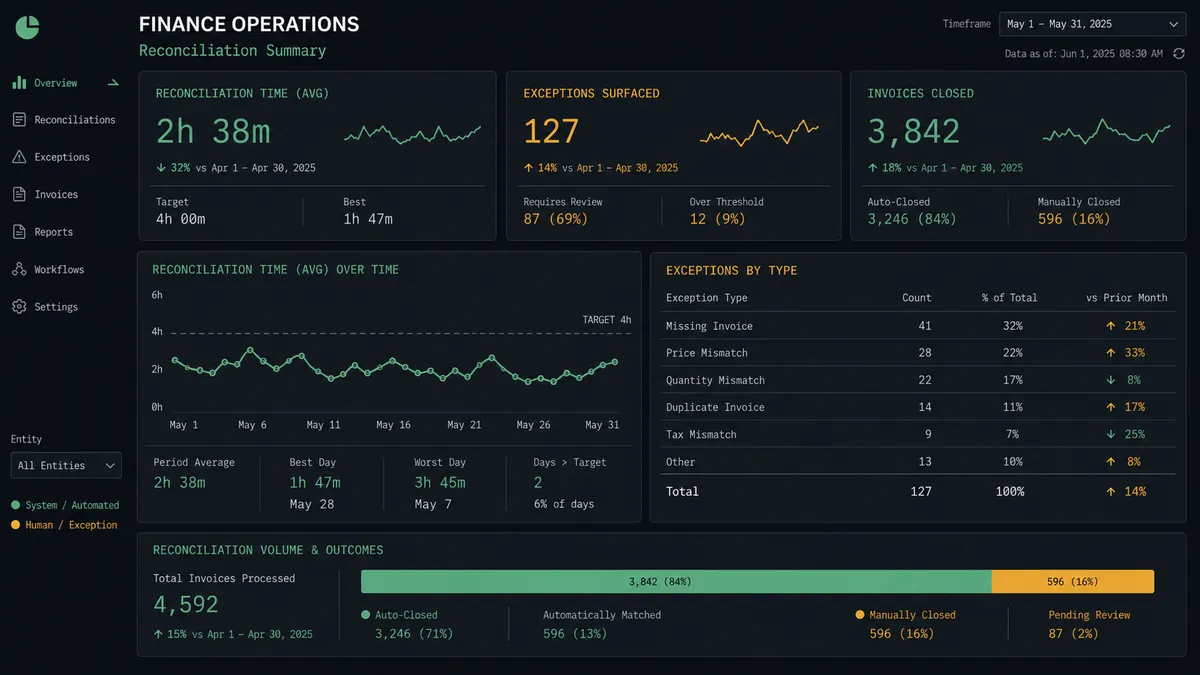
Payout reconciliation with exception routing. The agent pulls List Payout Items on every GoCardless payout, matches each line to an open QuickBooks invoice with Create Payment, and routes refunds and unmatched amounts to the accounting manager before anything posts. This is the primary flow described above.
Failed-payment recovery with QuickBooks visibility. When a Payment Event Happens fires on a failed collection, the agent checks whether the failure is retryable and calls Retry Payment where it is. For failures that stay unresolved, it updates the corresponding invoice status in QuickBooks Online so AR reporting reflects reality instead of showing a payment that never actually landed.
New subscriber onboarding into billing. The agent reads a batch of new subscribers, calls GoCardless Create Customer and Create Subscription to set up recurring Direct Debit, then calls QuickBooks Online Create Customer so the billing record exists on both sides from day one.
Refund processing under a review gate. When a refund is warranted, the agent packages the original payment, the amount, and the customer’s history, and routes it to a finance reviewer through Slack before calling GoCardless Create Refund. If the refund needs to be reflected against a QuickBooks invoice, the agent handles that update after approval, not before.
Monthly reconciliation summary. On a schedule, the agent pulls GoCardless List Payouts and cross-references QuickBooks Online List Payments to confirm every settled payout has a matching entry, then posts a summary of any gaps to the finance channel.
Common questions
Is it free to connect GoCardless and QuickBooks Online on FlowRunner?
FlowRunner has a free plan with 100 executions a month, every integration included, and no credit card required, and new accounts get 14 days of Professional on top. Beyond the free plan, Growth starts at $45 per month and includes unlimited users and workflows.
Can I self-host FlowRunner?
Yes. FlowRunner offers a free Community Edition for self-hosted single-instance deployments and an Enterprise self-hosted tier with multi-instance clustering and a full compliance suite.
Does the agent need my own OpenAI key?
FlowRunner uses a BYOK model. You bring your own key from whichever AI provider you prefer, and you are not locked into one model or vendor.
What happens when the agent cannot match a GoCardless payout line to a QuickBooks invoice?
The agent sets the unmatched line aside instead of guessing. It packages the payout breakdown and the unmatched amount, sends it to the accounting manager through Slack, and waits for a decision before posting anything against the books.
Can this connection handle refunds inside a payout, not just clean payments?
Yes. When a payout includes a refund line item, the agent recognizes it during reconciliation and routes it through the same human-in-loop step GoCardless uses for Create Refund, so a refund never posts without a person confirming it.
How is this different from reconciling GoCardless payouts in Zapier?
Zapier can move a payout notification into QuickBooks, but it cannot read the payout’s line items, decide which ones match an open invoice, and hold back the ones that do not. FlowRunner’s agent does that reasoning and only escalates the exceptions.
Getting started
FlowRunner has a free plan with 100 executions a month, every integration included, and no credit card required, and new accounts get 14 days of Professional on top. Corporate email required to start.
Connect both integrations from the FlowRunner integrations panel:
Start your workflow at flowrunner.ai. If you want to walk through the setup or discuss a specific reconciliation flow first, book a 30-minute intro at calendly.com/flowrunner/intro.
Frequently asked questions
Is it free to connect GoCardless and QuickBooks Online on FlowRunner?
FlowRunner has a free plan with 100 executions a month, every integration included, and no credit card required, and new accounts get 14 days of Professional on top. Beyond the free plan, Growth starts at $45 per month and includes unlimited users and workflows.
Can I self-host FlowRunner?
Yes. FlowRunner offers a free Community Edition for self-hosted single-instance deployments and an Enterprise self-hosted tier with multi-instance clustering and a full compliance suite.
Does the agent need my own OpenAI key?
FlowRunner uses a BYOK model. You bring your own key from whichever AI provider you prefer, and you are not locked into one model or vendor.
What happens when the agent cannot match a GoCardless payout line to a QuickBooks invoice?
The agent sets the unmatched line aside instead of guessing. It packages the payout breakdown and the unmatched amount, sends it to the accounting manager through Slack, and waits for a decision before posting anything against the books.
Can this connection handle refunds inside a payout, not just clean payments?
Yes. When a payout includes a refund line item, the agent recognizes it during reconciliation and routes it through the same human-in-loop step GoCardless uses for Create Refund, so a refund never posts without a person confirming it.
How is this different from reconciling GoCardless payouts in Zapier?
Zapier can move a payout notification into QuickBooks, but it cannot read the payout's line items, decide which ones match an open invoice, and hold back the ones that do not. FlowRunner's agent does that reasoning and only escalates the exceptions.