Connect GitHub to Notion: Every PR Decision Logged
Connect GitHub and Notion so pull request and release events write decision logs and release pages automatically, with a human approving the merges that matter.
How do you connect GitHub to Notion?
On Pull Request Opened and On Release Published events in GitHub drive Find or Create Database Item and Create Page actions in Notion, so every merge decision and every shipped release gets written into a workspace your team already reads. FlowRunner is a visual AI-agent orchestration platform where automations run autonomously and pause for human judgment on the steps that carry real consequence. The same connection can run as a script that always logs the same way, or as an AI agent that reads the PR, decides whether the merge is routine or risky, and pauses for an on-call engineer only on the ones that need a person.
The problem it solves
An engineering lead or release manager tracks pull request status and release history across three places that don’t talk to each other: GitHub’s own tabs, a Slack channel full of ad-hoc pings, and whatever notes someone remembered to write down. Reviewers get pulled in by a direct message, not a system. When a release ships, the changelog, the workflow status, and who approved what live in scattered DMs. Six months later, nobody can answer “why did we merge that PR with failing checks” without digging through chat history that may not even still exist.
Notion is where the team already keeps decisions, run books, and project trackers, but nothing writes to it automatically from GitHub. Someone has to manually copy PR details or release notes into a database after the fact, and that step gets skipped the moment things get busy. The record exists only when someone remembers to make it, which means the audit trail has gaps exactly where it matters most: contested merges and production releases.
How it works: the connection
The connection runs in one direction because Notion has no triggers in FlowRunner today, only actions. Every flow starts with a GitHub event and writes into Notion.
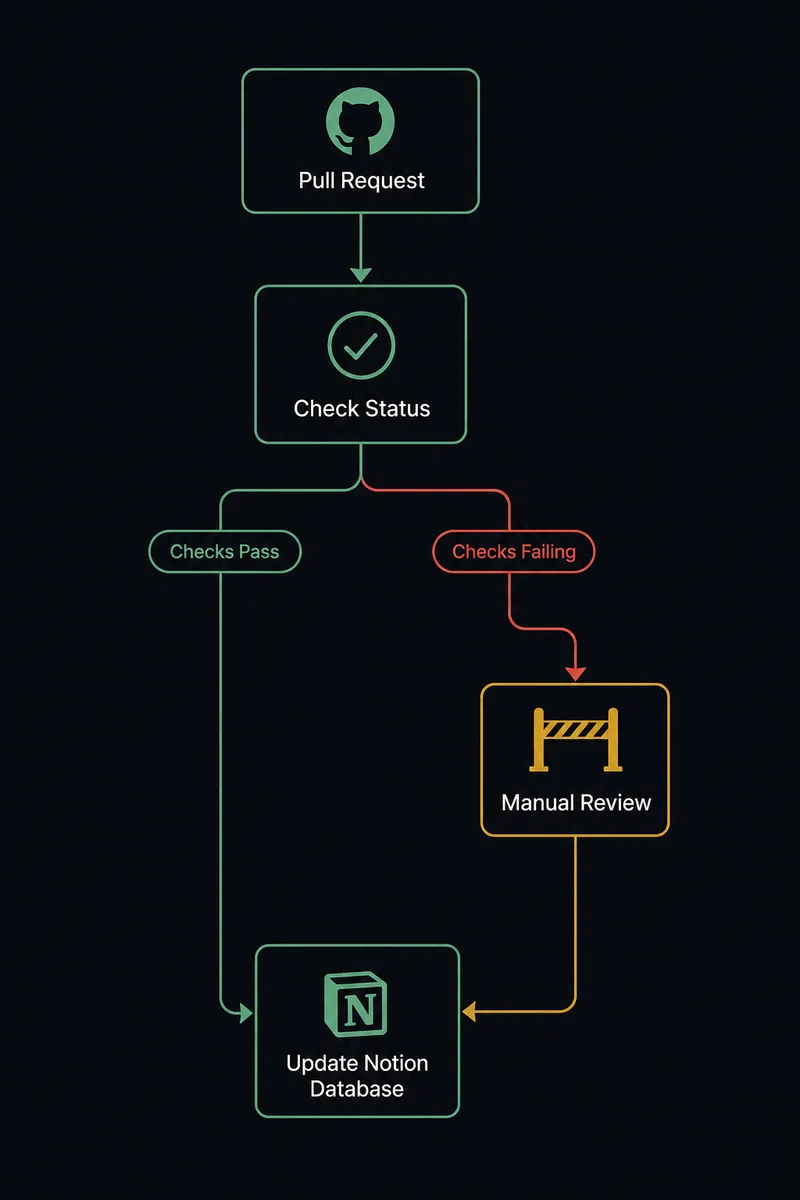
For pull requests, On Pull Request Opened fires when a new PR lands in a watched repository. The agent reads the PR title, author, branch, and touched files, then calls List Workflow Run Jobs to pull the current check status for that branch. It writes a Find or Create Database Item call into a Notion decision-log database, capturing the PR number, the branch, and whether checks are passing, so the record exists the moment the PR opens, not after someone remembers to log it.
For releases, On Release Published fires when a tagged release goes out. The agent calls List Workflows and List Workflow Runs to confirm the release pipeline ran clean, then calls Create Page in Notion with the changelog, the contributors, and the workflow run outcome. Anyone checking the release tracker reads one page instead of stitching together GitHub tabs and old Slack threads.
For issue intake, On Issue Opened or a chat report can drive Search Issues and Pull Requests to check for duplicates, then Find or Create Issue in GitHub and a matching Create Database Item in Notion, so the bug tracker and the team’s Notion workspace agree on what’s open.
Can an AI agent run it? (and why a human stays in the loop)
A sync tool would log every PR and every release the same way, on a fixed rule. An AI agent reads what’s actually in the pull request and decides for itself whether the merge needs a person before it happens. The agent calls List Workflow Run Jobs as a tool, reasons about the result, and only escalates when the situation calls for it: failing checks, a merge into a production branch, or a release tag that touches a system with real consequences if it breaks.
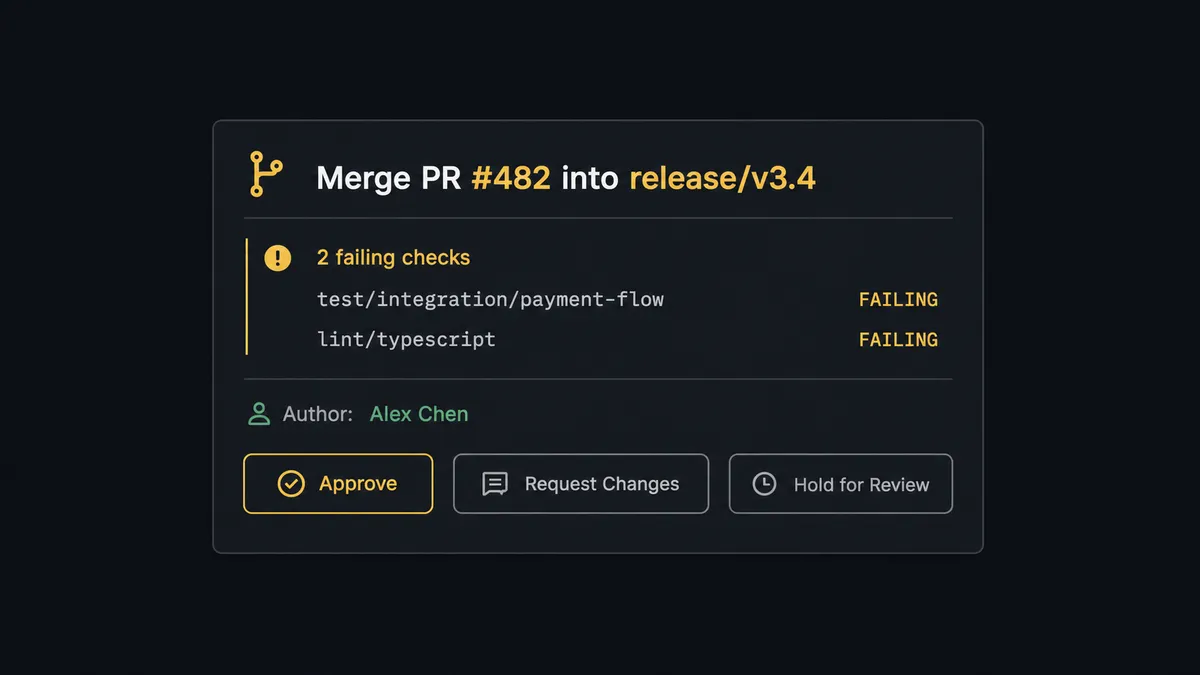
Say a PR targets the production release branch and two of five checks are failing. The agent does not call Merge Pull Request on its own. It invokes a human-in-loop flow as a tool, the same way it would call any GitHub action, and posts to the on-call engineer in Slack: “Merge PR #482 into release/v3.4. Failing checks: integration-tests, deploy-smoke-test. Author: [name]. Approve, request changes, or hold for review?” The engineer sees the PR number, the branch, and the exact failing jobs, not a generic “approval needed” ping. They decide. The agent resumes, calls Merge Pull Request if approved, and writes the decision, the approver’s identity, and the timestamp into the Notion decision log in the same step. A routine PR from a trusted contributor with all checks green never generates that message; it moves through untouched.
This is not a sync tool. The agent knows when to stop and ask, and when to just get out of the way. Prospects who’ve described this pattern back to us call it a digital andon cord: the line keeps moving on its own until something needs a human, then it stops and waits.
FlowRunner vs n8n
n8n is a strong choice for engineering teams that want to write custom logic around GitHub events and are comfortable building and maintaining that logic themselves. It has deep GitHub node support and a large community of workflow templates. Where it falls short for this specific pair is turning “should a human review this merge” into a judgment call instead of a hardcoded if-statement, and doing it without a developer maintaining the workflow.
| FlowRunner | n8n | |
|---|---|---|
| Human-in-loop on risky merges | Native: the agent decides when to escalate based on check status and branch, not a fixed rule | Requires building and maintaining a custom conditional node yourself |
| AI provider costs | BYOK: connect the OpenAI or Anthropic account you already have | Also BYOK, but agent reasoning logic is manually wired per workflow |
| Self-hosting | Enterprise tier supports self-hosted deployment with the same platform | Self-hosted is n8n’s default model, with more setup and maintenance overhead |
| Team access | Unlimited users and workflows on every cloud tier | Free and Pro tiers cap at limited users; Business tier required for team-scale access |
| Pricing model | Transparent workflow-based execution tiers ($45 to $999/mo) | Per-execution pricing that gets harder to predict as workflow volume grows |
Before and after
| Category | Before | After |
|---|---|---|
| PR and check status | Status hidden in tabs; checks, workflow runs, and release status live in separate UI tabs and chat threads | Status surfaced on event; PR events drive a single notification with check summary, failing jobs, and author context |
| Reviewer routing | Reviewers pinged manually by engineers after opening a PR or pushing a fix | Reviewers pulled in automatically with the change scope and risk context attached |
| Release tracking | Releases tracked in chat; release notes and approvals scattered across DMs with no single record | Releases recorded as a flow; release-published events drive the tracker, notifications, and audit record together |
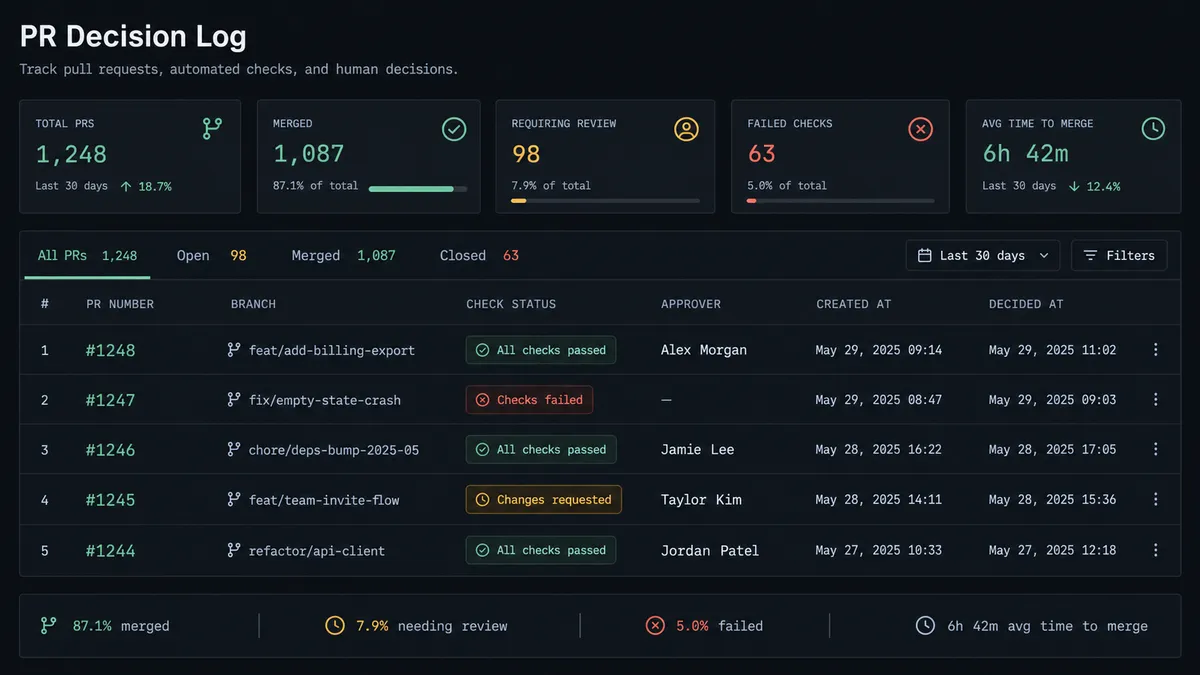
| Merge decision audit trail | No decision audit trail; escalation decisions made via Slack leave no searchable, organized record | Searchable decision log; every human escalation decision recorded with context in Notion |
What you can build
Merge decision log. On Pull Request Opened, the agent checks build status with List Workflow Run Jobs, escalates failing or production-branch merges to an on-call engineer in Slack, and logs every decision as a Notion database item with the approver and timestamp.
Release documentation, written the moment it ships. On Release Published, the agent confirms the pipeline ran clean via List Workflow Runs and calls Create Page in Notion with the changelog, contributors, and workflow status, so the release tracker updates itself.
Bug intake with a shared record. On Issue Opened or a chat report, the agent calls Search Issues and Pull Requests to check for duplicates, files a new issue with Find or Create Issue if none exists, and mirrors it into a Notion database item so support and engineering read from the same list.
Access change audit trail. On New Collaborator, the agent logs the addition as a Notion database item with the repository, the new collaborator, and the date, building a searchable access history without anyone updating a spreadsheet by hand.
Common questions
Is it free to connect GitHub and Notion on FlowRunner? Yes. FlowRunner has a free plan with 100 executions a month, every integration included, and no credit card required, and new accounts get 14 days of Professional on top.
Does Notion have triggers, or does the flow always start in GitHub? Notion has no triggers in FlowRunner today, only actions, so a GitHub event (a PR opening, a release publishing, an issue opening) always starts the flow and Notion receives the write.
Can I self-host this connection instead of running it in FlowRunner’s cloud? Yes. FlowRunner’s Enterprise tier supports self-hosted deployment for teams that need the workflow running on their own infrastructure.
Does the agent need my own OpenAI key? FlowRunner runs on a bring-your-own-key model, so you connect the AI provider account you already pay for rather than paying FlowRunner a markup on model usage.
What happens when the agent isn’t sure whether a merge is safe? It stages the merge instead of executing it, packages the PR number, branch, and the specific failing checks, and posts that context to the on-call engineer in Slack for an approve, request-changes, or hold decision.
Does every pull request need human approval? No. Routine PRs with passing checks move through without a pause; only merges with failing checks, production-branch targets, or repository deletions route to a human.
Getting started
FlowRunner has a free plan with 100 executions a month, every integration included, and no credit card required, and new accounts get 14 days of Professional on top. Build the flow with the merge decision log or the release documentation pattern above, add the human-in-loop step on the merges that carry risk, and turn it on against a real repository. Start at flowrunner.ai or book a walkthrough at calendly.com/flowrunner/intro.
Frequently asked questions
Is it free to connect GitHub and Notion on FlowRunner?
Yes. FlowRunner has a free plan with 100 executions a month, every integration included, and no credit card required, and new accounts get 14 days of Professional on top.
Does Notion have triggers, or does the flow always start in GitHub?
Notion has no triggers in FlowRunner today, only actions, so a GitHub event (a PR opening, a release publishing, an issue opening) always starts the flow and Notion receives the write.
Can I self-host this connection instead of running it in FlowRunner's cloud?
Yes. FlowRunner's Enterprise tier supports self-hosted deployment for teams that need the workflow running on their own infrastructure.
Does the agent need my own OpenAI key?
FlowRunner runs on a bring-your-own-key model, so you connect the AI provider account you already pay for rather than paying FlowRunner a markup on model usage.
What happens when the agent isn't sure whether a merge is safe?
It stages the merge instead of executing it, packages the PR number, branch, and the specific failing checks, and posts that context to the on-call engineer in Slack for an approve, request-changes, or hold decision.
Does every pull request need human approval?
No. Routine PRs with passing checks move through without a pause; only merges with failing checks, production-branch targets, or repository deletions route to a human.