DocuSign Slack Integration: Declined Contracts Ping the Right Human
Connect DocuSign and Slack so completed and declined envelopes post automatically, or run it as an AI agent that escalates high-value declines to a sales manager and waits for a decision.
How do you connect DocuSign to Slack?
Connect DocuSign to Slack by firing a workflow on On Envelope Completed or On Envelope Declined, then using Send Message to Channel to post the outcome, deal details, and any next-step buttons directly into a channel like #revenue-ops. FlowRunner is a visual AI-agent orchestration platform where automations run autonomously and pause for human judgment on the steps that carry real consequence. The same connection can run as an AI agent that reads the deal value and signer history, decides whether a decline needs a manager’s judgment, and invokes a human-in-loop Slack message only on the ones that do.
The problem it solves
A signature lands in DocuSign and the sales rep finds out whenever they next check their inbox, which might be immediately or might be tomorrow morning. A decline is worse: nobody watches the DocuSign dashboard for rejected envelopes, so a $48,000 deal can sit declined for a day or two before the deal owner even knows something went wrong. By the time someone notices, the signer has moved on, or a competitor has already called.
This is not a discipline problem. It is a visibility problem. DocuSign knows exactly what happened to every envelope the moment it happens. Slack is where your revenue team already lives, watching for exceptions and making decisions. Nothing connects the two by default, so someone has to manually check DocuSign, manually decide who needs to know, and manually type a Slack message describing what they found. That manual bridge is where time back gets lost and where declined deals fall through the cracks.
How it works: the connection
Two DocuSign triggers drive this connection, and each maps to a different Slack behavior.
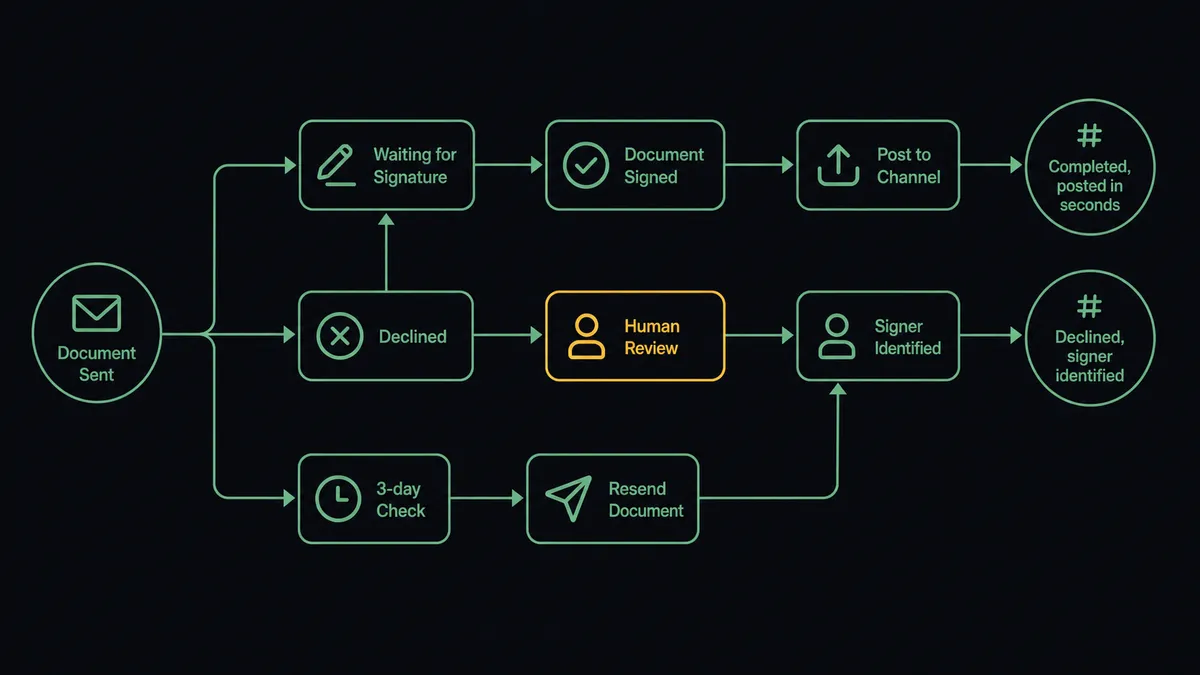
- On Envelope Completed fires the moment the last required signature lands. The agent calls Download Document to save the executed PDF, then runs Send Message to Channel to post a confirmation to #revenue-ops: company name, deal value, and deal ID, all within seconds of the signature.
- On Envelope Declined fires when a recipient explicitly rejects the contract. The agent calls Get Envelope Recipients to identify exactly who declined, then posts to the deal owner’s channel with the signer’s name and a direct link to the DocuSign record.
- For stalled envelopes, a scheduled check calls Get Envelope Status. If a document sent days ago is still pending, the agent runs Resend Envelope and posts a Slack message asking the rep whether they want a personal follow-up email sent as well.
Every one of these is a real Slack message with real deal context, not a generic “something happened in DocuSign” ping. The deal owner reads one line and knows exactly what to do next.
Can an AI agent run it? (and why a human stays in the loop)
A straightforward trigger-action connection treats every decline the same way: post a notification, move on. But a $2,400 renewal declined by a customer who always negotiates terms first is not the same situation as a $48,000 new-logo contract declined with no explanation. Treating them identically means either spamming the team with noise or missing the deal that actually needed attention.
The AI agent reads the decline. It checks the deal value against the account’s history and looks at whether this signer has declined before. If the pattern matches a routine renegotiation from a known account, the agent posts the standard notification and lets the rep handle it in the normal course of business. No escalation needed.
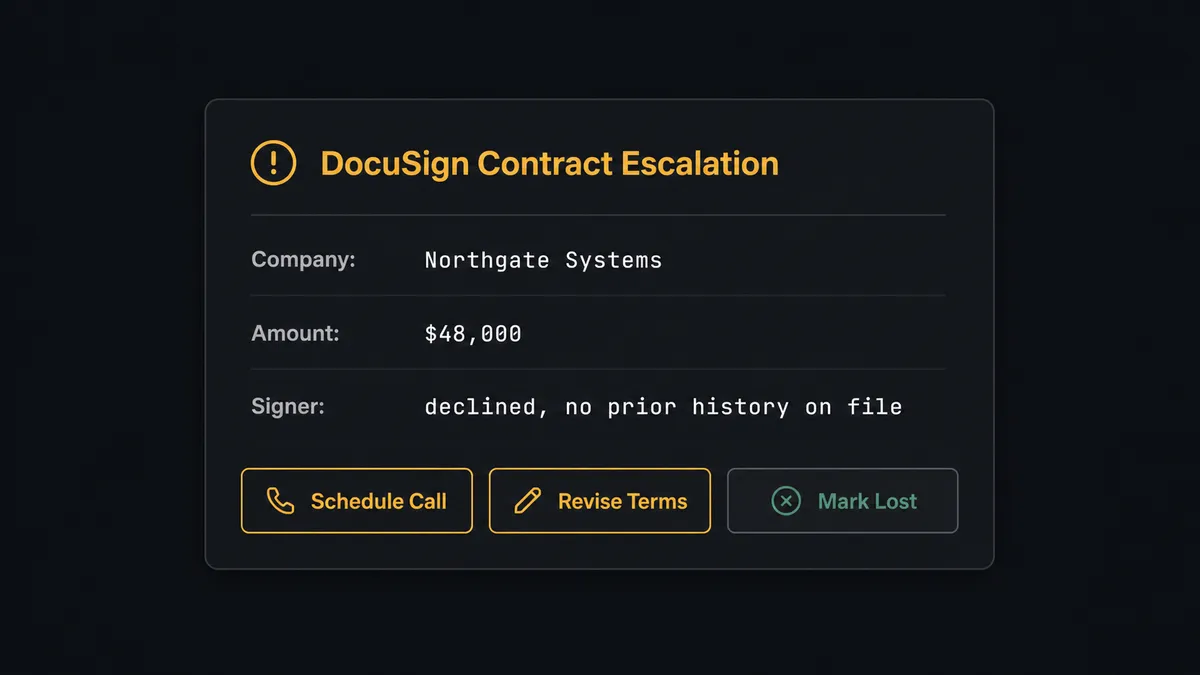
If the deal is large, the signer is new, or the decline breaks an established pattern, the agent stops and invokes the human-in-loop flow as a callable tool. It packages the context that matters: deal value, signer name, a link to the DocuSign record, and three options. The sales manager sees this in Slack: “The Northgate Systems contract was declined by the signer. Deal value: $48,000. Options: (1) Schedule a review call, (2) Send revised terms, (3) Mark deal as lost. What should I do next?” The manager picks one, the click fires the On Block Action trigger, and the agent resumes the workflow with that decision as input. The decision, the manager’s identity, and the timestamp are all captured in the audit trail.
This is not a hardcoded dollar threshold. The agent weighs deal value against context it has actually reviewed. Prospects call this a “digital andon cord,” the line stops the moment something needs a person’s judgment. This is not a sync tool. The agent knows when to stop and ask.
FlowRunner vs Zapier
Zapier is a fast, reasonable choice for a simple two-step connection. If all you need is “envelope completed, post a message to a channel,” Zapier’s Slack and DocuSign integrations handle that in a few minutes of setup with no orchestration required. For teams that want the shortest path to a basic notification, it is a legitimate starting point.
The gap shows up once declines, deal value, and accountability enter the picture:
| Capability | Zapier | FlowRunner |
|---|---|---|
| Human-in-loop on high-value declines | Not available natively | Native tool the agent invokes based on deal context, not a fixed rule |
| Interactive Slack decisions that resume a workflow | Requires custom webhook setup | On Block Action is a built-in trigger designed for this |
| Audit trail with decision accountability | Not available | Every decision, decider, and timestamp recorded automatically |
| Unlimited users on every paid plan | Per-user pricing | Unlimited users and workflows on all tiers |
| Self-hosted deployment option | Not available | Free Community Edition plus Enterprise self-hosted |
| BYOK for AI providers | Not available | Bring your own keys for any AI provider |
If your need is “post a message when an envelope completes and nothing more,” Zapier is sufficient. If declined deals need to reach the right person with the right context and an accountable decision trail, FlowRunner is built for that layer.
Before and after
| Category | Before | After |
|---|---|---|
| Time to notification on completed deals | Rep checks email or DocuSign dashboard whenever they get to it | Slack message posts within seconds of the signature |
| Declined contract visibility | Nobody notices until someone happens to check DocuSign | Deal owner notified in Slack within minutes with signer name and record link |
| High-value decline response | No systematic escalation, deal owner decides alone if they notice at all | Agent routes flagged declines to a sales manager with three clear options |
| Stalled envelope follow-up | Unsigned envelopes sit open for days with no one tracking them | Agent checks status, resends automatically, and asks the rep about a personal follow-up |
| Decision accountability | Approval or next-step decisions live in memory or scattered email threads | Every decision, decider, and timestamp recorded in the audit trail |
What you can build
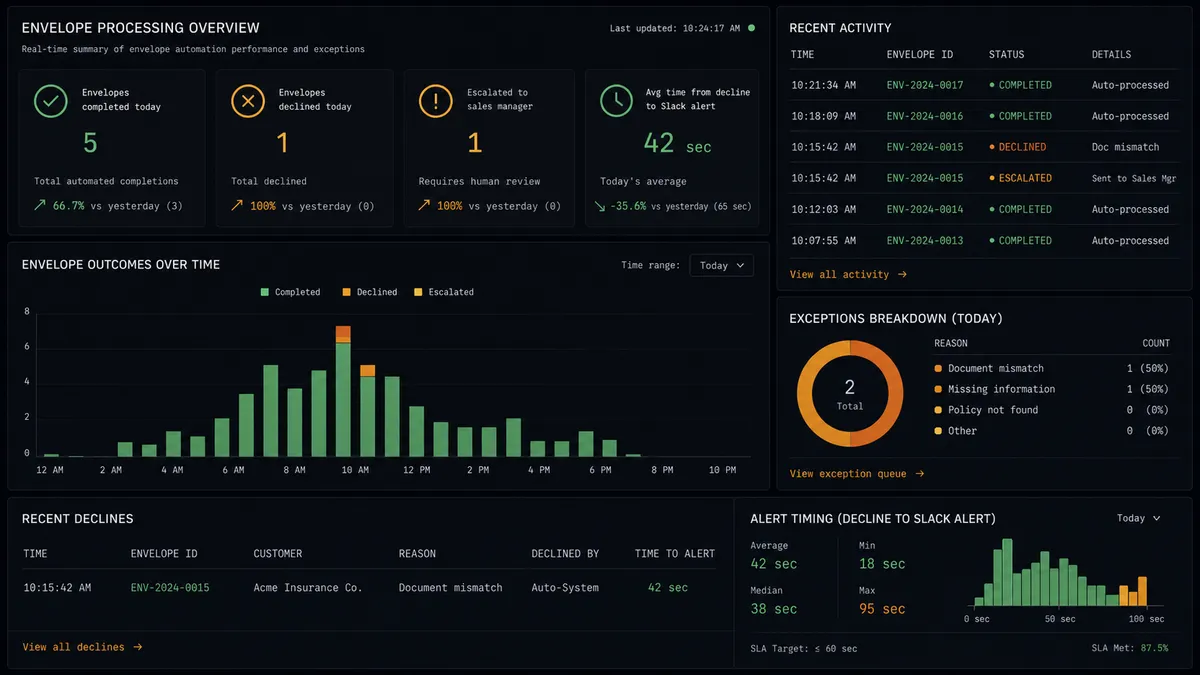
Instant Close Confirmation On Envelope Completed fires. The agent downloads the executed document and posts to #revenue-ops with the company name, deal value, and deal ID, so the whole team sees every closed deal the moment it happens, not at end of day.
Declined Deal Escalation with a Human Decision On Envelope Declined fires. The agent calls Get Envelope Recipients to identify the signer, then either posts a standard notification for routine declines or invokes the human-in-loop tool for high-value ones, giving the sales manager three concrete next steps in Slack.
Stalled Envelope Recovery A scheduled check calls Get Envelope Status three days after an envelope sends. If still pending, the agent runs Resend Envelope and posts to the rep’s Slack asking whether a personal follow-up email should go out, resuming only when the rep responds.
Weekly Signature Digest Every Monday, the agent calls List Envelopes to pull the prior week’s activity and posts a formatted summary to #revenue-ops: completed, declined, and still pending, giving leadership visibility without anyone pulling a manual report.
Void Cleanup Alert On Envelope Voided fires. The agent notifies the deal owner in Slack immediately so the pipeline reflects reality and no one mistakes a canceled envelope for a live deal in progress.
Common questions
Is it free to connect DocuSign and Slack on FlowRunner? FlowRunner has a free plan with 100 executions a month, every integration included, and no credit card required, and new accounts get 14 days of Professional on top. No credit card is required to start.
Can I self-host the DocuSign and Slack workflow? Yes. FlowRunner offers a free Community Edition for single-instance self-hosted deployments and an Enterprise tier for multi-instance clustering with full compliance features.
Does the AI agent need my own OpenAI key? FlowRunner runs on a bring-your-own-key model for AI providers, so you connect your own Claude or OpenAI key instead of paying a markup on model usage.
What happens when the agent isn’t sure whether a decline needs a manager? It posts the decline to Slack with the deal value, signer history, and a link to the envelope, then waits for a decision. It does not guess and it does not send an automated form response.
Do I need to pay per user to add my whole revenue team to Slack alerts? No. Every FlowRunner tier includes unlimited users and unlimited workflows, so sales, ops, and finance can all see and act on the same Slack alerts at no extra per-seat cost.
Can the agent handle both completed and declined envelopes in one setup? Yes. On Envelope Completed and On Envelope Declined are separate triggers that can drive two workflows in the same FlowRunner account, one posting confirmations and one routing declines for a decision.
Getting started
FlowRunner has a free plan with 100 executions a month, every integration included, and no credit card required, and new accounts get 14 days of Professional on top.
Start with the integration pages to verify the actions your workflow will use: DocuSign on FlowRunner and Slack on FlowRunner.
Ready to build? Start your free trial at flowrunner.ai or book an intro call at calendly.com/flowrunner/intro to see the DocuSign and Slack connection running on a real deal.
Frequently asked questions
Is it free to connect DocuSign and Slack on FlowRunner?
FlowRunner has a free plan with 100 executions a month, every integration included, and no credit card required, and new accounts get 14 days of Professional on top. No credit card is required to start.
Can I self-host the DocuSign and Slack workflow?
Yes. FlowRunner offers a free Community Edition for single-instance self-hosted deployments and an Enterprise tier for multi-instance clustering with full compliance features.
Does the AI agent need my own OpenAI key?
FlowRunner runs on a bring-your-own-key model for AI providers, so you connect your own Claude or OpenAI key instead of paying a markup on model usage.
What happens when the agent isn't sure whether a decline needs a manager?
It posts the decline to Slack with the deal value, signer history, and a link to the envelope, then waits for a decision. It does not guess and it does not send an automated form response.
Do I need to pay per user to add my whole revenue team to Slack alerts?
No. Every FlowRunner tier includes unlimited users and unlimited workflows, so sales, ops, and finance can all see and act on the same Slack alerts at no extra per-seat cost.
Can the agent handle both completed and declined envelopes in one setup?
Yes. On Envelope Completed and On Envelope Declined are separate triggers that can drive two workflows in the same FlowRunner account, one posting confirmations and one routing declines for a decision.