Sync Dialpad Call Transcripts to Salesforce Pro Leads
Connect Dialpad and Salesforce Pro so every sales call transcript lands on the right lead automatically, and let an AI agent decide when a transcript signals a lead is ready to convert, pausing for manager approval before that irreversible step.
How do you connect Dialpad to Salesforce Pro?
A completed Dialpad call triggers Get Call Transcript, and the transcript drives Create Enhanced Note (or Create Lead, if the caller is new) on the matching Salesforce Pro record. FlowRunner is a visual AI-agent orchestration platform where automations run autonomously and pause for human judgment on the steps that carry real consequence. Run this as a straight sync and every sales call lands in Salesforce within the hour; run it as an AI agent and the agent also reads the transcript for buying signals, decides whether a lead is ready to convert, and pauses for a sales manager’s approval before Convert Lead to Contact, since that step cannot be undone.
The problem it solves
The call happens, the deal moves, and then the record sits untouched until someone remembers to update it. A rep finishes six calls before lunch and logs two of them. The other four exist only in memory: a pricing objection, a competitor mention, a verbal yes that never becomes a note. By the time the sales manager pulls the pipeline report, half the context that actually explains a deal’s status has fallen through the cracks. Dialpad has the transcript. Salesforce never sees it.
The reverse gap is just as costly. When a lead does look ready to buy, converting it in Salesforce is a one-way door: Convert Lead to Contact merges the record, creates the account and opportunity, and there is no undo. So reps either convert too early on a hunch and create phantom opportunities that inflate the pipeline, or they sit on a hot lead waiting for a manager to notice, and the manager only notices in the weekly pipeline review, days after the call that should have triggered it. Neither failure mode is a technology problem. Both are a coordination problem: nobody built the bridge between the phone call and the CRM decision that should follow it.
How it works: the connection
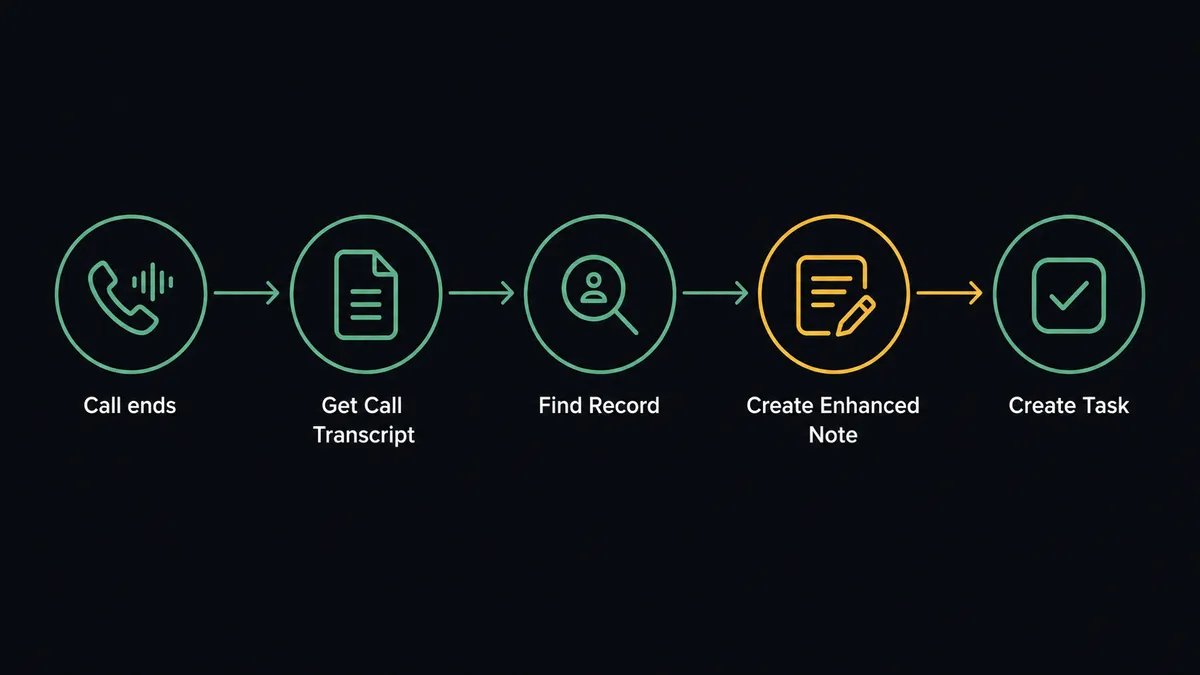
The flow starts with a Create Call Event Subscription webhook in Dialpad, scoped to call-ended events, so it fires the moment a sales call finishes rather than on a polling schedule. From there, Get Call Transcript retrieves the AI-generated, speaker-attributed transcript, the raw material for everything downstream.
Before writing anything, a Find Record step in Salesforce Pro matches the caller’s phone number to an existing Lead or Contact. If a match exists, the flow calls Create Enhanced Note to log a structured summary of the call against that record, and Create Record to open a follow-up Task so the next action has an owner and a due date. If no match exists, Create Lead captures the caller as a new record instead of letting the call disappear.
That much runs the same way every time, and it already closes the biggest gap: every sales call becomes CRM history within the hour instead of whatever a rep remembers to type in later.
Can an AI agent run it? (and why a human stays in the loop)
A fixed sync stops at logging the call. An AI agent goes further: it reads the transcript the same way a sales manager would, reasons about what was actually said, and picks its next action from the full set of Dialpad and Salesforce Pro tools available to it, rather than following a rule that was hardcoded months ago.
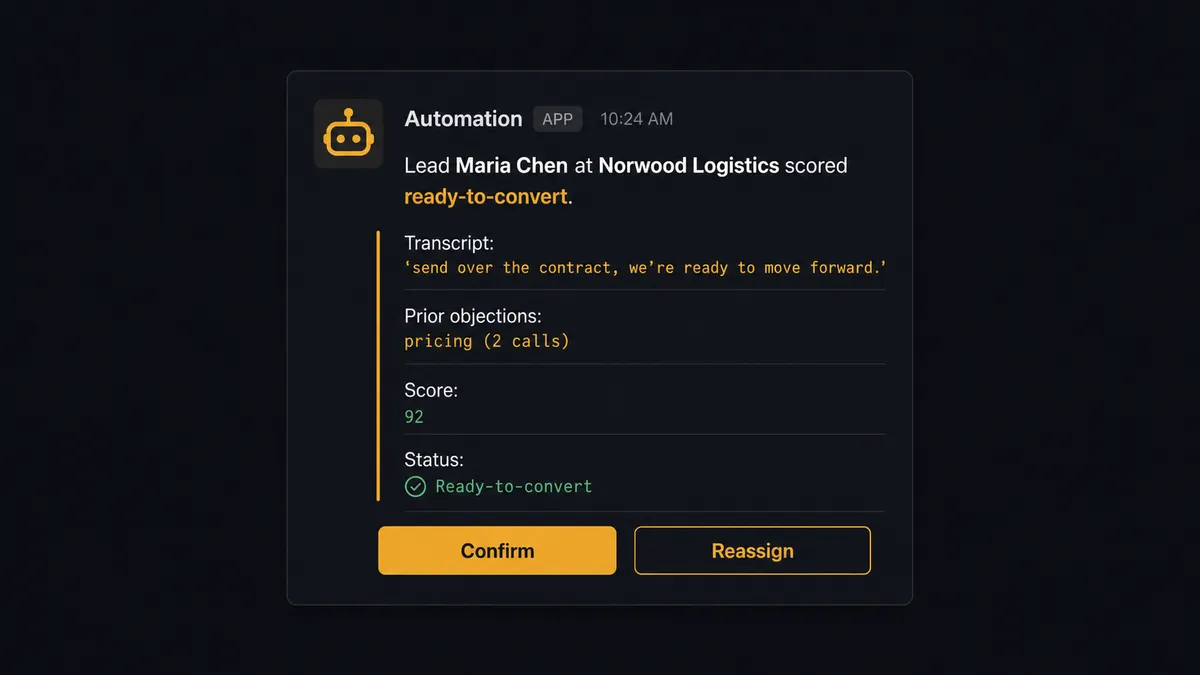
Here is the decision moment. The agent logs a call from a rep to a Lead who has been in the pipeline for three weeks. The transcript includes the line “send over the contract, we’re ready to move forward,” plus two prior calls in the record’s history that ended in objections about pricing. The agent doesn’t convert the lead automatically, because Convert Lead to Contact is irreversible in Salesforce: it merges the record, creates the Contact, Account, and Opportunity, and there is no undo. Instead, the agent invokes a human-in-loop flow as a callable tool, exactly the way it would call any other action, and pauses execution.
The sales manager gets a Slack message: “Lead Maria Chen at Norwood Logistics scored ready-to-convert based on today’s call. Transcript: ‘send over the contract, we’re ready to move forward.’ Prior objections: pricing (2 calls). Ready to convert and assign to rep David Osei. Confirm or reassign?” The manager approves in one click. The agent runs Convert Lead to Contact, creates the opportunity, and assigns it by territory. The decision, the approver, and the timestamp are all captured in the audit trail. No phantom conversions, no territory disputes, no lead sitting untouched because nobody read the transcript.
This is not a sync tool. The agent knows when to stop and ask, and it applies the same judgment to Dialpad’s side of the flow: when it drafts the promised follow-up text based on what the rep said on the call, it routes the draft to the rep for approval before Send SMS delivers it from their own number, because outbound messages to real customers get a person’s sign-off first.
FlowRunner vs Zapier
Zapier is the fastest way for a non-technical team to get a first Dialpad-to-Salesforce zap running, and its trigger library for both platforms is broad and well documented. That’s a genuine strength for a simple, one-directional log-the-call zap.
Where it runs out of road is exactly the scenario above: a fixed zap either converts every qualifying lead automatically or converts none of them. It has no native concept of pausing mid-workflow for a human decision, packaging context, and resuming from where it left off. Teams bolt that on with a separate approval app and a webhook, which turns one integration into three things to maintain.
| Dimension | Zapier | FlowRunner |
|---|---|---|
| Human-in-loop | Bolt-on via a separate approval app and webhook | Native: a callable tool the agent invokes mid-workflow |
| Lead conversion judgment | Runs on a fixed rule or not at all | Agent reasons over the transcript, then asks a person before the irreversible step |
| Users included | Priced per user on most plans | Unlimited users on every tier |
| AI provider | Zapier’s own AI credits, marked up | Bring your own key (BYOK) for the provider you already pay for |
| Self-hosting | Not available | Free Community Edition, plus Enterprise self-hosted with clustering |
| Pricing model | Per-task/zap pricing that scales with volume in ways that are hard to predict | Transparent workflow-based tiers with a clear execution ceiling |
Before and after
| Category | Before | After |
|---|---|---|
| Call-to-CRM lag | Reps log calls when they remember, often hours or days later | Transcript and summary logged to the Salesforce record within the hour |
| Lead conversion | Reps convert on a hunch or wait for a manager to notice in the weekly review | Agent flags conversion-ready leads from the transcript same-day, manager approves in one click |
| Follow-up texts | Promised follow-ups get typed manually or forgotten entirely | Agent drafts the text from what was said on the call; rep approves and it sends |
| Pipeline visibility | Managers see the pipeline stage but not what was actually said on the call | Manager’s Slack approval request already contains the deciding quote from the transcript |
| Territory disputes | Conversions happen without a paper trail on who decided what | Every conversion decision, approver, and timestamp is logged in the audit trail |
What you can build
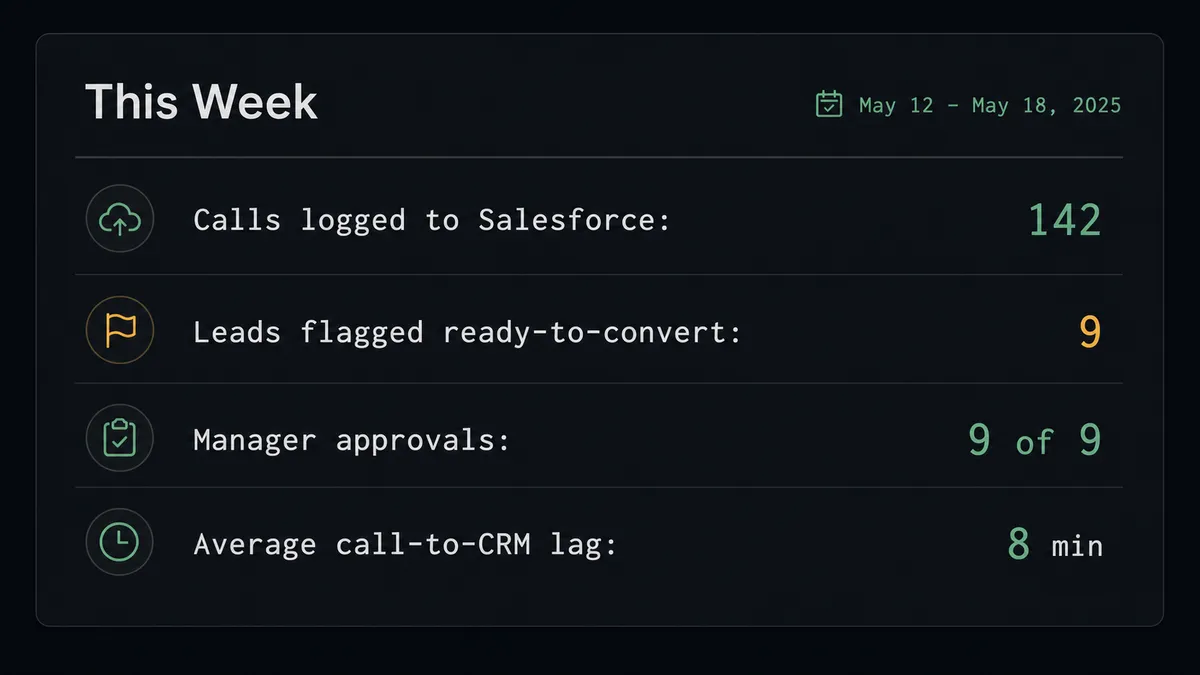
Call-to-record sync. Every completed Dialpad call logs a Create Enhanced Note and a follow-up Task to the matching Salesforce Lead or Contact, found with Find Record, so no call goes unrecorded.
Conversion-ready alerting. The agent reads each transcript for buying language, cross-references it against Find Child Records on the opportunity, and routes conversion-ready leads to the sales manager in Slack before Convert Lead to Contact runs.
Rep-approved follow-up texts. The agent drafts the follow-up SMS the rep promised on the call and routes it for one-tap approval before Send SMS delivers it from the rep’s own Dialpad number.
New-caller capture. When Find Record turns up no match, Create Lead captures the caller as a new Salesforce record instead of letting an unlogged inbound call disappear.
Weekly campaign attribution with call context. The agent runs the existing SOQL attribution query on closed opportunities and enriches the revenue-ops report with which calls, and which transcript moments, preceded each conversion.
Common questions
Is it free to connect Dialpad and Salesforce Pro on FlowRunner? Yes for a trial period. FlowRunner has a free plan with 100 executions a month, every integration included, and no credit card required, and new accounts get 14 days of Professional on top.
Can I self-host the Dialpad and Salesforce Pro connection? Yes. FlowRunner offers a free Community Edition for self-hosting a single instance, and an Enterprise self-hosted option with multi-instance clustering and the full compliance suite for larger teams.
Does the agent need my own OpenAI key? FlowRunner uses a bring-your-own-key model, so you connect the AI provider you already pay for instead of paying FlowRunner a markup on model usage.
What happens when the agent thinks a lead is ready to convert? It does not convert the lead on its own. Lead conversion is irreversible in Salesforce, so the agent packages the transcript context and its reasoning and sends it to the sales manager for a one-click approval before Convert Lead to Contact runs.
Does this replace Salesforce’s own telephony integration? It replaces the need for a fixed sync rule. Instead of logging every call the same way, an agent reads each transcript, decides what it means for the deal, and only pauses for a human on the step that cannot be undone.
Do I need to write code to connect Dialpad and Salesforce Pro? No. Both connections are built visually: pick the trigger, map the fields, add the human-in-loop step, and turn it on.
Getting started
FlowRunner has a free plan with 100 executions a month, every integration included, and no credit card required, and new accounts get 14 days of Professional on top. Connect Dialpad and Salesforce Pro, pick the call-ended trigger, and add the human-in-loop step before any conversion action runs.
Start building at flowrunner.ai, or book a walkthrough at calendly.com/flowrunner/intro.
Frequently asked questions
Is it free to connect Dialpad and Salesforce Pro on FlowRunner?
Yes for a trial period. FlowRunner has a free plan with 100 executions a month, every integration included, and no credit card required, and new accounts get 14 days of Professional on top.
Can I self-host the Dialpad and Salesforce Pro connection?
Yes. FlowRunner offers a free Community Edition for self-hosting a single instance, and an Enterprise self-hosted option with multi-instance clustering and the full compliance suite for larger teams.
Does the agent need my own OpenAI key?
FlowRunner uses a bring-your-own-key model, so you connect the AI provider you already pay for instead of paying FlowRunner a markup on model usage.
What happens when the agent thinks a lead is ready to convert?
It does not convert the lead on its own. Lead conversion is irreversible in Salesforce, so the agent packages the transcript context and its reasoning and sends it to the sales manager for a one-click approval before Convert Lead to Contact runs.
Does this replace Salesforce's own telephony integration?
It replaces the need for a fixed sync rule. Instead of logging every call the same way, an agent reads each transcript, decides what it means for the deal, and only pauses for a human on the step that cannot be undone.
Do I need to write code to connect Dialpad and Salesforce Pro?
No. Both connections are built visually: pick the trigger, map the fields, add the human-in-loop step, and turn it on.