Dialpad + HubSpot: Every Sales Call Becomes CRM History
Connect Dialpad to HubSpot so every sales call becomes a logged summary and follow-up task on the contact record, optionally as an AI agent that drafts the follow-up text and pauses for the rep's approval before it reaches the customer.
How do you connect Dialpad to HubSpot?
You connect Dialpad to HubSpot by having Create Call Event Subscription fire a webhook the moment a sales call ends, pulling the AI-generated transcript with Get Call Transcript, and writing a call summary and follow-up task onto the matching record in HubSpot with Get Contact by Email, Search Contacts, and Update Contact or Create Contact. FlowRunner is a visual AI-agent orchestration platform where automations run autonomously and pause for human judgment on the steps that carry real consequence. The same connection can run as an AI agent that drafts the follow-up text the rep promised on the call and pauses for their approval before Send SMS delivers it to the customer.
The problem it solves
A sales call ends and everything that mattered on it lives in one place: the rep’s memory. They promised to send a spec sheet, quote a revised price, or follow up by Friday. If they remember, they open HubSpot, type a note, maybe move the deal stage, then switch to Dialpad or their phone to text the customer what was promised. If they do not remember, and reps on eight calls a day frequently do not, the commitment falls through the cracks. Nobody logged it, nobody follows up, and the next person who touches that account has no idea the conversation happened.
The sales ops lead feels this as a spreadsheet problem: pipeline reports built on deal stages that update whenever a rep gets around to it, not when the conversation actually moved the deal. Dialpad’s AI transcripts already capture what was said on every call, but a transcript sitting in Dialpad is not CRM history until something moves it there. Manually copying call outcomes into HubSpot does not scale past a handful of reps, and the moment it stops happening consistently, deal data quietly goes stale and nobody notices until a forecast is wrong.
How it works: the connection
The connection runs off the call itself, not a schedule. Here is the plain version, grounded in the real connector actions.
- Trigger: Create Call Event Subscription registers a webhook scoped to the hangup state, so the workflow starts the moment a sales call ends.
- Read the call: Get Call Transcript retrieves the speaker-attributed AI transcript, the raw material for everything downstream.
- Extract: The workflow pulls what was committed, what stalled, and what the rep promised to send or follow up on.
- Match the caller: Get Contact in Dialpad supplies the caller’s name, email, and company, and HubSpot’s Get Contact by Email or Search Contacts finds (or fails to find) the matching record.
- Write to the CRM: A known contact gets the call outcome logged via Update Contact and a follow-up task; an unknown caller becomes a new record via Create Contact, associated to their company with Associate Objects.
- Open or update the deal: A conversation that reads as a qualified sales call gets staged with Create Deal, or an existing deal gets its stage refreshed with Update Deal, both tied to the contact.
- Close the loop: The follow-up text the rep promised is drafted and sent with Send SMS from the rep’s own Dialpad number.
That is the “just connect them” answer. Every completed call becomes CRM history within the hour, and the follow-up the customer was promised actually goes out.
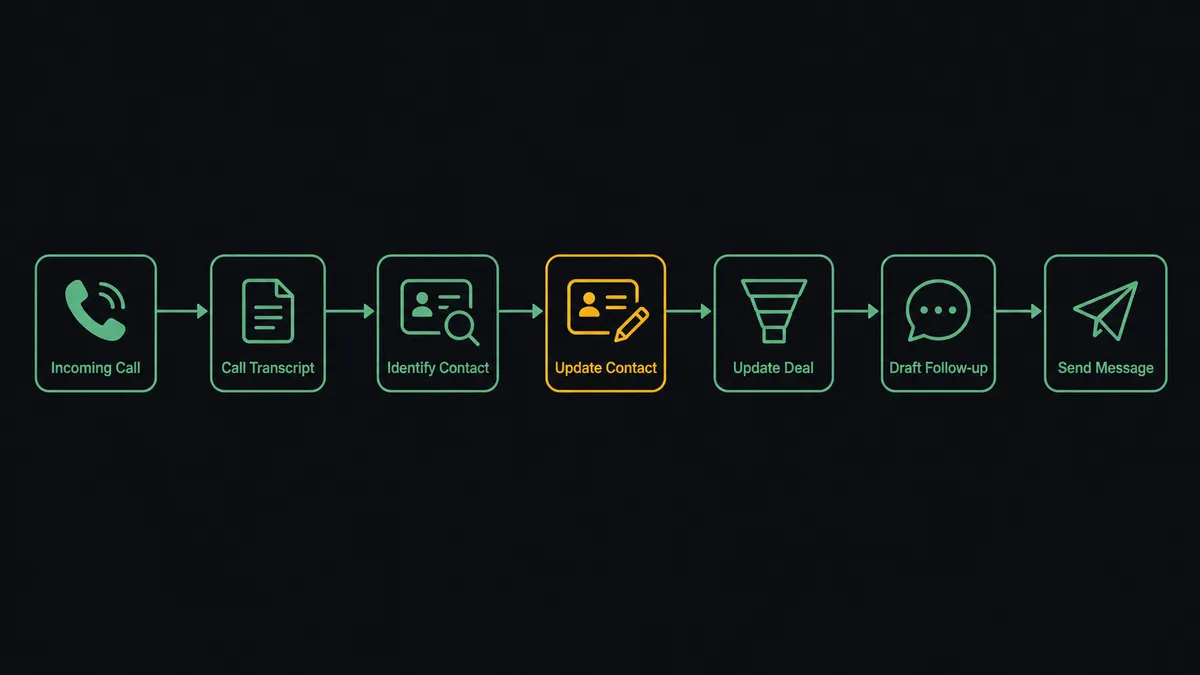
Can an AI agent run it? (and why a human stays in the loop)
Yes, and the agent earns its place in exactly the two spots where a fixed field-mapping tool would guess. The first is identity. Dialpad’s caller data and HubSpot’s contact database do not always agree cleanly. The same person might have called from a mobile number tied to a personal email in Dialpad while their HubSpot record was created under a work email months earlier. The agent holds Get Contact, Get Contact by Email, Search Contacts, Create Contact, and Update Contact as tools, and it reasons per call: is this caller an existing contact, or does the name and company overlap with more than one HubSpot record closely enough that guessing wrong would attach the call, the task, and the deal to the wrong account?
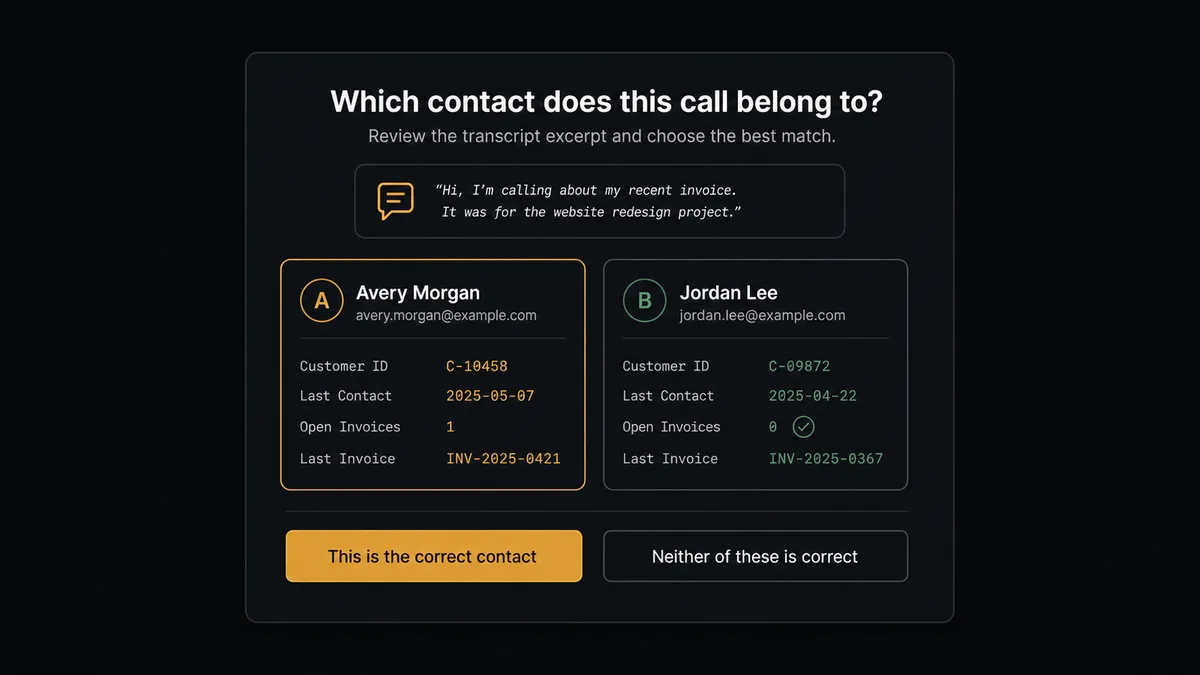
When that ambiguity shows up, the agent does not pick the more likely match and move on. It assembles the evidence, both candidate contacts, their company and deal associations, and the transcript context, and invokes a human-in-the-loop flow it holds as a callable tool. The workflow pauses and a CRM admin sees something like: “This call mentions a renewal discussion at Meridian Logistics. I found two contacts that could be the caller: one tied to Meridian’s old domain, one to their new domain after a rebrand. Which record should carry this call and the follow-up task?” The admin answers once, and the agent proceeds with Update Contact and Create Deal against the correct record. The decision, the approver, and the timestamp land in the audit trail.
The second gate is the one built into the connector itself: Send SMS reaches a real customer’s phone, so a drafted follow-up always routes through the rep before it sends. The agent writes the text from what the transcript actually shows was promised, not a template, and the rep taps approve or edits it. Nothing goes out under a rep’s name that the rep has not seen.
This is the digital andon cord for a phone-driven pipeline: like Toyota’s line, the agent stops the process the moment the next step carries real consequence, either an identity it cannot verify or a message a customer is about to receive, and a person makes the call.
FlowRunner vs Zapier
Zapier is the tool most sales teams reach for first, and for good reason. Its catalog covers both Dialpad and HubSpot already, its template gallery makes a basic call-to-contact-note Zap fast to set up, and for a team that just wants a note added after every call, that gets you moving the same afternoon. That speed is real and worth acknowledging.
The gap opens at the two moments that actually carry risk in this pair: an identity match that could be wrong, and a message about to reach a customer. FlowRunner runs the connection as a reasoning agent with native human gates on both, rather than a fixed step sequence you have to bolt approvals onto.
| What matters for this pair | FlowRunner | Zapier |
|---|---|---|
| Human-in-the-loop on ambiguous contact matches | Native. The agent invokes an approval flow as a callable tool when it cannot verify the caller | Requires manually inserted approval steps; the Zap itself has no judgment about when to ask |
| Who interprets each call | An AI agent reads the transcript and reasons about the match and the follow-up | A predefined step sequence you configure once per Zap |
| Users included | Unlimited users on every tier | Priced by task volume; seats vary by plan |
| Bring your own AI keys | Yes, BYOK | AI features tied to Zapier’s own AI offering |
| Self-hosted option | Yes, cloud-hosted or self-hosted | Cloud only |
| Pricing model | Transparent workflow-based tiers | Per-task pricing, and every logged call and drafted text consumes tasks as call volume grows |
If your reps make a low volume of calls and your contact data is already clean, Zapier will do the basic logging fine. If you want ambiguous matches caught before they corrupt a record and every outbound text reviewed before it reaches a customer, this pairing is the better fit.
Before and after
| Category | Before | After |
|---|---|---|
| Call follow-up | Reps recap and text customers from memory, if they remember at all | Transcript, summary, and follow-up task logged the same hour the call ends |
| CRM record | What was said on the phone never reaches the contact record | Every completed call becomes logged history on the HubSpot contact |
| Caller identity | Reps guess which contact a call belongs to when a name looks familiar | The agent matches automatically and pauses for a person only when records could genuinely be the same caller |
| Deal accuracy | Deal stage updates only when a rep remembers to change it | Calls that read as qualified conversations open or update the deal without manual entry |
| Outbound texts | Follow-up texts are ad hoc, sent from memory, inconsistent in tone | Drafted from the actual transcript and sent only after the rep reviews it |
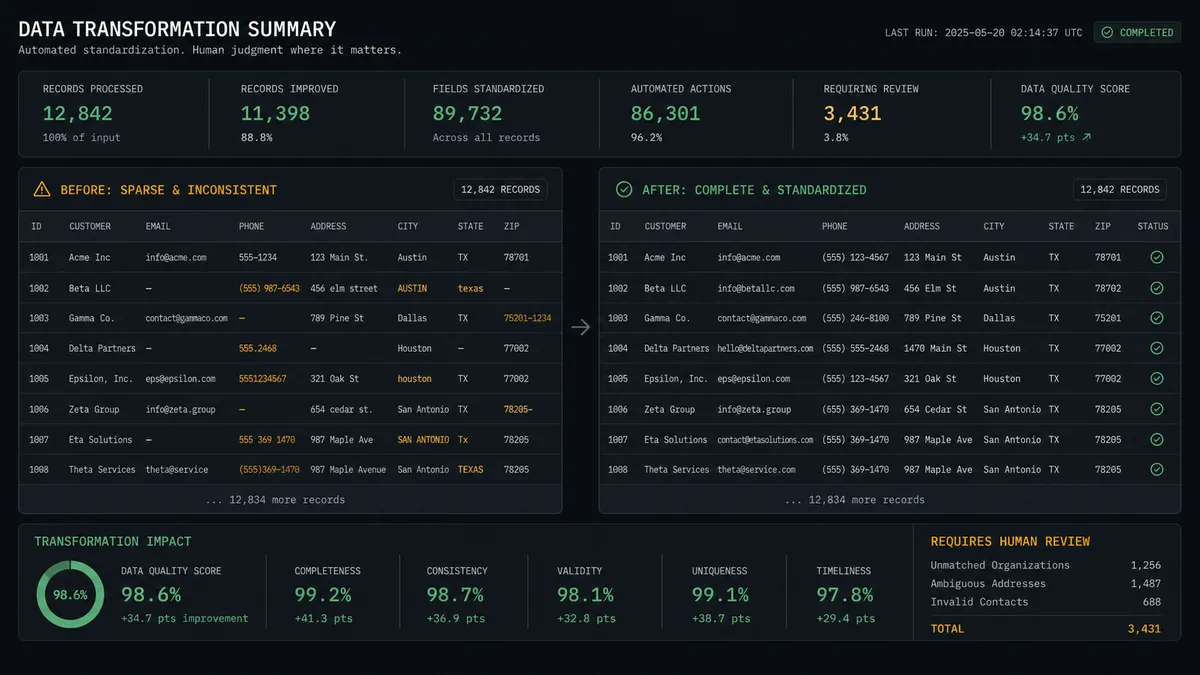
What you can build
Call wrap-up that writes itself. Get Call Transcript feeds the extraction step, and Update Contact or Create Contact lands the summary and follow-up task on the record without the rep opening HubSpot.
Sales-call to pipeline. When a call reads as qualified interest, the agent stages Create Deal, wires it to the contact and company with Associate Objects, and keeps the stage current with Update Deal as later calls come in.
Gated identity resolution. Every match the agent cannot verify with confidence gets packaged with both candidate records and the call context, then routed to a CRM admin before anything is written.
Reviewed follow-up delivery. The agent drafts the text a rep promised on the call, the rep approves or edits it, and Send SMS delivers it from the rep’s own number, never from a template nobody read.
Common questions
Is it free to connect Dialpad and HubSpot on FlowRunner? You can build and run the connection on FlowRunner’s free plan, which includes 100 executions a month and every integration with no credit card required, and new accounts also get 14 days of Professional. Both connectors are available on every FlowRunner tier, and every tier includes unlimited users and unlimited workflows.
Can I self-host the Dialpad to HubSpot workflow? Yes. FlowRunner offers a cloud-hosted option and a self-hosted option, so the same connection can run inside your own environment if that is a requirement for your team.
Does the AI agent need my own OpenAI or Claude key? FlowRunner uses a bring-your-own-keys model, so you connect the AI provider key you already have. You are not locked to one model or vendor.
What happens when the agent isn’t sure which HubSpot contact a call belongs to? It does not guess. When a caller could plausibly match more than one HubSpot record, the agent pauses, posts both contacts side by side with the call context to a CRM admin, and waits for a ruling before it logs anything.
Which event actually starts the Dialpad to HubSpot workflow? Dialpad supports real-time event subscriptions, so Create Call Event Subscription registers a webhook that fires the moment a call ends. The workflow starts on that event rather than on a polling schedule.
Can the workflow open a HubSpot deal from a sales call, not just log a note? Yes. When a call reads as a qualified sales conversation, the agent stages a deal with Create Deal, ties it to the contact and company with Associate Objects, and keeps the stage current on later calls with Update Deal.
Getting started
Start on the free plan: 100 executions a month, every integration included, no credit card required, plus 14 days of Professional for new accounts. Both connectors are available on every tier, and every tier includes unlimited users and unlimited workflows.
Explore the integration details:
- Dialpad integration (33 actions covering calls, contacts, users, numbers, and webhooks)
- HubSpot integration (21 actions covering contacts, companies, deals, and associations)
Start building free at flowrunner.ai or book a demo to see a live Dialpad to HubSpot workflow, contact-match approval and all.
Frequently asked questions
Is it free to connect Dialpad and HubSpot on FlowRunner?
You can build and run the connection on FlowRunner's free plan, which includes 100 executions a month and every integration with no credit card required, and new accounts also get 14 days of Professional. Both connectors are available on every FlowRunner tier, and every tier includes unlimited users and unlimited workflows.
Can I self-host the Dialpad to HubSpot workflow?
Yes. FlowRunner offers a cloud-hosted option and a self-hosted option, so the same connection can run inside your own environment if that is a requirement for your team.
Does the AI agent need my own OpenAI or Claude key?
FlowRunner uses a bring-your-own-keys model, so you connect the AI provider key you already have. You are not locked to one model or vendor.
What happens when the agent isn't sure which HubSpot contact a call belongs to?
It does not guess. When a caller could plausibly match more than one HubSpot record, the agent pauses, posts both contacts side by side with the call context to a CRM admin, and waits for a ruling before it logs anything.
Which event actually starts the Dialpad to HubSpot workflow?
Dialpad supports real-time event subscriptions, so Create Call Event Subscription registers a webhook that fires the moment a call ends. The workflow starts on that event rather than on a polling schedule.
Can the workflow open a HubSpot deal from a sales call, not just log a note?
Yes. When a call reads as a qualified sales conversation, the agent stages a deal with Create Deal, ties it to the contact and company with Associate Objects, and keeps the stage current on later calls with Update Deal.