Route Deel HR Exceptions to Slack for Approval
Connect Deel and Slack so contract, time-off, and termination events post to the right channel automatically, with an AI agent pausing for human approval on the moments that carry weight.
How do you connect Deel to Slack?
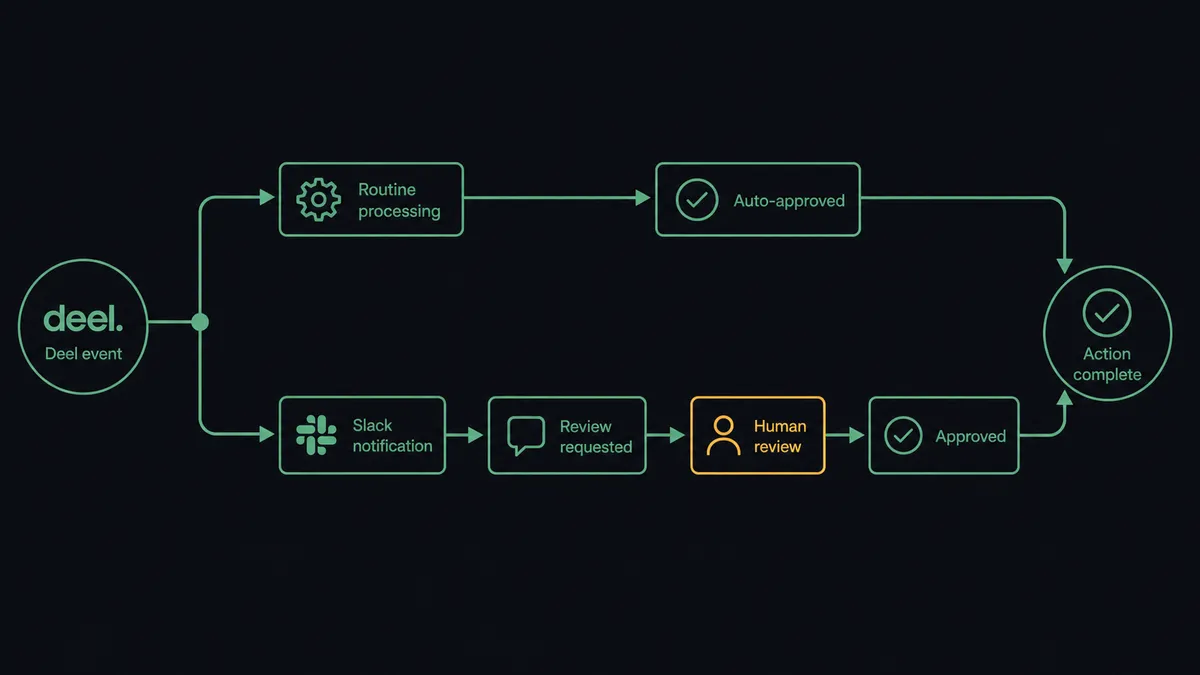
Connect Deel to Slack by wiring the On Deel Event trigger (contract.signed, time_off.requested, eor.payslips.available, and every other published event) to a Send Message to Channel action, so contract, time off, and payroll events land in the right Slack channel the moment they happen. FlowRunner is a visual AI-agent orchestration platform where automations run autonomously and pause for human judgment on the steps that carry real consequence. On this connection, routine events post and resolve on their own, while the same flow can run as an AI agent that reads each event, decides what it means, and invokes a human-in-loop step in Slack before anything that changes a worker’s employment status or pay goes through.
The problem it solves
Right now, a People Ops lead is tracking new hires across spreadsheets and chat threads with no shared state. A contract gets signed in Deel, someone has to notice, someone has to message the manager, someone has to remember to kick off IT provisioning. Time-off requests live in email: a request comes in, a manager approves it in a reply, and there’s no audit trail connecting the approval to the balance that was actually available at the time. Payroll adjustments get entered into Deel at the last minute with no review history, because nobody built a step where someone has to sign off before the cycle closes.
None of this is really about Deel or Slack being bad tools. It’s about the gap between them. Every event in Deel that should trigger a conversation, a review, or a notification currently requires a person to notice it and manually start that conversation somewhere else. Exceptions fall through the cracks not because People Ops isn’t paying attention, but because nothing is watching the events for them.
How it works: the connection
The connection runs on Deel’s single trigger, On Deel Event, which fires for any published event type: contract.signed, eor.payslips.available, time_off.requested, and the rest of the catalog. That one trigger point is enough to react to the moment that matters instead of polling for changes.
For contractor onboarding, a hiring system approval leads to Create Contractor Contract and Send Contract to Worker in Deel. When contract.signed fires, the flow posts a Send Message to Channel update to the team channel and provisions the worker downstream. For payslip distribution, eor.payslips.available fires, and the flow calls List EOR Payslips and Download Payslip PDF, then routes the document to the employee. For time off, time_off.requested fires, the flow calls Get Entitlements to confirm balance and Validate Time Off Request against policy, and the approval question lands in Slack as a message with the request details attached. When the manager responds, On Block Action fires and the decision routes back to Review Time Off Request in Deel, closing the loop with the approver’s identity and a timestamp captured automatically.
Can an AI agent run it? (and why a human stays in the loop)
The agent reads each Deel event, evaluates what it means, and picks its next move from the same set of Deel and Slack actions available to it as tools. This isn’t a fixed script that always runs the same three steps. When time_off.requested fires, the agent calls Get Entitlements and Validate Time Off Request, and if the balance and policy check clear, it can route straight to approval without pulling in extra context. When the event is a termination, a cancellation, or a compliance exception, the agent’s evaluation changes: it recognizes that this event changes a person’s employment status, and it does not execute on its own.
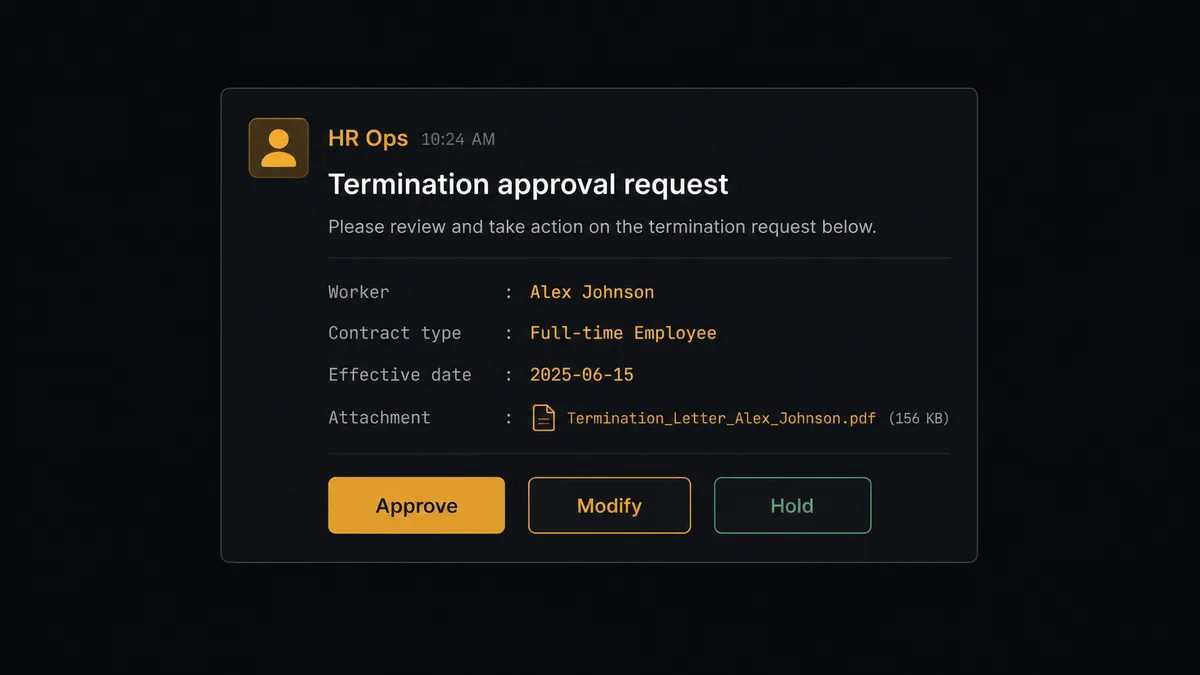
Here’s a concrete moment: a Terminate Contract action is about to fire for a contractor. The agent doesn’t run it. It stages the request, gathers the contract type, the worker’s name, the effective date, and any attached documents, and posts to the People Ops lead in Slack: “Termination of contractor agreement for [worker] effective [date]. Reason and documents attached. Approve, modify, or hold?” The lead sees the full context in one message, not a summary that requires them to go dig through Deel first. They click a button. On Block Action fires, the agent calls Terminate Contract with the confirmed decision, and the approval, the approver’s identity, and the timestamp are captured in the audit trail.
This is not a sync tool moving data from one place to another. The agent knows when to stop and ask, and it decides that based on what the event actually is, not a hardcoded dollar amount or a fixed list of event types someone configured once and forgot about.
FlowRunner vs Zapier
Zapier is genuinely good at what it’s built for: fast, simple triggers-and-actions between Deel and Slack for teams that don’t need anything more than “when X happens in Deel, post to a channel.” For a small team that just wants payslip notifications or a new-hire ping in a channel, Zapier gets that running in minutes.
Where the two diverge is what happens at the moment a decision needs a person. Zapier can send a Slack message, but it can’t reason about whether a Deel event should be automated or escalated, and it has no built-in mechanism for capturing a structured decision and resuming a paused workflow with that decision as input.
| FlowRunner | Zapier | |
|---|---|---|
| Human-in-loop | Native: agent invokes a human-approval flow as a callable tool, mid-workflow | Not built in: requires manual multi-step workarounds, no resume-with-decision |
| Decision audit trail | Approver identity and timestamp captured automatically | Not native; requires a separate logging step |
| AI provider | BYOK: connect your own key | Adds AI as a bolt-on feature within Zaps |
| Users included | Unlimited on every tier | Priced per user on higher tiers |
| Self-hosting | Community Edition free, Enterprise self-hosted available | Cloud only |
| Pricing model | Transparent workflow-based execution tiers | Per-task pricing that scales with volume |
Before and after
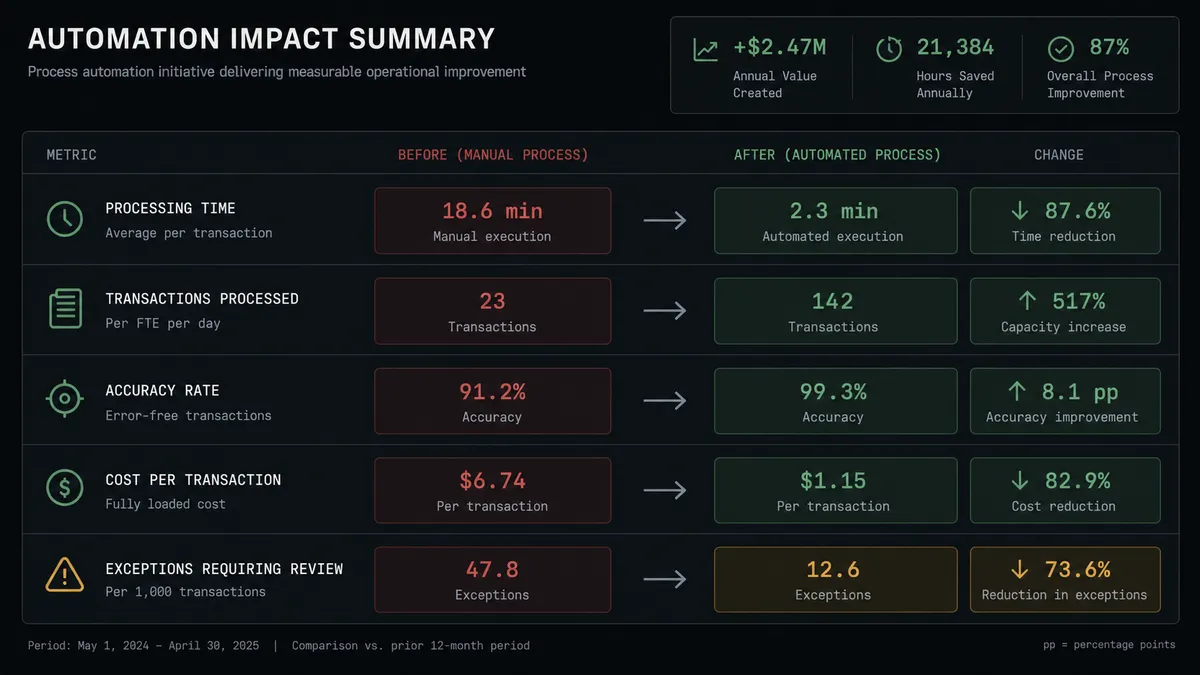
| Metric | Before | After |
|---|---|---|
| New hire tracking | Tracked across spreadsheets and chat threads with no shared state | Contract events drive provisioning, manager notification, and document collection automatically |
| Time off requests | Requests, approvals, and balance checks happen in inboxes with no audit trail | Requests are validated, routed, and logged with a record of who approved what |
| Payroll adjustments | Entered into Deel at the last minute with no review history | Staged, validated, and reviewed before the cycle closes |
| Exception resolution | Requires a meeting or email chain before resolution | Resolved in one Slack session, often from a phone |
| Decision record | No structured audit trail | Every approval captured with approver identity and timestamp automatically |
What you can build
Contractor onboarding, start to channel post. A hiring system approval triggers Create Contractor Contract and Send Contract to Worker in Deel. When contract.signed fires, the agent provisions the worker downstream and posts the new hire to the team channel with Send Message to Channel.
Payslip distribution without the download loop. When eor.payslips.available fires, the agent calls List EOR Payslips and Download Payslip PDF for each affected employee and routes the document by email, closing a step that used to be a manual download-and-attach cycle.
Time-off approval with a policy check built in. time_off.requested fires, the agent runs Get Entitlements and Validate Time Off Request, and posts the approval question to the manager’s Slack DM using Send Direct Message so it doesn’t get lost in a busy channel.
Termination staged for review, never auto-executed. Any Terminate Contract, Cancel EOR Contract, or Request EOR Termination event routes to the People Ops lead in Slack with full context attached, and only fires after an Approve click captured by On Block Action.
Weekly People Ops digest. Every Monday, an agent compiles the week’s Deel activity, contracts signed, time off approved, payroll adjustments reviewed, and posts a formatted Block Kit report to #people-ops so leadership gets visibility without pulling a report manually.
Common questions
Is it free to connect Deel and Slack on FlowRunner? Yes. FlowRunner has a free plan with 100 executions a month, every integration included, and no credit card required, and new accounts get 14 days of Professional on top.
Does the agent need my own OpenAI key? FlowRunner uses a BYOK (bring your own key) model, so you connect your own AI provider key and the agent runs on it. This keeps your HR data inside a provider relationship you already control.
Can I self-host the Deel and Slack connection? Yes. FlowRunner offers a free Community Edition for self-hosting, and an Enterprise self-hosted option with multi-instance clustering and the full compliance suite for organizations that need HR data to stay on their own infrastructure.
What happens when the agent isn’t sure whether to act? The agent stages the action, attaches the context it gathered from Deel, and posts to Slack with Approve, Modify, or Hold options. It does not guess on anything that touches a worker’s employment status or pay.
Do I need to build the Slack approval buttons myself? No. FlowRunner’s Slack integration includes Send Message to Channel with Block Kit buttons and the On Block Action trigger out of the box, so the approve and escalate flow is a configuration step, not custom development.
Can this replace a person in People Ops? No. It removes the manual tracking and copy-paste work around routine Deel events so your People Ops team spends their time on the terminations, exceptions, and judgment calls that actually need a person.
Getting started
Connect your Deel account and your Slack workspace, and you can have contract, time off, and payroll events routing to the right channel today. Start on the free plan: 100 executions a month, every integration included, no credit card required, plus 14 days of Professional for new accounts. When you’re ready to see the human-in-loop step in action on your own Deel data, book time at calendly.com/flowrunner/intro or start building now at flowrunner.ai.
Frequently asked questions
Is it free to connect Deel and Slack on FlowRunner?
Yes. FlowRunner has a free plan with 100 executions a month, every integration included, and no credit card required, and new accounts get 14 days of Professional on top.
Does the agent need my own OpenAI key?
FlowRunner uses a BYOK (bring your own key) model, so you connect your own AI provider key and the agent runs on it. This keeps your HR data inside a provider relationship you already control.
Can I self-host the Deel and Slack connection?
Yes. FlowRunner offers a free Community Edition for self-hosting, and an Enterprise self-hosted option with multi-instance clustering and the full compliance suite for organizations that need HR data to stay on their own infrastructure.
What happens when the agent isn't sure whether to act?
The agent stages the action, attaches the context it gathered from Deel, and posts to Slack with Approve, Modify, or Hold options. It does not guess on anything that touches a worker's employment status or pay.
Do I need to build the Slack approval buttons myself?
No. FlowRunner's Slack integration includes Send Message to Channel with Block Kit buttons and the On Block Action trigger out of the box, so the approve and escalate flow is a configuration step, not custom development.
Can this replace a person in People Ops?
No. It removes the manual tracking and copy-paste work around routine Deel events so your People Ops team spends their time on the terminations, exceptions, and judgment calls that actually need a person.