Log CloudTalk Call Outcomes in Pipedrive Automatically
Connect CloudTalk and Pipedrive so qualified deals trigger an agent-first call and the outcome writes back to the deal automatically, with a human approving any contact merge.
How do you connect CloudTalk to Pipedrive?
You connect CloudTalk to Pipedrive by triggering a flow when a deal reaches a qualified stage in Pipedrive, syncing the lead into CloudTalk with Add Contact, and using Make Call (Click to Call) to connect an available rep to the lead while the deal is still warm. The call outcome writes back into Pipedrive through Create Note and Create Activity, so the deal record updates itself instead of waiting on the rep. FlowRunner is a visual AI-agent orchestration platform where automations run autonomously and pause for human judgment on the steps that carry real consequence. The same connection can run as an AI agent that reasons about each lead and pauses for a person only when it finds a contact match worth a second look, such as a possible duplicate before a merge.
The problem it solves
A qualified lead lands in Pipedrive, and now someone has to notice it. The sales ops coordinator or the rep themselves copies the phone number out of the deal record, opens CloudTalk, and dials manually, sometimes minutes after the lead qualified, sometimes hours later once the notification gets buried under everything else on their plate. Every version of this process depends on a person checking a queue at the right moment. When they don’t, the lead cools, and speed-to-lead becomes something the team measures in hours instead of minutes.
The reverse direction has its own gap. The call happens, but the outcome, the recording link, and the notes stay inside CloudTalk unless someone manually copies them into the deal. Activities get logged on Friday afternoon in a batch, days after the calls actually happened, if they get logged at all. Duplicate contacts pile up because nobody checks Pipedrive before creating a new person in CloudTalk, and the phone system and the CRM slowly disagree about who the customer even is. None of this is a skills problem. It is a process that depends on manual attention at exactly the moments attention is most likely to slip.
How it works: the connection
The flow starts when a deal crosses into your qualified pipeline stage in Pipedrive. From there, Search Persons checks whether the lead already exists as a Pipedrive record, and Search Organizations does the same for the company, so nothing duplicates before it needs to. Add Contact then writes the lead into CloudTalk with their name, company, and phone number formatted in E.164, which is what keeps the phone system recognizing who is calling and who is being called.
Next, List Agents checks the sales group for who is online and available right now. Make Call (Click to Call) rings that agent’s line first, and only dials the lead once the agent answers, so a human is always the one on the call. If nobody picks up, Send SMS follows with a short text from the team’s number so the lead hears from someone even when the first attempt misses.
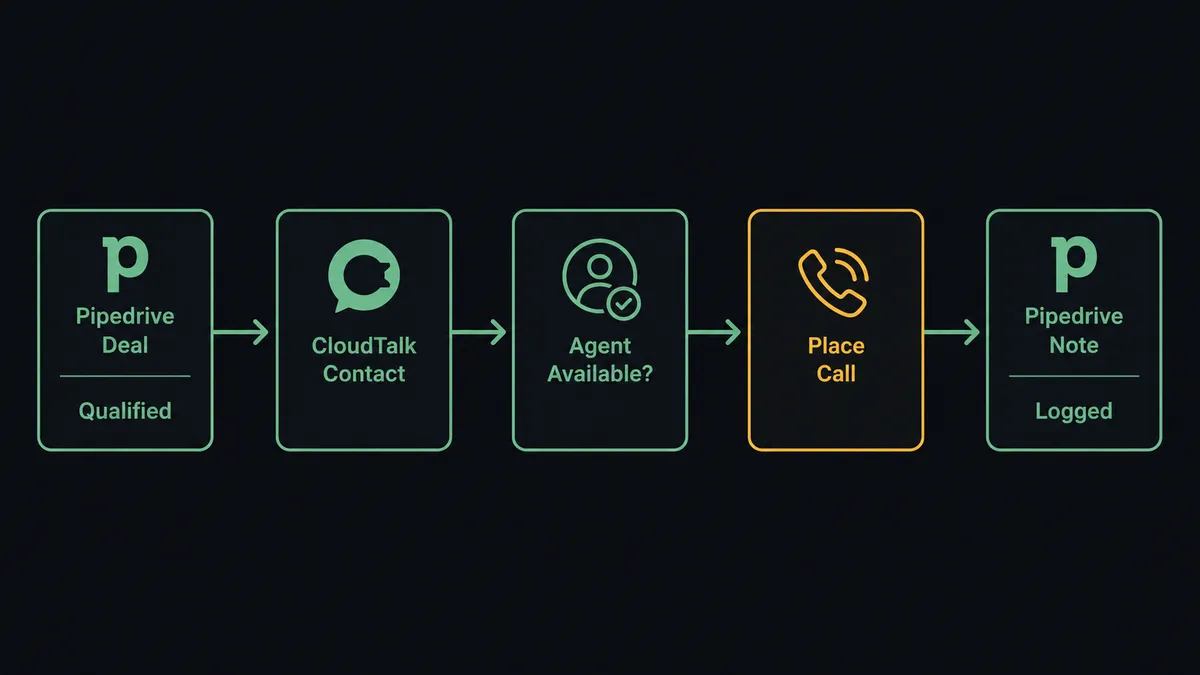
Once the call ends, Get Call and List Notes pull the outcome, duration, and recording link. Create Note writes that context onto the Pipedrive deal, and Create Activity schedules whatever comes next, a follow-up call, a proposal send, a check-in. The deal record ends up with the same detail a rep would have typed in by hand, generated automatically from the call that actually happened.
Can an AI agent run it? (and why a human stays in the loop)
An AI agent does more than move data between the two systems on a fixed script. It reads the deal context, decides which CloudTalk actions to use and in what order, and recognizes the one moment in this flow that isn’t a routine sync: a possible duplicate contact.
Search Persons sometimes returns a match that is close but not certain, a person with a similar name and a different email, or a phone number that overlaps with an existing record tied to a completely different deal. A rules engine would either merge automatically or ignore the ambiguity entirely. The agent does neither. It evaluates the match, checks the call and deal history attached to both candidate records, and decides this one is worth a person’s judgment before Merge Persons runs.
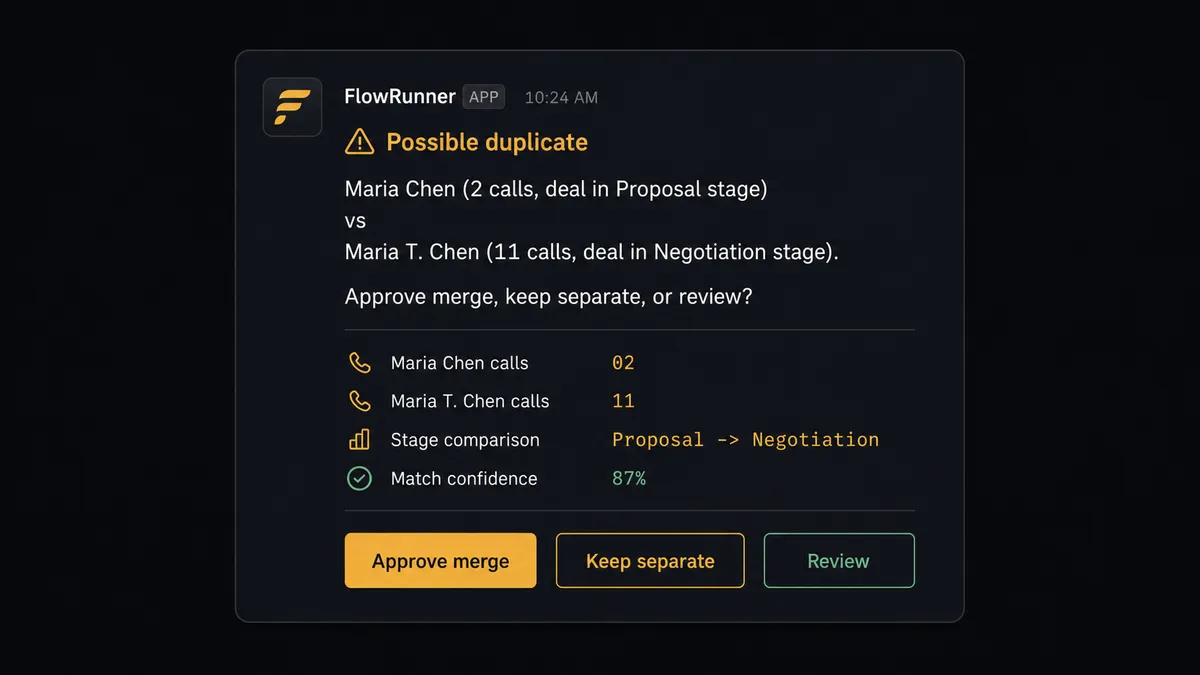
The agent posts the decision to Slack: both records side by side, the call volume and deal stage attached to each, and three options, approve the merge, keep them separate, or flag for a closer look. The sales lead decides. On approval, the agent calls Merge Persons and records who approved it and when, straight into the audit trail. On any other lead in the same batch that matches cleanly, the agent moves straight through without asking, because a clean match carries no real risk. This is not a sync tool. The agent knows when to stop and ask, and it only stops when the decision actually matters.
FlowRunner vs Zapier
Zapier is a genuinely easy way to wire a CloudTalk trigger to a Pipedrive action, and for a single-step “new call logged, create a note” zap, it does the job well with a setup time measured in minutes. Where it runs out of room is the exact moment this flow gets useful: reasoning about a duplicate contact, weighing call history before a merge, and giving a manager a real decision instead of an automatic one.
| Capability | FlowRunner | Zapier |
|---|---|---|
| Human-in-the-loop | Native: the agent decides when to pause and routes the decision with full context | Not built in; a Zap runs the same path every time regardless of context |
| Users on your plan | Unlimited on every tier | Priced per user on team plans |
| AI provider | Bring your own key, you control the spend | Zapier’s AI features run on Zapier’s own model access |
| Deployment | Cloud or self-hosted (Enterprise) | Cloud only |
| Pricing model | Transparent workflow-based tiers with a fixed execution ceiling | Per-task pricing that gets harder to predict as call and deal volume scale |
Before and after
| Category | Before | After |
|---|---|---|
| Speed to first call | Speed-to-lead measured in hours while someone copies a number into a dialer | Qualified leads get dialed while they are still warm, in the same flow that syncs the contact |
| Contact records | Duplicate persons pile up with no dedupe check before creation | Search Persons and Search Organizations run before any create, and the agent flags true ambiguity for a human |
| Activity logging | Calls, notes, and tasks entered when the rep gets to it, often days later | Notes and activities are created from the call the moment it ends |
| Contact merges | Merges happen manually or not at all, and history gets lost either way | The agent proposes merges with call and deal history attached; a person approves before anything combines |
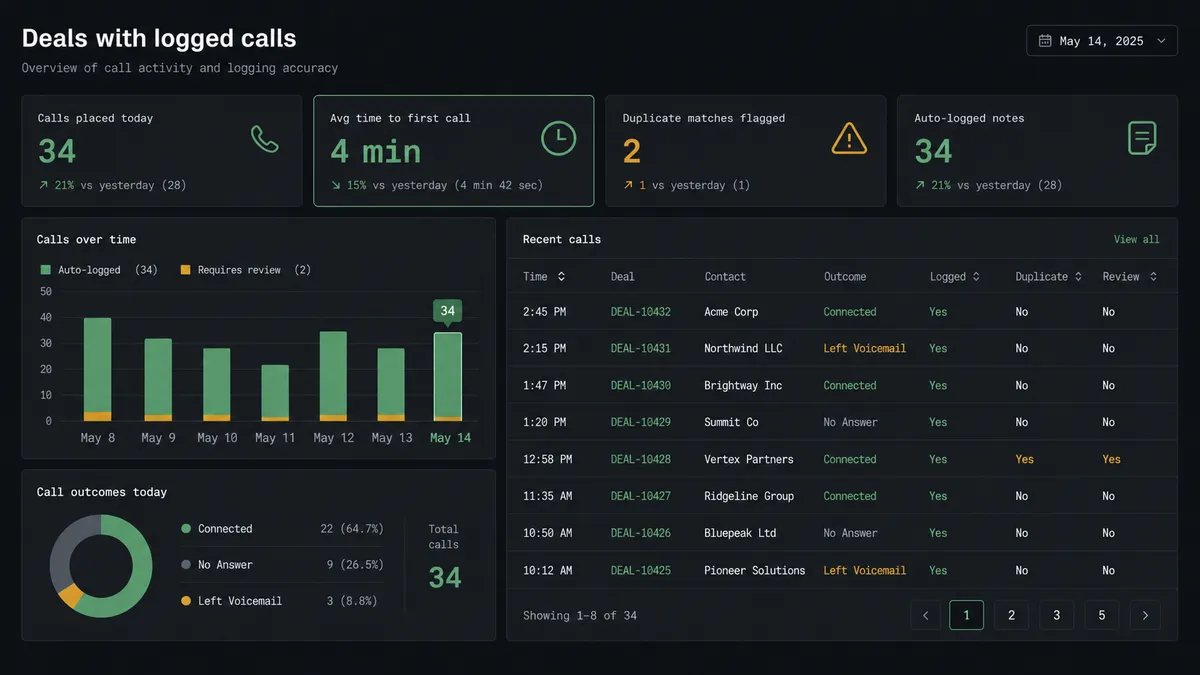
| Reporting | Call center statistics are a monthly export, assembled by hand | Daily call outcomes land on the deal record without anyone running a report |
What you can build
Hot-lead connect. A deal crosses into your qualified stage, the agent syncs the contact into CloudTalk, checks agent availability, and connects a rep to the lead within the minute, following up with Send SMS if nobody answers.
Call-to-deal logging. Every completed call writes its outcome, recording link, and notes onto the matching Pipedrive deal automatically, so the deal timeline reflects what actually happened on the phone.
Contract-signal call sync. When Update Deal moves a deal to Closed Won, the agent triggers a CloudTalk call log entry and a thank-you SMS, closing the loop between the CRM event and the customer touch.
Appointment reminder sweep. The afternoon before a scheduled activity, the agent pulls tomorrow’s Pipedrive activities, matches each person against CloudTalk contacts, and sends a reminder through Send SMS, flagging silent replies for a morning call.
Duplicate contact cleanup. On a schedule, the agent runs List Contacts in CloudTalk and Search Persons in Pipedrive together, builds a merge candidate list with call and deal history attached to each, and routes the list to a sales lead before Merge Persons runs on anything.
Common questions
Is it free to connect CloudTalk and Pipedrive on FlowRunner? Yes. FlowRunner has a free plan with 100 executions a month, every integration included, and no credit card required, and new accounts get 14 days of Professional on top.
Can I self-host the CloudTalk and Pipedrive connection? Yes. FlowRunner offers a self-hosted Enterprise option alongside the cloud tiers, and the same trigger, action, and human-in-loop logic runs either way.
Does the AI agent need my own OpenAI key? Yes, FlowRunner runs on a bring-your-own-key model for AI providers, so you connect your own key and control the AI spend directly.
What happens when the agent isn’t sure whether two Pipedrive contacts are the same person? The agent stops and asks. It packages the matching candidates, their linked deal and call history, and posts the choice to a Slack channel or email for a person to approve, modify, or cancel before Merge Persons ever runs.
Does CloudTalk or Pipedrive need a paid plan to work with FlowRunner? You need a CloudTalk account with API access and a Pipedrive account with an active plan; FlowRunner connects to both through their standard APIs and does not require a specific tier on either side.
Can this flow call the lead automatically without a human dialing? Make Call (Click to Call) rings the assigned sales rep first and only dials the lead once the rep answers, so a person is always the one talking to the customer.
Getting started
Start on the free plan: 100 executions a month, every integration included, no credit card required, plus 14 days of Professional for new accounts. Connect CloudTalk and Pipedrive in FlowRunner, pick the qualified-stage trigger, and the first synced contact and connected call can run the same day. Start building at flowrunner.ai, or book a walkthrough at calendly.com/flowrunner/intro.
Frequently asked questions
Is it free to connect CloudTalk and Pipedrive on FlowRunner?
Yes. FlowRunner has a free plan with 100 executions a month, every integration included, and no credit card required, and new accounts get 14 days of Professional on top.
Can I self-host the CloudTalk and Pipedrive connection?
Yes. FlowRunner offers a self-hosted Enterprise option alongside the cloud tiers, and the same trigger, action, and human-in-loop logic runs either way.
Does the AI agent need my own OpenAI key?
Yes, FlowRunner runs on a bring-your-own-key model for AI providers, so you connect your own key and control the AI spend directly.
What happens when the agent isn't sure whether two Pipedrive contacts are the same person?
The agent stops and asks. It packages the matching candidates, their linked deal and call history, and posts the choice to a Slack channel or email for a person to approve, modify, or cancel before Merge Persons ever runs.
Does CloudTalk or Pipedrive need a paid plan to work with FlowRunner?
You need a CloudTalk account with API access and a Pipedrive account with an active plan; FlowRunner connects to both through their standard APIs and does not require a specific tier on either side.
Can this flow call the lead automatically without a human dialing?
Make Call (Click to Call) rings the assigned sales rep first and only dials the lead once the rep answers, so a person is always the one talking to the customer.