CloudTalk + HubSpot: Dial Qualified Leads While They're Warm
Connect CloudTalk and HubSpot so a qualified lead gets synced, matched, and dialed within seconds, run as an AI agent that pauses for a person only when a contact match is ambiguous.
How do you connect CloudTalk to HubSpot?
Connect CloudTalk to HubSpot by triggering off a HubSpot deal reaching your qualified stage, then running Get Contact by Email in HubSpot to confirm the record before CloudTalk’s Add Contact and Make Call (Click to Call) actions sync the lead and connect the call. FlowRunner is a visual AI-agent orchestration platform where automations run autonomously and pause for human judgment on the steps that carry real consequence. The same connection can run as a simple sync, or as an AI agent that reasons about the lead, chooses which CloudTalk and HubSpot actions to call, and pauses for a person only when a contact match is ambiguous. Either way, the lead gets dialed while it is still warm instead of sitting in a queue.
The problem it solves
A lead crosses the qualification threshold in HubSpot and, in most setups, nothing happens next except a notification a rep might see between calls. Someone, usually a sales development rep or the ops lead covering pipeline hygiene, has to open the deal, copy the phone number, check who is free, and dial manually from CloudTalk or a separate line. That gap is where speed-to-lead goes to die. Every minute the lead sits between systems is a minute a competitor’s rep might get there first, and speed-to-lead is one of the few variables that reliably moves close rates.
The same manual bridge causes a second problem: two systems that quietly disagree. Contacts get created in HubSpot but never make it into CloudTalk, so an inbound callback from a warm lead rings in as an unrecognized number with no history attached. Reps end up re-qualifying people who already qualified themselves, and duplicate contact records pile up in both systems because nobody has time to check before creating a new one. None of this shows up as a single incident. It shows up as a slow leak, hours a week a rep spends on data entry and lookups instead of talking to leads.
How it works: the connection
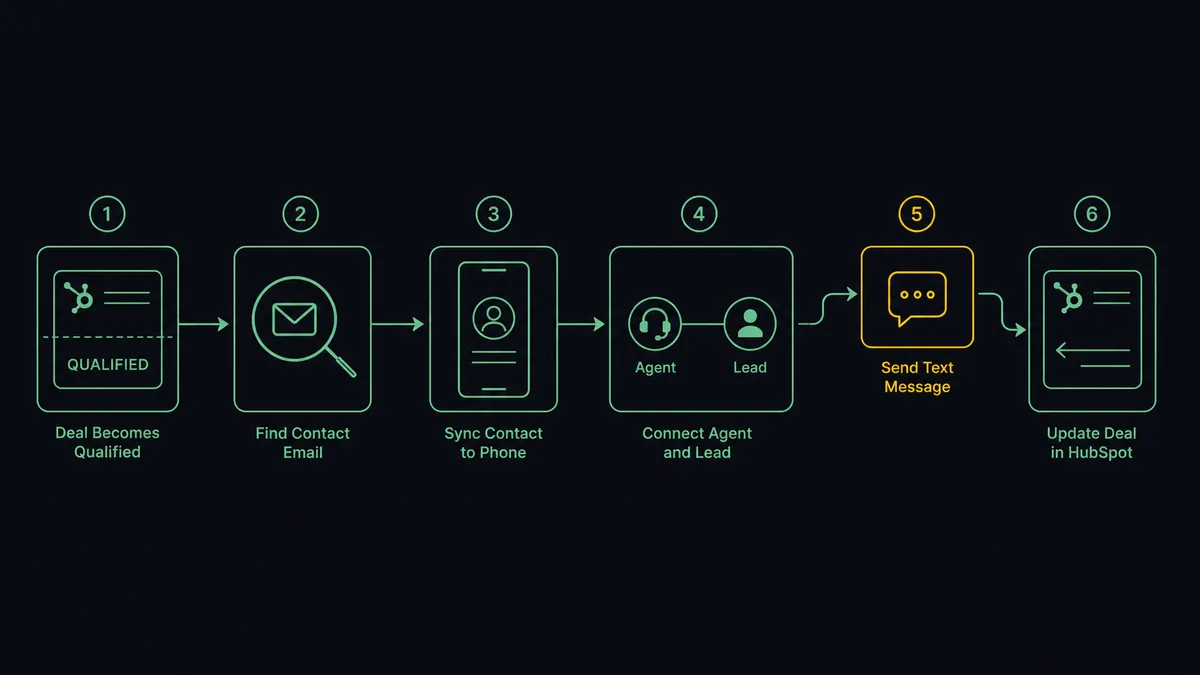
The flow starts the moment a deal reaches your qualified stage in HubSpot, whether that is a lifecycle stage change to Lead or a pipeline stage advance. From there:
- Get Contact by Email in HubSpot confirms the contact tied to the deal and pulls the full context: company, deal amount, source, and any notes already on the record.
- Add Contact in CloudTalk writes that lead into the phone platform with an E.164-formatted number, company name, and title, so the call center recognizes the caller before the first ring.
- List Agents checks who in the sales group is online and available right now, not who is scheduled to be.
- Make Call (Click to Call) rings the available rep’s line first, then dials the lead automatically once the rep picks up. This is agent-first outbound: the rep is already connected before the lead’s phone rings.
- If nobody answers, Send SMS follows with a short text from the team’s CloudTalk number, and the flow schedules the next attempt.
- The call outcome, recording link, and notes post back to the HubSpot deal, so the rep’s next touch starts with full history instead of a blank slate.
Every action here is a named CloudTalk or HubSpot action available today. Nothing in this flow requires custom code or a middleware layer between the two systems.
Can an AI agent run it? (and why a human stays in the loop)
Yes, and this is where the connection stops being a sync tool and starts being an orchestration layer. Instead of a rigid step sequence, an AI agent reads the qualified deal, reasons about what it finds, and calls CloudTalk and HubSpot actions as tools in whatever order the situation calls for. It decides whether to check for an existing contact first, whether the deal context is complete enough to route immediately, and whether anything about the match needs a second set of eyes before it proceeds.
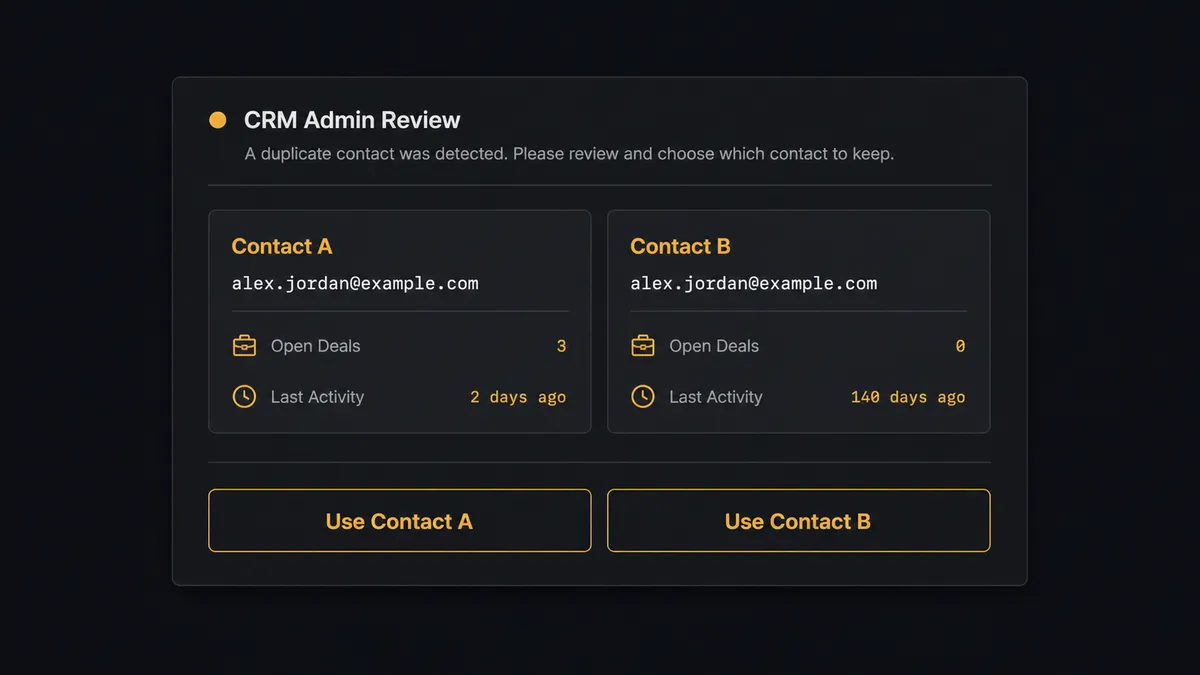
That last part is the real upgrade. When the agent runs Get Contact by Email and finds a clean single match, it moves straight through to CloudTalk and the call. But HubSpot data gets messy in the real world: two contacts sharing a personal and work email, a contact merged from two lead sources, a company domain shared by two people at the same account. When the agent hits that kind of ambiguity, it does not guess and it does not silently pick the more recent record. It pauses, packages both candidate contacts with their deal history and last activity, and sends them to a CRM admin over Slack: “I found two contacts matching this email. Which should I associate this deal with?” The admin picks one with a single click, the agent resumes with that decision as input, and the choice, the decider’s identity, and the timestamp all land in the audit trail.
This is the “digital andon cord” idea in practice, the same pull-cord logic Toyota built into its assembly lines: the agent keeps the line moving on everything routine and stops it the moment something needs a human call. This is not a sync tool. The agent knows when to stop and ask.
FlowRunner vs Zapier
Zapier is the tool most sales and ops teams already know, and it genuinely earns that familiarity. Its trigger and action library covers HubSpot and CloudTalk well, the interface is approachable for a non-technical rep or ops coordinator, and a simple “new qualified deal creates a CloudTalk contact” zap can be live in minutes.
Where the two diverge is what happens when the data gets messy or the workflow needs a decision, not just a data move.
| FlowRunner | Zapier | |
|---|---|---|
| Human-in-the-loop | Native: the agent invokes a human-review step as a callable tool at the exact point of ambiguity | Not built in; requires a separate app or manual review outside the zap |
| AI reasoning over the data | Agent evaluates context and chooses which actions to call, in what order | Steps run in a fixed sequence regardless of what the data looks like |
| Users included per plan | Unlimited users and workflows on every tier | Per-user pricing scales with team size |
| AI provider | BYOK, bring your own key from any supported provider | Built-in AI steps run on Zapier’s own model access |
| Self-hosting | Free Community Edition, plus a self-hosted Enterprise tier | Cloud only, no self-hosted option |
| Pricing model | Transparent workflow-based tiers with clear execution limits | Task-based pricing that can create anxiety about what counts as a task |
Before and after
| Metric | Before | After |
|---|---|---|
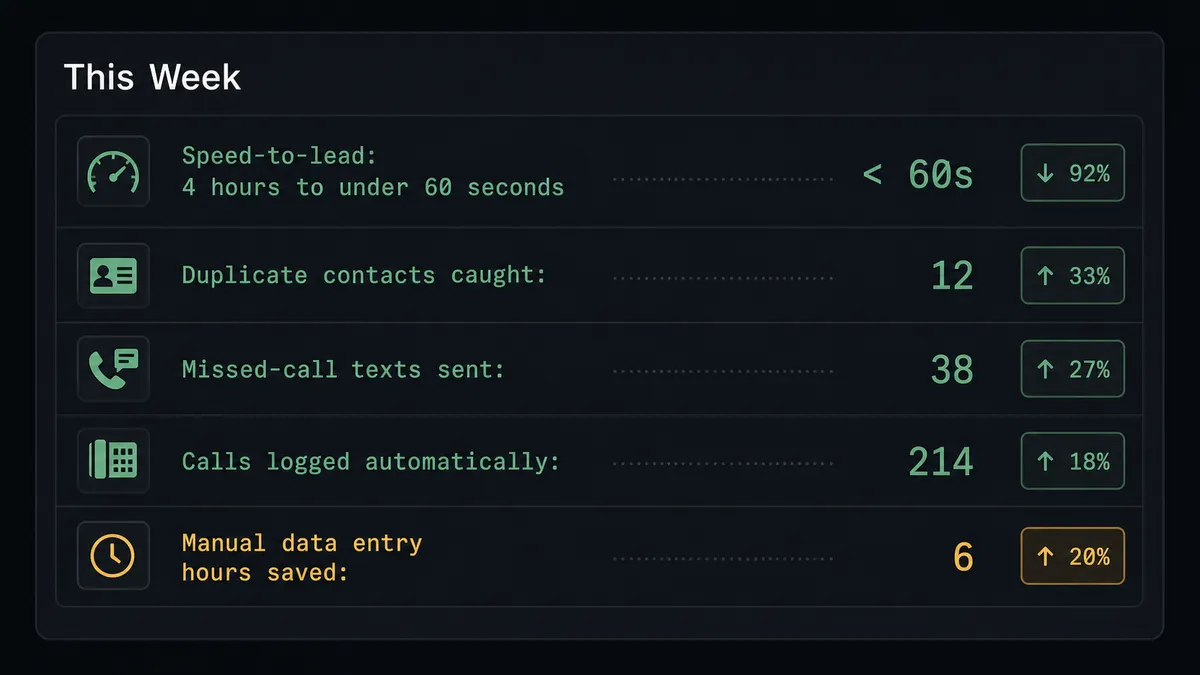
| Speed-to-lead | Qualified lead waits while a rep manually copies the number into a dialer | Contact syncs, an available agent is found, and the call connects in one pass |
| Duplicate contacts | No systematic check before creating a new record | Get Contact by Email runs before every sync, ambiguous matches route to a person |
| Missed-call follow-up | Follow-up depends on a rep remembering to text | Send SMS fires automatically on an unanswered dial |
| Call record visibility | Call history lives in CloudTalk, deal history lives in HubSpot, nobody sees both | Outcome, recording link, and notes post back to the HubSpot deal automatically |
| Data entry time | Hours a week spent copying contact and call data between systems | Sync and routing happen without a rep touching either system by hand |
What you can build
Hot-lead connect. A HubSpot deal reaches Qualified, the agent confirms the contact, syncs it into CloudTalk, finds an available rep with List Agents, and connects the call with Make Call (Click to Call) before the lead cools off.
Daily call operations feed. Every night, List Calls and List Notes pull the day’s activity into a report, Get Statistics adds answer rates and talk times, and the agent posts a morning digest so pipeline decisions run on real numbers instead of guesswork.
Appointment reminder loop. The afternoon before a booked call, the agent matches the HubSpot deal’s contact against CloudTalk’s List Contacts and sends a reminder with Send SMS, logging silent replies for a morning follow-up call.
Contact hygiene sweep. On a schedule, the agent runs List Contacts to surface duplicates and stale CloudTalk entries, matches them against HubSpot, and builds a deletion candidate list. A person reviews and approves before Delete Contact runs, since call history tied to a contact cannot be recovered once it is severed.
Deal-aware SMS follow-up. When Update Deal changes a deal’s stage in HubSpot, the agent checks whether the contact has an open, unanswered CloudTalk dial and sends a stage-appropriate SMS instead of a generic template.
Common questions
Is it free to connect CloudTalk and HubSpot on FlowRunner? FlowRunner has a free plan with 100 executions a month, every integration included, and no credit card required, and new accounts get 14 days of Professional on top. Beyond the free plan, Growth starts at $45 per month and includes unlimited users and unlimited workflows.
Can I self-host this connection? Yes. FlowRunner offers a free self-hosted Community Edition for single-instance deployments. The self-hosted Enterprise tier adds multi-instance clustering and the full compliance suite for teams that need it.
Does the AI agent need my own API key for the AI model? FlowRunner is a BYOK platform. You bring your own key from your preferred AI provider, so your data stays under your control and your model costs are separate from your FlowRunner subscription.
What happens when the agent finds two HubSpot contacts with the same email? The agent does not guess. It pauses the flow and routes the ambiguity to a CRM admin over Slack, showing both matching contacts. The admin picks the right one, and the agent resumes and documents the decision in the audit trail.
Does the lead actually talk to a robot? No. Make Call (Click to Call) rings the available sales rep’s line first and only dials the lead once a human agent has picked up. The agent automates the setup and routing, not the conversation.
What happens if the lead does not answer? The agent follows an unanswered dial with Send SMS, a short text from the team’s CloudTalk number, and logs the attempt back to the HubSpot deal so the next touch has full context.
Getting started
FlowRunner has a free plan with 100 executions a month, every integration included, and no credit card required, and new accounts get 14 days of Professional on top. Build the flow yourself in the visual editor, or book a walkthrough at calendly.com/flowrunner/intro and we will help you map the trigger, the human-in-loop step, and the fallback SMS before you turn it on. Start at flowrunner.ai.
Frequently asked questions
Is it free to connect CloudTalk and HubSpot on FlowRunner?
FlowRunner has a free plan with 100 executions a month, every integration included, and no credit card required, and new accounts get 14 days of Professional on top. Beyond the free plan, Growth starts at $45 per month and includes unlimited users and unlimited workflows.
Can I self-host this connection?
Yes. FlowRunner offers a free self-hosted Community Edition for single-instance deployments. The self-hosted Enterprise tier adds multi-instance clustering and the full compliance suite for teams that need it.
Does the AI agent need my own API key for the AI model?
FlowRunner is a BYOK platform. You bring your own key from your preferred AI provider, so your data stays under your control and your model costs are separate from your FlowRunner subscription.
What happens when the agent finds two HubSpot contacts with the same email?
The agent does not guess. It pauses the flow and routes the ambiguity to a CRM admin over Slack, showing both matching contacts. The admin picks the right one, and the agent resumes and documents the decision in the audit trail.
Does the lead actually talk to a robot?
No. Make Call (Click to Call) rings the available sales rep's line first and only dials the lead once a human agent has picked up. The agent automates the setup and routing, not the conversation.
What happens if the lead does not answer?
The agent follows an unanswered dial with Send SMS, a short text from the team's CloudTalk number, and logs the attempt back to the HubSpot deal so the next touch has full context.