How to Connect Chargebee to Xero: Every Invoice Synced
Connect Chargebee subscription billing to Xero's ledger, optionally as an AI agent that mirrors clean invoices automatically and pauses for a named approver before an invoice gets voided.

How do you connect Chargebee to Xero?
You connect Chargebee to Xero by having a scheduled check pull new and updated invoices with Chargebee’s List Invoices, match or create the customer with Xero’s Find Contacts and Create Contact, and post the invoice and its payment with Create Invoice and Create Payment, so every dollar Chargebee bills shows up in the Xero ledger without anyone typing it in twice. FlowRunner is a visual AI-agent orchestration platform where automations run autonomously and pause for human judgment on the steps that carry real consequence. The same connection can run as an AI agent that mirrors every clean invoice on its own, and pauses for a named accounting manager before a cancelled subscription turns into a voided Xero invoice.
The problem it solves
Today a billing manager runs the subscription side in Chargebee and a bookkeeper runs the books in Xero, and the two systems only agree when someone makes them agree. A new subscriber signs up, Chargebee creates the customer and starts the plan, and at some point someone has to notice the new invoice, open Xero, find or create the matching contact, and key in the invoice by hand. Payments get collected in Chargebee days before anyone logs the corresponding entry in Xero, so accounts receivable stays open longer than it needs to. Ad-hoc invoices created outside the normal billing cycle are the easiest to miss entirely, because they don’t show up on anyone’s routine checklist.
The real risk shows up at the edges. A subscription gets cancelled in Chargebee, or a credit gets issued informally to smooth over a complaint, and accounting finds out weeks later during reconciliation, if at all. By then the Xero invoice for that account is sitting open in the books, overstating revenue that was never going to be collected. Exceptions like this are exactly what fall through the cracks in a manual process: the billing manager isn’t careless, but the two systems don’t talk, and moving information between them depends on whoever has a spare hour that day.
How it works: the connection
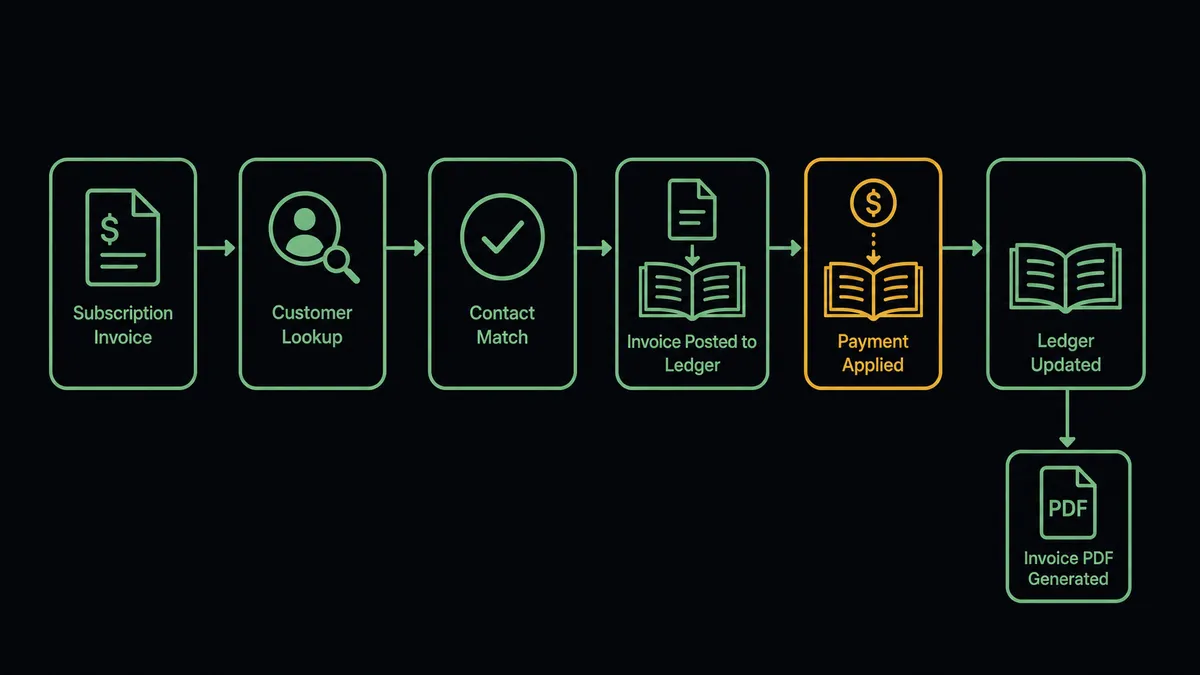
Chargebee does not fire events for invoices or payments, so the connection runs on a schedule and reads Chargebee rather than waiting on it. Here is the plain version, grounded in the real connector actions.
- Trigger: A daily or hourly schedule checks Chargebee’s List Invoices for anything created or collected since the last run.
- Read: Get Customer pulls the subscriber’s details for any new or updated invoice the sweep finds.
- Match: Find Contacts in Xero checks whether the customer already exists. If not, Create Contact provisions the Xero record.
- Post: Create Invoice mirrors the Chargebee invoice into Xero, with the same line items and amount.
- Collect: Once Chargebee confirms payment through Collect Payment or its own payment record, Create Payment records the allocation in Xero and closes the invoice.
- File: Get Invoice PDF in Chargebee retrieves the billing document, which the workflow can deliver to the customer or attach to the Xero record for reference.
That is the “just connect them” answer. Chargebee stays the source of what the subscriber was actually billed; Xero stops being a hand-copied version of it.
Can an AI agent run it? (and why a human stays in the loop)
Yes, and the agent is what keeps the books trustworthy instead of just current. Rather than posting a mirrored entry and hoping the underlying subscription is still active, an AI agent reads each invoice’s context and reasons about it before it acts. List Invoices, Get Customer, Get Subscription, Find Contacts, Create Invoice, Create Payment, Void Invoice, Cancel Subscription: these are the agent’s tools, and it chooses among them per invoice, not per template.
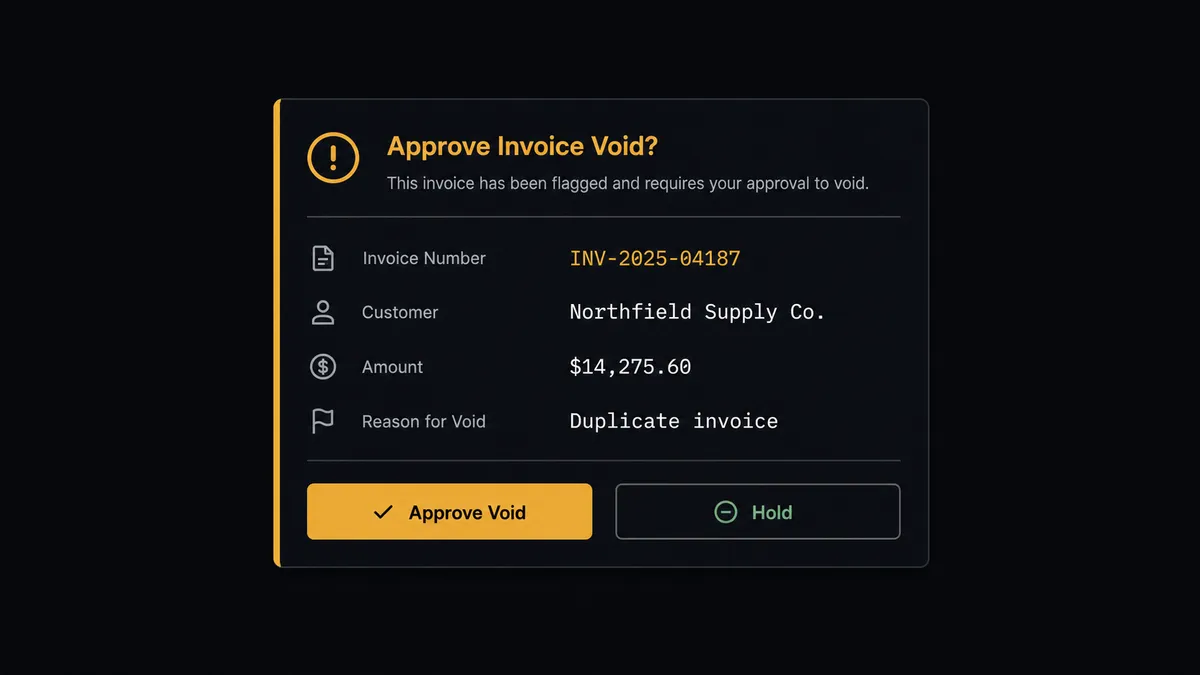
The consequential step is any invoice tied to a subscription that has been cancelled or credited, because voiding a Xero invoice is an irreversible accounting action. On a Wednesday sweep, the agent finds a Chargebee subscription that was cancelled three days ago, with an open $8,900 invoice still sitting in Xero from before the cancellation. Instead of leaving it alone or voiding it automatically, the agent pauses and posts to the accounting channel: “Invoice for $8,900 to [Customer] is tied to a Chargebee subscription cancelled on [date]. Approve void in Xero, or hold because a partial service period still applies?” The accounting manager checks the cancellation reason, confirms no service was delivered after the cutoff, and approves. The agent calls Void Invoice in Xero, then Cancel Subscription in Chargebee if it has not already run, and logs the approver’s name and timestamp against both records. An invoice with no cancellation or credit behind it posts and reconciles on its own, with no one paged.
Prospects call this pattern a digital andon cord: like Toyota’s quality control pull cord, the workflow stops the line the moment it hits an action it cannot reverse, and a person pulls it back into motion. This is not a sync tool guessing at whether an invoice is still good. The agent knows when to stop and ask.
FlowRunner vs Zapier
Plenty of finance teams connecting Chargebee to Xero start with Zapier, and for understandable reasons. Zapier has native Xero actions to create invoices and record payments, and a working Zap that mirrors a new Chargebee invoice into Xero can be live in minutes without anyone technical involved. For a straightforward “new invoice, log it” automation, it does the job.
The difference shows up at the edges, where a cancellation or a credit turns a routine mirrored invoice into something that needs to be reversed. FlowRunner is built around native human-in-the-loop and AI-agent orchestration, where the agent checks the subscription’s current state before it decides whether an invoice should post, stay open, or get voided.
| What matters for this pair | FlowRunner | Zapier |
|---|---|---|
| Human-in-the-loop before an invoice is voided | Native. The agent invokes an approval flow as a callable tool and pauses until accounting signs off | Available only if you build a manual approval step into the Zap yourself |
| Who checks subscription state before posting | An AI agent reads Get Subscription and reasons about cancellations and credits before it acts | A fixed step sequence you configure per Zap, without checking subscription status |
| Users included | Unlimited users on every tier | Priced by task volume; seats vary by plan |
| Bring your own AI keys | Yes, BYOK. Connect the AI provider key you already have | AI features tied to Zapier’s own AI offering |
| Self-hosted option | Yes, cloud-hosted or self-hosted, including a free Community Edition | Cloud only |
| Pricing model | Transparent workflow-based tiers with clear execution limits | Per-task pricing that gets harder to predict as invoice volume grows |
If all you need is a new Chargebee invoice logged into Xero every time one appears, Zapier will do it. If a cancelled subscription should never leave a stale invoice sitting in the books, and a void needs a named person to sign off first, that is where FlowRunner is the better fit.
Before and after
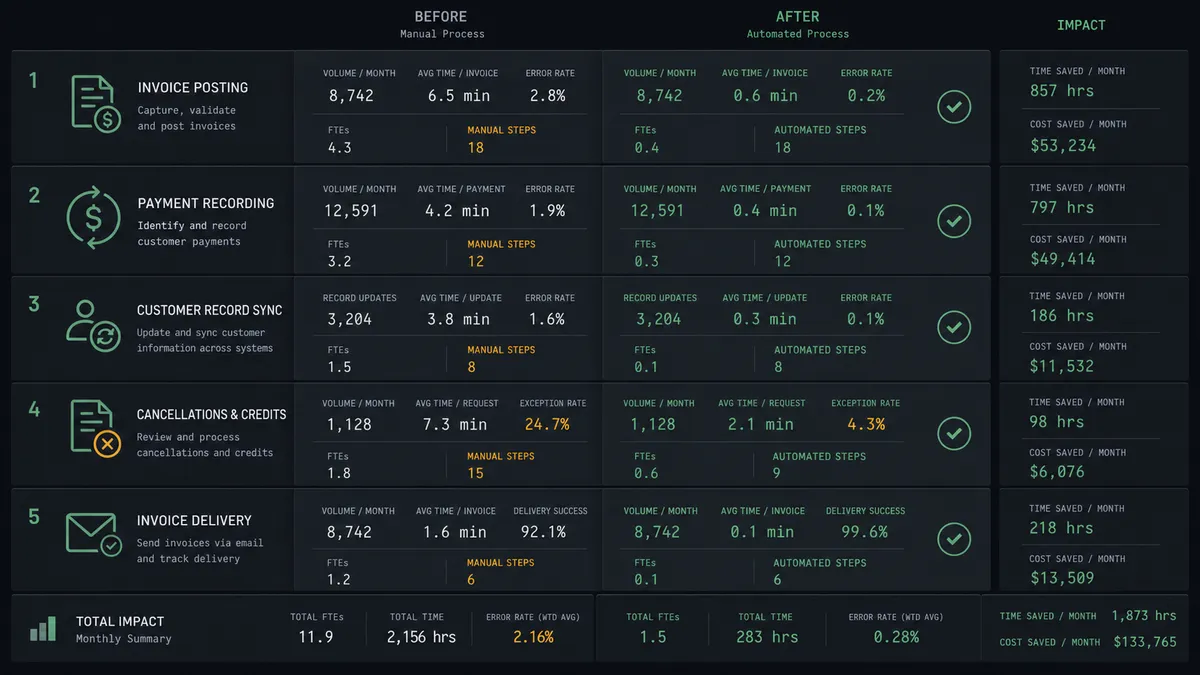
| Category | Before | After |
|---|---|---|
| Invoice posting to Xero | Billing manager re-keys Chargebee invoices into Xero manually, typically in batches | List Invoices feeds Create Invoice automatically, mirrored line by line |
| Payment recording | AR stays open until someone logs the Chargebee payment confirmation in Xero | Create Payment records the allocation as soon as Chargebee confirms collection |
| Customer record sync | New Chargebee customers added to Xero by hand during onboarding | Find Contacts matches or Create Contact provisions the Xero record automatically |
| Cancellations and credits | Subscriptions cancelled or credited informally with no approval trail and no accounting visibility | Cancellations and credits route the linked Xero invoice through a named approver before it is voided |
| Invoice delivery | AP clerk manually pulls invoice PDFs from Chargebee and forwards to customers | Get Invoice PDF retrieves the document as part of the same workflow |
What you can build
Signup-to-invoice mirror. When a new subscriber signs up and the agent creates the Chargebee customer with Create Customer and starts the subscription with Create Subscription, it simultaneously provisions the matching Xero contact with Create Contact and posts the first invoice with Create Invoice. Both systems stay in step from day one.
Payment-to-books close. The agent uses List Invoices in Chargebee to find recently collected invoices, calls Collect Payment where needed, and records the result in Xero with Create Payment. AR closes the same day the money lands instead of during a batch run.
Cancellation-to-void with a human gate. A cancellation event in Chargebee triggers the agent to check Get Subscription and find the linked Xero invoice. If the invoice is still open, it routes the void decision to the accounting manager before calling Void Invoice, so the books never overstate revenue on a closed account.
Credit note reconciliation. When the agent finds a credit in Chargebee through List Credit Notes and Get Credit Note, it reads the credit value and checks whether the corresponding Xero invoice needs an adjustment. Credits above the review threshold hold for approval before anything changes in Xero.
Weekly billing reconciliation report. Every Monday, the agent sweeps List Invoices in Chargebee against Find Invoices in Xero, identifies anything that did not mirror cleanly, and posts a summary to the finance Slack channel so gaps get caught before month-end close.
Common questions
Is it free to connect Chargebee and Xero on FlowRunner? You can build and run the connection on FlowRunner’s free plan, which includes 100 executions a month and every integration with no credit card required, and new accounts also get 14 days of Professional. Both connectors are available on every FlowRunner tier, and every tier includes unlimited users and unlimited workflows.
Can I self-host the Chargebee to Xero workflow? Yes. FlowRunner offers a cloud-hosted option and a self-hosted option, including a free Community Edition, so the billing sync can run inside your own environment if your finance team requires it.
Does the AI agent need my own OpenAI or Claude key? FlowRunner uses a bring-your-own-keys model, so you connect the AI provider key you already have. You control which model runs the agent and FlowRunner does not charge separately for AI usage.
Does Chargebee have its own trigger to start this workflow? No. Chargebee does not expose event triggers in this connector, so the workflow starts on a schedule and calls List Invoices to check for anything new. Xero’s own triggers, including On New Payment Received and On Invoice Updated, can drive the reverse direction for confirmation and CRM sync.
What happens when the agent isn’t sure about an invoice? The agent does not guess. It posts the invoice detail, the mismatch it found, and the reason for the flag to your accounting channel, then waits for a named approver before anything gets created or voided in Xero.
What happens when a Chargebee subscription is cancelled? The agent reads the subscription’s value and payment history and checks whether a corresponding Xero invoice needs to be voided. Because voiding an invoice is irreversible, it always routes that decision to the accounting manager, packaging the invoice number, customer, and amount before anything is reversed in the books.
Getting started
Start on the free plan: 100 executions a month, every integration included, no credit card required, plus 14 days of Professional for new accounts. Both connectors are available on every tier, and every tier includes unlimited users and unlimited workflows.
Explore the integration details:
- Chargebee integration (28 actions covering customers, subscriptions, invoices, product catalog, and hosted checkout)
- Xero integration (8 triggers and 38 actions covering invoices, contacts, payments, credit notes, and financial reports)
Start building free at flowrunner.ai or book a demo to see a live Chargebee to Xero billing sync, void approval and all.
Frequently asked questions
Is it free to connect Chargebee and Xero on FlowRunner?
You can build and run the connection on FlowRunner's free plan, which includes 100 executions a month and every integration with no credit card required, and new accounts also get 14 days of Professional. Both connectors are available on every FlowRunner tier, and every tier includes unlimited users and unlimited workflows.
Can I self-host the Chargebee to Xero workflow?
Yes. FlowRunner offers a cloud-hosted option and a self-hosted option, including a free Community Edition, so the billing sync can run inside your own environment if your finance team requires it.
Does the AI agent need my own OpenAI or Claude key?
FlowRunner uses a bring-your-own-keys model, so you connect the AI provider key you already have. You control which model runs the agent and FlowRunner does not charge separately for AI usage.
Does Chargebee have its own trigger to start this workflow?
No. Chargebee does not expose event triggers in this connector, so the workflow starts on a schedule and calls List Invoices to check for anything new. Xero's own triggers, including On New Payment Received and On Invoice Updated, can drive the reverse direction for confirmation and CRM sync.
What happens when the agent isn't sure about an invoice?
The agent does not guess. It posts the invoice detail, the mismatch it found, and the reason for the flag to your accounting channel, then waits for a named approver before anything gets created or voided in Xero.
What happens when a Chargebee subscription is cancelled?
The agent reads the subscription's value and payment history and checks whether a corresponding Xero invoice needs to be voided. Because voiding an invoice is irreversible, it always routes that decision to the accounting manager, packaging the invoice number, customer, and amount before anything is reversed in the books.