Connect Capsule CRM to Mailchimp Marketing: Deals Fuel Campaigns
Connect Capsule CRM to Mailchimp Marketing so every closed-won opportunity becomes a synced subscriber and tagged segment, with an AI agent that pauses for a human before any erasure request touches both systems.
How do you connect Capsule CRM to Mailchimp Marketing?
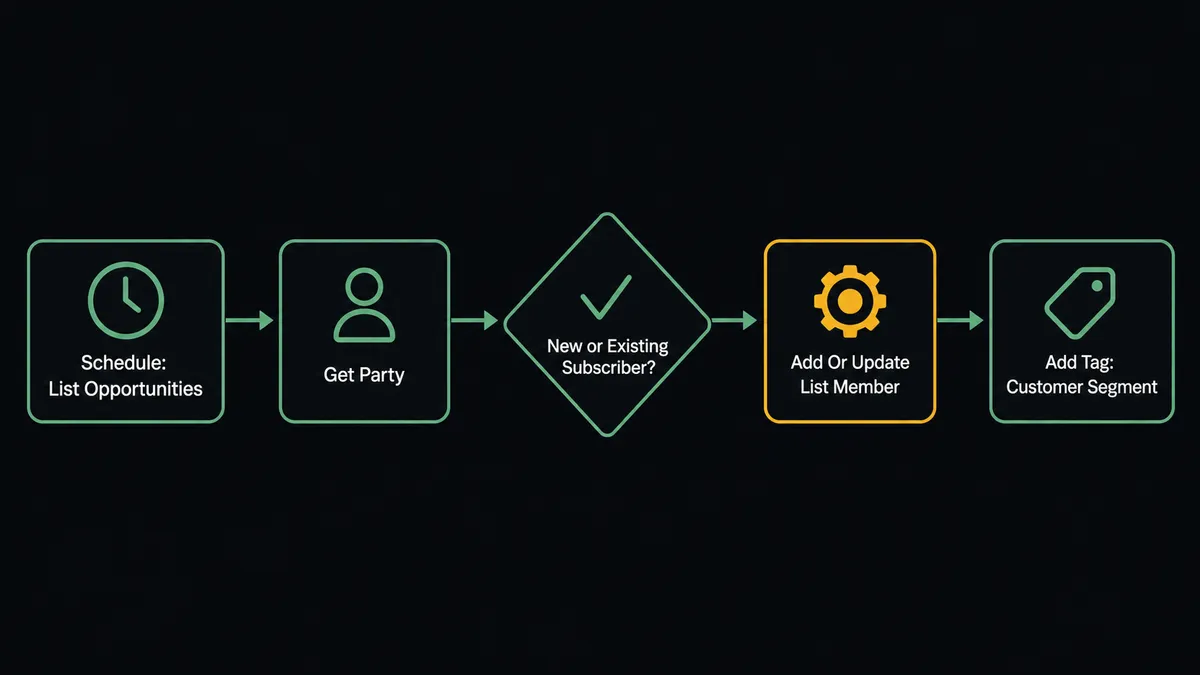
FlowRunner watches Capsule CRM on a schedule with List Opportunities, and when a deal advances to a closed-won milestone, it calls Get Party for the buyer’s details, then Add Or Update List Member and Add Tag in Mailchimp to sync the contact into the customer segment. FlowRunner is a visual AI-agent orchestration platform where automations run autonomously and pause for human judgment on the steps that carry real consequence. That same connection can run as an AI agent that decides which segment fits a given deal and pauses for a human before Delete Party or Unsubscribe Or Delete List Member removes anyone’s record from either system.
The problem it solves
Right now, someone on the sales or marketing team is exporting closed deals from Capsule and manually building the Mailchimp list that should receive onboarding and upsell campaigns. It happens in batches, once a week if the team is disciplined, once a month if they are not. New customers sit in the gap between the deal closing and the first onboarding email, and nobody notices until a customer asks why they never got the welcome sequence they were promised.
The second problem is worse. Right-to-erasure requests are supposed to touch every system that holds a person’s data, not just the one where the request landed. A contact who asks Capsule to delete their record is often still sitting in a Mailchimp audience, receiving campaigns, because nobody remembered to check the second system. Deletion in Capsule is permanent, and the same is true in Mailchimp once a record is fully removed. Doing that by hand, under time pressure, with no record of what was checked first, is exactly how compliance work goes wrong.
How it works: the connection
Neither Capsule CRM nor Mailchimp Marketing exposes a native trigger in the FlowRunner catalog, so this workflow runs on a schedule. On each run, the agent calls List Opportunities in Capsule CRM and compares the current milestone of each deal against the last run, watching for opportunities that just advanced to a closed-won stage.
When a newly won deal appears, the agent calls Get Party to pull the buyer’s name, email, and any custom fields your team tracks. It then calls Search Member in Mailchimp to check whether that contact already exists in the audience. Add Or Update List Member handles both cases: it updates the existing subscriber or creates a new one, so there is no separate branch to maintain for new versus returning contacts.
Once the subscriber record is current, the agent calls Add Tag to apply a segment tag tied to the deal’s stage, for example “Customer” for a closed-won opportunity. As the deal or a later opportunity moves through other Capsule milestones, the agent calls Remove Member Tag to drop the outdated tag and Add Tag again for the new one, so the Mailchimp audience reflects the actual pipeline state instead of a snapshot from whenever someone last exported it.
Can an AI agent run it? (and why a human stays in the loop)
A scheduled rule that syncs closed deals into Mailchimp is useful. It is not the same as an agent that reads the data and decides what it means. The agent evaluates each newly won opportunity against the party’s full Capsule history, the buyer’s existing tags, and any prior interactions, and chooses the segment and campaign enrollment that actually fits, rather than applying one tag to every closed deal regardless of context.
The consequential step lives on the deletion side. In the same scheduled run, the agent watches for erasure requests logged against a Capsule party. Delete Party is permanent in Capsule, and Unsubscribe Or Delete List Member can be permanent in Mailchimp depending on the option selected. The agent never runs either action on receipt of a request. It first assembles what deletion actually touches: the party record via Get Party, any open opportunities from List Opportunities, active cases from List Cases, and the contact’s current Mailchimp subscription and tag history. That dossier goes to the data owner, not a generic admin inbox: “Erasure request verified for this contact. They have one open opportunity at Proposal and an active Mailchimp subscription tagged Customer. Deleting is permanent in both systems. Approve full deletion, or resolve the open opportunity first?”
This is not a hardcoded threshold that fires the same way every time. The agent recognizes that a contact with an open deal or an active onboarding case needs a decision about sequencing, not just a delete command. The reviewer decides whether to close out the open items first or approve deletion as is. Only after that decision does the agent call Delete Party in Capsule and Unsubscribe Or Delete List Member in Mailchimp, logging both actions, the approver’s identity, and the timestamp in the audit trail.
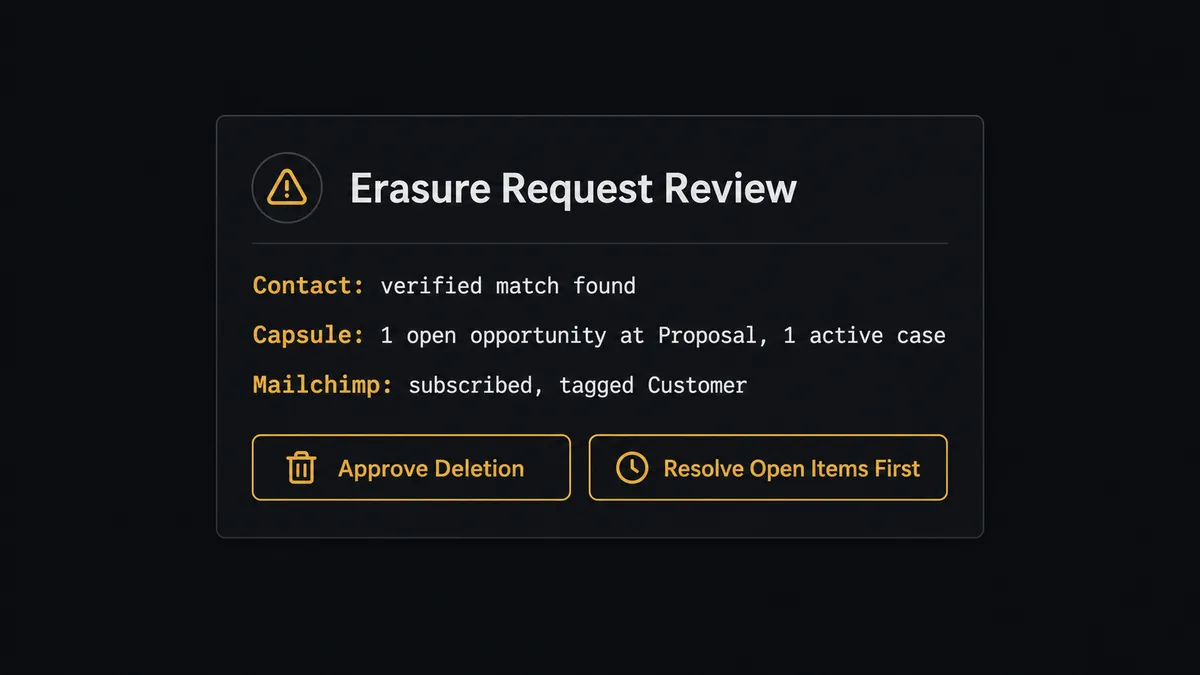
Prospects call this a digital andon cord. The agent stops the line the moment it hits a step with real consequence, packages the context a person needs, and waits. It does not just execute a delete command because a request arrived.
FlowRunner vs the tool you’re probably comparing
If you built this connection on Zapier, you have a scheduled trigger and a linear action chain. It syncs the same way every time, with no awareness of whether a closed deal has an unusual custom field or whether a contact flagged for deletion has an open opportunity attached. Zapier is genuinely fast to set up for this kind of two-tool sync, and its Capsule and Mailchimp app library covers the basic list-and-tag actions well. For a straightforward closed-deal-to-segment sync with no exceptions, it does the job.
Where the comparison changes is anything involving judgment: a deletion request that overlaps a live deal, a contact whose Mailchimp status disagrees with their Capsule record, a segment decision that depends on more than one field. Here is where the two platforms diverge for this pair:
| Feature | Zapier | FlowRunner |
|---|---|---|
| Scheduled sync from Capsule to Mailchimp | Yes, fast to set up | Yes, same speed |
| Native human approval step | Not native (requires manual Slack wiring) | Native callable tool; agent invokes it by judgment |
| Coordinated deletion across both systems | No built-in check for open deals before deleting | Agent checks open opportunities and cases before either delete runs |
| AI agent with context-aware segmentation | Not available | Yes; agent reads party history and decides the tag |
| Audit trail of approvals | No | Yes; reviewer identity and timestamp captured |
| Unlimited users on every tier | No (seat-based pricing) | Yes |
Before and after
| Category | Before | After |
|---|---|---|
| Closed deal to Mailchimp | Manual export after deals accumulate for a week or more | Contact synced the same run List Opportunities detects the closed-won milestone |
| Segment accuracy | Whoever runs the export decides the tag; inconsistent | Pipeline milestone maps to Mailchimp tag automatically |
| Erasure requests | Handled in Capsule only, Mailchimp checked ad hoc or not at all | Both systems checked together before either Delete Party or Unsubscribe Or Delete List Member runs |
| Deletion record | No record of what was reviewed before deleting | Approver identity, context reviewed, and timestamp captured in the audit trail |
| Audience state | Reflects the last manual sync | Reflects the current Capsule pipeline on every scheduled run |
What you can build
Closed-won to customer segment. When List Opportunities finds a deal at a closed-won milestone, the agent calls Get Party, then Add Or Update List Member and Add Tag in Mailchimp to move the contact into the customer segment and its onboarding sequence.
Pipeline-stage nurture tracks. As an opportunity advances through Capsule milestones, the agent calls Remove Member Tag to drop the prior stage tag and Add Tag for the new one, so a contact at Proposal receives different messaging than one at Negotiation.
Coordinated right-to-erasure. When an erasure request is logged against a Capsule party, the agent checks List Opportunities and List Cases for open items and Search Member for Mailchimp subscription status, then pauses for the data owner before Delete Party and Unsubscribe Or Delete List Member run together.
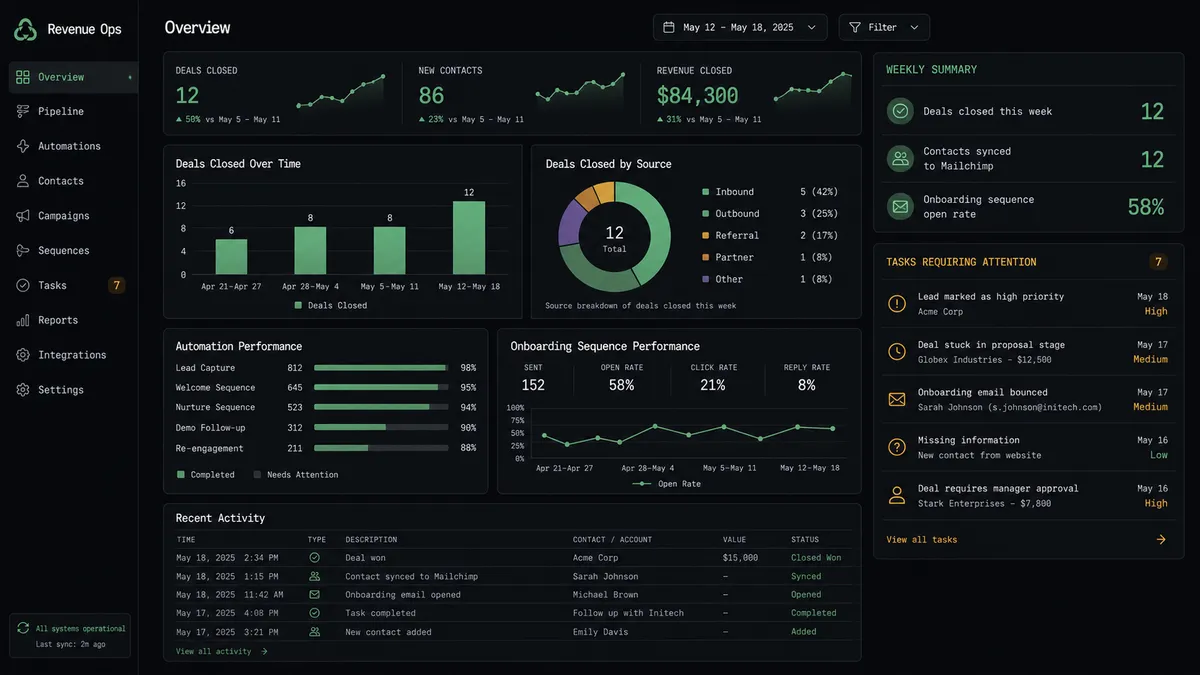
Weekly pipeline-to-engagement digest. Every Monday, the agent calls List Opportunities to summarize the week’s closed deals and Get Campaign Report for the customer segment’s onboarding campaign, then posts open rate and click rate alongside deal volume to the sales and marketing channel. A typical week shows 12 deals closed against a 58% open rate on the onboarding sequence.
Reactivation from a stalled deal. When an opportunity sits unchanged past a configured window, the agent applies a “Re-engage” tag via Add Tag and adds a note with Add Member Note describing the last known stage, giving marketing a segment to target without sales having to flag it manually.
Common questions
Is it free to connect Capsule CRM and Mailchimp Marketing on FlowRunner? FlowRunner has a free plan with 100 executions a month, every integration included, and no credit card required, and new accounts get 14 days of Professional on top. The Growth plan is $45 per month and includes unlimited users, unlimited workflows, and full access to both the Capsule CRM and Mailchimp Marketing connectors.
Can I self-host the Capsule CRM to Mailchimp Marketing connection? Yes. FlowRunner offers a self-hosted Community Edition at no cost and an Enterprise self-hosted option with multi-instance clustering and a full compliance suite. Both include the same connector library as the cloud-hosted tiers.
Does the AI agent need my own API keys for Capsule and Mailchimp? Yes. FlowRunner uses a bring-your-own-keys model. You connect your Capsule CRM account with its API key and your Mailchimp account with its API key. Your credentials stay in your environment and are never shared with FlowRunner’s AI providers.
Which triggers and actions drive this workflow if neither connector has native triggers? Both connectors are action-based, so the workflow runs on a schedule. It calls List Opportunities in Capsule CRM to catch newly won deals, then Search Member and Add Or Update List Member in Mailchimp to sync the contact, with Add Tag applying the customer segment.
What happens to someone’s Mailchimp subscription when they submit a right-to-erasure request in Capsule? Nothing deletes automatically. The agent assembles the full picture, the Capsule party record, any open opportunities or active cases, and the Mailchimp subscription status, and sends it to the data owner before Delete Party or Unsubscribe Or Delete List Member runs in either system. The erasure is honored fully, on purpose, with a record of what was checked first.
Can I segment Mailchimp campaigns by Capsule pipeline stage? Yes. As an opportunity advances through your Capsule milestones, the agent calls Remove Member Tag to drop the old stage tag and Add Tag to apply the new one, so the Mailchimp audience always reflects where each contact actually sits in the pipeline.
Getting started
FlowRunner has a free plan with 100 executions a month, every integration included, and no credit card required, and new accounts get 14 days of Professional on top. Every plan includes unlimited users and unlimited workflows.
Both connectors are ready to use:
Start building at flowrunner.ai or book a 30-minute walkthrough at calendly.com/flowrunner/intro.
Frequently asked questions
Is it free to connect Capsule CRM and Mailchimp Marketing on FlowRunner?
FlowRunner has a free plan with 100 executions a month, every integration included, and no credit card required, and new accounts get 14 days of Professional on top. The Growth plan is $45 per month and includes unlimited users, unlimited workflows, and full access to both the Capsule CRM and Mailchimp Marketing connectors.
Can I self-host the Capsule CRM to Mailchimp Marketing connection?
Yes. FlowRunner offers a self-hosted Community Edition at no cost and an Enterprise self-hosted option with multi-instance clustering and a full compliance suite. Both include the same connector library as the cloud-hosted tiers.
Does the AI agent need my own API keys for Capsule and Mailchimp?
Yes. FlowRunner uses a bring-your-own-keys model. You connect your Capsule CRM account with its API key and your Mailchimp account with its API key. Your credentials stay in your environment and are never shared with FlowRunner's AI providers.
Which triggers and actions drive this workflow if neither connector has native triggers?
Both connectors are action-based, so the workflow runs on a schedule. It calls List Opportunities in Capsule CRM to catch newly won deals, then Search Member and Add Or Update List Member in Mailchimp to sync the contact, with Add Tag applying the customer segment.
What happens to someone's Mailchimp subscription when they submit a right-to-erasure request in Capsule?
Nothing deletes automatically. The agent assembles the full picture, the Capsule party record, any open opportunities or active cases, and the Mailchimp subscription status, and sends it to the data owner before Delete Party or Unsubscribe Or Delete List Member runs in either system. The erasure is honored fully, on purpose, with a record of what was checked first.
Can I segment Mailchimp campaigns by Capsule pipeline stage?
Yes. As an opportunity advances through your Capsule milestones, the agent calls Remove Member Tag to drop the old stage tag and Add Tag to apply the new one, so the Mailchimp audience always reflects where each contact actually sits in the pipeline.