Box + Slack: External Shares Wait for Human Approval
Connect Box and Slack so filed documents post automatically and external share requests pause for a human in Slack before the link goes out.
How do you connect Box to Slack?
Connect Box to Slack by triggering on Box’s On Folder Event (or On File Event), running Box’s filing and sharing actions, and using Slack’s Send Message to Channel action to post the result where your team already works. FlowRunner is a visual AI-agent orchestration platform where automations run autonomously and pause for human judgment on the steps that carry real consequence. On this pair, the upgrade is specific: the same connection can run as an AI agent that files documents on its own but pauses in Slack for a human decision before any file or folder leaves the organization.
What’s the manual process today?
Right now, filing and sharing Box documents is a task someone does between other tasks. An account manager finishes a signed contract, uploads it to the right client folder, and has to remember the naming convention, the metadata tags, and whether this particular recipient needs a password-protected link with an expiry date. An ops lead handling a nightly export watches a slow upload finish, moves the file manually, and deletes yesterday’s version by hand. None of this is hard. It’s just easy to skip when someone is busy, and skipped filing is how documents fall through the cracks.
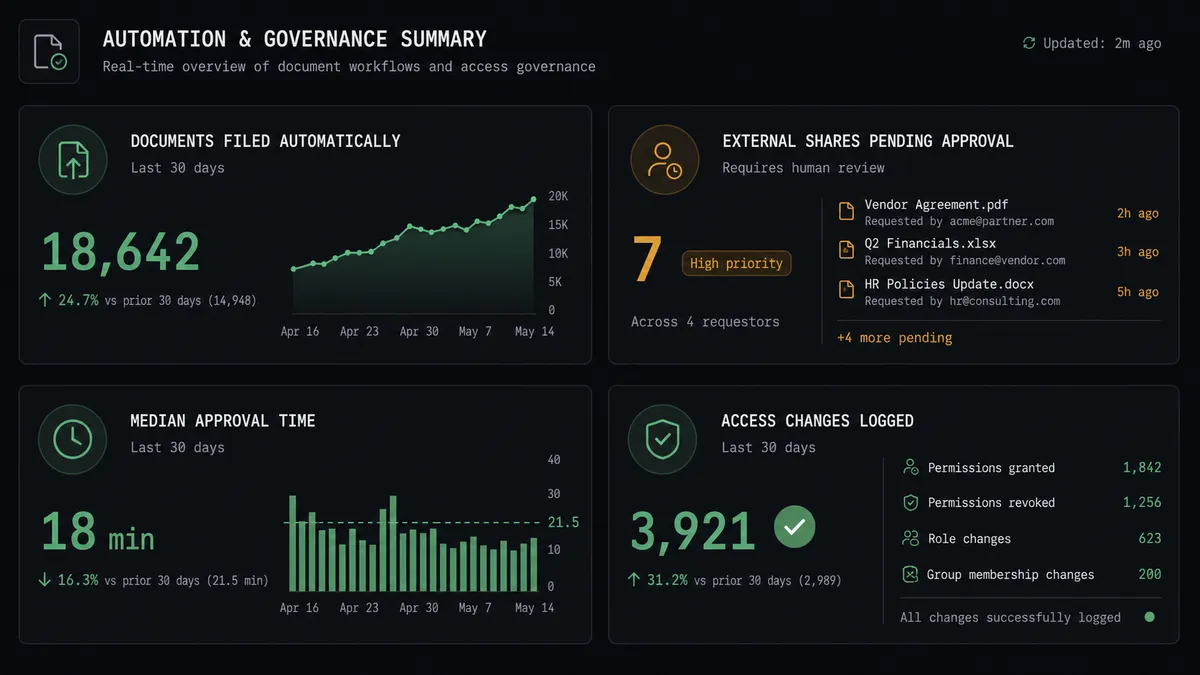
External sharing is where the real risk sits. Links get created ad hoc, with no consistent expiry and no record of who approved sending a sensitive folder to an outside auditor or vendor. Collaborators get added to a project once and are rarely reviewed again. The spreadsheet tracking who has access to what, if it exists at all, is already out of date. An operations lead doesn’t need more storage. They need filing that happens without being asked, and external access that never leaves the building without someone signing off first.
How does the Box to Slack connection work?
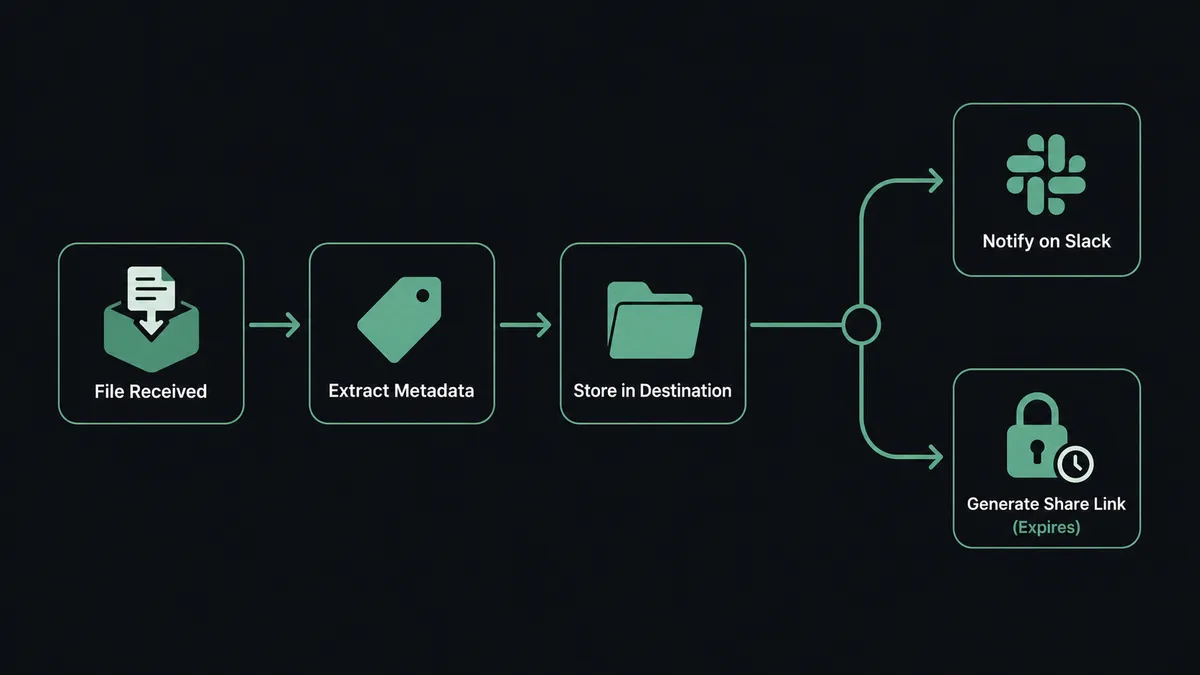
The flow starts on the Box side. On Folder Event fires when a new file lands in a watched folder, such as a client-documents or exports folder. The agent calls Get File Info to confirm the document type, then applies a Create Metadata Instance call so the file is tagged and searchable, and uses Move File or Upload File to put it in its destination folder. For files over 50 MB, Upload Large File handles the transfer with chunked upload so a nightly export doesn’t fail partway through.
Once the document is filed, the agent uses Slack’s Send Message to Channel action to post a confirmation, for example to the account manager who requested it, with a link to the file. If the workflow needs a shared link created, the agent calls Create File Shared Link or Create Folder Shared Link with a password and expiry set by policy, and that confirmation carries the access details. This is the plain connection: a Box event drives Box filing actions, and Slack carries the result to the people who need to see it. It works whether or not anything ever needs a human decision.
Can an AI agent run the Box to Slack workflow, and why does a human stay in the loop?
Yes, and this is where FlowRunner is not a sync tool. The agent doesn’t just move files when a folder event fires. It reads what changed, decides whether the action is internal filing or an external share request, and only escalates the second case. Internal filing, tagging, and confirmation run without anyone touching them. A request to share a folder with someone outside the organization, or to grant a collaborator access to a sensitive folder, is different in kind, and the agent treats it that way.
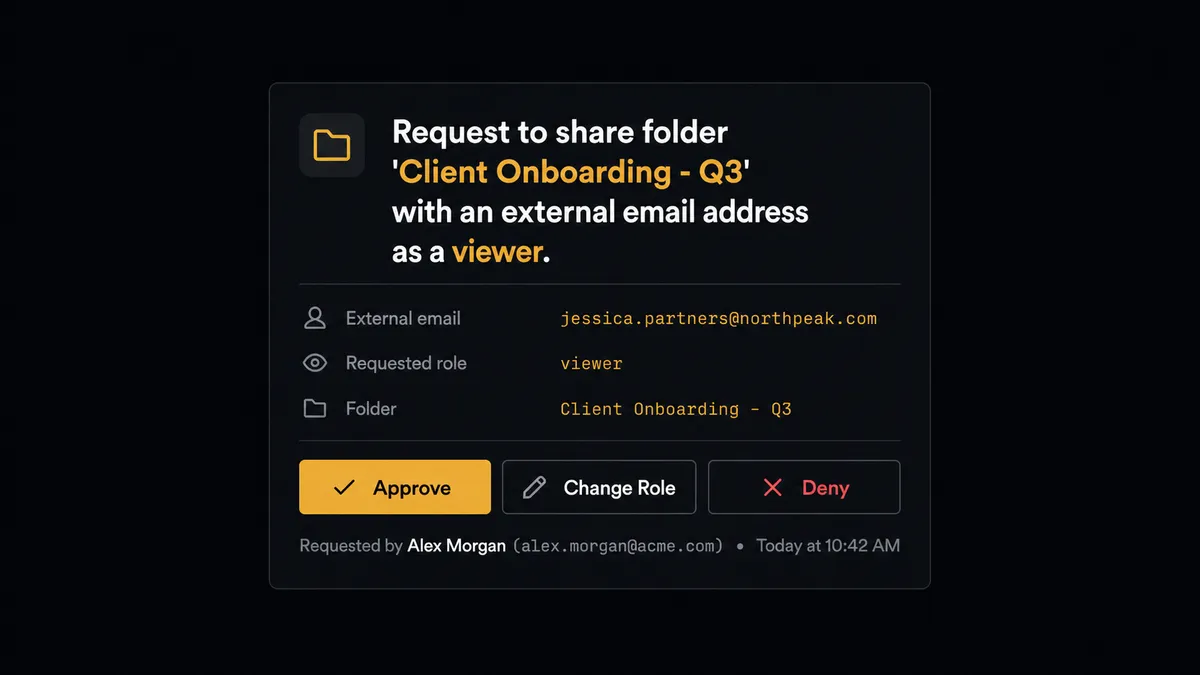
When the agent detects an external share request, it does not create the link. It packages the context: the folder name, the intended recipient, and the access level requested, and posts it to the data owner in Slack using On Block Action: “Request to share folder ‘[folder name]’ with [recipient] as a viewer. Approve, change the role, or deny?” The data owner responds from their phone. On approval, the agent calls Create Folder Shared Link and delivers it. On denial, the agent logs the decision and stops, no link is ever created. The approver’s identity and the decision are captured in the audit trail automatically.
This is the “digital andon cord” idea in practice: the agent doesn’t fail or skip when it hits something it shouldn’t decide alone, and it doesn’t apply a fixed rule like “always ask for shares over X people.” It reasons about what kind of request it’s looking at and pulls the cord itself when access is about to leave the building.
FlowRunner vs Zapier: what’s different for Box and Slack?
Zapier is a genuinely fast way to wire a two-step Zap between Box and Slack, and for teams that just want a notification when a file lands, its app catalog and setup speed are real strengths. Where it runs out of road is the decision most operations leads actually care about with Box: not “tell me a file arrived” but “don’t let this file leave the organization without a person checking first.”
| Capability | FlowRunner | Zapier |
|---|---|---|
| Human-in-the-loop on external shares | Native: the agent reasons about the request and routes to a person via Slack buttons, decision captured in the audit trail | Not built in; approval requires a separate paid app or a manual step outside the Zap |
| Pricing model | Transparent workflow-based tiers with a clear execution count per tier | Per-task pricing that scales with every step, harder to predict at volume |
| Users included | Unlimited users and workflows on every tier | Per-user pricing on most plans |
| AI provider | BYOK: connect your own AI provider key | AI features bundled at Zapier’s model and rate |
| Self-hosting | Enterprise tier supports self-hosted deployment | Cloud-only |
Before and after: Box and Slack automation
| Category | Before | After |
|---|---|---|
| Document filing | Exports and attachments are uploaded and sorted into folders by hand | Documents land in the right Box folder with metadata applied automatically |
| External share requests | Links are created ad hoc with no consistent expiry or access record | Shared links carry a password and expiry, requested and approved in Slack before they’re sent |
| Approval turnaround | Exceptions require a meeting or email chain before resolution | Approve or deny a share request from a phone in Slack, decision resolved in minutes |
| Access review | Collaborators are added once and rarely reviewed or revoked | Collaborator changes run through the flow with a record of who approved and when |
| Audit trail | No structured approval record for who shared what | Every approval captured with approver identity and timestamp automatically |
What can you build with Box and Slack?
Signed contract filing with Slack notification. When a generated contract lands in a client’s Box folder, the agent calls Upload File, applies Create Metadata Instance so it’s searchable by client and contract type, creates a Create File Shared Link with a password and 14-day expiry, and posts the link to the account manager with Send Message to Channel.
External share approval workflow. On Folder Event fires when someone requests access to a sensitive folder. The agent prepares the request but routes it through Slack’s On Block Action for Approve, change-role, or Deny before Create Folder Shared Link or Add Collaboration ever runs.
Large nightly export alert. A nightly job produces a data export over 50 MB. The agent uses Upload Large File to push it reliably, moves it into the reporting folder, and posts a Send Message to Channel summary so the finance team knows it landed without checking Box directly.
Vendor document intake from Slack into Box. A vendor drops a PDF into the #vendor-docs Slack channel, firing On File Shared. The agent validates the document, files it into Box with Upload File and Create Metadata Instance, and confirms in the Slack thread that it’s archived and tagged.
Common questions about connecting Box and Slack
Is it free to connect Box and Slack on FlowRunner? FlowRunner has a free plan with 100 executions a month, every integration included, and no credit card required, and new accounts get 14 days of Professional on top. Beyond the free plan, Growth starts at $45/mo for 12,000 executions.
Can I self-host the Box and Slack integration? Yes. FlowRunner’s Enterprise tier offers a self-hosted deployment option for teams that need Box and Slack automation to run inside their own infrastructure, alongside the standard cloud-hosted tiers.
Does the agent need my own OpenAI key? FlowRunner uses a bring-your-own-key model for AI providers, so the Box-to-Slack agent runs on the AI provider and key you connect rather than a bundled model you pay FlowRunner a markup on.
What happens when the agent isn’t sure whether to share a Box file externally? The agent stops and posts a message in Slack to the data owner with the folder name, the recipient, and the requested access level, then waits for an Approve, change-role, or Deny decision before it creates or denies the shared link.
Which Box and Slack triggers actually power this flow? On Folder Event and On File Event on the Box side start the flow when documents arrive or change, and On Block Action on the Slack side fires when a person clicks Approve or Deny on the agent’s message, resuming the workflow with their decision.
Can non-technical staff set this up? Yes. The connection is built in FlowRunner’s visual workflow builder by choosing triggers and actions from Box and Slack, not by writing code, so an operations lead can configure it directly.
Getting started
FlowRunner has a free plan with 100 executions a month, every integration included, and no credit card required, and new accounts get 14 days of Professional on top. Start filing documents automatically and put a real approval step in front of every external share. Sign up at flowrunner.ai or book a walkthrough at calendly.com/flowrunner/intro.
Frequently asked questions
Is it free to connect Box and Slack on FlowRunner?
FlowRunner has a free plan with 100 executions a month, every integration included, and no credit card required, and new accounts get 14 days of Professional on top. Beyond the free plan, Growth starts at $45/mo for 12,000 executions.
Can I self-host the Box and Slack integration?
Yes. FlowRunner's Enterprise tier offers a self-hosted deployment option for teams that need Box and Slack automation to run inside their own infrastructure, alongside the standard cloud-hosted tiers.
Does the agent need my own OpenAI key?
FlowRunner uses a bring-your-own-key model for AI providers, so the Box-to-Slack agent runs on the AI provider and key you connect rather than a bundled model you pay FlowRunner a markup on.
What happens when the agent isn't sure whether to share a Box file externally?
The agent stops and posts a message in Slack to the data owner with the folder name, the recipient, and the requested access level, then waits for an Approve, change-role, or Deny decision before it creates or denies the shared link.
Which Box and Slack triggers actually power this flow?
On Folder Event and On File Event on the Box side start the flow when documents arrive or change, and On Block Action on the Slack side fires when a person clicks Approve or Deny on the agent's message, resuming the workflow with their decision.
Can non-technical staff set this up?
Yes. The connection is built in FlowRunner's visual workflow builder by choosing triggers and actions from Box and Slack, not by writing code, so an operations lead can configure it directly.