Connect Google BigQuery to Google Sheets: Self-Updating KPIs
Connect Google BigQuery and Google Sheets so validated sheet rows stream into the warehouse and query results write straight back into the sheet, with an AI agent that pauses for a person before it loads a bad row or drops a table.
How do you connect Google BigQuery to Google Sheets?
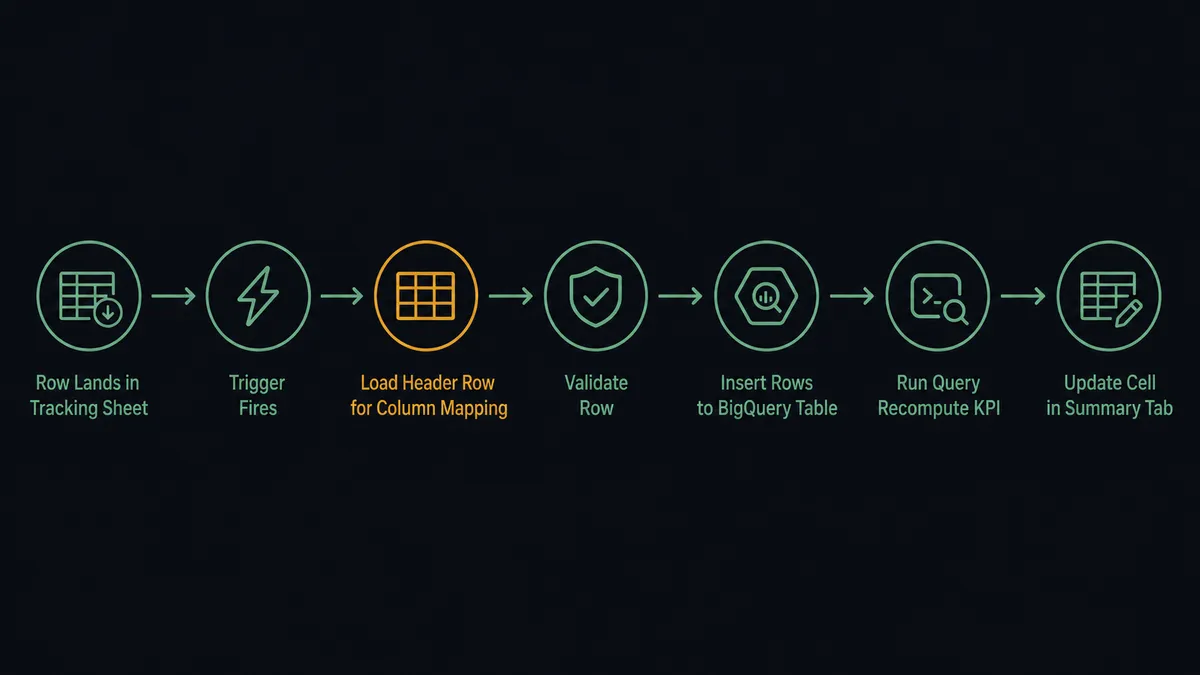
You connect Google BigQuery to Google Sheets by building a FlowRunner workflow that starts on Google Sheets’ On New or Updated Row trigger, validates the row against the mapped header, and calls BigQuery’s Insert Rows action to stream it into a table; a second step in the same flow runs BigQuery’s Run Query action and writes the result back into the sheet with Update Cell. FlowRunner is a visual AI-agent orchestration platform where automations run autonomously and pause for human judgment on the steps that carry real consequence. The same connection can run as an AI agent that reads each row, decides whether it is clean enough to load, and pauses for a person on the rows and tables where a mistake would be expensive.
The problem it solves
An ops lead who tracks vendor onboarding, expense intake, or campaign performance in a shared Google Sheet does the same thing every week: export a report from another system, paste it into a tab, and forward it to whoever asked for the numbers. Nobody treats a new row in that sheet as an event, so nothing downstream reacts to it. A vendor gets added, a threshold gets crossed, or a batch of leads lands, and it sits there until a person notices and manually keys it into the warehouse or the next system in line. Analysts who run the actual reporting live on the other side of the same gap. Their KPIs live in BigQuery, computed with a query somebody wrote once, and the results surface in a BI tool that operations teams have to remember to open. Both sides end up doing reconciliation work every week: one loads rows into the warehouse by hand, the other pastes query results back into a sheet so the team that lives in spreadsheets can use them.
The exceptions are what actually cost time. A row with a missing amount or an unrecognized status loads into BigQuery anyway, because nobody checks before the paste, and it quietly skews the next KPI query. A stale snapshot table nobody remembers creating sits in the warehouse for a year because deleting it means finding out who might still be querying it, and that conversation never happens. None of this shows up as one big failure. It shows up as an hour here, a wrong number there, and a general sense that the sheet and the warehouse have drifted apart.
How it works: the connection
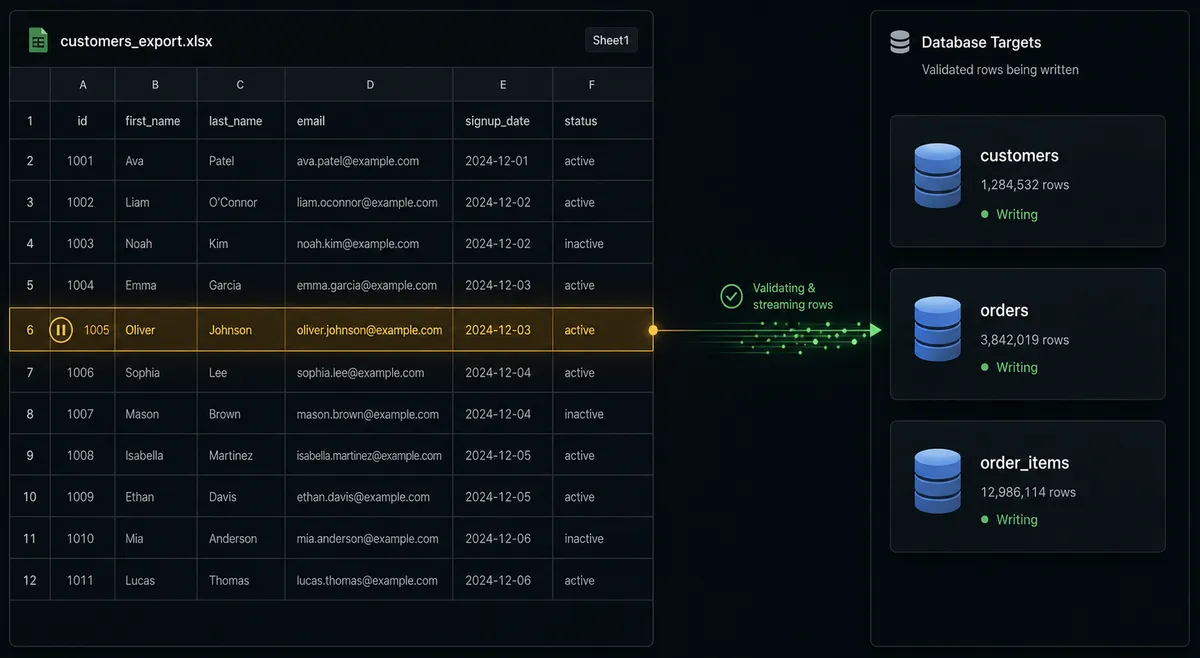
The connection uses Google Sheets’ On New or Updated Row trigger as the starting point. When a row is added to a tracking sheet or an existing row changes, the trigger fires and passes the row into the flow. FlowRunner loads the sheet’s header row with Load Header Row so the flow can address columns by name instead of column letters, then reads the new row’s values against that map.
From there, BigQuery’s Insert Rows action streams the row into an analytics table. Streaming inserts are queryable within seconds, so the warehouse reflects the sheet’s data almost immediately, without a nightly batch job or a custom ingestion script. If the flow needs the full table rather than just the new row, List Rows reads a BigQuery table’s contents without incurring query cost, useful for a periodic full sync back into a reporting tab.
The other direction runs through BigQuery’s Run Query action. A parameterized GoogleSQL query, using named @name placeholders, computes the KPI the team cares about, whether that’s a daily total, a rolling average, or a count against a threshold. Run Query returns the rows as plain JSON keyed by column name. If the job runs long, Get Query Results fetches the same rows by job id once the job finishes. Those rows go straight into Google Sheets with Update Cell, landing in a summary tab the team already has open. No export, no manual paste, no separate BI login.
Can an AI agent run it? (and why a human stays in the loop)
A plain sync tool moves rows from one system to another and does not think about what is in them. Put an AI agent in front of this connection instead, and it gets access to both connectors’ actions as tools it can choose to use: Load Header Row, Insert Rows, Run Query, Update Cell, all of it. The agent reads each new row, reasons about it against the required fields, and decides for itself whether the row is clean enough to load into the warehouse.
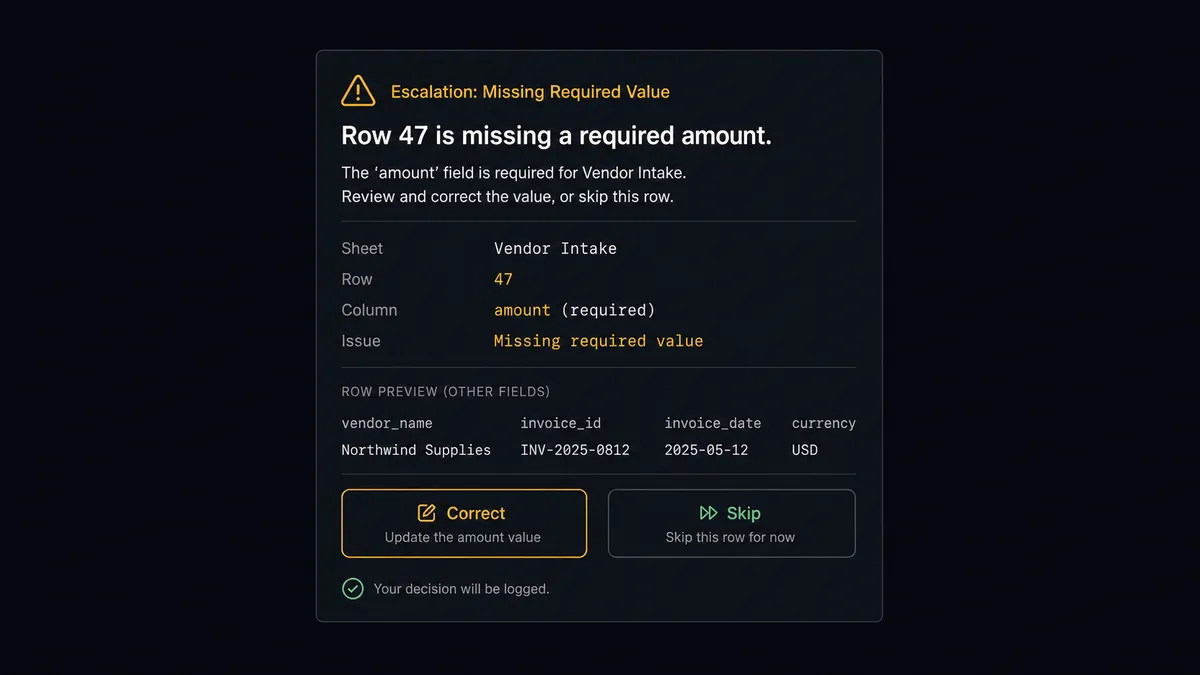
Most rows pass. The agent streams them into BigQuery with Insert Rows and moves on. A row that’s missing a required value, an empty amount column, or a status the mapped header doesn’t recognize, is a different case. The agent does not push it downstream to see what happens. It holds the row, marks it in the sheet, and invokes a human-in-loop flow as a tool, which routes a message to the data owner on Slack: “Row 47 in ‘Vendor Intake’ is missing a required value in the amount column. Correct the row and I will reprocess it, or tell me to skip it.” The flow pauses. When the owner fixes the row or tells the agent to skip it, the agent resumes and reprocesses only what was approved. The decision and the responder’s identity are captured in the run log.
The same judgment applies on the warehouse side. Deleting a BigQuery table or dataset cannot be undone from the flow, so the agent never runs Delete Table or Delete Dataset on its own. It evaluates whether the drop looks like routine cleanup of a snapshot table it created itself or something it has not seen before, then packages the table name, its row count, and its last-modified time and asks: “Ready to delete table analytics.vendor_intake_2025. Here is its row count and last-modified time. Approve or cancel?” The delete runs only after a person confirms.
Prospects who know Toyota’s production line call this a digital andon cord: the agent stops the line and asks the moment it hits uncertainty. This is not a sync tool with an approval step bolted on afterward. The agent decides when to stop and ask, based on what it actually found in the row or the table, not a rule someone wrote into a config screen.
FlowRunner vs n8n for connecting BigQuery and Google Sheets
n8n is a common choice for teams that already have a developer or a data engineer on staff. It has native nodes for both Google Sheets and BigQuery, an active community, and a fair-code self-hosting model that many technical teams prefer to a fully managed SaaS. If your team is comfortable writing and maintaining workflow logic, n8n can move rows between a sheet and a warehouse without much friction.
The gap opens once the workflow needs judgment, not just data movement.
| Capability | n8n | FlowRunner |
|---|---|---|
| Google Sheets and BigQuery connectors | Yes, native nodes | Yes, verified against the Sheets and BigQuery APIs |
| Human-in-loop on failed rows and deletes | Manual IF node plus a webhook or third-party approval step | Native: the agent invokes a human-in-loop subflow as a tool and resumes on response |
| AI agent decision-making | LangChain agent node, added on top of the workflow engine | Native agent node with tool access to every connector action and 15-message context history |
| Unlimited users on every tier | Limited on lower tiers | Unlimited users on Growth, Professional, and Business |
| Audit trail with approver identity | Not included by default; requires custom logging | Built in: approver, timestamp, and decision captured per run |
| Pricing model | Per-execution, measured by node runs | Workflow executions per month with a hard cap, unlimited workflows |
For a Sheets-to-BigQuery pipeline that only ever moves clean data, the difference is small. The moment a row is malformed or a table needs to go away, the question isn’t whether the data moved. It’s whether the system stopped, asked the right person, and wrote down who said yes.
Before and after
| Category | Before | After |
|---|---|---|
| Getting rows into the warehouse | Someone exports from the sheet and loads it into BigQuery by hand, usually once a week | Insert Rows streams each new or updated row into BigQuery within seconds of the trigger firing |
| Getting KPIs back to the team | Query results sit in a BI tool that people have to remember to open | Run Query results write straight back into the summary tab with Update Cell |
| Row validation | A row with a missing field loads into BigQuery anyway and quietly skews the next query | The agent holds the row, flags it in the sheet, and routes it to the owner before it touches the warehouse |
| Table cleanup | A stale snapshot table sits in BigQuery indefinitely because nobody wants to be the one who drops it | The agent proposes the delete with row count and last-modified time; a person approves before it runs |
| Reporting cadence | Reports are produced by opening the sheet and downloading a file when someone remembers | Export Sheet generates the file and delivers it on schedule, no manual download |
| Audit trail | No record of who approved a bulk load or a table drop | Approver identity, decision, and timestamp are captured in the run log per execution |
What you can build
Vendor intake to warehouse. A new or updated row in a vendor intake tab triggers the flow. The agent validates the row, streams it into BigQuery with Insert Rows, and holds anything missing a required field for the owner to fix.
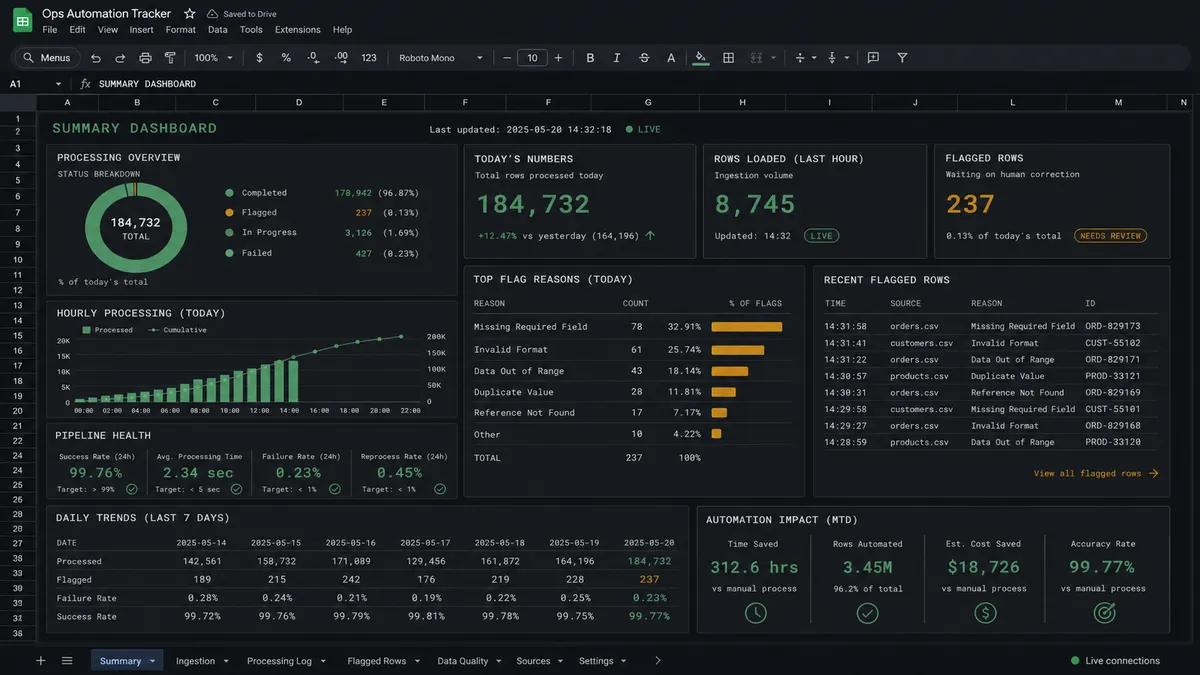
Daily KPI written back to the sheet. On a schedule, the agent runs a parameterized Run Query to compute the day’s KPI and writes the result into a live summary tab with Update Cell, so the team sees current numbers without opening a BI tool.
Governed table cleanup. The agent uses List Tables and Get Table to find snapshot tables past their useful life, then pauses for approval with the row count and last-modified time before running Delete Table.
CSV import bridge. Import from CSV brings bulk data into a sheet for review, and once the agent validates the rows, Insert Rows streams the clean set into BigQuery for warehouse-side analysis.
Common questions
Is it free to connect Google BigQuery and Google Sheets on FlowRunner? FlowRunner has a free plan with 100 executions a month, every integration included, and no credit card required, and new accounts get 14 days of Professional on top. No credit card is required to start. Beyond the free plan, Growth is $45 per month.
Can I self-host FlowRunner? Yes. FlowRunner offers a free Community Edition for single-instance self-hosting and an Enterprise tier for multi-instance clustering. Both include the Google BigQuery and Google Sheets connectors.
Does the AI agent need my own OpenAI or Anthropic key? FlowRunner uses a bring-your-own-keys model for AI providers. You connect your own API key from whichever model provider you use. FlowRunner orchestrates the agent; you own the AI relationship.
What happens when the agent isn’t sure whether a row is clean or a table is safe to delete? The agent holds the row or the delete, packages the details (the missing field, or the table’s row count and last-modified time) as context, and routes an approval request to a person on Slack, email, or WhatsApp. It resumes only after they respond, and the decision, the responder’s identity, and the timestamp go into the run log.
Does FlowRunner charge per execution on every tier? FlowRunner prices by workflow executions per month with a hard cap, not by individual action calls within a run. Growth includes 12,000 executions, Professional includes 75,000, and Business includes 250,000. All tiers include unlimited users and unlimited workflows.
Can I use FlowRunner without writing any code? Yes. The visual builder connects Google BigQuery and Google Sheets through a drag-and-drop interface. You map columns, set validation rules, and configure the human-in-loop step without writing a line of code.
Getting started
FlowRunner has a free plan with 100 executions a month, every integration included, and no credit card required, and new accounts get 14 days of Professional on top. Corporate email required (no @gmail, @yahoo, or similar).
Both connectors are ready to use today:
- Google BigQuery integration covers Run Query, Insert Rows, List Rows, Create Table, Delete Table, and Delete Dataset.
- Google Sheets integration covers the full spreadsheet surface: rows, cells, sheets, documents, import, export, and five triggers including On New or Updated Row.
Start building at flowrunner.ai or book a 30-minute walkthrough at calendly.com/flowrunner/intro. If you have a specific BigQuery-to-Sheets workflow in mind, bring it to the call and we will map it out together.
Frequently asked questions
Is it free to connect Google BigQuery and Google Sheets on FlowRunner?
FlowRunner has a free plan with 100 executions a month, every integration included, and no credit card required, and new accounts get 14 days of Professional on top. No credit card is required to start. Beyond the free plan, Growth is $45 per month.
Can I self-host FlowRunner?
Yes. FlowRunner offers a free Community Edition for single-instance self-hosting and an Enterprise tier for multi-instance clustering. Both include the Google BigQuery and Google Sheets connectors.
Does the AI agent need my own OpenAI or Anthropic key?
FlowRunner uses a bring-your-own-keys model for AI providers. You connect your own API key from whichever model provider you use. FlowRunner orchestrates the agent; you own the AI relationship.
What happens when the agent isn't sure whether a row is clean or a table is safe to delete?
The agent holds the row or the delete, packages the details (the missing field, or the table's row count and last-modified time) as context, and routes an approval request to a person on Slack, email, or WhatsApp. It resumes only after they respond, and the decision, the responder's identity, and the timestamp go into the run log.
Does FlowRunner charge per execution on every tier?
FlowRunner prices by workflow executions per month with a hard cap, not by individual action calls within a run. Growth includes 12,000 executions, Professional includes 75,000, and Business includes 250,000. All tiers include unlimited users and unlimited workflows.
Can I use FlowRunner without writing any code?
Yes. The visual builder connects Google BigQuery and Google Sheets through a drag-and-drop interface. You map columns, set validation rules, and configure the human-in-loop step without writing a line of code.