Can an AI Agent Turn BigCommerce Orders Into Xero Invoices?
Connect BigCommerce and Xero so every new order becomes a Xero invoice automatically, with an AI agent that pauses for a human before voiding or refunding.
How do you connect BigCommerce to Xero?
BigCommerce’s On Order Created trigger fires the moment a customer completes checkout, and the connection maps that event to Xero’s Create Invoice action, with Find Contacts checking for an existing customer before Create Contact provisions a new one. FlowRunner is a visual AI-agent orchestration platform where automations run autonomously and pause for human judgment on the steps that carry real consequence. The same connection can run as a plain trigger-and-action sync, or as an AI agent that reads the order, reasons about it, and calls a human-in-loop flow as a tool before it voids an invoice or issues a refund. Either way, the order that closed in your storefront becomes a real invoice in your books without anyone re-typing it.
The problem it solves
Right now, a billing manager or bookkeeper is probably pulling order data out of BigCommerce and re-keying it into Xero by hand, or reconciling the two systems at the end of the day when the queue has already piled up. Line items get mistyped, customer records get duplicated because nobody checked whether the contact already existed, and refunds get processed in BigCommerce without a matching correction ever landing in the accounting system. Each of those is a small task, but multiplied across every order, it eats the time back that the finance team needs for the exceptions that actually require judgment.
The gap gets worse at the edges. A disputed charge or a void needs a real decision, not just a database update, and when that decision happens outside any documented process, it falls through the cracks during an audit. Ops leads end up spending Friday afternoons reconstructing what happened to a handful of orders instead of running the business. The fix isn’t more spreadsheets. It’s a connection that moves the routine work automatically and stops, visibly, at the moment that needs a person.
How it works: the connection
The flow starts when BigCommerce fires On Order Created. The agent reads the order’s line items, billing details, and total, then calls Find Contacts in Xero to check whether the customer already has a record. If the contact exists, the agent proceeds with it; if not, Create Contact provisions a new one so billing terms and tax settings are in place before the invoice is built.
With the contact resolved, the agent calls Create Invoice, mapping the order’s line items and total directly onto the Xero invoice, and uses Get Accounts when it needs to assign the correct GL code. Email Invoice sends the invoice to the customer straight from Xero, which keeps the send inside Xero’s own audit trail rather than a side channel. From there, the flow listens for Xero’s On New Payment Received trigger. When payment posts, the agent can update the order status back in BigCommerce so fulfillment and accounting stay in step, closing the loop from checkout to cash without a manual handoff at any point.
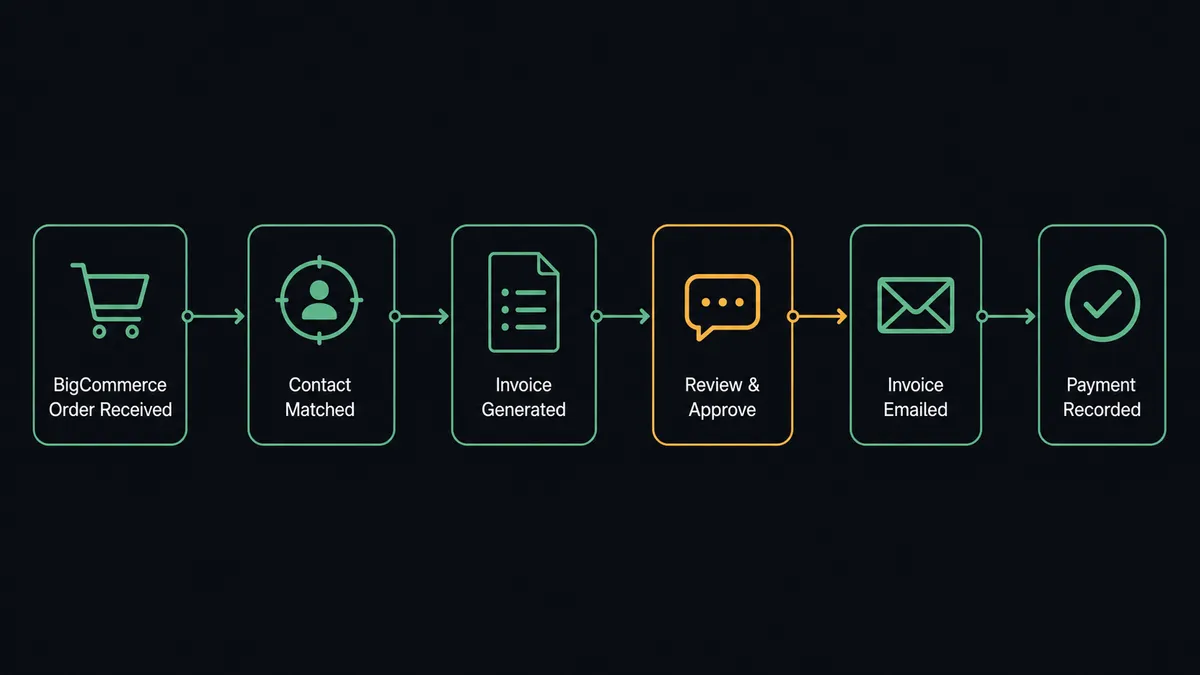
Can an AI agent run it? (and why a human stays in the loop)
A sync tool maps a trigger to an action every time, the same way, no matter what the order looks like. An AI agent reads the order and decides. It might route a routine order straight through to invoice and payment confirmation without ever involving a person. But when it hits a refund request or a candidate for voiding an invoice, it stops.
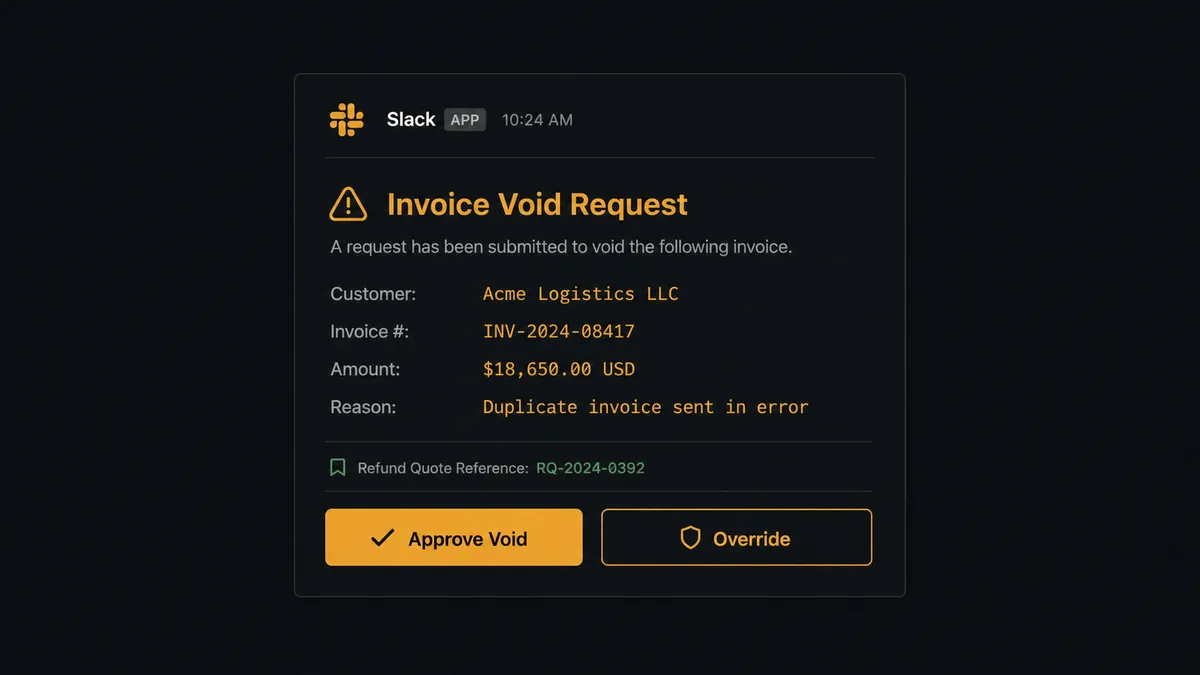
Here’s the actual decision moment. A customer disputes a charge, and BigCommerce’s customer-service flow generates a refund decision. Before issuing anything, the agent calls Create Refund Quote to work out the numbers, then checks whether the matching Xero invoice needs to be voided. Voiding an invoice is irreversible, so instead of executing Void Invoice on its own, the agent posts the full context to the accounting manager on Slack: “Invoice #XR-4421 to [Customer] for $8,900 has been flagged for voiding. Reason: [reason]. Refund quoted for order [number] in the same amount. Approve void or override?” The workflow pauses there. The manager reviews the reason, the amount, and the customer history, then approves or overrides. The agent resumes, executes Void Invoice or Create Credit Note based on the answer, and logs the decision, the approver’s identity, and the timestamp to the audit trail.
This is not a sync tool. The agent knows when to stop and ask, and it packages the context a person actually needs to answer quickly instead of forcing them to go dig through two systems first. Prospects who’ve seen this pattern before call it a digital andon cord: the agent stops the line the moment it hits something uncertain, instead of guessing and hoping the exception gets caught later.
FlowRunner vs Celigo
Celigo is a real option here, and it’s a strong one. It has purpose-built prebuilt integration templates for BigCommerce paired with accounting and ERP systems, and teams already running Celigo for multi-system commerce stacks know its flow builder well. If your integration needs stop at BigCommerce and Xero and never touch a third system, Celigo will get you there.
Where FlowRunner differs is what happens at the decision point. Celigo’s flows execute the mapping you configure; they don’t reason about whether this particular refund looks different from the last hundred. FlowRunner’s agent does, and it invokes a human as a callable tool exactly when the situation calls for one, not through a static conditional you have to anticipate and hardcode in advance.
| FlowRunner | Celigo | |
|---|---|---|
| Human-in-the-loop | Native: the agent calls a human-in-loop flow as a tool, based on its own reasoning | Not a native concept; approvals require custom conditional logic |
| AI agent decision-making | Agent reads context and decides which action to call and when to escalate | Rule-based flow mapping; no autonomous reasoning layer |
| Pricing model | Transparent workflow-based tiers with clear execution limits | Custom-quoted, typically scoped to integration complexity |
| Users included | Unlimited users and workflows on every tier | Seat and connector-based licensing |
| AI provider model | BYOK: connect the AI provider you already pay for | No native AI agent layer to bring a key to |
Before and after
| What changes | Before | After |
|---|---|---|
| Order-to-invoice entry | Billing staff manually re-key each BigCommerce order into Xero as a new invoice | The Xero invoice is created the moment BigCommerce fires On Order Created, with line items mapped automatically |
| Customer records | New customers get created ad hoc in Xero, sometimes as duplicates of an existing contact | Find Contacts checks before Create Contact runs, so billing records stay clean |
| Payment confirmation | Payment receipts sent at end of day or manually triggered by billing staff | Customer receives receipt email within seconds of payment posting in Xero |
| Overdue invoices | Overdue invoices discovered during weekly review, not when they first cross 30 days | 30-day reminders sent automatically; 60-day accounts escalated to the AR manager the same day |
| Refunds and voids | Refund and void decisions made without a documented approval trail | Every void is paused for accounting manager approval and logged with the decision, approver, and timestamp |
What you can build
Order-to-invoice automation. Every BigCommerce order becomes a Xero invoice within seconds, with the customer matched or created and the invoice emailed straight from Xero.
Payment-to-fulfillment sync. When Xero’s On New Payment Received fires, the agent updates the order status back in BigCommerce so warehouse staff see confirmed payment without checking accounting first.
Aged receivables follow-up. The agent pulls Get Aged Receivables weekly, sends automated reminders on 30-day invoices, and routes 60-day accounts to the AR manager with the invoice and contact history attached.
Refund-to-credit-note bridge. When a BigCommerce refund is quoted, the agent proposes a matching Xero Create Credit Note and Allocate Credit Note, pausing for approval before either fires.
Wholesale customer onboarding. When a new customer lands in BigCommerce’s wholesale group, the agent creates the matching Xero contact with the correct tax rate from Get Tax Rates, ready for the first invoice.
Getting started
FlowRunner has a free plan with 100 executions a month, every integration included, and no credit card required, and new accounts get 14 days of Professional on top. See the full capability list on the BigCommerce integration page and the Xero integration page. Start building at flowrunner.ai, or book a walkthrough at calendly.com/flowrunner/intro if you want to see the human-in-loop step configured live.
Frequently asked questions
Is it free to connect BigCommerce and Xero on FlowRunner?
Yes. FlowRunner has a free plan with 100 executions a month, every integration included, and no credit card required, and new accounts get 14 days of Professional on top.
Do I need to know how to code to set this up?
No. The trigger, the invoice mapping, and the human-in-loop step are all configured visually. No API keys to hand-wire and no scripts to maintain.
Can I self-host the BigCommerce to Xero flow?
Yes. FlowRunner offers a self-hosted Community Edition and a self-hosted Enterprise tier for teams that need the flow running on their own infrastructure.
Does the agent need my own OpenAI key?
FlowRunner runs on a bring-your-own-key model for AI providers, so you connect the model you already pay for rather than paying FlowRunner a markup on inference.
What happens when the agent isn't sure whether to void an invoice?
It doesn't guess. The agent packages the invoice detail and its reasoning, sends it to the accounting manager on Slack or email, and waits for a decision before it touches the Xero record.
Can this run as a plain sync without an AI agent?
Yes. The order-to-invoice mapping works as a standard trigger-and-action flow; the AI agent layer is an upgrade you add when you want the agent reasoning about exceptions instead of a human checking every order.