Everything You Can Automate with Acumatica in FlowRunner
Connect your Acumatica ERP to FlowRunner and automate the full accounts payable lifecycle: vendor validation, bill creation, duplicate detection, approvals, and daily AP reporting with human oversight on exceptions.
Your AP Team Is Buried in Data Entry
Acumatica is where your financial operations live. Vendor records, bills, payment terms, GL accounts, AP balances. Every dollar going out the door passes through it.
But getting data into Acumatica is still manual for most teams. Someone opens an email, downloads a PDF invoice, reads the vendor name, types it into the vendor field, enters line items one by one, checks for duplicates by memory or by flipping between browser tabs, and clicks Save. Then they do it again. And again. Twenty invoices a day means a full-time person doing nothing but copying fields from documents into screens.
The real cost is not the time spent entering data. It is what falls through the cracks while your team is doing it. A duplicate invoice gets entered because no one had time to cross-check reference numbers. A bill goes to the wrong GL account because the chart of accounts changed last quarter and nobody updated the process. An overdue balance grows unnoticed because the daily AP check is a report someone runs when they remember to. If your team spends time manually entering vendor bills, chasing approvals over email, and logging into Acumatica just to pull an AP balance, that is time FlowRunner gives back.
What Changes When Acumatica Is Connected
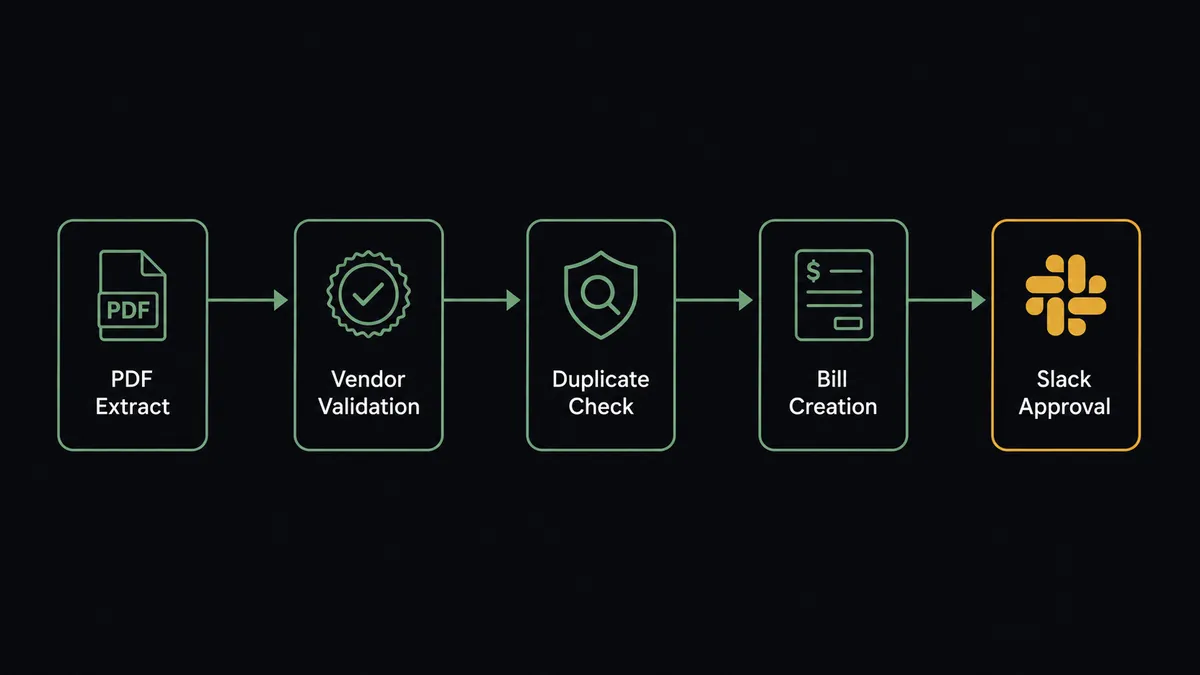
FlowRunner connects directly to your Acumatica instance through 16 actions covering the full accounts payable lifecycle. Vendor validation, bill creation and management, duplicate detection, document attachment, GL account mapping, and AP balance reporting. The entire AP workflow from invoice receipt through bill release, coordinated by a single flow that handles the routine work and surfaces exceptions to your team with full context.
The end state looks like this: invoices arrive, the workflow validates the vendor, checks for duplicates, creates the bill with the correct GL codes and payment terms, attaches the source PDF, and notifies your AP team. Bills queue up for approval. Your AP manager reviews them in Slack, approves in bulk or flags exceptions, and approved bills are released automatically. Every morning, a structured AP health check lands in your finance channel with balances, upcoming due dates, and overdue amounts. Your team starts the day informed instead of spending the first hour running reports.
The accounting team stops doing data entry. They focus on vendor relationships, cash flow decisions, and the exceptions that actually require human judgment.
Why Human-in-Loop Matters Here
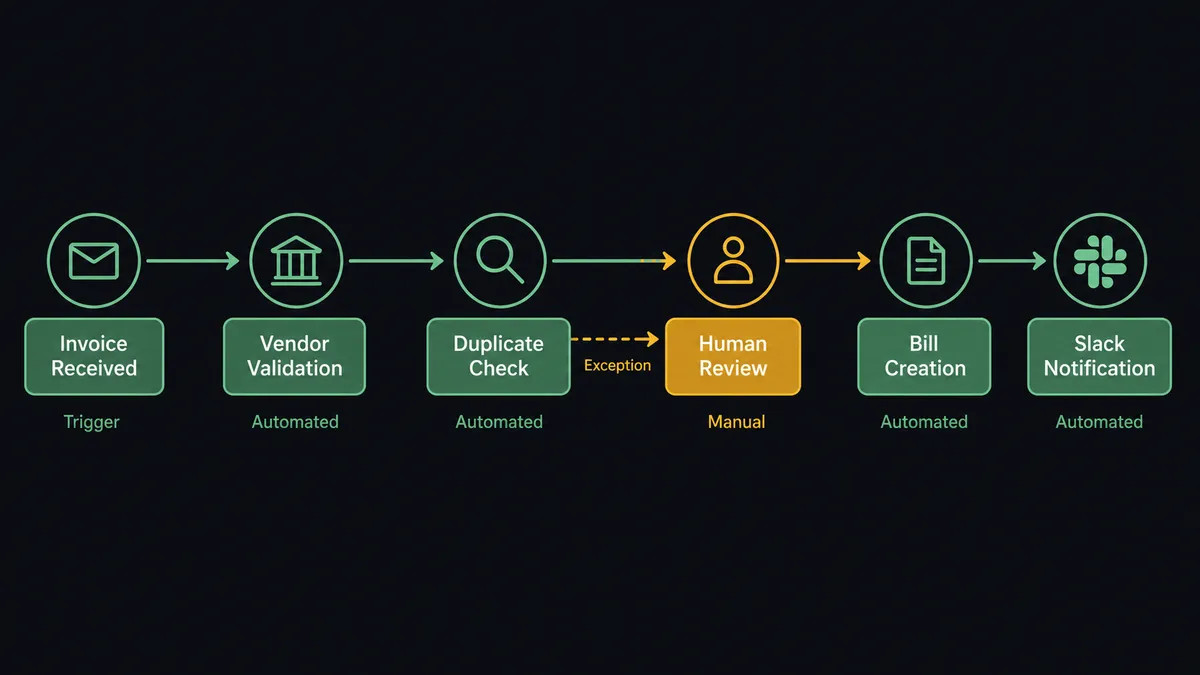
Fully automated AP processing with no human checkpoints is how companies make double payments. An invoice comes in with a slightly different reference number than the one entered last week. Same vendor. Same amount. Different reference. A purely automated system either blocks it (and you miss a legitimate invoice) or creates it (and you pay twice). Neither outcome is acceptable.
The same risk applies across the AP lifecycle. A new vendor gets created with incomplete tax information. A bill posts to the wrong GL account because the expense category was ambiguous. A batch of bills gets released without anyone reviewing the total exposure. These are not technical failures. They are judgment calls that belong to your accounting team. The workflow handles the routine validation, creation, and notification. When the data is ambiguous, the flow stops the line and asks. Your team handles the judgment calls. The system handles everything else.
Top Workflows
Automated AP Processing from Document Parser
This is the core workflow. A vendor email with a PDF invoice arrives in a Parseur mailbox. Parseur extracts the structured data: vendor name, invoice number, amount, line items, due date. The moment extraction completes, FlowRunner takes over.
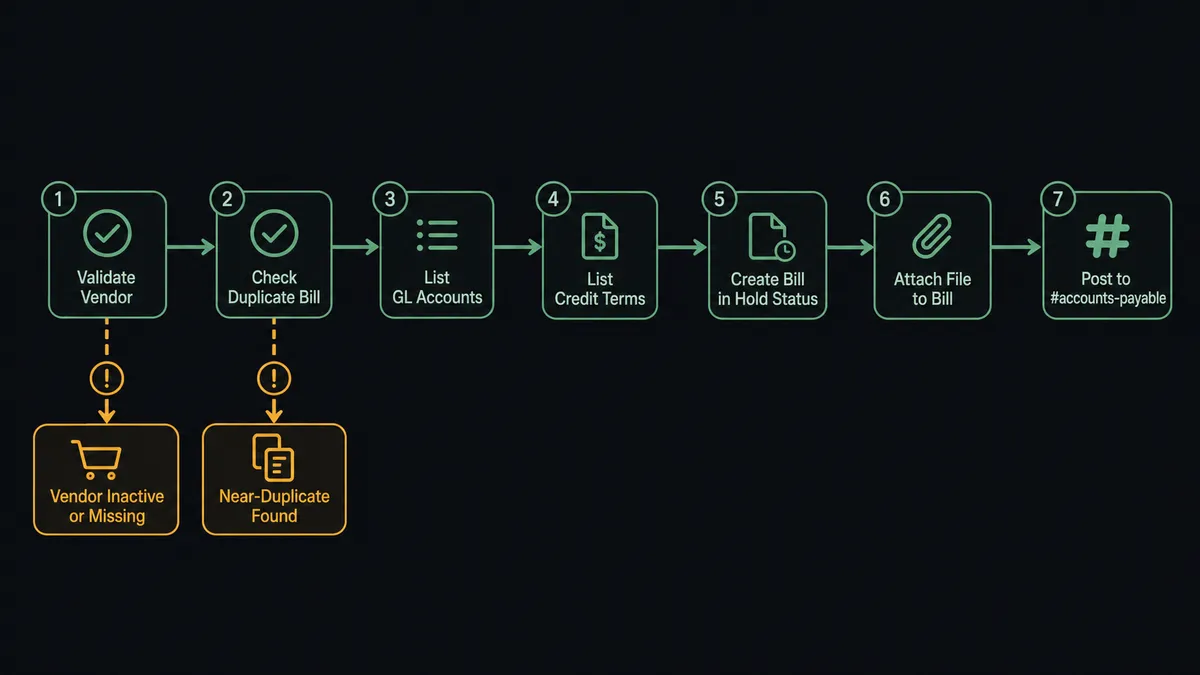
The flow calls Validate Vendor to confirm the supplier is approved and active in Acumatica. If the vendor is not found or is flagged as inactive, the workflow pauses and routes the invoice to procurement for review. No bills created against unapproved vendors.
Next, the flow calls Check Duplicate Bill with the vendor ID and reference number. If an exact match exists, the invoice is discarded and logged. If a near-duplicate is found (same vendor, similar amount, different reference), the workflow pauses for human review. More on that below.
Both checks pass. The flow calls List GL Accounts to map the expense categories from the parsed invoice to the correct GL codes. It calls List Credit Terms to apply the vendor’s payment terms. Then it calls Create Bill with all the extracted data: vendor, amount, line items, GL codes, terms, and due date. The bill lands in Acumatica in Hold status.
Next, the flow calls Attach File to Bill to store the original PDF against the bill record. Every bill has its source document one click away for review purposes. Finally, a notification posts to the #accounts-payable Slack channel with the bill details: vendor, amount, reference number, and a link to the Acumatica record.
A batch of vendor bills that would have taken a long stretch of manual entry is handled automatically. The AP team sees the notification, confirms the bills look right, and moves on.
Bill Approval and Release
Bills land in Acumatica in Hold status by design. The flow creates them there intentionally so nothing moves to payment without review.
Every morning at 9am, the flow calls List Bills filtered to Hold status. It groups the results by vendor, totals the amounts, and sends a structured approval request to the AP manager via Slack: “Multiple bills are awaiting your review. Approve all, or review individually?”
The manager has two paths. Approve in bulk (the common case when everything looks routine) or drill into specific bills that need closer attention. For every approved bill, the flow calls Release Bill from Hold automatically. The bill moves out of Hold and becomes available for payment processing. Flagged bills stay in Hold with the manager’s notes attached as context for follow-up.
No one logs into Acumatica to release bills one at a time. No one sends an email asking “did you approve that batch?” The approval is captured, timestamped, and tied to the specific bills. When the AP manager needs to review who approved a batch months later, the answer is in the decision history.
Daily AP Health Check
Each morning before the team arrives, the flow runs a financial snapshot. It calls Get AP Account Balance for the current total payables. It calls List Bills filtered to bills due within 7 days and again for overdue bills. It calls List Vendors to identify which suppliers have outstanding overdue balances.
The flow compiles this into a structured daily summary and posts it to #finance-daily: total AP balance, bills coming due this week with amounts, overdue balances grouped by vendor, and anything that changed significantly from the previous day.
The finance team starts the day knowing exactly what is due and what is at risk. No one runs a report. No one exports to a spreadsheet. No one asks “what’s our AP position?” in the morning meeting. The information is waiting for them when they arrive.
The Human-in-Loop Moment
Check Duplicate Bill catches exact matches automatically. But the real risk in accounts payable is near-duplicates: same vendor, similar amount, different reference number. These are the invoices that cause double payments.
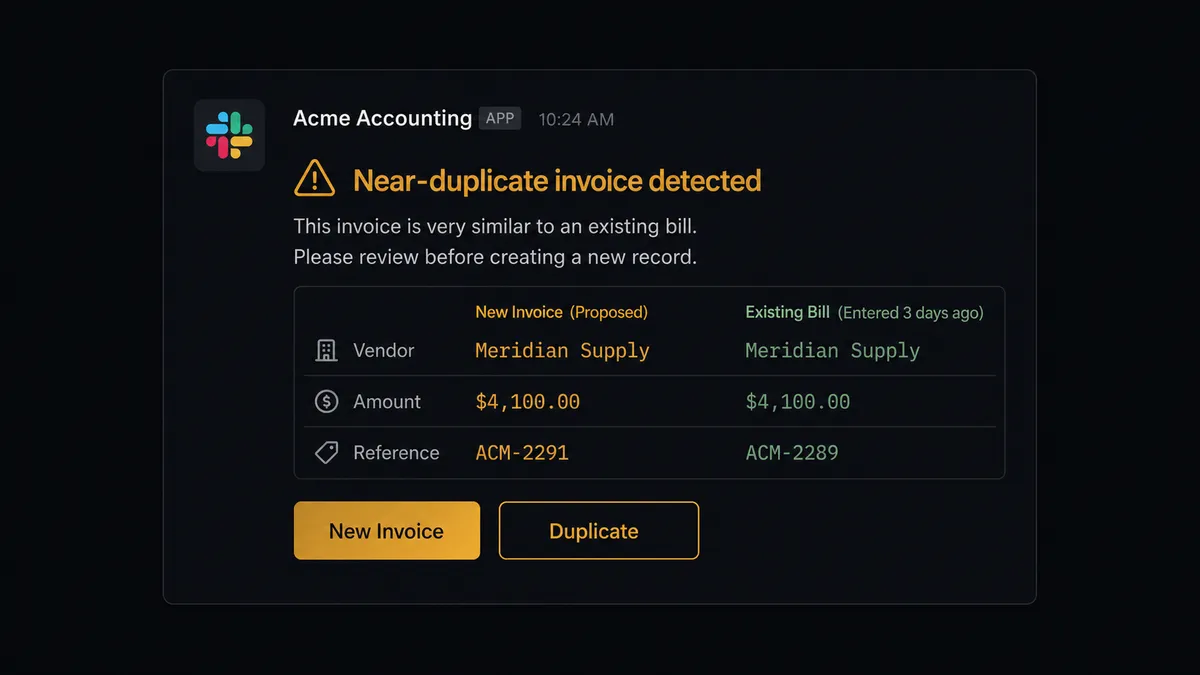
When the flow finds a potential near-duplicate, it does not silently skip the bill. It does not create it and hope someone catches it later. It pauses. The AP manager gets a Slack message with full context:
“Possible duplicate detected: same vendor, same amount, different reference. An existing bill was entered a few days ago for a matching amount. Is this a new invoice or a resubmission?”
The original bill reference, the new one, the amounts, the dates. Everything the manager needs to make the call. They respond directly in Slack. If it is a legitimate new invoice, the workflow creates the bill. If it is a resubmission, it is discarded and the decision is logged with the manager’s name and timestamp.
No double payments. No guessing. No “I thought someone already checked that.” This is the digital andon cord in accounts payable. The workflow stops the line when it hits uncertainty and puts a human in control of the decision.
Before and After
| Before FlowRunner | After FlowRunner | |
|---|---|---|
| Invoice entry | Manual data entry across batches of vendor bills | Automated processing for clean extractions; exceptions routed for review |
| Duplicate risk | No systematic checks. Relies on memory and spot checks | Check Duplicate Bill runs before every creation. Near-duplicates routed to AP manager |
| Visibility | AP team discovers issues reactively. Problems surface when vendors call | Daily health reports. Team starts the day with balances, due dates, and overdue amounts |
| Bill approval | Email chains and verbal confirmations. No structured record | Structured Slack approvals with timestamps. Release Bill from Hold runs automatically |
| Source documents | PDFs saved in shared drives, disconnected from bills | Attach File to Bill stores the original PDF against every Acumatica record |
| GL accuracy | Hardcoded mappings that drift out of date | The flow pulls live GL codes via List GL Accounts on every bill creation |
Works Best With
Parseur is the front end of the AP pipeline. Invoices arrive as email attachments or PDFs. Parseur extracts the vendor name, amount, line items, and due date into structured data that the workflow validates and pushes into Acumatica.
Slack is where your team makes decisions. Approval requests, duplicate alerts, daily AP summaries, and every human-in-loop moment route through Slack. The AP manager approves bills, resolves near-duplicates, and reviews the daily health check without leaving the channel.
QuickBooks Online enables cross-system reconciliation. When bills are processed in Acumatica, corresponding records in QuickBooks Online can be validated to keep both systems in agreement. Useful for organizations running parallel accounting systems during migration or for different entities.
NetSuite supports ERP coordination for organizations running both platforms. Vendor data, payment terms, and financial records stay synchronized across Acumatica and NetSuite through flows that bridge both systems without manual exports.
Amazon S3 provides long-term document archiving. After the workflow attaches the invoice PDF to the Acumatica bill, it can also upload the document to S3 for retention policies that exceed Acumatica’s storage limits.
Getting Started
FlowRunner has a free plan with 100 executions a month, every integration included, and no credit card required, and new accounts get 14 days of Professional on top.
The Acumatica integration is available on every tier with all 16 actions. Connect your Acumatica instance with your session credentials (instance URL, username, password) and start building.
A good first workflow: connect Parseur and Acumatica to automate a single vendor’s invoice processing. Start with your highest-volume vendor. Watch it run for a week. Measure the time your team gets back. Expand from there.
Start building free or book a demo to see the Acumatica integration in action.